
1. ບົດແນະນຳ
Thank you for choosing the Severin KA 4497 Filter Coffee Machine. This manual provides essential information for the safe and efficient operation of your appliance. Please read these instructions carefully before first use and keep them for future reference.
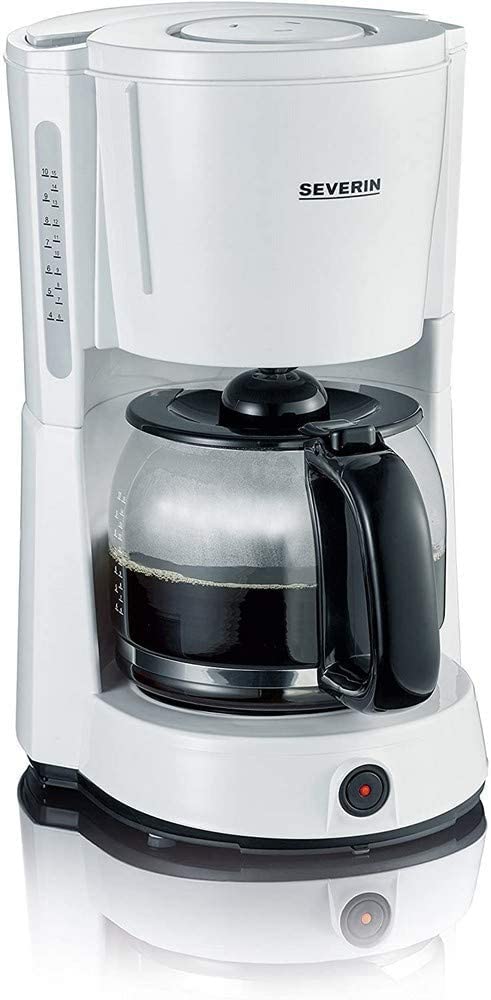
Image 1.1: Severin KA 4497 Filter Coffee Machine overview.
ຄຸນນະສົມບັດທີ່ສໍາຄັນ:
- Integrated aroma function for enhanced coffee enjoyment.
- Capacity: Up to 10 cups (1.4 Liters).
- Removable swivel filter holder with drip stop (size 1x4).
- Glass carafe with fresh water scale.
- Control switch with indicator light.
- Automatic shut-off function.
- Warming plate to keep coffee hot.
2. ຄໍາແນະນໍາຄວາມປອດໄພ
ປະຕິບັດຕາມຄໍາແນະນໍາດ້ານຄວາມປອດໄພຕໍ່ໄປນີ້ຢູ່ສະເຫມີເພື່ອປ້ອງກັນອຸປະຕິເຫດແລະຄວາມເສຍຫາຍຂອງເຄື່ອງໃຊ້:
- ເຄື່ອງໃຊ້ນີ້ມີຈຸດປະສົງເພື່ອໃຊ້ພາຍໃນປະເທດເທົ່ານັ້ນ.
- ຢ່າເອົາເຄື່ອງໃຊ້, ສາຍໄຟ, ຫຼືສຽບໃສ່ນໍ້າ ຫຼື ນໍ້າອື່ນໆ.
- ຮັບປະກັນ voltage indicated on the rating plate matches your mains supply.
- ຮັກສາເຄື່ອງໃຊ້ໃຫ້ໄກຈາກເດັກນ້ອຍ.
- Unplug the appliance from the mains socket when not in use, before cleaning, and in case of malfunction.
- ຫ້າມໃຊ້ອຸປະກອນທີ່ມີສາຍໄຟ ຫຼືປລັກສຽບເສຍຫາຍ.
- Avoid contact with hot surfaces, especially the warming plate and glass carafe during and after operation.
- Only use cold, fresh water for brewing.
3. ຕັ້ງຄ່າ
3.1 ການຫຸ້ມຫໍ່
- ເອົາວັດສະດຸຫຸ້ມຫໍ່ທັງໝົດອອກຈາກເຄື່ອງເຮັດກາເຟຢ່າງລະມັດລະວັງ.
- Check the appliance for any signs of damage. Do not operate if damaged.
3.2 ການເຮັດຄວາມສະອາດໃນຄັ້ງທຳອິດ
Before using for the first time, clean the appliance by running two full cycles with cold water only, without coffee grounds. This removes any manufacturing residues.
3.3 ການຈັດວາງ
Place the coffee machine on a stable, level, heat-resistant surface, away from water sources and heat-emitting appliances.
4. ຄໍາແນະນໍາການດໍາເນີນງານ
4.1 ການຕື່ມນ້ໍາ
- ເປີດຝາຂອງຖັງນ້ໍາ.
- Fill the glass carafe with the desired amount of cold, fresh water. Refer to the cup markings on the carafe and the water level indicator on the side of the machine.
- Pour the water from the carafe into the water tank. Do not exceed the maximum fill level.
- ປິດຝາຢ່າງປອດໄພ.
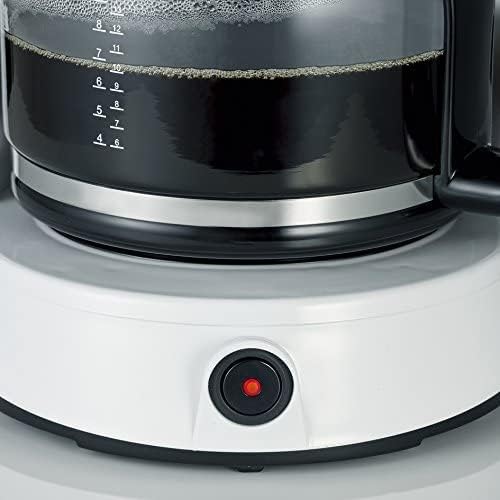
Image 4.1: Water level indicator for precise filling.
4.2 ການເພີ່ມພື້ນທີ່ກາເຟ
- ຫັນຕົວຍຶດຕົວກອງອອກ.
- Insert a size 1x4 paper filter into the filter holder.
- Add the desired amount of ground coffee into the paper filter. A general guideline is one level tablespoon of coffee per cup. Adjust to personal preference.
- Swivel the filter holder back into position until it clicks.

Image 4.2: Inserting the filter basket with coffee grounds.
4.3 ການຕົ້ມກາເຟ
- Place the glass carafe with its lid on the warming plate. Ensure it is correctly positioned to activate the drip stop.
- ສຽບອຸປະກອນເຂົ້າໄປໃນເຕົ້າສຽບໄຟຟ້າທີ່ເຫມາະສົມ.
- Press the ON/OFF switch. The indicator light will illuminate, and the brewing process will begin.
- Once all the water has passed through, the brewing process is complete. The warming plate will keep the coffee hot.

Image 4.3: Brewed coffee in the carafe and the illuminated power button.
4.4 ການປິດອັດຕະໂນມັດ
For safety and energy saving, the coffee machine will automatically switch off approximately 30-40 minutes after the brewing process is complete.
5. ການບໍາລຸງຮັກສາແລະການທໍາຄວາມສະອາດ
ການທໍາຄວາມສະອາດເປັນປົກກະຕິຮັບປະກັນປະສິດທິພາບທີ່ດີທີ່ສຸດແລະຍືດອາຍຸຂອງເຄື່ອງກາເຟຂອງທ່ານ.
5.1 ການທໍາຄວາມສະອາດປະຈໍາວັນ
- ຖອດປລັກເຄື່ອງທຸກຄັ້ງ ແລະປ່ອຍໃຫ້ມັນເຢັນລົງຢ່າງສົມບູນກ່ອນທີ່ຈະທໍາຄວາມສະອາດ.
- Remove the used paper filter and coffee grounds.
- Wash the glass carafe and its lid, and the swivel filter holder in warm soapy water. Rinse thoroughly and dry. These parts are generally dishwasher safe (top rack), but hand washing is recommended for longevity.
- ເຊັດພາຍນອກຂອງເຄື່ອງກາເຟທີ່ມີໂຄສະນາamp ຜ້າ. ຫ້າມໃຊ້ສານທຳຄວາມສະອາດທີ່ມີສານຂັດຫຼືແຊ່ຫົວໜ່ວຍຫຼັກໃນນ້ຳ.
5.2 ເສີຍໆ
Depending on water hardness and frequency of use, limescale deposits may form. Descale your coffee machine regularly (e.g., every 2-4 weeks) to maintain brewing performance and flavor.
- Use a commercially available descaling agent suitable for coffee machines, following the manufacturer's instructions.
- Alternatively, a mixture of white vinegar and water (1:2 ratio) can be used.
- Run the descaling solution through the machine as if brewing coffee, without coffee grounds.
- After descaling, run at least two full cycles with fresh water to rinse out any descaling agent residues.
6. ການແກ້ໄຂບັນຫາ
| ບັນຫາ | ສາເຫດທີ່ເປັນໄປໄດ້ | ການແກ້ໄຂ |
|---|---|---|
| ກາເຟບໍ່ໄດ້ຕົ້ມ. | Appliance not plugged in; power switch not activated; water tank empty. | Check power connection; press ON/OFF switch; fill water tank. |
| ກາເຟມີລົດຊາດອ່ອນ ຫຼືແຮງເກີນໄປ. | Incorrect coffee-to-water ratio; coffee too finely/coarsely ground. | Adjust coffee amount; use appropriate grind size. |
| Water overflows from filter holder. | Too much coffee grounds; filter clogged; carafe not correctly placed. | Reduce coffee amount; clean filter holder; ensure carafe is centered. |
| ຂະບວນການຜະລິດເບຍແມ່ນຊ້າ. | ການກໍ່ສ້າງປູນຂາວໃສ່. | ປັບຂະໜາດເຄື່ອງກາເຟ. |
7. ຂໍ້ມູນຈໍາເພາະ
| ຄຸນສົມບັດ | ລາຍລະອຽດ |
|---|---|
| ຍີ່ຫໍ້ | SEVERIN |
| ໝາຍເລກຕົວແບບ | KA 4497 |
| ສີ | ຂາວ/ດຳ |
| ຂະໜາດສິນຄ້າ | 17 x 24 x 34 cm |
| ນ້ຳໜັກ | 2.14 ກິໂລກຣາມ |
| ຄວາມອາດສາມາດ | 1.4 ລິດ (ປະມານ 10 ຈອກ) |
| ພະລັງງານ/ວັດtage | 1000 ວັດ |
| ວັດສະດຸ | Glass (carafe) |
| ຄຸນນະສົມບັດພິເສດ | Glass Carafe, Drip Stop, Warming Plate, Automatic Shut-off |

Image 7.1: Product dimensions of the Severin KA 4497.
8. ການຮັບປະກັນແລະການສະຫນັບສະຫນູນ
This product is covered by a manufacturer's warranty. For detailed warranty information, please refer to the warranty card included with your purchase or visit the official Severin webເວັບໄຊ. ສໍາລັບການສະຫນັບສະຫນູນດ້ານວິຊາການ, ຊິ້ນສ່ວນອາໄຫຼ່, ຫຼືການສອບຖາມການບໍລິການ, ກະລຸນາຕິດຕໍ່ບໍລິການລູກຄ້າ Severin.