
ແນະນຳ
This manual provides instructions for the Sentry BT900 On-Neck Bluetooth Headphones. It covers setup, operation, maintenance, and troubleshooting to ensure proper use of your wireless audio device.
ເນື້ອໃນຊຸດ
ກວດສອບວ່າລາຍການຕໍ່ໄປນີ້ລວມຢູ່ໃນຊຸດຜະລິດຕະພັນຂອງທ່ານແລ້ວ:
- Sentry BT900 On-Neck Bluetooth Headphones
- ສາຍສາກ USB
- Assorted Ear Tips
- ຄູ່ມືຜູ້ໃຊ້
ສິນຄ້າເກີນview
Familiarize yourself with the components of your Sentry BT900 headphones.
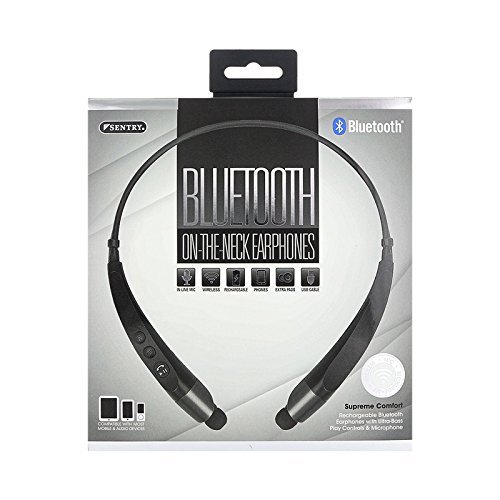
The image displays the Sentry BT900 headphones, featuring a flexible neckband designed for comfortable wear. The earbuds are connected to the neckband, and control buttons are typically located on one side of the neckband for easy access.
ອົງປະກອບທີ່ສໍາຄັນ:
- ປຸ່ມພະລັງງານ/ຫຼາຍຟັງຊັນ: ໃຊ້ສໍາລັບການເປີດ / ປິດ, ຫຼິ້ນ / ຢຸດ, ຮັບສາຍ / ວາງສາຍ.
- ປຸ່ມເພີ່ມສຽງຂຶ້ນ/ຕິດຕາມຕໍ່ໄປ: ເພີ່ມປະລິມານ, ຂ້າມໄປຫາເພງຕໍ່ໄປ.
- ປະລິມານລົງ/ປຸ່ມຕິດຕາມກ່ອນໜ້າ: ຫຼຸດສຽງລົງ, ຂ້າມໄປຫາເພງກ່ອນໜ້າ.
- ຊ່ອງສາກໄຟ Micro-USB: ສໍາລັບການເຊື່ອມຕໍ່ສາຍສາກໄຟ.
- ຕົວຊີ້ວັດ LED: ສະແດງສະຖານະການພະລັງງານ, ການສາກໄຟ ແລະ ສະຖານະການຈັບຄູ່.
- ໄມໂຄຣໂຟນ: ສໍາລັບການໂທຫາແບບແຮນຟຣີ.
ກຳລັງສາກຫູຟັງ
Before initial use, fully charge the headphones.
- ເຊື່ອມຕໍ່ປາຍສາຍສາກໄຟ USB ຂະໜາດນ້ອຍເຂົ້າກັບພອດ Micro-USB ໃນຫູຟັງ.
- ເຊື່ອມຕໍ່ປາຍໃຫຍ່ກວ່າຂອງສາຍສາກ USB ກັບແຫຼ່ງພະລັງງານ USB (ເຊັ່ນ: ພອດ USB ຂອງຄອມພິວເຕີ, ຕົວແປງໄຟ USB).
- ໄຟ LED ຈະສະຫວ່າງຂຶ້ນໃນລະຫວ່າງການສາກໄຟ ແລະ ປ່ຽນສີ ຫຼື ປິດລົງເມື່ອການສາກໄຟສຳເລັດ.
- ໂດຍປົກກະຕິການສາກເຕັມຈະໃຊ້ເວລາປະມານ 2-3 ຊົ່ວໂມງ.
ການຈັບຄູ່ກັບອຸປະກອນ Bluetooth
Follow these steps to connect your headphones to a Bluetooth-enabled device:
- ກວດໃຫ້ແນ່ໃຈວ່າປິດຫູຟັງ ແລະສາກເຕັມແລ້ວ.
- ກົດຄ້າງໄວ້ ປຸ່ມເປີດປິດ/ຫຼາຍຟັງຊັນ for approximately 5-7 seconds until the LED indicator flashes red and blue alternately, indicating pairing mode.
- ໃນອຸປະກອນທີ່ເປີດໃຊ້ Bluetooth ຂອງທ່ານ (ໂທລະສັບສະຫຼາດ, ແທັບເລັດ, ແລະອື່ນໆ), ໄປຫາການຕັ້ງຄ່າ Bluetooth.
- ເປີດໃຊ້ Bluetooth ແລະຊອກຫາອຸປະກອນທີ່ມີຢູ່.
- Select 'Sentry BT900' from the list of found devices.
- Once paired, the LED indicator on the headphones will typically flash blue slowly or turn solid blue.
- If a passcode is requested, enter '0000'.
ປະຕິບັດການຫູຟັງ
ເປີດ/ປິດ:
- ເປີດ: ກົດຄ້າງໄວ້ ປຸ່ມເປີດປິດ/ຫຼາຍຟັງຊັນ for 3 seconds. The LED indicator will flash blue.
- ປິດພະລັງງານ: ກົດຄ້າງໄວ້ ປຸ່ມເປີດປິດ/ຫຼາຍຟັງຊັນ for 3 seconds. The LED indicator will flash red and then turn off.
ການຫຼິ້ນເພງ:
- ຫຼິ້ນ/ຢຸດ: ກົດ ປຸ່ມເປີດປິດ/ຫຼາຍຟັງຊັນ ຄັ້ງດຽວ.
- ເພງຕໍ່ໄປ: ກົດຄ້າງໄວ້ ປຸ່ມເພີ່ມສຽງ.
- ຕິດຕາມກ່ອນ ໜ້າ ນີ້: ກົດຄ້າງໄວ້ ປຸ່ມລະດັບສຽງລົງ.
ການຄຸ້ມຄອງການໂທ:
- ຮັບ/ສາຍໂທ: ກົດ ປຸ່ມເປີດປິດ/ຫຼາຍຟັງຊັນ ຄັ້ງດຽວ.
- ປະຕິເສດການໂທ: ກົດຄ້າງໄວ້ ປຸ່ມເປີດປິດ/ຫຼາຍຟັງຊັນ ເປັນເວລາ 2 ວິນາທີ.
- ໂທຫາເບີສຸດທ້າຍ: ກົດປຸ່ມສອງເທື່ອ ປຸ່ມເປີດປິດ/ຫຼາຍຟັງຊັນ.
ການຄວບຄຸມລະດັບສຽງ:
- ເພີ່ມປະລິມານ: ກົດ ປຸ່ມເພີ່ມສຽງ ຊ້ຳໆ.
- ຫຼຸດລະດັບສຽງລົງ: ກົດ ປຸ່ມລະດັບສຽງລົງ ຊ້ຳໆ.
ບໍາລຸງຮັກສາ
ທໍາຄວາມສະອາດ:
Gently wipe the headphones and earbuds with a soft, dry cloth. For ear tips, remove them and clean with a mild soap solution if necessary, then rinse and dry completely before reattaching.
ການເກັບຮັກສາ:
ເກັບຮັກສາຫູຟັງໄວ້ໃນບ່ອນທີ່ເຢັນ, ແຫ້ງ, ຫ່າງຈາກແສງແດດໂດຍກົງ ແລະອຸນຫະພູມທີ່ຮ້າຍກາດ. ຫຼີກລ້ຽງການວາງວັດຖຸໜັກໃສ່ພວກມັນ.
ການດູແລຫມໍ້ໄຟ:
ເພື່ອຍືດອາຍຸແບັດເຕີລີ, ຫຼີກເວັ້ນການຖອດແບດເຕີລີ່ເຕັມເລື້ອຍໆ. ສາກຫູຟັງເປັນປະຈຳ, ເຖິງແມ່ນວ່າບໍ່ໄດ້ໃຊ້ເປັນເວລາດົນກໍຕາມ.
ການແກ້ໄຂບັນຫາ
ຫູຟັງບໍ່ເປີດ:
Ensure the headphones are fully charged. Connect to a power source and attempt to power on after a few minutes.
ບໍ່ສາມາດຈັບຄູ່ກັບອຸປະກອນ:
Ensure the headphones are in pairing mode (flashing red and blue LED). Make sure Bluetooth is enabled on your device and it is within range (typically 10 meters). Turn off and on both the headphones and the device, then try pairing again.
ບໍ່ມີສຽງ ຫຼືສຽງຕໍ່າ:
Check the volume levels on both the headphones and your connected device. Ensure the headphones are properly paired and connected. Try re-pairing the headphones.
ຄຸນະພາບສຽງບໍ່ດີ:
ໃຫ້ແນ່ໃຈວ່າບໍ່ມີສິ່ງກີດຂວາງລະຫວ່າງຫູຟັງ ແລະ ອຸປະກອນຂອງທ່ານ. ຍ້າຍເຂົ້າໃກ້ອຸປະກອນຂອງທ່ານຫຼາຍຂຶ້ນ. ກວດສອບການລົບກວນຈາກອຸປະກອນໄຮ້ສາຍອື່ນໆ.
ບັນຫາການສາກໄຟ:
Verify the USB cable is securely connected to both the headphones and the power source. Try a different USB cable or power source.
ຂໍ້ມູນຈໍາເພາະ
- ຕົວແບບ: BT900
- ເຕັກໂນໂລຊີການສື່ສານໄຮ້ສາຍ: Bluetooth
- ປະເພດຫມໍ້ໄຟ: 1 Lithium Ion (ລວມ)
- ນ້ໍາຫນັກລາຍການ: 2.39 ອອນ
- ຂະໜາດຜະລິດຕະພັນ: 8.25 x 1.5 x 6.75 ນິ້ວ
- ຄຸນນະສົມບັດພິເສດ: Microphone Included, Wireless
- UPC: 080068549000
ການຮັບປະກັນແລະການສະຫນັບສະຫນູນ
For warranty information, please refer to the documentation included with your purchase or contact Sentry customer support.
ຮັກສາຫຼັກຖານການຊື້ຂອງທ່ານສໍາລັບການຮ້ອງຂໍການຮັບປະກັນ.