
ແນະນຳ
ຂອບໃຈສໍາລັບການຊື້asing the Ezonetronics 1DIN Car Stereo, Model RM-CW9601. This unit features a 7-inch retractable touchscreen, Bluetooth connectivity, FM radio, and multimedia playback capabilities. This manual provides essential information for installation, operation, and maintenance to ensure optimal performance and user satisfaction. Please read this manual thoroughly before using the product.
ຂໍ້ມູນຄວາມປອດໄພ
- ຫ້າມປະຕິບັດເຄື່ອງຈັກໃນລັກສະນະທີ່ລົບກວນທ່ານຈາກການຂັບລົດ. ໃຫ້ຄວາມສຳຄັນຕໍ່ຄວາມປອດໄພທາງຖະໜົນສະເໝີ.
- Ensure proper installation by a qualified professional to prevent damage to the unit or vehicle.
- ຫຼີກລ່ຽງການໃຫ້ເຄື່ອງຖືກອຸນຫະພູມສູງ ຫຼື ແສງແດດໂດຍກົງເປັນເວລາດົນ ຫຼື ຄວາມຊຸ່ມ.
- ຢ່າພະຍາຍາມຖອດປະກອບຫຼືດັດແປງຫນ່ວຍງານ. ອັນນີ້ອາດຈະເຮັດໃຫ້ການຮັບປະກັນເປັນໂມຄະ ແລະສ້າງຄວາມສ່ຽງດ້ານຄວາມປອດໄພ.
- ຮັກສາລະດັບສຽງໃຫ້ຢູ່ໃນລະດັບທີ່ອະນຸຍາດໃຫ້ທ່ານໄດ້ຍິນສຽງການຈະລາຈອນພາຍນອກ.
ເນື້ອໃນຊຸດ
ກວດສອບວ່າລາຍການທັງຫມົດແມ່ນມີຢູ່ໃນຊຸດ:
- Ezonetronics 1DIN Car Stereo Unit (RM-CW9601)
- ສາຍສາຍໄຟ ແລະລຳໂພງ
- ການຄວບຄຸມໄລຍະໄກ
- ຄູ່ມືຜູ້ໃຊ້ (ເອກະສານນີ້)
- Mounting Accessories (brackets, screws)
- ທາງເລືອກ: ດ້ານຫຼັງview Camera (if included in your specific package)
ສິນຄ້າເກີນview
The Ezonetronics RM-CW9601 features a single DIN chassis with a motorized retractable 7-inch touchscreen display. The front panel includes essential controls and ports for easy access.

ຮູບທີ 1: ດ້ານໜ້າ view of the Ezonetronics RM-CW9601 car stereo, illustrating the 7-inch screen in both retracted and extended positions, along with front panel controls and ports.
ການຄວບຄຸມແຜງດ້ານໜ້າ ແລະ ພອດ:
- ປຸ່ມ Power / Mode: Press to turn on/off, short press to change mode.
- ປຸ່ມລະດັບສຽງ: ໝຸນເພື່ອປັບລະດັບສຽງ. ກົດເພື່ອປິດ/ປິດສຽງ.
- ພອດ USB: ສໍາລັບການຫຼິ້ນສື່ຈາກໄດ USB.
- ຊ່ອງໃສ່ບັດ SD: For media playback from SD cards.
- AUX Input: Jack 3.5mm ສໍາລັບອຸປະກອນສຽງພາຍນອກ.
- ປຸ່ມຣີເຊັດ: Small button to reset the unit (requires a pointed object).
- Screen Retract/Extend Button: Controls the motorized screen movement.
ຕັ້ງຄ່າ
1. ການຕິດຕັ້ງ
The RM-CW9601 is designed for a standard 1DIN car stereo opening. Professional installation is highly recommended. Ensure the vehicle's battery is disconnected before starting installation.
- ເອົາສະເຕີລິໂອລົດທີ່ມີຢູ່ອອກຈາກ dashboard.
- Connect the wiring harness to the vehicle's wiring.
- ຍຶດເຄື່ອງເຂົ້າກັບແຜງໜ້າປັດໂດຍໃຊ້ຂາຕັ້ງ ແລະ ສະກູທີ່ໃຫ້ມາ.
- Reconnect the vehicle's battery and test the unit.
2. ແຜນວາດສາຍໄຟ (ທົ່ວໄປ)
Refer to the detailed wiring diagram included with your product packaging for specific connections. Below are common connections:
- ສາຍສີເຫຼືອງ: 12V ຄົງທີ່ (ຫມໍ້ໄຟ)
- ສາຍສີແດງ: ສະຫຼັບ 12V (ອຸປະກອນເສີມ/ຈຸດໄຟ)
- ສາຍດຳ: ດິນ
- ສາຍສີສົ້ມ: Illumination (Optional)
- ລວດສີຟ້າ: ເສົາອາກາດພະລັງງານ / Amplifier ເປີດໄລຍະໄກ
- ສາຍ ລຳ ໂພງ: Connect to vehicle speakers (e.g., White/White-Black for Front Left, Grey/Grey-Black for Front Right, Green/Green-Black for Rear Left, Purple/Purple-Black for Rear Right).
- ການປ້ອນຂໍ້ມູນຈາກກ້ອງຖ່າຍຮູບດ້ານຫຼັງ: Connect to the rearview camera video output and reverse trigger wire.
- ການປ້ອນຂໍ້ມູນການຄວບຄຸມພວງມາໄລ: Connect to vehicle's steering wheel control wires (if applicable).

ຮູບທີ 2: Illustration of USB connection points, relevant for media input and smartphone integration.
ຄໍາແນະນໍາການດໍາເນີນງານ
1. ການດໍາເນີນງານພື້ນຖານ
- ເປີດ/ປິດ: ກົດປຸ່ມເປີດປິດຢູ່ແຖບດ້ານຫນ້າຫຼືການຄວບຄຸມຫ່າງໄກສອກຫຼີກ.
- ການປັບລະດັບສຽງ: ໝຸນລູກບິດລະດັບສຽງ ຫຼືໃຊ້ຣີໂໝດຄວບຄຸມ.
- ການເລືອກໂໝດ: Short press the power/mode button to cycle through available modes (Radio, USB, SD, Bluetooth, AUX, CarPlay/Android Auto).
- ການຄວບຄຸມຫນ້າຈໍ: Use the dedicated button to retract or extend the 7-inch display.
2. ຟັງຊັນ Bluetooth
The unit supports Bluetooth for hands-free calling and wireless audio streaming.
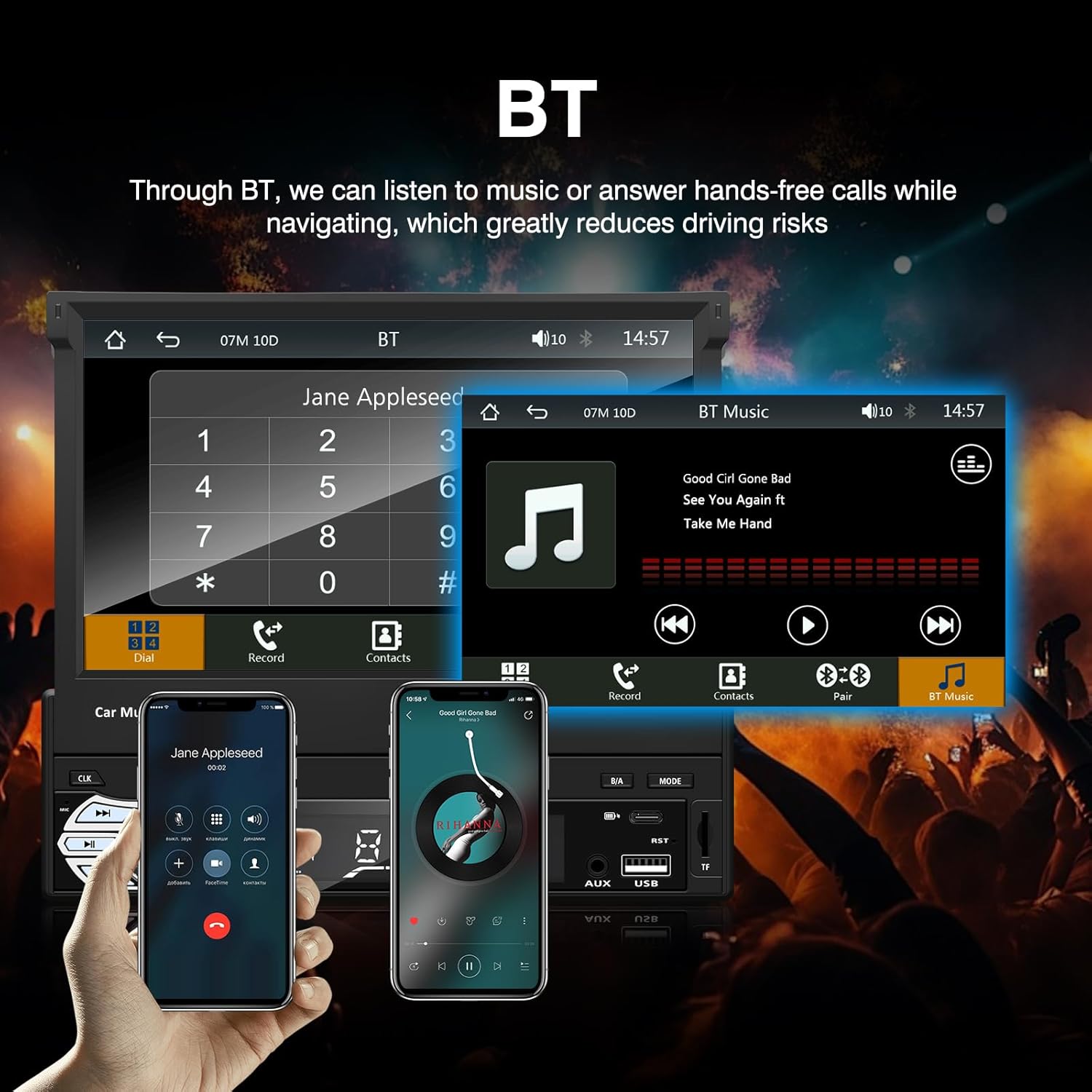
ຮູບທີ 3: Bluetooth interface for hands-free calls and music streaming, showing a dial pad and music controls.
- ການຈັບຄູ່: ເປີດໃຊ້ Bluetooth ໃນອຸປະກອນມືຖືຂອງທ່ານ. ຊອກຫາ available devices and select "Ezonetronics" or similar. Enter PIN "0000" if prompted.
- ໂທຟຣີ: Once paired, you can make and receive calls directly through the car stereo. Use the touchscreen or remote to dial, answer, or end calls.
- ການຖ່າຍທອດສຽງ (A2DP): Play music from your paired device wirelessly. Control playback (play/pause, skip) from the car stereo or your device.
3. USB/SD Media Playback
Insert a USB drive or SD card into the respective slot. The unit will automatically switch to USB/SD mode and begin playing compatible media files.

ຮູບທີ 4: Icons indicating support for Bluetooth, Auxiliary input, TF (SD) Card, and USB connections for media playback.
- Supported formats include RM, RMVB, ASF, MKV, DIVX, MPEG4, AVI, VOB for video, and MP3/MP4 for audio.
- ທ່ອງໄປຫາໂດຍຜ່ານໂຟນເດີແລະ files ໃຊ້ການໂຕ້ຕອບຫນ້າຈໍສໍາຜັດ.
4. ວິທະຍຸ FM
Access the FM radio mode to listen to local broadcasts.

ຮູບທີ 5: FM Radio interface with frequency display and equalizer settings for audio customization.
- ສະແກນອັດຕະໂນມັດ: Automatically search and save strong stations.
- ຄູ່ມືການປບັຄູ່ມື: Fine-tune frequencies using the touchscreen.
- presets: Save your favorite stations for quick access (up to 18 preset stations).
5. Apple CarPlay / Android Auto
Connect your compatible smartphone via USB to access Apple CarPlay or Android Auto features directly on the stereo's display.

ຮູບທີ 6: Wired Apple CarPlay interface, displaying phone applications like navigation, music, and messages on the car stereo screen.

ຮູບທີ 7: Wired Android Auto interface, displaying Android applications like Google Maps, Spotify, and phone calls on the car stereo screen.
- Ensure your phone has CarPlay or Android Auto enabled.
- Use a high-quality USB cable for a stable connection.
- Access navigation, music, messages, and other compatible apps safely while driving.
6. ການເຊື່ອມຕໍ່ກະຈົກ
Mirror Link allows you to display your smartphone's screen content directly onto the car stereo's display via a USB data cable.

ຮູບທີ 8: Mirror Link function demonstrating a smartphone screen being projected onto the car stereo display.
- Connect your smartphone to the USB port using a data cable.
- Follow the on-screen prompts on both the stereo and your phone to establish the connection.
- Note: Functionality may vary depending on your smartphone model and operating system.
7. ຫລັງview ການປ້ອນຂໍ້ມູນກ້ອງຖ່າຍຮູບ
ເມື່ອມີທາງຫຼັງview camera is connected and the vehicle is shifted into reverse, the stereo automatically displays the camera feed.

ຮູບທີ 9: Reversing display showing the view from a rearview camera with parking assistance lines, providing an intuitive aid for parking.
- ຮັບປະກັນດ້ານຫລັງview camera is properly installed and connected to the dedicated input.
- The display will automatically switch to the camera view when the reverse gear is engaged.
8. ການຄວບຄຸມພວງມາໄລ
The unit supports connection to your vehicle's existing steering wheel controls for convenient operation. Refer to your vehicle's manual and the stereo's wiring diagram for proper connection and configuration.
ບໍາລຸງຮັກສາ
- ທໍາຄວາມສະອາດຫນ້າຈໍ: ໃຊ້ຜ້າແພທີ່ອ່ອນນຸ່ມ, ບໍ່ມີສານດ່າງເພື່ອເຊັດໜ້າຈໍສຳຜັດຄ່ອຍໆ. ຢ່າໃຊ້ເຄື່ອງເຮັດຄວາມສະອາດຂັດຫຼືສານລະລາຍ.
- ທໍາຄວາມສະອາດທົ່ວໄປ: ເຊັດດ້ານນອກຂອງຕົວເຄື່ອງດ້ວຍຜ້າແຫ້ງ ແລະ ອ່ອນ.
- ຫຼີກລ້ຽງການຂອງແຫຼວ: ຫ້າມສີດນໍ້າຢາໃສ່ເຄື່ອງໂດຍກົງ.
- ອຸນຫະພູມ: Avoid prolonged exposure to extreme heat or cold, which can affect the unit's lifespan.
ການແກ້ໄຂບັນຫາ
| ບັນຫາ | ສາເຫດທີ່ເປັນໄປໄດ້ | ການແກ້ໄຂ |
|---|---|---|
| ຫນ່ວຍບໍລິການບໍ່ເປີດ. | ສາຍໄຟບໍ່ຖືກຕ້ອງ; ຟິວເປົ່າ; ບັນຫາຫມໍ້ໄຟລົດ. | Check power connections (Yellow, Red, Black wires). Inspect vehicle fuses. Ensure battery is charged. |
| ບໍ່ມີສຽງ. | ປະລິມານຕ່ໍາເກີນໄປ; ປິດສຽງເປີດໃຊ້ງານແລ້ວ; ສາຍລຳໂພງບໍ່ຖືກຕ້ອງ. | ເພີ່ມປະລິມານ. ກວດເບິ່ງວ່າປິດສຽງເຮັດວຽກຫຼືບໍ່. ຢືນຢັນການເຊື່ອມຕໍ່ລໍາໂພງ. |
| Bluetooth ບໍ່ເຊື່ອມຕໍ່. | Bluetooth not enabled on phone; Incorrect pairing process. | Ensure phone's Bluetooth is on and discoverable. Re-attempt pairing. |
| USB/SD media not playing. | ບໍ່ຮອງຮັບ file format; Corrupted media; Drive/card not inserted correctly. | ກວດສອບ file formats. Try a different USB drive/SD card. Ensure proper insertion. |
| ຫລັງview ກ້ອງຖ່າຍຮູບບໍ່ສະແດງ. | Camera not connected; Reverse trigger wire not connected. | Verify camera video input and reverse trigger wire connection. |
ຖ້າບັນຫາຍັງຄົງຢູ່, ໃຫ້ປຶກສາຊ່າງເຕັກນິກທີ່ມີຄຸນວຸດທິ ຫຼື ຕິດຕໍ່ຝ່າຍສະໜັບສະໜູນລູກຄ້າ.
ຂໍ້ມູນຈໍາເພາະ
- ຍີ່ຫໍ້: EZoneTronics
- ໝາຍເລກຕົວແບບ: RM-CW9601
- ສີ: ດຳ
- ໜ້າຈໍ: 7-inch Capacitive Touchscreen, Retractable
- ເຕັກໂນໂລຍີການເຊື່ອມຕໍ່: Bluetooth, USB, SD, AUX, RCA
- Bluetooth: Integrated Bluetooth 2.0 with A2DP/Hands-free
- ອຸປະກອນທີ່ເຂົ້າກັນໄດ້: ໂທລະສັບສະຫຼາດ
- ໂModeດອອກສຽງ: ສະເຕຣິໂອ
- ຮອງຮັບການເຂົ້າລະຫັດວິດີໂອ: RM, RMVB, ASF, MKV, DIVX, MPEG4, AVI, VOB
- ຮອງຮັບ USB/SD: Up to 32GB max.
- ຄຸນນະສົມບັດພິເສດ: Touchscreen, Steering Wheel Control Support, Rear Camera Input, Apple CarPlay, Android Auto, Mirror Link
- ຜູ້ຜະລິດ: Rhythm Electronics Limited
ການຮັບປະກັນແລະການສະຫນັບສະຫນູນ
This product comes with a limited manufacturer's warranty.
- ການຮັບປະກັນຂອງໜ່ວຍຫຼັກ: 12 months for defective items (excluding damaged or misused items after receipt).
- ການຮັບປະກັນອຸປະກອນເສີມ: 3 months for accessories.
ສຳລັບການຮຽກຮ້ອງການຮັບປະກັນ ຫຼື ການຊ່ວຍເຫຼືອດ້ານເຕັກນິກ, ກະລຸນາຕິດຕໍ່ຜູ້ຂາຍຍ່ອຍ ຫຼື ຜູ້ຜະລິດຂອງທ່ານໂດຍກົງ. ເກັບໃບຮັບເງິນການຊື້ຂອງທ່ານໄວ້ເປັນຫຼັກຖານການຊື້.