
ແນະນຳ
This manual provides detailed instructions for the use and maintenance of your Strong SRT 7404 HD remote control. This remote is designed as an original replacement for the Strong SRT 7404 HD FRANSAT receiver, ensuring full compatibility and functionality.
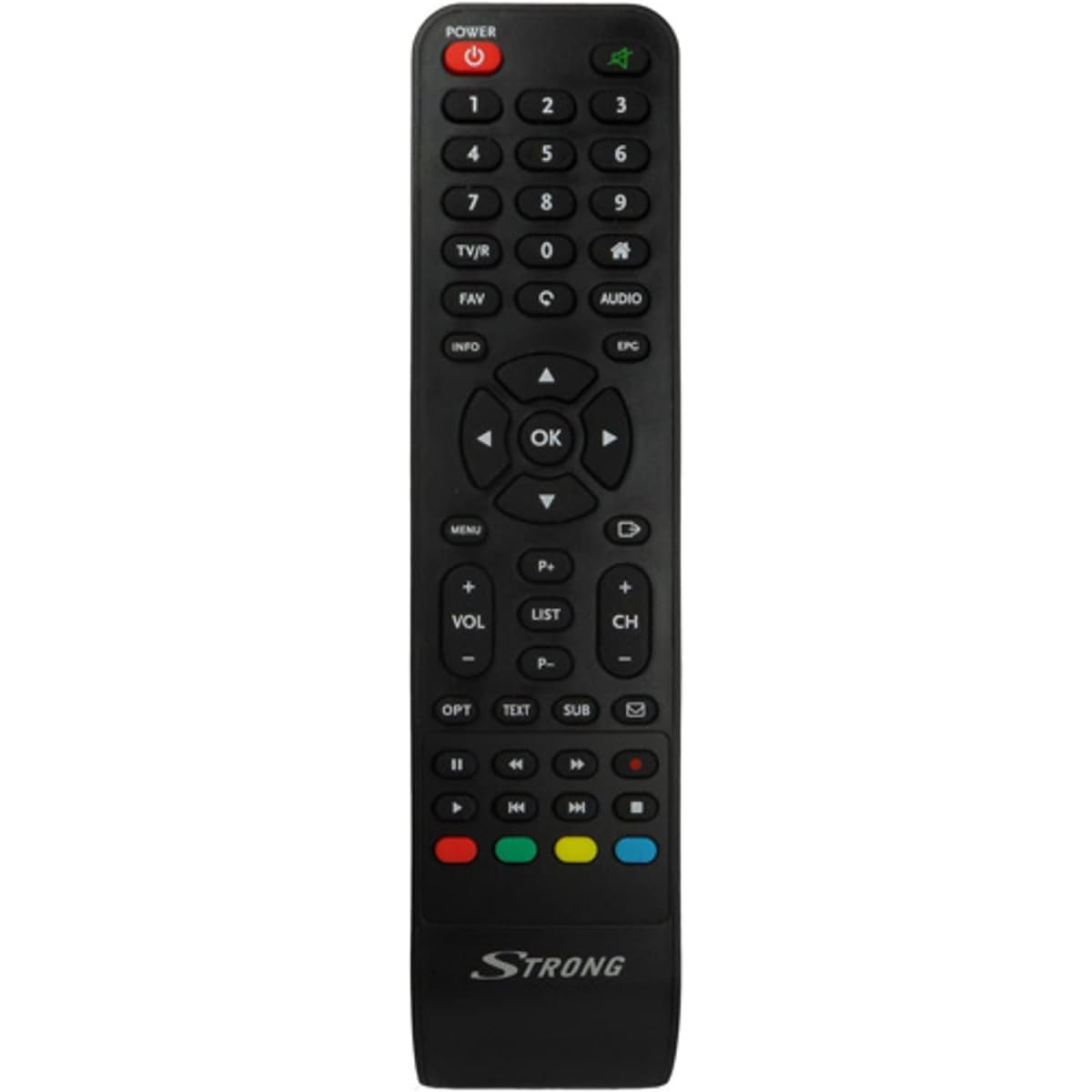
Image: The Strong SRT 7404 HD remote control, black in color, featuring various control buttons for television and receiver functions.
ຕັ້ງຄ່າ
1. ການຕິດຕັ້ງຫມໍ້ໄຟ
- ຊອກຫາຊ່ອງໃສ່ຫມໍ້ໄຟຢູ່ດ້ານຫຼັງຂອງການຄວບຄຸມໄລຍະໄກ.
- ເລື່ອນຝາປິດແບັດເຕີຣີລົງລຸ່ມ ຫຼື ໄປໃນທິດທາງທີ່ລູກສອນຊີ້ບອກເພື່ອເປີດມັນ.
- Insert two AAA alkaline batteries (not included), ensuring the positive (+) and negative (-) terminals align correctly with the markings inside the compartment.
- ປ່ຽນຝາແບັດເຕີລີໂດຍການເລື່ອນມັນກັບຄືນໄປບ່ອນຢູ່ໃນຕໍາແຫນ່ງຈົນກ່ວາມັນກົດຢ່າງປອດໄພ.
Note: Always use new alkaline batteries for optimal performance. Do not mix old and new batteries, or different types of batteries.
2. ການນໍາໃຊ້ເບື້ອງຕົ້ນ
The Strong SRT 7404 HD remote control is an original replacement and is pre-programmed for the Strong SRT 7404 HD FRANSAT receiver. No additional setup or pairing is typically required. Simply install the batteries and point the remote control towards your receiver to begin operation.
ຄໍາແນະນໍາການດໍາເນີນງານ
This section outlines the basic functions of the remote control buttons.
- ປຸ່ມເປີດປິດ: ເປີດ ຫຼືປິດເຄື່ອງຮັບ.
- ຊ່ອງຂຶ້ນ/ລົງ: Navigates through television channels.
- ປະລິມານຂຶ້ນ/ລົງ: ປັບລະດັບສຽງ.
- ປິດສຽງ: Silences or restores the audio.
- ປຸ່ມຕົວເລກ (0-9): Directly selects channels or enters numerical data.
- ປຸ່ມເມນູ: ເຂົ້າເຖິງເມນູຫຼັກຂອງຜູ້ຮັບ.
- ປຸ່ມນຳທາງ (ຂຶ້ນ, ລົງ, ຊ້າຍ, ຂວາ, ຕົກລົງ): ໃຊ້ເພື່ອນຳທາງເມນູ ແລະຢືນຢັນການເລືອກ.
- ປຸ່ມອອກ/ກັບຄືນ: ກັບໄປໜ້າຈໍກ່ອນໜ້າ ຫຼືອອກຈາກເມນູໃດນຶ່ງ.
- ປຸ່ມຂໍ້ມູນ: ສະແດງຂໍ້ມູນໂຄງການ.
- ປຸ່ມສີ (ສີແດງ, ສີຂຽວ, ສີເຫຼືອງ, ສີຟ້າ): Functions vary depending on the on-screen menu or application.
Refer to your Strong SRT 7404 HD FRANSAT receiver's manual for specific functions related to its menu system and advanced features.
ບໍາລຸງຮັກສາ
ທໍາຄວາມສະອາດ
ເພື່ອເຮັດຄວາມສະອາດເຄື່ອງຄວບຄຸມໄລຍະໄກ, ຄ່ອຍໆເຊັດພື້ນຜິວຂອງມັນດ້ວຍຜ້າອ່ອນໆ, ແຫ້ງ. ສໍາລັບຝຸ່ນ stubborn, ເລັກນ້ອຍ dampen the cloth with water. Avoid using abrasive cleaners, solvents, or alcohol, as these can damage the remote's finish or internal components.
ການປ່ຽນແບັດ
Replace batteries when the remote control becomes unresponsive or its range decreases significantly. Follow the battery installation steps outlined in the "Setup" section. Dispose of used batteries according to local regulations.
ການເກັບຮັກສາ
ເມື່ອບໍ່ໄດ້ໃຊ້ເປັນເວລາດົນ, ໃຫ້ຖອດແບັດເຕີຣີອອກເພື່ອປ້ອງກັນການຮົ່ວໄຫຼ, ເຊິ່ງສາມາດເຮັດໃຫ້ຣີໂໝດຄວບຄຸມເສຍຫາຍໄດ້. ເກັບຮັກສາຣີໂໝດໄວ້ໃນບ່ອນທີ່ເຢັນ, ແຫ້ງ, ຫ່າງຈາກແສງແດດໂດຍກົງ ແລະ ອຸນຫະພູມທີ່ຮຸນແຮງ.
ການແກ້ໄຂບັນຫາ
- ການຄວບຄຸມໄລຍະໄກບໍ່ຕອບສະຫນອງ:
- ກວດສອບວ່າແບັດເຕີຣີຖືກໃສ່ຢ່າງຖືກຕ້ອງດ້ວຍຂົ້ວທີ່ຖືກຕ້ອງ (+/-) ບໍ່.
- ປ່ຽນແບດເຕີລີ່ເກົ່າດ້ວຍແບດເຕີຣີທີ່ເປັນດ່າງໃຫມ່.
- ໃຫ້ແນ່ໃຈວ່າບໍ່ມີສິ່ງກີດຂວາງລະຫວ່າງຣີໂໝດຄວບຄຸມ ແລະ ເຊັນເຊີອິນຟາເຣດຂອງເຄື່ອງຮັບສັນຍານ.
- Make sure you are within the effective operating range (up to 10 meters).
- ຊີ້ຣີໂໝດໂດຍກົງໃສ່ເຄື່ອງຮັບ.
- ປຸ່ມສະເພາະບໍ່ເຮັດວຽກ:
- ທຳຄວາມສະອາດພື້ນຜິວຂອງຣີໂໝດຄວບຄຸມ, ໂດຍສະເພາະອ້ອມຮອບປຸ່ມທີ່ບໍ່ຕອບສະໜອງ, ເພື່ອກຳຈັດຝຸ່ນ ຫຼື ສິ່ງເສດເຫຼືອທີ່ອາດຈະກີດຂວາງການສຳຜັດຢ່າງຖືກຕ້ອງ.
- If cleaning and battery replacement do not resolve the issue, the button or remote may be faulty.
ຂໍ້ມູນຈໍາເພາະ
| ຄຸນສົມບັດ | ລາຍລະອຽດ |
|---|---|
| ຍີ່ຫໍ້ | STRONG |
| ຊື່ຕົວແບບ | 7404 |
| ຄຸນນະສົມບັດພິເສດ | ນ້ຳໜັກເບົາ |
| ສີ | ດຳ |
| ອຸປະກອນສູງສຸດທີ່ຮອງຮັບ | 1 |
| ອຸປະກອນທີ່ເຂົ້າກັນໄດ້ | TV Decoder (Strong SRT 7404 HD FRANSAT Receiver) |
| ເຕັກໂນໂລຊີການເຊື່ອມຕໍ່ | ຄວາມຖີ່ວິທະຍຸ |
| ຈໍານວນປຸ່ມ | 5 |
| ປະເພດການຄວບຄຸມ | ການຄວບຄຸມໄລຍະໄກ |
| ຂອບເຂດສູງສຸດ | 10 ແມັດ |
| ປະເພດຫມໍ້ໄຟ | Alkaline (AAA, not included) |
| ປະເທດຕົ້ນກໍາເນີດ | ຈີນ |
ການຮັບປະກັນແລະການສະຫນັບສະຫນູນ
ຂໍ້ມູນການຮັບປະກັນ
This Strong SRT 7404 HD remote control comes with a 2-year warranty from the date of purchase. This warranty covers manufacturing defects under normal use. Please retain your proof of purchase for warranty claims.
ການຊ່ວຍເຫຼືອລູກຄ້າ
For further assistance, technical support, or warranty inquiries, please contact Strong customer service. Contact details can typically be found on the official Strong webເວັບໄຊທ໌ຫຼືຜ່ານຮ້ານຂາຍຍ່ອຍຜະລິດຕະພັນຂອງທ່ານ.
You can visit the official Strong brand store for more information: Strong Brand Store