
1. ບົດແນະນຳ
Thank you for choosing the 2BOOM HPBT500K Wireless Headphone System. This manual provides essential information for the proper setup, operation, and maintenance of your new headphones. Please read it thoroughly before use to ensure optimal performance and longevity of the product.
The HPBT500K headphones offer a wireless audio experience with a built-in microphone for hands-free calling, enhanced bass sound, and comfortable wear.
2. ສິ່ງທີ່ຢູ່ໃນກ່ອງ
- 2BOOM HPBT500K Wireless Headphone
- ສາຍສາກ USB
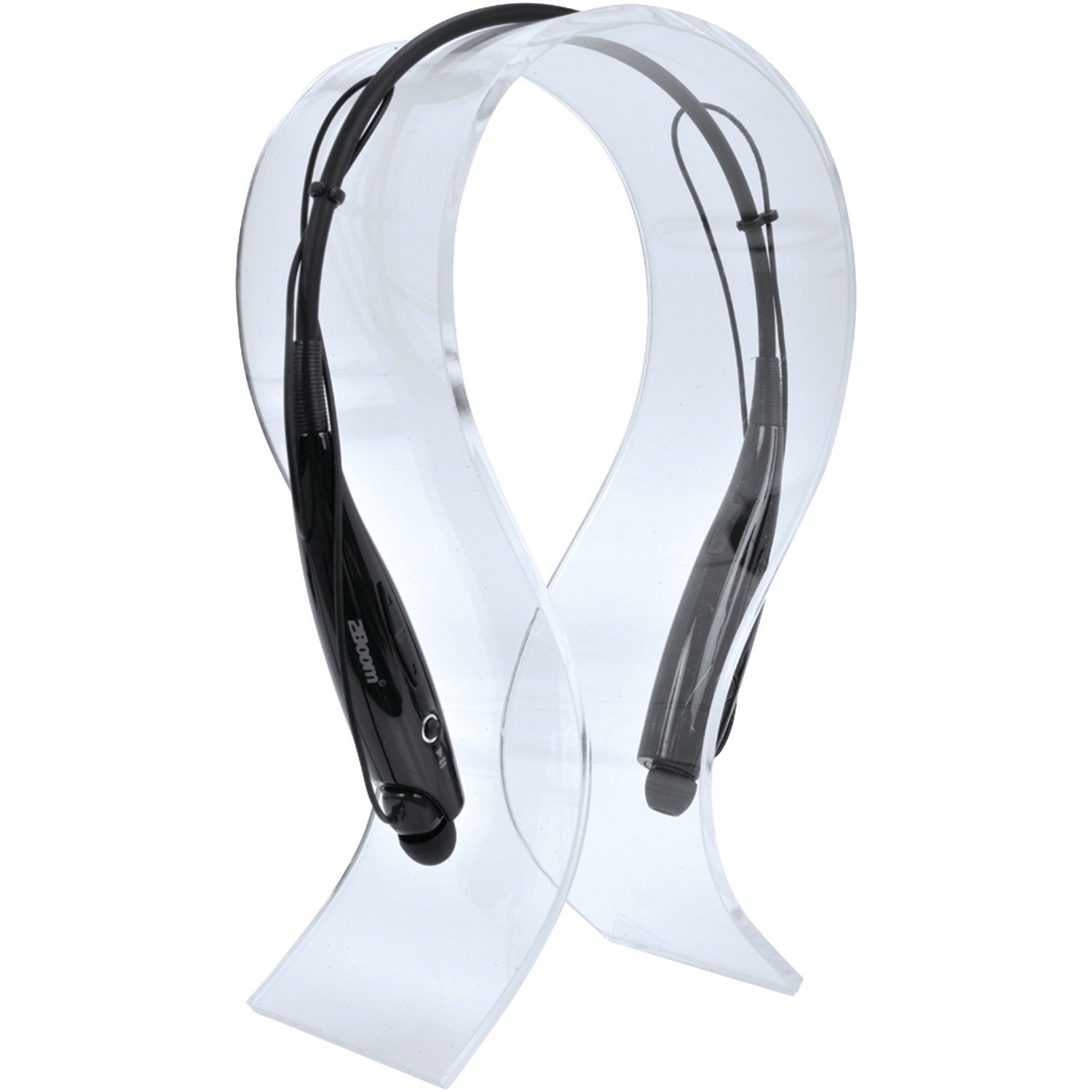
Image: The 2BOOM HPBT500K Wireless Headphone, showcasing ການອອກແບບຂອງຕົນ.
Image: The included USB charging cable for the headphones.
3. ຜະລິດຕະພັນເກີນview
Familiarize yourself with the various parts and controls of your HPBT500K headphones.

ຮູບພາບ: ຂ້າງ view of the 2BOOM HPBT500K Wireless Headphone, highlighting control buttons and ports.
ການຄວບຄຸມ ແລະຕົວຊີ້ວັດ:
- ປຸ່ມເປີດປິດ: Used to turn the headphones on/off and for pairing.
- ເພີ່ມລະດັບສຽງຂຶ້ນ/ເພງຕໍ່ໄປ: ເພີ່ມລະດັບສຽງ ຫຼື ຂ້າມໄປຫາເພງຕໍ່ໄປ.
- ຫຼຸດສຽງລົງ/ເພງກ່ອນ ໜ້າ: ຫຼຸດລະດັບສຽງ ຫຼື ໄປຫາເພງກ່ອນໜ້າ.
- ປຸ່ມຫຼາຍຟັງຊັນ (MFB): ຫຼິ້ນ/ຢຸດຊົ່ວຄາວ, ຮັບສາຍ/ວາງສາຍ.
- ໄມໂຄຣໂຟນ: ສໍາລັບການສື່ສານແບບບໍ່ມີມື.
- ຕົວຊີ້ວັດ LED: ສະແດງສະຖານະພະລັງງານ, ໂໝດຈັບຄູ່ ແລະ ສະຖານະການສາກໄຟ.
- ພອດສາກ Micro USB: ສໍາລັບການເຊື່ອມຕໍ່ສາຍສາກໄຟ.
4. ການສາກຫູຟັງ
Before first use, fully charge your headphones. A full charge typically takes about 2-3 hours.
- Connect the small end of the USB charging cable to the Micro USB charging port on your headphones.
- Connect the larger end of the USB charging cable to a USB power source (e.g., computer USB port, USB wall adapter). Ensure the power source provides DC 5V.
- The LED indicator will illuminate during charging and change color or turn off once charging is complete.
ໝາຍເຫດ: Do not use chargers with a voltage higher than DC 5V, as this may damage the headphones.
5. ຕັ້ງຄ່າ ແລະ ການຈັບຄູ່ Bluetooth
Follow these steps to pair your HPBT500K headphones with your Bluetooth-enabled device.
- ເປີດ: Press and hold the Power button on the headphones until the LED indicator flashes, usually alternating blue and red, indicating pairing mode.
- ເປີດໃຊ້ Bluetooth: On your smartphone, tablet, or other Bluetooth device, go to the Bluetooth settings and ensure Bluetooth is turned on.
- ຊອກຫາ ອຸປະກອນ: ອຸປະກອນຂອງທ່ານຈະສະແກນຫາອຸປະກອນ Bluetooth ທີ່ມີຢູ່.
- Select 'HPBT500K': From the list of found devices, select 'HPBT500K'.
- ຢືນຢັນການຈັບຄູ່: Once paired, the LED indicator on the headphones will typically flash blue slowly or remain solid blue, and your device may confirm the connection.
The operating distance for Bluetooth connectivity is up to 33 feet (10 meters) in an open environment. Obstacles may reduce this range.
6. ຄໍາແນະນໍາການດໍາເນີນງານ
ການຫຼິ້ນເພງ:
- ຫຼິ້ນ/ຢຸດ: ກົດປຸ່ມຫຼາຍໜ້າທີ່ (MFB) ໜຶ່ງຄັ້ງ.
- ເພງຕໍ່ໄປ: ກົດປຸ່ມເພີ່ມສຽງຄ້າງໄວ້.
- ຕິດຕາມກ່ອນ ໜ້າ ນີ້: ກົດປຸ່ມປະລິມານລົງຄ້າງໄວ້.
- ປະລິມານຂຶ້ນ: ກົດປຸ່ມ Volume Up ສັ້ນໆ.
- ປະລິມານລົງ: ກົດປຸ່ມ Volume Down ສັ້ນໆ.
Music playback time is up to 3 hours on a full charge.
ໂທຟຣີ:
- ຮັບສາຍ: ກົດ MFB ເມື່ອມີສາຍໂທເຂົ້າມາ.
- ສິ້ນສຸດການໂທ: ກົດ MFB ຄັ້ງດຽວໃນລະຫວ່າງການໂທ.
- ປະຕິເສດການໂທ: Press and hold the MFB for approximately 2 seconds when a call comes in.
- ໂທຫາເບີສຸດທ້າຍ: ກົດສອງຄັ້ງ MFB.
Talk time is up to 3 hours on a full charge.
7. ບໍາລຸງຮັກສາ
ເພື່ອຮັບປະກັນອາຍຸການໃຊ້ງານທີ່ຍາວນານ ແລະ ປະສິດທິພາບທີ່ດີທີ່ສຸດຂອງຫູຟັງຂອງທ່ານ, ໃຫ້ປະຕິບັດຕາມຄຳແນະນຳກ່ຽວກັບການບຳລຸງຮັກສາເຫຼົ່ານີ້:
- Keep the headphones dry. Avoid exposure to moisture, rain, or liquids.
- Clean the headphones with a soft, dry cloth. Do not use harsh chemicals or abrasive cleaners.
- ເກັບຮັກສາຫູຟັງໄວ້ໃນບ່ອນທີ່ເຢັນ, ແຫ້ງ, ຫ່າງຈາກອຸນຫະພູມສູງສຸດ.
- ຫຼີກເວັ້ນການລຸດລົງ ຫຼື ວາງຫູຟັງໃຫ້ຖືກຜົນກະທົບຢ່າງແຮງ.
- ຢ່າພະຍາຍາມຖອດຫຼືດັດແປງຫູຟັງ, ເພາະວ່ານີ້ຈະເປັນການປະຖິ້ມການຮັບປະກັນ.
8. ການແກ້ໄຂບັນຫາ
If you encounter issues with your HPBT500K headphones, refer to the following common problems and solutions:
- ຫູຟັງບໍ່ເປີດ:
Ensure the headphones are fully charged. Connect them to a power source using the provided USB cable. - ບໍ່ສາມາດຈັບຄູ່ກັບອຸປະກອນ:
Make sure Bluetooth is enabled on your device and the headphones are in pairing mode (LED flashing blue/red). Move the headphones closer to your device. Try turning both devices off and on again. - ບໍ່ມີສຽງ ຫຼືສຽງຕໍ່າ:
ກວດເບິ່ງລະດັບສຽງໃນທັງຫູຟັງ ແລະອຸປະກອນທີ່ເຊື່ອມຕໍ່ຂອງທ່ານ. ກວດໃຫ້ແນ່ໃຈວ່າໄດ້ຈັບຄູ່ຫູຟັງຢ່າງຖືກຕ້ອງ. - ຄຸນນະພາບສຽງບໍ່ດີ ຫຼືການຕັດການເຊື່ອມຕໍ່:
ໃຫ້ແນ່ໃຈວ່າບໍ່ມີສິ່ງກີດຂວາງລະຫວ່າງຫູຟັງ ແລະ ອຸປະກອນຂອງທ່ານ. ຍ້າຍເຂົ້າໃກ້ອຸປະກອນຂອງທ່ານຫຼາຍຂຶ້ນ. ຫຼີກລ່ຽງສະພາບແວດລ້ອມທີ່ມີ Wi-Fi ທີ່ແຮງ ຫຼື ການລົບກວນໄຮ້ສາຍອື່ນໆ. - ໄມໂຄຣໂຟນບໍ່ເຮັດວຽກ:
Ensure the headphones are properly connected and selected as the audio input device on your phone/computer.
9. ຂໍ້ມູນຈໍາເພາະ
| ຄຸນສົມບັດ | ຂໍ້ມູນຈໍາເພາະ |
|---|---|
| ລຸ້ນ Bluetooth | 2.1 + EDR |
| ໄລຍະທາງປະຕິບັດການ | ສູງເຖິງ 33 ຟຸດ (10 ແມັດ) |
| ເວລາການຫຼີ້ນດົນຕີ | ສູງສຸດ 3 ຊົ່ວໂມງ |
| ເວລາສົນທະນາ | ສູງສຸດ 3 ຊົ່ວໂມງ |
| ກຳ ລັງສາກໄຟ Voltagetage | DC 5V |
| ເວລາສາກໄຟ | ປະມານ 2-3 ຊົ່ວໂມງ |
| ລຳໂພງ Output | 2 x 40 mW |
| ແບັດເຕີຣີໃນຕົວ | 3.7V, 150mAh |
| ນ້ໍາຫນັກລາຍການ | 113 g |
| ຂະໜາດສິນຄ້າ (LxWxH) | 23.11 x 16.76 x 3.81 cm |
| ອົງປະກອບລວມ | Headphone with charging cable |
| ວິທີການຄວບຄຸມ | ແຕະ |
| ຄຸນນະສົມບັດພິເສດ | ນ້ຳໜັກເບົາ, ມີໄມໂຄຣໂຟນ |
10. ການຮັບປະກັນແລະການສະຫນັບສະຫນູນ
For warranty information or technical support, please refer to the documentation provided at the time of purchase or contact 2BOOM customer service. Keep your proof of purchase for warranty claims.