
Biconic Bluetooth Tough Weatherproof Portable Wireless Speaker User Manual
Model: ABC-AU-BS-103-BK
ຍີ່ຫໍ້: Bytech
1. ຜະລິດຕະພັນເກີນview
The Biconic Bluetooth Tough Weatherproof Portable Wireless Speaker is designed for robust outdoor and indoor use, providing enhanced bass and clear audio. Its wireless capabilities allow for easy connection to various devices, and its durable, weatherproof construction ensures reliable performance in diverse environments.

ຮູບ 1.1: ດ້ານຫນ້າ view of the Biconic Bluetooth Speaker, showcasing ການອອກແບບທີ່ເຂັ້ມແຂງຂອງຕົນແລະປີ້ງລໍາໂພງ.
ຄຸນນະສົມບັດທີ່ສໍາຄັນ:
- ການເຊື່ອມຕໍ່ແບບໄຮ້ສາຍ: Seamless Bluetooth pairing with smartphones, tablets, and other compatible devices.
- ການອອກແບບກັນອາກາດ: IPX6 water resistance protects against strong jets of water, making it suitable for outdoor use.
- Bass ປັບປຸງ: Delivers rich, deep bass for a superior audio experience.
- Portable: Compact design with a durable strap for easy transport.
- ເວລາຫຼິ້ນດົນ: Up to 4 hours of continuous audio playback on a single charge.
2. ຂໍ້ມູນຄວາມປອດໄພ
ກະລຸນາອ່ານຄໍາເຕືອນຄວາມປອດໄພທັງຫມົດແລະຄໍາແນະນໍາຢ່າງລະອຽດກ່ອນທີ່ຈະນໍາໃຊ້ຜະລິດຕະພັນນີ້ເພື່ອຮັບປະກັນການດໍາເນີນງານທີ່ປອດໄພແລະປ້ອງກັນຄວາມເສຍຫາຍ.
- ຢ່າໃຫ້ລຳໂພງຖືກອຸນຫະພູມສູງ ຫຼື ຕໍ່າເກີນໄປ.
- Do not immerse the speaker in water. While it is IPX6 water resistant, it is not designed for submersion.
- Keep the speaker away from direct heat sources, open flames, and flammable liquids.
- Use only the provided charging cable and a compatible power adapter (5V/1A recommended) to charge the device.
- ຢ່າພະຍາຍາມຖອດປະກອບ, ສ້ອມແປງ ຫຼື ດັດແປງລຳໂພງ. ການເຮັດແບບນີ້ຈະເຮັດໃຫ້ການຮັບປະກັນເປັນໂມຄະ ແລະ ອາດຈະເຮັດໃຫ້ເກີດອັນຕະລາຍໄດ້.
- ຮັກສາໃຫ້ໄກຈາກເດັກນ້ອຍ.
- ເຮັດຄວາມສະອາດລໍາໂພງດ້ວຍຜ້າອ່ອນໆ, ແຫ້ງ. ຢ່າໃຊ້ເຄື່ອງເຮັດຄວາມສະອາດຂັດຫຼືສານລະລາຍ.
3. ເນື້ອໃນຊຸດ
ກວດສອບວ່າລາຍການທັງຫມົດແມ່ນມີຢູ່ໃນຊຸດຫຼັງຈາກ unboxing:
- Biconic Bluetooth Tough Weatherproof Portable Wireless Speaker
- ສາຍສາກ USB
- ຄູ່ມືຜູ້ໃຊ້ (ເອກະສານນີ້)
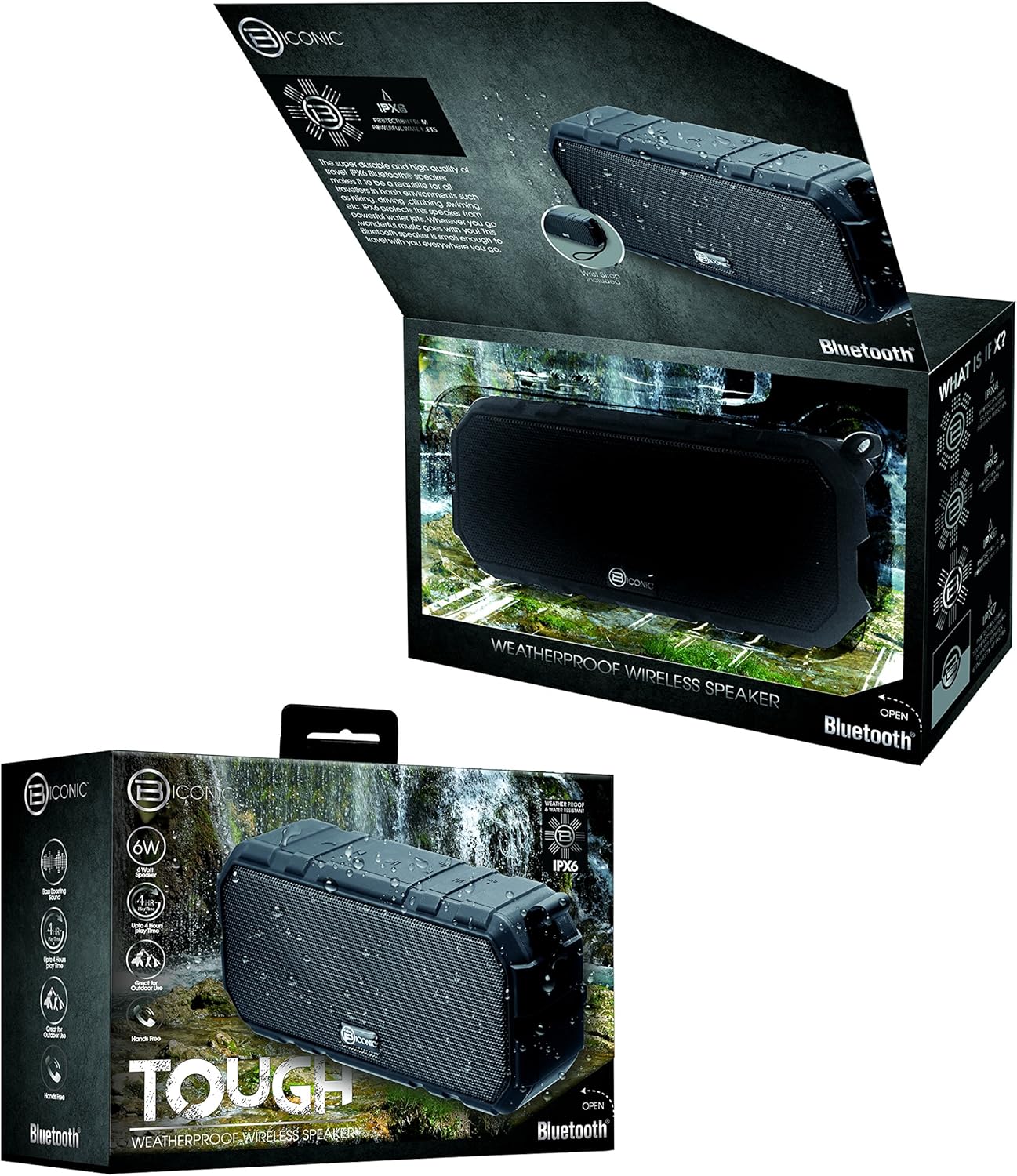
Figure 3.1: The Biconic Bluetooth Speaker shown with its retail packaging, indicating typical package contents.
4. ຕັ້ງຄ່າ
4.1 ກຳລັງສາກລຳໂພງ
- Locate the charging port on the side of the speaker. This port is typically protected by a rubber flap to maintain water resistance.
- ເປີດຝາຢາງ.
- ເຊື່ອມຕໍ່ປາຍສາຍສາກໄຟ USB ທີ່ໃຫ້ມາເຂົ້າກັບພອດສາກໄຟຂອງລຳໂພງ.
- ເຊື່ອມຕໍ່ປາຍໃຫຍ່ກວ່າຂອງສາຍ USB ກັບແຫຼ່ງພະລັງງານ USB (ເຊັ່ນ: ພອດ USB ຂອງຄອມພິວເຕີ, ຕົວແປງໄຟ USB).
- ໄຟສັນຍານສາກໄຟຈະສະຫວ່າງຂຶ້ນ, ໂດຍປົກກະຕິແລ້ວຈະເປັນສີແດງ, ເພື່ອສະແດງວ່າລຳໂພງກຳລັງສາກໄຟຢູ່.
- Once fully charged (approximately 2-3 hours), the indicator light will change color (e.g., turn off or turn blue/green). Disconnect the charging cable and close the rubber flap securely to maintain water resistance.
4.2 ການເປີດ/ປິດ
- ເພື່ອເປີດເຄື່ອງ: Press and hold the Power button (usually marked with a power symbol) for a few seconds until you hear an audible tone or see an indicator light illuminate.
- ປິດເຄື່ອງ: Press and hold the Power button again for a few seconds until you hear an audible tone or the indicator light turns off.
5. ຄໍາແນະນໍາການດໍາເນີນງານ
5.1 ການຈັບຄູ່ Bluetooth
Before first use, you need to pair the speaker with your Bluetooth-enabled device.
- Ensure the speaker is fully charged and powered on. It will automatically enter pairing mode, indicated by a flashing blue LED light.
- On your smartphone, tablet, or other Bluetooth device, go to the Bluetooth settings menu.
- ເປີດໃຊ້ Bluetooth ຖ້າມັນບໍ່ໄດ້ເປີດໃຊ້ແລ້ວ.
- Scan for available devices. You should see "Biconic Speaker" or a similar name appear in the list.
- Select "Biconic Speaker" to connect. Once successfully paired, you will hear a confirmation tone, and the blue LED light on the speaker will stop flashing and remain solid.
- ຖ້າຖືກຖາມຫາລະຫັດຜ່ານ, ໃສ່ "0000".
- ລຳໂພງຈະເຊື່ອມຕໍ່ຄືນໃໝ່ໂດຍອັດຕະໂນມັດກັບອຸປະກອນທີ່ຈັບຄູ່ສຸດທ້າຍເມື່ອເປີດ, ຖ້າອຸປະກອນຢູ່ໃນຂອບເຂດ ແລະ Bluetooth ຖືກເປີດໃຊ້.
5.2 ການຫລີ້ນດົນຕີ
Once paired, you can control music playback directly from your connected device or using the speaker's controls.
- ຫຼິ້ນ/ຢຸດ: Press the Play/Pause button (often marked with a triangle or || symbol) once to play or pause music.
- ປະລິມານຂຶ້ນ: Press the Volume Up button (+) to increase the volume.
- ປະລິມານລົງ: Press the Volume Down button (-) to decrease the volume.
- ເພງຕໍ່ໄປ: Press and hold the Volume Up button (+) for a few seconds to skip to the next track.
- ຕິດຕາມກ່ອນ ໜ້າ ນີ້: Press and hold the Volume Down button (-) for a few seconds to go to the previous track.

ຮູບທີ 5.1: ທາງເທິງ view of the Biconic Bluetooth Speaker, highlighting the control buttons for power, volume, and playback.
5.3 ການຮັບສາຍ (ຟັງຊັນ Hands-Free)
The speaker supports hands-free calling when connected to a smartphone.
- ຮັບສາຍ: ເມື່ອມີສາຍໂທເຂົ້າມາ, ໃຫ້ກົດປຸ່ມຫຼິ້ນ/ຢຸດຊົ່ວຄາວເພື່ອຮັບສາຍ.
- ສິ້ນສຸດການໂທ: ໃນລະຫວ່າງການໂທ, ກົດປຸ່ມຫຼິ້ນ/ຢຸດຊົ່ວຄາວໜຶ່ງຄັ້ງເພື່ອວາງສາຍ.
- ປະຕິເສດການໂທ: ກົດປຸ່ມຫຼິ້ນ/ຢຸດຊົ່ວຄາວຄ້າງໄວ້ສອງສາມວິນາທີເພື່ອປະຕິເສດສາຍໂທເຂົ້າ.
6. ບໍາລຸງຮັກສາ
ການບຳລຸງຮັກສາທີ່ເໝາະສົມຮັບປະກັນອາຍຸການໃຊ້ງານທີ່ຍາວນານ ແລະ ປະສິດທິພາບທີ່ດີທີ່ສຸດຂອງລຳໂພງຂອງທ່ານ.
- ທໍາຄວາມສະອາດ: ເຊັດລໍາໂພງດ້ວຍສຽງອ່ອນ, ງamp cloth. Do not use harsh chemicals, solvents, or abrasive cleaners. Ensure the charging port flap is closed before cleaning with a damp ຜ້າ.
- ການເກັບຮັກສາ: ເກັບຮັກສາລຳໂພງໄວ້ໃນບ່ອນທີ່ເຢັນ, ແຫ້ງ, ຫ່າງຈາກແສງແດດໂດຍກົງ ແລະ ອຸນຫະພູມສູງສຸດເມື່ອບໍ່ໄດ້ໃຊ້ເປັນເວລາດົນ.
- ການດູແລຫມໍ້ໄຟ: To preserve battery life, fully charge the speaker before storing it for long periods. Recharge every 3-6 months if not used regularly.
- ຄວາມຕ້ານທານນ້ໍາ: Always ensure the rubber flap covering the charging port is securely closed to maintain the IPX6 water resistance rating.

Figure 6.1: The Biconic Bluetooth Speaker demonstrating its water-resistant capabilities, highlighting the importance of proper sealing for maintenance.
7. ການແກ້ໄຂບັນຫາ
| ບັນຫາ | ສາເຫດທີ່ເປັນໄປໄດ້ | ການແກ້ໄຂ |
|---|---|---|
| ລຳໂພງບໍ່ເປີດ. | ແບັດເຕີຣີໝົດ. | ສາກລຳໂພງໃຫ້ເຕັມ. |
| ບໍ່ສາມາດຈັບຄູ່ກັບອຸປະກອນ Bluetooth ໄດ້. | Bluetooth is off on your device; speaker is not in pairing mode; device is too far. | Ensure Bluetooth is enabled on your device. Power off and on the speaker to re-enter pairing mode. Move device closer to the speaker (within 10 meters). Forget the device on your phone and try pairing again. |
| ບໍ່ມີສຽງ ຫຼືສຽງຕໍ່າ. | ລະດັບສຽງຕໍ່າເກີນໄປໃນລຳໂພງ ຫຼືອຸປະກອນ; ລຳໂພງບໍ່ໄດ້ເຊື່ອມຕໍ່. | Increase volume on both the speaker and your connected device. Ensure the speaker is properly paired and connected. |
| ການບິດເບືອນສຽງ. | ລະດັບສຽງສູງເກີນໄປ; ການລົບກວນ; ແບັດເຕີຣີຕໍ່າ. | ຫຼຸດສຽງລົງ. ຍ້າຍລຳໂພງອອກຈາກອຸປະກອນເອເລັກໂຕຣນິກອື່ນໆ. ສາກໄຟລຳໂພງ. |
8. ຂໍ້ມູນຈໍາເພາະ
| ຄຸນສົມບັດ | ລາຍລະອຽດ |
|---|---|
| ໝາຍເລກຕົວແບບ | ABC-AU-BS-103-BK |
| ຍີ່ຫໍ້ | Bytech |
| ເຕັກໂນໂລຊີການເຊື່ອມຕໍ່ | Bluetooth |
| ລຳໂພງກຳລັງຜົນຜະລິດສູງສຸດ | 3 ວັດ |
| ຮູບແບບການອອກສຽງ | ສະເຕຣິໂອ |
| ການຈັດອັນດັບຄວາມຕ້ານທານນ້ໍາ | IPX6 (Water resistant, not submersible) |
| ປະເພດຫມໍ້ໄຟ | ແບັດເຕີຣີ Lithium Ion 1 ອັນ (ຕ້ອງການ) |
| ເວລາຫຼິ້ນ | ສູງສຸດ 4 ຊົ່ວໂມງ |
| ຂະໜາດສິນຄ້າ | 2.54 x 2.54 x 2.54 cm |
| ນ້ໍາຫນັກລາຍການ | 522 g |
| ປະເພດການຕິດຕັ້ງ | ໂຕະ |
9. ການຮັບປະກັນແລະການສະຫນັບສະຫນູນ
For warranty information and technical support, please contact Bytech customer service. Details are typically provided on the product packaging or the official Bytech webເວັບໄຊ.
ກະລຸນາຮັກສາຫຼັກຖານການຊື້ຂອງທ່ານສໍາລັບການຮຽກຮ້ອງການຮັບປະກັນໃດໆ.
ໝາຍເຫດ: ເງື່ອນໄຂການຮັບປະກັນອາດແຕກຕ່າງກັນໄປຕາມພາກພື້ນ.