
Kaiser KAS-9012
Kaiser KAS-9012 Wireless Amplified Speaker Kit
ຄູ່ມືຜູ້ໃຊ້
ແນະນຳ
Thank you for choosing the Kaiser KAS-9012 Wireless Amplified Speaker Kit. This manual provides essential information for the safe and efficient operation of your new speaker system. Please read it thoroughly before use and retain it for future reference.
The KAS-9012 is a portable amplified speaker system featuring 9700W PMPO / 28W RMS audio power, a 12-inch woofer, 2x3-inch speakers, audio-rhythmic LED lights, and a rechargeable battery offering up to 8 hours of continuous music playback. It supports Bluetooth connectivity and includes scratch discs for volume and playback control.
ຂໍ້ມູນຄວາມປອດໄພ
- ຫ້າມບໍ່ໃຫ້ອຸປະກອນຖືກຝົນ ຫຼື ຄວາມຊຸ່ມຊື້ນເພື່ອປ້ອງກັນໄຟ ຫຼື ໄຟຟ້າຊັອດ.
- Do not open the speaker cabinet. There are no user-serviceable parts inside. Refer all servicing to qualified personnel.
- ຮັບປະກັນການລະບາຍອາກາດທີ່ເຫມາະສົມ. ຫ້າມປິດຊ່ອງລະບາຍອາກາດໃດໆ.
- ເກັບຮັກສາລຳໂພງໃຫ້ຫ່າງຈາກແຫຼ່ງຄວາມຮ້ອນເຊັ່ນ: ເຄື່ອງເຮັດຄວາມຮ້ອນ, ເຄື່ອງບັນທຶກຄວາມຮ້ອນ, ເຕົາໄຟ, ຫຼືອຸປະກອນອື່ນໆ (ລວມທັງ amplifiers) ທີ່ຜະລິດຄວາມຮ້ອນ.
- ປົກປ້ອງສາຍໄຟຈາກການຖືກສຽບ ຫຼື ສຽບ, ໂດຍສະເພາະຢູ່ປລັກສຽບ, ກ່ອງຮັບສະດວກ, ແລະຈຸດທີ່ພວກມັນອອກຈາກອຸປະກອນ.
- ຖອດອຸປະກອນນີ້ອອກໃນລະຫວ່າງການມີພາຍຸຟ້າຜ່າ ຫຼືເມື່ອບໍ່ໄດ້ໃຊ້ເປັນເວລາດົນນານ.
- ຜະລິດຕະພັນນີ້ແມ່ນບໍ່ກັນນ້ໍາ. ຫຼີກເວັ້ນການສໍາຜັດກັບຂອງແຫຼວ.
ເນື້ອໃນຊຸດ
ກະລຸນາກວດສອບວ່າລາຍການທັງຫມົດທີ່ລະບຸໄວ້ຂ້າງລຸ່ມນີ້ແມ່ນລວມຢູ່ໃນຊຸດຂອງທ່ານ:
- Kaiser KAS-9012 Amplified Speaker Unit
- ໄມໂຄຣໂຟນ
- ການຄວບຄຸມໄລຍະໄກ
- ສາຍໄຟ
- ຄູ່ມືຜູ້ໃຊ້ (ເອກະສານນີ້)
ສິນຄ້າເກີນview
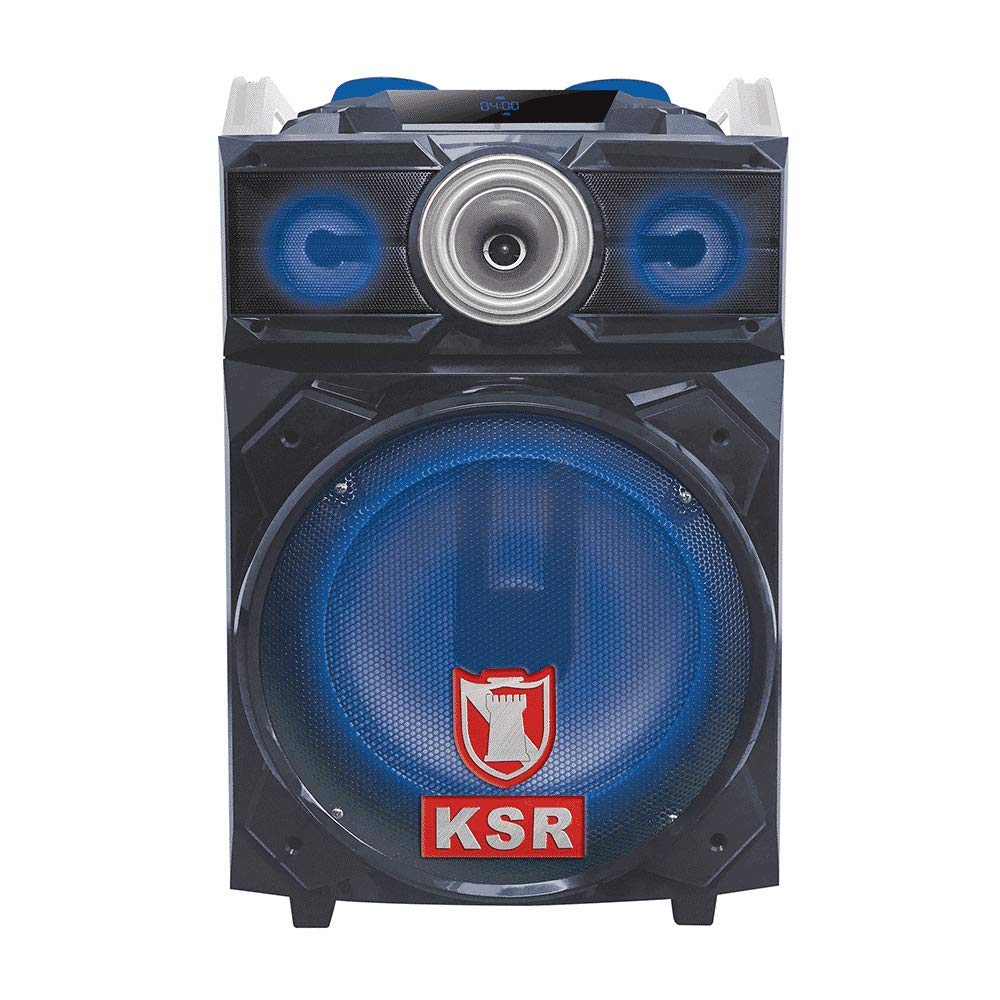
ຮູບ 1: ດ້ານຫນ້າ view of the Kaiser KAS-9012 Wireless Amplified Speaker Kit, showing the main speaker, control panel, and LED lights.
The Kaiser KAS-9012 is designed for powerful and portable audio. It features a robust enclosure, a comprehensive control panel, and various connectivity options to suit different audio sources.
ຄຸນນະສົມບັດທີ່ສໍາຄັນ:
- High Power Output: 9700W PMPO / 28W RMS.
- Integrated 12-inch Woofer and 2x3-inch Speakers.
- Bluetooth Wireless Connectivity.
- Audio-Rhythmic LED Lights (deactivatable).
- Rechargeable Battery with up to 8 hours playback.
- Scratch Discs for Volume and Playback Control.
- Multiple Input Options: USB, SD Card, AUX, Microphone.
- ການດໍາເນີນງານການຄວບຄຸມໄລຍະໄກ.
ການຄວບຄຸມ ແລະການເຊື່ອມຕໍ່
Familiarize yourself with the control panel and connection ports on your KAS-9012 speaker.
ແຜງຄວບຄຸມດ້ານໜ້າ:
- ປຸ່ມເປີດປິດ: ເປີດ ຫຼືປິດເຄື່ອງ.
- ປຸ່ມໂໝດ: Switches between Bluetooth, USB, SD, AUX, and FM radio modes.
- ປຸ່ມຫຼິ້ນ/ຢຸດຊົ່ວຄາວ: ຫຼິ້ນ ຫຼືຢຸດການຫຼິ້ນສຽງຊົ່ວຄາວ.
- ປຸ່ມຕິດຕາມກ່ອນໜ້າ/ຕໍ່ໄປ: ນຳທາງຜ່ານທາງ.
- ປຸ່ມປັບສຽງ: Adjusts master volume, microphone volume, and echo.
- Scratch Discs: For DJ-style sound effects and fine-tuning volume/playback.
- ປຸ່ມແສງໄຟ LED: Activates or deactivates the audio-rhythmic LED lights.
- ຈໍສະແດງຜົນ: Shows current mode, track information, and battery status.
ການເຊື່ອມຕໍ່ແຜງດ້ານຫຼັງ:
- ຊ່ອງສາກໄຟ: Connect the power cable to recharge the internal battery.
- ພອດ USB: ສຳລັບການຫຼິ້ນສຽງຈາກ USB flash drive.
- ຊ່ອງໃສ່ບັດ SD: For playing audio from SD memory cards.
- AUX Input (3.5mm): Connect external audio devices using an AUX cable.
- ໄມໂຄຣໂຟນເຂົ້າ (6.35 ມມ): Connect the included microphone or another compatible microphone.
ຕັ້ງຄ່າ
1. ການສາກແບັດເຕີຣີ
- Before first use, fully charge the speaker's internal battery.
- Connect the provided power cable to the charging port on the rear panel of the speaker.
- ສຽບປາຍອື່ນໆຂອງສາຍໄຟເຂົ້າໄປໃນປ່ຽງໄຟຟ້າມາດຕະຖານ.
- The charging indicator light (if present) will illuminate. Once fully charged, the light may change color or turn off.
- A full charge typically takes several hours and provides up to 8 hours of playback.
2. ການເປີດເຄື່ອງເບື້ອງຕົ້ນ
- ກົດຄ້າງໄວ້ ປຸ່ມເປີດປິດ on the front panel for a few seconds until the display screen illuminates.
- The speaker will typically start in Bluetooth mode by default.
ຄໍາແນະນໍາການດໍາເນີນງານ
1. ການຈັບຄູ່ Bluetooth
- Ensure the speaker is powered on and in Bluetooth mode. The display will show "BLUE" or a Bluetooth icon, and you may hear an audible prompt.
- ໃນອຸປະກອນມືຖືຂອງທ່ານ (ໂທລະສັບສະຫຼາດ, ແທັບເລັດ, ແລະອື່ນໆ), ເປີດໃຊ້ Bluetooth ແລະຄົ້ນຫາອຸປະກອນທີ່ມີຢູ່.
- Select "KAS-9012" from the list of devices.
- Once paired, the speaker will confirm with an audible sound, and the Bluetooth indicator on the display will become solid.
- You can now play audio from your device through the KAS-9012 speaker.
2. ການຫຼິ້ນບັດ USB/SD
- ໃສ່ແຟລດໄດຣຟ໌ USB ຫຼື SD card (ພ້ອມສຽງ MP3) files) into the respective port/slot.
- ກົດ ປຸ່ມໂໝດ until the display shows "USB" or "SD". The speaker will automatically begin playing audio files.
- ໃຊ້ ຫຼິ້ນ/ຢຸດຊົ່ວຄາວ ແລະ ເພງກ່ອນ ໜ້າ/ຖັດໄປ ປຸ່ມເພື່ອຄວບຄຸມການຫຼິ້ນ.
3. ເຄື່ອງປ້ອນຂໍ້ມູນ AUX
- ເຊື່ອມຕໍ່ອຸປະກອນສຽງພາຍນອກ (ເຊັ່ນ: ເຄື່ອງຫຼິ້ນ MP3, ແລັບທັອບ) ເຂົ້າກັບ ການປ້ອນຂໍ້ມູນ AUX ໂດຍໃຊ້ສາຍສຽງ 3.5 ມມ.
- ກົດ ປຸ່ມໂໝດ until the display shows "AUX".
- ຄວບຄຸມການຫຼິ້ນ ແລະລະດັບສຽງຈາກອຸປະກອນທີ່ເຊື່ອມຕໍ່ຂອງທ່ານ.
4. ການນຳໃຊ້ໄມໂຄຣໂຟນ
- Plug the microphone into the ການປ້ອນຂໍ້ມູນໄມໂຄຣໂຟນ ທ່າເຮືອ.
- Adjust the microphone volume using the dedicated knob on the control panel.
- Adjust the echo effect using the echo knob for desired vocal effects.
5. LED Lights Control
ກົດ ປຸ່ມໄຟ LED to toggle the audio-rhythmic LED lights on or off according to your preference.
6. Scratch Discs
The scratch discs allow for DJ-style sound manipulation and can also be used for precise volume adjustments or track scrubbing depending on the active mode.
ບໍາລຸງຮັກສາ
ທໍາຄວາມສະອາດ
- Always unplug the speaker from the power source before cleaning.
- ໃຊ້ຜ້າອ່ອນ, ແຫ້ງເພື່ອເຊັດພື້ນຜິວພາຍນອກຂອງລໍາໂພງ.
- ຢ່າໃຊ້ເຄື່ອງເຮັດຄວາມສະອາດຂັດ, ຂີ້ເຜີ້ງ, ຫຼືສານລະລາຍເພາະວ່າພວກມັນອາດຈະທໍາລາຍການສໍາເລັດຮູບ.
- ຫຼີກເວັ້ນການສີດນ້ໍາໂດຍກົງໃສ່ລໍາໂພງ.
ການເກັບຮັກສາ
- ເມື່ອບໍ່ໄດ້ໃຊ້ເປັນເວລາດົນ, ໃຫ້ເກັບຮັກສາລໍາໂພງໄວ້ໃນບ່ອນທີ່ເຢັນ, ແຫ້ງ.
- It is recommended to fully charge the battery every 3-6 months to maintain its lifespan.
ການແກ້ໄຂບັນຫາ
| ບັນຫາ | ສາເຫດທີ່ເປັນໄປໄດ້ | ການແກ້ໄຂ |
|---|---|---|
| ບໍ່ມີພະລັງງານ | ແບັດເຕີຣີໝົດແລ້ວ; ບໍ່ໄດ້ເຊື່ອມຕໍ່ສາຍໄຟ. | Charge the battery; Ensure power cable is securely connected to both speaker and outlet. |
| ບໍ່ມີສຽງ | ລະດັບສຽງຕໍ່າເກີນໄປ; ເລືອກໂໝດບໍ່ຖືກຕ້ອງ; ອຸປະກອນບໍ່ໄດ້ຈັບຄູ່ (Bluetooth). | Increase master volume; Select correct input mode (Bluetooth, USB, AUX); Re-pair Bluetooth device. |
| ການເຊື່ອມຕໍ່ Bluetooth ບໍ່ສະຖຽນ | ອຸປະກອນຢູ່ໄກຈາກລຳໂພງເກີນໄປ; ມີການລົບກວນ. | Move device closer to speaker (within 10 meters); Avoid obstacles between devices; Turn off other Bluetooth devices. |
| ໄມໂຄຣໂຟນບໍ່ເຮັດວຽກ | ບໍ່ໄດ້ສຽບໄມໂຄຣໂຟນຢ່າງຖືກຕ້ອງ; ລະດັບສຽງໄມໂຄຣໂຟນຕ່ຳເກີນໄປ. | Ensure microphone is fully inserted into the input; Increase microphone volume knob. |
ຂໍ້ມູນຈໍາເພາະ
| ຕົວແບບ: | KAS-9012 |
| ຍີ່ຫໍ້: | ໄກເຊີ |
| ສຽງພະລັງງານອອກ: | 9700W PMPO / 28W RMS (Max Speaker Output Power: 180 Watts) |
| ການຕັ້ງຄ່າລຳໂພງ: | 12-inch Woofer, 2x3-inch Speakers |
| ການຕອບສະໜອງຄວາມຖີ່: | 20 KHz |
| ເຕັກໂນໂລຍີການເຊື່ອມຕໍ່: | Bluetooth |
| ໂModeດອອກສຽງ: | Stereo (2.0 Channels) |
| impedance: | 4 ໂອມ |
| ແຫຼ່ງພະລັງງານ: | ແບັດເຕີຣີທີ່ສາມາດສາກໄດ້ |
| ອາຍຸຫມໍ້ໄຟສະເລ່ຍ: | ສູງສຸດ 8 ຊົ່ວໂມງ |
| ວິທີການຄວບຄຸມ: | Buttons, Remote Control |
| ອຸປະກອນທີ່ເຂົ້າກັນໄດ້: | Smartphone, Tablet, MP3 Player, Game Consoles |
| ນ້ໍາຫນັກລາຍການ: | 15.5 ກິໂລກຣາມ |
| ກັນນ້ຳ: | ບໍ່ |
ການຮັບປະກັນແລະການສະຫນັບສະຫນູນ
ການຮັບປະກັນຜະລິດຕະພັນ
The Kaiser KAS-9012 Wireless Amplified Speaker Kit comes with a ຮັບປະກັນ 3 ເດືອນຈໍາກັດ ນັບຈາກວັນທີ່ຊື້. ການຮັບປະກັນນີ້ກວມເອົາຂໍ້ບົກພ່ອງຈາກການຜະລິດພາຍໃຕ້ການນໍາໃຊ້ປົກກະຕິ. ມັນບໍ່ກວມເອົາຄວາມເສຍຫາຍທີ່ເກີດຈາກການໃຊ້ຜິດ, ອຸບັດຕິເຫດ, ການດັດແປງທີ່ບໍ່ໄດ້ຮັບອະນຸຍາດ, ຫຼື ການສວມໃສ່ແລະການຈີກຂາດຕາມປົກກະຕິ.
ກະລຸນາຮັກສາຫຼັກຖານການຊື້ຂອງທ່ານສໍາລັບການຮຽກຮ້ອງການຮັບປະກັນ.
ການຊ່ວຍເຫຼືອລູກຄ້າ
For technical assistance, troubleshooting, or warranty inquiries, please contact Kaiser customer support. Refer to the contact information provided on the product packaging or the official Kaiser webເວັບໄຊ.
ນອກນັ້ນທ່ານຍັງສາມາດໄປຢ້ຽມຢາມໄດ້ Kaiser Store on Amazon ສໍາລັບຂໍ້ມູນເພີ່ມເຕີມຜະລິດຕະພັນ.
Ask a question about this manual
Ask about setup, troubleshooting, compatibility, parts, safety, or missing instructions. Manuals+ will review the question and use this page’s manual context to help answer it.