
Instapark PWT-07
Instapark PWT-07 Digital Programmable Water Timer User Manual
Model: PWT-07
ແນະນຳ
This manual provides detailed instructions for the setup, operation, maintenance, and troubleshooting of your Instapark PWT-07 Digital Programmable Water Timer. Please read this manual thoroughly before using the device to ensure proper function and longevity.
ຂໍ້ມູນຄວາມປອດໄພ
- Use only 1.5V AA alkaline batteries. Do not mix old and new batteries, or different battery types.
- ໃຫ້ແນ່ໃຈວ່າຊ່ອງໃສ່ແບັດເຕີຣີຖືກປິດຢ່າງແໜ້ນໜາເພື່ອຮັກສາລະດັບການກັນນ້ຳ IP66.
- Do not expose the timer to extreme temperatures or direct sunlight for prolonged periods, which may affect battery life and device performance.
- Disconnect the timer from the faucet and drain it before freezing temperatures to prevent damage.
- This device is designed for outdoor use with standard ¾” (GHS) threaded faucets.
ເນື້ອໃນຊຸດ
ກວດສອບວ່າລາຍການທັງຫມົດແມ່ນມີຢູ່ໃນຊຸດ:
- Instapark PWT-07 Water Timer
- ຄູ່ມືຜູ້ໃຊ້ (ເອກະສານນີ້)
- ບັດຮັບປະກັນ
Note: 2 AA alkaline batteries are required and not included.
ຄຸນສົມບັດຜະລິດຕະພັນ
- Single-station digital programmable faucet water timer.
- Impulse solenoid valve for reliable operation.
- Compatible with standard ¾” (GHS) threaded outdoor hose faucets.
- User-friendly interface with a single oversized rotary dial and 4 pushbuttons.
- Large, easy-to-read LCD display (2.1” x 1”).
- ລະດັບກັນນ້ໍາ: IP66.
- Built-in rain delay function (24, 48, or 72 hours).
- Manual watering option without interrupting programmed schedules.
- Detachable battery compartment for easy battery replacement.
- Low power consumption, up to 4,000 on/off cycles per battery set.
ຕັ້ງຄ່າ
1. ການຕິດຕັ້ງຫມໍ້ໄຟ
The Instapark PWT-07 requires two (2) 1.5V AA alkaline batteries (not included).
- ຊອກຫາຊ່ອງໃສ່ຫມໍ້ໄຟຢູ່ດ້ານຫຼັງຂອງເຄື່ອງຈັບເວລາ.
- ເລື່ອນຝາປິດຊ່ອງໃສ່ແບັດເຕີຣີລົງເພື່ອເປີດ.
- ໃສ່ໝໍ້ໄຟ AA ໃໝ່ 2 ອັນ, ຮັບປະກັນການຂົ້ວທີ່ຖືກຕ້ອງ (+/-).
- ເລື່ອນຝາປິດຊ່ອງໃສ່ໝໍ້ໄຟຄືນໃສ່ບ່ອນເກົ່າຈົນກວ່າມັນຈະກົດຢ່າງປອດໄພ.
- The LCD display should illuminate, indicating successful battery installation. If the display shows a low battery indicator, remove the batteries, wait for the screen to go completely dark, then reinsert them.
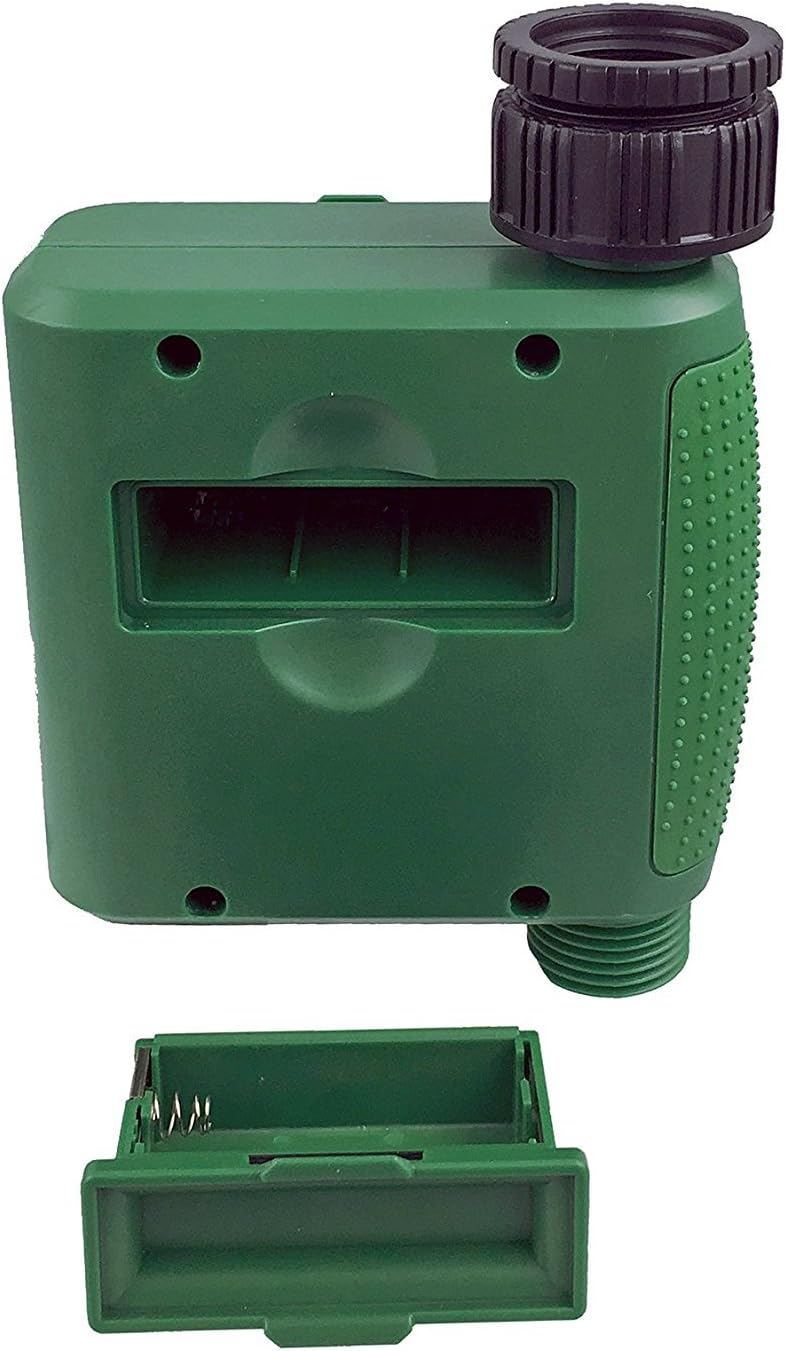
ຮູບທີ 1: ຊ່ອງໃສ່ຫມໍ້ໄຟທີ່ມີຝາປິດອອກ.
2. Mounting the Timer
Attach the timer to your outdoor faucet:
- ໃຫ້ແນ່ໃຈວ່າ faucet ສະອາດແລະບໍ່ມີສິ່ງເສດເຫຼືອ.
- Screw the timer's inlet (top connector) onto a standard ¾” (GHS) outdoor hose faucet. Hand-tighten only to prevent damage. Do not overtighten.
- Connect your garden hose or irrigation system to the timer's outlet (bottom connector). Hand-tighten securely.
- Turn on the faucet fully. The timer is designed to operate under pressure.

Figure 2: Instapark PWT-07 mounted on a faucet.
ຄໍາແນະນໍາການດໍາເນີນງານ
The timer features a large rotary dial and four buttons: SET, +, -, ແລະ ຄູ່ມື.

Figure 3: Control panel and LCD display.
1. ຕັ້ງຄ່າເວລາປະຈຸບັນ
- ຫັນໜ້າປັດ rotary ໄປ ຕັ້ງໂມງ.
- ໃຊ້ + ແລະ - buttons to adjust the current hour. Press SET ເພື່ອຢືນຢັນ.
- ໃຊ້ + ແລະ - buttons to adjust the current minute. Press SET ເພື່ອຢືນຢັນ.
2. Programming Watering Schedule
The timer allows you to set a start time, duration, and frequency for watering.
ຕັ້ງເວລາເລີ່ມຕົ້ນ:
- ຫັນໜ້າປັດ rotary ໄປ ເລີ່ມເວລາ.
- ໃຊ້ + ແລະ - buttons to set the desired watering start hour. Press SET ເພື່ອຢືນຢັນ.
- ໃຊ້ + ແລະ - buttons to set the desired watering start minute. Press SET ເພື່ອຢືນຢັນ.
ກຳນົດໄລຍະເວລາ (ໄລຍະເວລາ):
- ຫັນໜ້າປັດ rotary ໄປ ດົນປານໃດ.
- ໃຊ້ + ແລະ - buttons to set the watering duration (from 5 seconds to 360 minutes). Press SET ເພື່ອຢືນຢັນ.
ກຳນົດຄວາມຖີ່ (ຄວາມຖີ່):
- ຫັນໜ້າປັດ rotary ໄປ ເລື້ອຍໆເທົ່າໃດ.
- ໃຊ້ + ແລະ - buttons to select the watering frequency (e.g., every 10 seconds, 30 seconds, 1 minute, 3 minutes, 5 minutes, 1 hour, 2 hours, 4 hours, 12 hours, 1 day, 2 days, 3 days, 4 days, 5 days, 6 days, 7 days). Press SET ເພື່ອຢືນຢັນ.
After setting all parameters, turn the rotary dial to ແລ່ນ ເພື່ອເປີດໃຊ້ຕາຕະລາງການວາງແຜນ.
3. ການຫົດນໍ້າດ້ວຍມື
ການຫົດນໍ້າດ້ວຍຕົນເອງໂດຍບໍ່ມີຜົນກະທົບຕໍ່ຕາຕະລາງການວາງແຜນຂອງທ່ານ:
- Ensure the dial is set to ແລ່ນ or ປິດ.
- ກົດ ຄູ່ມື button. The display will show a default manual watering duration.
- ໃຊ້ + ແລະ - buttons to adjust the desired manual watering duration.
- ກົດ SET to start manual watering. The timer will run for the selected duration and then automatically shut off.
- To stop manual watering prematurely, press the ຄູ່ມື ປຸ່ມອີກເທື່ອຫນຶ່ງ.
4. ຟັງຊັນການລ່າຊ້າຝົນ
The rain delay function allows you to pause your watering schedule for a set period without losing your program settings.
- Ensure the dial is set to ແລ່ນ.
- ກົດຄ້າງໄວ້ - button for 3 seconds. The display will show "DELAY" and a default delay duration.
- ໃຊ້ + ແລະ - buttons to select a delay duration of 24, 48, or 72 hours.
- ກົດ SET to activate the rain delay. The timer will resume its programmed schedule after the delay period ends.
- ເພື່ອຍົກເລີກການລ່າຊ້າຝົນ, ໃຫ້ກົດຄ້າງໄວ້ - ກົດປຸ່ມອີກເທື່ອຫນຶ່ງສໍາລັບ 3 ວິນາທີ.
ບໍາລຸງຮັກສາ
- ການປ່ຽນແບັດເຕີຣີ: Replace batteries when the low battery indicator appears on the LCD. Always use new AA alkaline batteries.
- ທໍາຄວາມສະອາດ: ເຊັດໂມງຈັບເວລາດ້ວຍການໂຄສະນາamp ຜ້າ. ຢ່າໃຊ້ເຄື່ອງເຮັດຄວາມສະອາດຂັດຫຼືສານລະລາຍ.
- ລະດູໜາວ: Before the first frost, disconnect the timer from the faucet. Remove the batteries and store the timer indoors in a dry, frost-free location. Failure to do so may result in damage from freezing water.
- ໜ້າຈໍການກັ່ນຕອງ: Periodically check the filter screen inside the inlet connector for debris. Clean if necessary to ensure proper water flow.
ການແກ້ໄຂບັນຫາ
| ບັນຫາ | ສາເຫດທີ່ເປັນໄປໄດ້ | ການແກ້ໄຂ |
|---|---|---|
| Timer does not turn on / LCD is blank. | ແບັດເຕີຣີຕາຍ ຫຼື ຕິດຕັ້ງບໍ່ຖືກຕ້ອງ. | Replace with new AA alkaline batteries, ensuring correct polarity. If still blank, remove batteries, wait for screen to fully clear, then reinsert. |
| Water does not turn on at scheduled time. |
|
|
| Water does not turn off. |
|
|
| ນ້ໍາຮົ່ວຈາກການເຊື່ອມຕໍ່. |
|
|
| Low battery indicator flashes even with new batteries. | Firmware not booting correctly after battery change. | Remove batteries, wait for the LCD screen to go completely dark (may take a few minutes), then reinsert new batteries. |
ຂໍ້ມູນຈໍາເພາະ
| ຕົວແບບ | PWT-07 |
| ແຫຼ່ງພະລັງງານ | ແບັດເຕີຣີອາຄາລາຍ AA 2 x 1.5V (ບໍ່ລວມ) |
| ປະເພດວາວ | ປ່ຽງ Solenoid Impulse |
| ຄວາມກົດດັນນ້ໍາເຮັດວຽກ | 14.5 ຫາ 116 psi |
| ກະແສສະແຕນບາຍ | <100 µA |
| Watering Frequency Settings | 10s, 30s, 1m, 3m, 5m, 1h, 2h, 4h, 12h, 1d, 2d, 3d, 4d, 5d, 6d, 7d (16 settings) |
| Watering Duration Settings | 5s, 10s, 15s, 20s, 25s, 30s, 35s, 40s, 45s, 50s, 55s, 1-360m |
| ຮູບແບບການສະແດງທີ່ໃຊ້ເວລາ | 24 ຊົ່ວໂມງ |
| ການປະເມີນກັນນ້ໍາ | IP66 |
| ວັດສະດຸ | ພາດສະຕິກ ABS |
| ຂະໜາດສິນຄ້າ | 4.25"D x 6"W x 2.6"H |
| ນ້ໍາຫນັກລາຍການ | 14.2 ອອນ |
ການຮັບປະກັນແລະການສະຫນັບສະຫນູນ
The Instapark PWT-07 Digital Programmable Water Timer is backed by a standard 1-year manufacturer's warranty from the date of purchase. This warranty covers defects in materials and workmanship under normal use.
For warranty claims, technical support, or any questions regarding your product, please contact Instapark customer service. Please have your purchase receipt and product model number (PWT-07) available when contacting support.
Contact information for Instapark customer service can typically be found on the manufacturer's webເວັບໄຊ ຫຼືເອກະສານການຊື້ຂອງທ່ານ.
Ask a question about this manual
Ask about setup, troubleshooting, compatibility, parts, safety, or missing instructions. Manuals+ will review the question and use this page’s manual context to help answer it.