
ແນະນຳ
This manual provides essential information for the safe and efficient operation of your Amazon Basics 15-Sheet Cross-Cut Paper, CD, and Credit Card Shredder. Please read all instructions carefully before use and retain this manual for future reference.
ຂໍ້ມູນຄວາມປອດໄພ
ເພື່ອຮັບປະກັນການດຳເນີນງານທີ່ປອດໄພ, ໃຫ້ປະຕິບັດຕາມຄຳແນະນຳຕໍ່ໄປນີ້ສະເໝີ:
- ຮັກສາມື, ຜົມ ແລະ ເຄື່ອງນຸ່ງທີ່ຫຼົ່ນອອກໃຫ້ຫ່າງຈາກຊ່ອງໃສ່ເຈ້ຍ.
- ຫ້າມບໍ່ໃຫ້ສີດ ຫຼືເກັບຮັກສາຜະລິດຕະພັນ aerosol ຢູ່ໃນ ຫຼືອ້ອມເຄື່ອງຕັດ.
- Do not shred items like metallic credit cards, adhesive labels, or continuous forms.
- ຖອດປລັກເຄື່ອງບົດເມື່ອບໍ່ໄດ້ໃຊ້ງານ ຫຼື ກ່ອນການທຳຄວາມສະອາດ.
- Keep the shredder out of reach of children and pets.
- ຢ່າໃຊ້ເຄື່ອງບົດຖ້າສາຍໄຟເສຍຫາຍ.
ສິນຄ້າເກີນview
The Amazon Basics 15-Sheet Cross-Cut Shredder is designed for efficient document destruction, offering a high level of security for personal and office use.

ຮູບ 1: ດ້ານຫນ້າ view of the Amazon Basics 15-Sheet Cross-Cut Shredder.
ຄຸນນະສົມບັດທີ່ສໍາຄັນ:
- 15-Sheet Capacity: Shreds up to 15 sheets of 20 lb. paper at once.
- Cross-Cut Shredding: Shreds paper into 3/16" x 1-7/32" (4.7 x 31mm) particles for enhanced security (Security Level P-4).
- Multi-Material Shredding: Also destroys CD/DVDs, credit cards, staples, and small paper clips.
- ຂະຫຍາຍເວລາແລ່ນ: Features a 20-minute continuous run time.
- ຄຸນນະສົມບັດຄວາມປອດໄພ: Includes Overheat / Overload protection.
- ຕົວຊີ້ວັດ LED: Provides visual alerts for Standby, Overheat, Overload, Door open, and Bin full status.
- Large Capacity Bin: Equipped with a 6-gallon pull-out basket for easy waste disposal.
- ການເຄື່ອນຍ້າຍ: Casters included for convenient movement.
- 4-Mode Switch: Auto/Off/Forward/Reverse settings for versatile control.
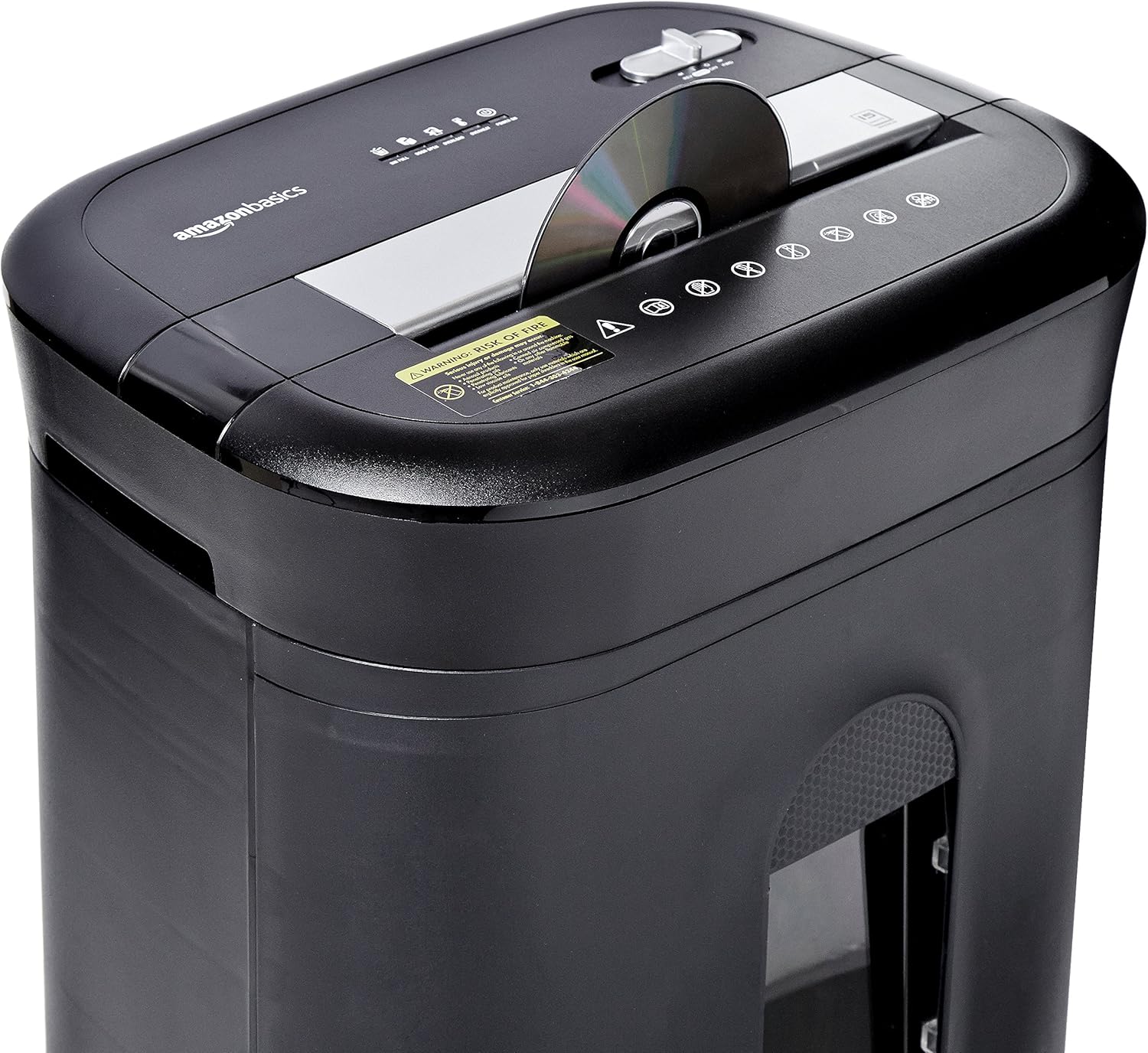
Figure 2: Diagram illustrating key features of the shredder.
ຕັ້ງຄ່າ
Follow these steps to set up your shredder:
- ແກະກ່ອງ: ເອົາສ່ວນປະກອບທັງຫມົດອອກຈາກການຫຸ້ມຫໍ່ຢ່າງລະມັດລະວັງ.
- ຕໍາແໜ່ງ: Place the shredder on a flat, stable surface. Ensure the waste bin is securely closed and properly inserted into the main unit.
- ເຊື່ອມຕໍ່ພະລັງງານ: Plug the power cord into a standard 120-volt AC outlet.
Video 1: Official product video demonstrating the setup and basic operation of the Amazon Basics 15-Sheet Cross-Cut Shredder.
ຄໍາແນະນໍາການດໍາເນີນງານ
ປ່ຽນໂPowerດພະລັງງານ:
The shredder features a 4-mode slide switch located on the top panel:
- AUTO (I): ເຄື່ອງຕັດຈະເລີ່ມອັດຕະໂນມັດເມື່ອໃສ່ເຈ້ຍເຂົ້າໄປ ແລະຢຸດເມື່ອການຫົດຕົວສຳເລັດ. ນີ້ແມ່ນການຕັ້ງຄ່າທີ່ແນະນໍາສໍາລັບການນໍາໃຊ້ປົກກະຕິ.
- ປິດ (O): Turns off all shredder functions. Always select this setting when emptying the waste bin or when the shredder is not in use.
- FORWARD (▶▶): Manually activates the shredder to continuously cut. Useful for clearing minor jams.
- REVERSE (◀◀): Reverses the shredder mechanism to help clear paper jams.

Figure 3: Close-up of the control panel with the 4-mode switch.
Shredding Paper:
- Ensure the power mode switch is set to AUTO (I).
- Insert up to 15 sheets of paper (20 lb. bond) straight into the paper entry slot. The shredder will automatically start and stop.
- Do not force paper into the shredder. If the shredder struggles, reduce the number of sheets.

Figure 4: Inserting paper into the shredder.
Shredding Credit Cards and CDs/DVDs:
- Ensure the power mode switch is set to AUTO (I).
- Insert one credit card or CD/DVD at a time into the dedicated slot.
- The shredder will automatically start and stop.

Figure 5: Shredding a credit card.
ບໍາລຸງຮັກສາ
Emptying the Shredder Bin:
Regularly empty the waste bin to prevent paper jams and ensure optimal performance.
- Set the power mode switch to ເບີ (O) ແລະຖອດເຄື່ອງຕັດອອກ.
- ດຶງຖັງຂີ້ເຫຍື້ອອອກຈາກດ້ານໜ້າຂອງເຄື່ອງບົດ.
- ຖິ້ມອຸປະກອນການ shredded.
- ເລື່ອນຖັງຂີ້ເຫຍື້ອກັບຄືນເຂົ້າໄປໃນເຄື່ອງບົດຈົນກວ່າມັນຈະເຂົ້າທີ່ຢ່າງປອດໄພ.

Figure 6: Pull-out waste bin for easy emptying.
Oiling the Shredder:
To maintain the shredder's performance and longevity, it is recommended to oil the cutting blades periodically, especially after emptying the bin multiple times or if performance decreases.
- Apply shredder oil (or vegetable oil) in a zigzag pattern across the paper entry slot.
- Set the power mode switch to FORWARD (▶▶) for 2-3 seconds to distribute the oil.
- Then, set the switch to REVERSE (◀◀) ສໍາລັບ 2-3 ວິນາທີ.
- Shred a few sheets of paper to remove any excess oil.
ການແກ້ໄຂບັນຫາ
The shredder is equipped with LED indicators to help diagnose common issues:
- Standby (Green): ຊີ້ບອກວ່າເຄື່ອງບົດໄດ້ເປີດຢູ່ ແລະ ພ້ອມທີ່ຈະໃຊ້ງານ.
- ຮ້ອນເກີນໄປ (ສີແດງ): The shredder has exceeded its maximum operating temperature. Allow it to cool down for approximately 20-30 minutes before resuming use.
- ເກີນພາລະ (ສີແດງ): Too much material has been inserted. Use the REVERSE (◀◀) function to clear the jam, then reduce the amount of material.
- ປະຕູເປີດ (ສີແດງ): The waste bin is not properly closed or inserted. Ensure the bin is fully pushed in.
- ຖັງເຕັມ (ສີແດງ): The waste bin is full and needs to be emptied.
| ບັນຫາ | ສາເຫດທີ່ເປັນໄປໄດ້ | ການແກ້ໄຂ |
|---|---|---|
| ເຄື່ອງຕັດເຄື່ອງບໍ່ເປີດ. | Not plugged in; Power switch in OFF position; Waste bin not properly inserted. | Check power connection; Set switch to AUTO; Re-insert waste bin securely. |
| Shredder ຢຸດໃນລະຫວ່າງການປະຕິບັດງານ. | Overheat protection activated; Overload protection activated; Bin full. | Allow to cool down; Clear jam using REVERSE, then reduce material; Empty bin. |
| ເຈ້ຍຕິດ. | Too much paper inserted; Paper inserted at an angle. | Use REVERSE function; Reduce paper quantity; Insert paper straight. |
ຂໍ້ມູນຈໍາເພາະ
| ຄຸນສົມບັດ | ຂໍ້ມູນຈໍາເພາະ |
|---|---|
| ຍີ່ຫໍ້ | ພື້ນຖານ Amazon |
| ໝາຍເລກຕົວແບບ | PBH-49976 |
| ປະເພດ shred | ຕັດຂ້າມ |
| ຂະຫນາດ Shred | 3/16" x 1-7/32" (4.7 x 31mm) |
| ລະດັບຄວາມປອດໄພ | P-4 |
| ຄວາມອາດສາມາດຂອງແຜ່ນ | 15 sheets (20 lb. paper) |
| ເວລາແລ່ນຢ່າງຕໍ່ເນື່ອງ | 20 ນາທີ |
| ເວລາເຢັນລົງ | 30 ນາທີ |
| ຄວາມອາດສາມາດຂອງຖັງຂີ້ເຫຍື້ອ | 6 ກາລອນ |
| ນ້ໍາຫນັກລາຍການ | 22 ປອນ |
| ຂະໜາດສິນຄ້າ | 11 x 14.4 x 20.9 ນິ້ວ |
| ສີ | ດຳ |
ການຮັບປະກັນແລະການສະຫນັບສະຫນູນ
For warranty information or technical support, please refer to the documentation included with your product or contact Amazon Basics customer service.
Customer Service: 1-844-303-4244
ສໍາລັບຊັບພະຍາກອນເພີ່ມເຕີມ, ໄປຢ້ຽມຢາມ ຮ້ານ Amazon Basics.