1. ບົດແນະນຳ
This manual provides essential information for the proper installation, operation, and maintenance of the MikroTik LHG 5 Light Head Grid 5GHz CPE device. Please read this manual thoroughly before using the device to ensure safe and efficient operation.
ສິນຄ້າເກີນview
The MikroTik LHG 5 is a compact and lightweight 5GHz 802.11 a/n wireless device featuring an integrated dual-polarization 24.5 dBi grid antenna. It is designed for point-to-point links or as a Customer Premises Equipment (CPE) for longer distances, supporting the Nv2 TDMA protocol. The grid antenna design offers protection against wind, and the integration of the antenna element directly into the wireless unit minimizes cable loss.
ຄຸນນະສົມບັດທີ່ສໍາຄັນ
- Integrated 24.5 dBi dual-polarization grid antenna.
- 5GHz 802.11 a/n wireless standard.
- Supports Nv2 TDMA protocol for efficient long-distance links.
- Passive Power over Ethernet (PoE) input.
- One 10/100 Ethernet port.
- 600 MHz CPU, 64 MB RAM, 16 MB storage.
- Wind-resistant grid design.
2. ຂໍ້ມູນຄວາມປອດໄພ
- ປະຕິບັດຕາມລະຫັດ ແລະລະບຽບການໄຟຟ້າໃນທ້ອງຖິ່ນສະເໝີໃນລະຫວ່າງການຕິດຕັ້ງ.
- Ensure the device is securely mounted to prevent falling.
- Do not operate the device near water or in excessively humid environments.
- ຕັດການເຊື່ອມຕໍ່ໄຟຟ້າກ່ອນທີ່ຈະດໍາເນີນການບໍາລຸງຮັກສາຫຼືການຕິດຕັ້ງຂັ້ນຕອນ.
- Only use power adapters and cables specified by the manufacturer.
- This device should be installed by trained personnel.
3. ຮາດແວຫຼາຍກວ່າview
The LHG 5 consists of a central unit with an integrated antenna feed and a grid reflector assembly. The Ethernet port and power input are located on the central unit.
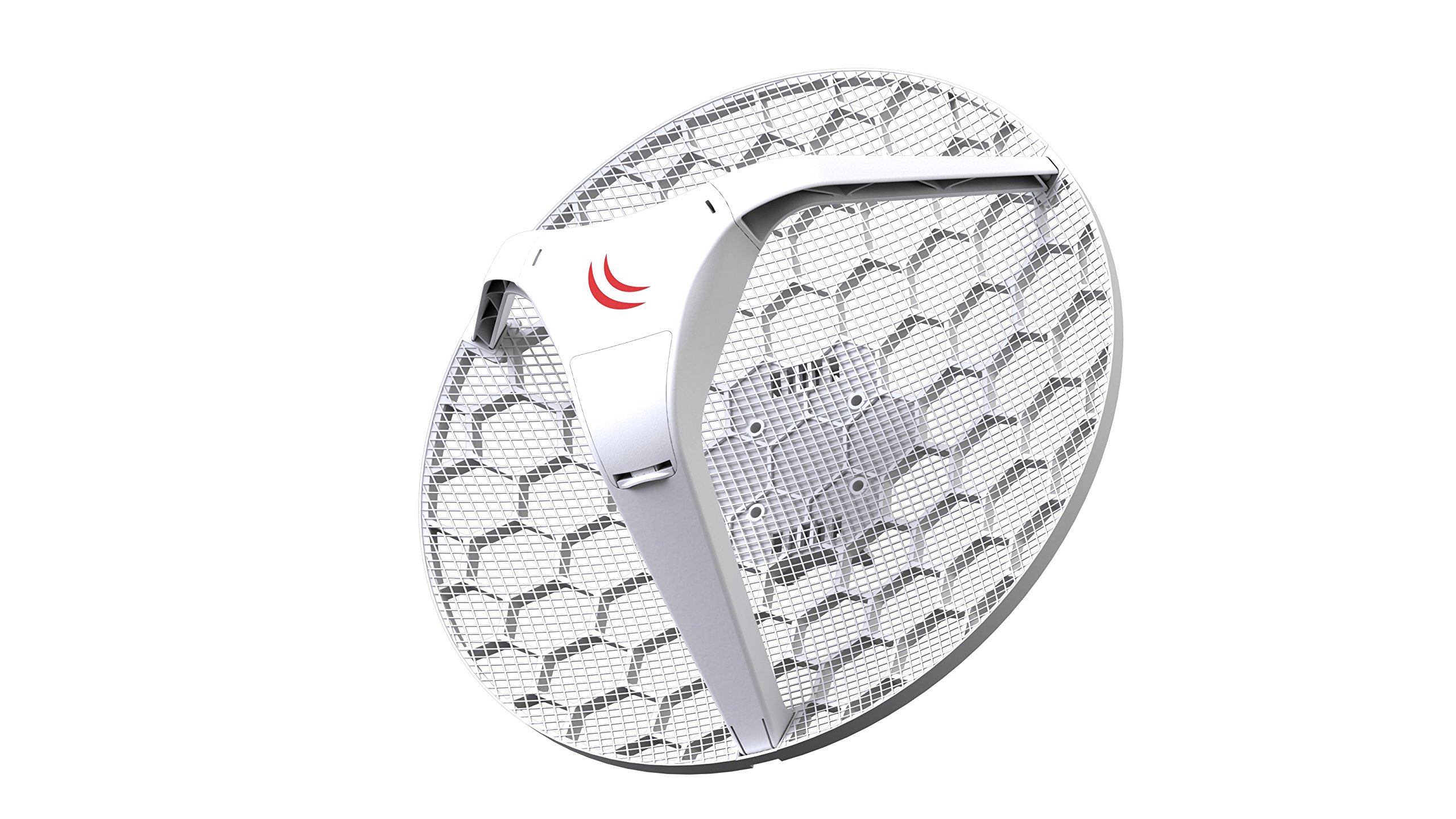
ຮູບທີ 1: ດ້ານໜ້າ view of the MikroTik LHG 5 central unit, showing the integrated antenna feed and the Ethernet port with a yellow cable connected.
ອົງປະກອບ:
- ຫນ່ວຍງານກາງ: Houses the wireless electronics, CPU, RAM, storage, and Ethernet port.
- Integrated Antenna Feed: Part of the central unit, connected directly to the wireless electronics.
- Grid Reflector: The large mesh dish that focuses the radio signal.
- ວົງເລັບຕິດຕໍ່: For attaching the device to a pole or mast.
- Port Ethernet: 10/100 Mbps port for data and Passive PoE input.
4. ການຕິດຕັ້ງແລະການຕິດຕັ້ງ
4.1 ເນື້ອໃນຊຸດ
Please verify that all components are present in your package. Refer to the product packaging for a detailed list of included items, which typically includes the LHG 5 unit, mounting kit, and a PoE injector (may vary by region/bundle).
4.2 ການຕິດຕັ້ງອຸປະກອນ
The LHG 5 is designed for outdoor pole mounting. Ensure the mounting surface is stable and capable of supporting the device, especially in windy conditions. The grid design helps reduce wind load.
- Assemble the grid reflector according to the diagrams provided in the separate assembly guide (if applicable).
- Attach the central unit to the assembled grid reflector.
- Secure the mounting bracket to the back of the central unit.
- Mount the entire assembly to a pole or mast using the provided U-bolts or clamps. Ensure the device is oriented correctly for optimal signal alignment.
- Tighten all fasteners to prevent movement due to wind or vibration.

ຮູບທີ 2: ຕ່າງໆ views of the MikroTik LHG 5, illustrating its components, assembly, and an example of pole mounting.
4.3 ການເປີດອຸປະກອນ
The LHG 5 supports Passive Power over Ethernet (PoE). It requires a PoE injector or a PoE-capable switch to provide power and data over a single Ethernet cable.
- Connect one end of an Ethernet cable to the LHG 5's Ethernet port.
- Connect the other end of the Ethernet cable to the "PoE" or "Data+Power" port of a Passive PoE injector.
- Connect a standard Ethernet cable from the "LAN" or "Data" port of the PoE injector to your network switch or computer.
- Plug the PoE injector's power adapter into an electrical outlet. The device will power on.
ໝາຍເຫດ: Ensure the PoE injector provides the correct voltage for the LHG 5 (typically 10-30V DC, refer to device label for exact requirements).
5. ປະຕິບັດການອຸປະກອນ
The MikroTik LHG 5 runs on MikroTik's RouterOS operating system. Initial configuration is typically done via a web ຕົວທ່ອງເວັບ (WebFig) or a dedicated utility (WinBox).
5.1 ການຕັ້ງຄ່າເບື້ອງຕົ້ນ
- After powering on, connect your computer directly to the LAN port of the PoE injector.
- ເປີດ ກ web browser and navigate to the default IP address of the device (commonly 192.168.88.1, refer to MikroTik documentation for specifics).
- Log in using the default credentials (usually admin with no password).
- Follow the on-screen prompts or refer to the RouterOS documentation for detailed configuration steps, including setting up wireless modes (Access Point, Station), IP addresses, and security settings.
5.2 Point-to-Point (PtP) Links
For PtP links, two LHG 5 devices are typically used, one configured as an Access Point (AP) and the other as a Station (Client). Ensure clear line-of-sight between the two devices for optimal performance.
5.3 CPE Usage
When used as CPE, the LHG 5 acts as a client device connecting to a central Access Point. Configure it in Station mode and scan for available networks.
6. ບໍາລຸງຮັກສາ
- ທໍາຄວາມສະອາດ: Periodically inspect the grid antenna for dirt, debris, or ice accumulation. Gently clean with a soft cloth and mild detergent if necessary. Do not use abrasive cleaners.
- ການອັບເດດເຟີມແວ: ກວດສອບ MikroTik ເປັນປະຈຳ website for firmware updates for RouterOS. Keeping the firmware updated ensures optimal performance, security, and access to new features.
- ການກວດຮ່າງກາຍ: Annually inspect mounting hardware for corrosion or loosening. Ensure all cables are securely connected and free from damage.
7. ການແກ້ໄຂບັນຫາ
7.1 ອຸປະກອນບໍ່ເປີດ
- Verify the PoE injector is properly connected to a working power outlet.
- Check the Ethernet cable between the PoE injector and the LHG 5 for damage or improper connection.
- Ensure the PoE injector is compatible with Passive PoE and provides the correct voltage.
7.2 ບໍ່ມີການເຊື່ອມຕໍ່ເຄືອຂ່າຍ
- Confirm the Ethernet cable from the PoE injector's LAN port to your network is functional.
- Check the device's IP configuration. Ensure your computer is on the same subnet for initial access.
- Verify wireless settings (SSID, security, frequency) are correctly configured for your network.
- Ensure clear line-of-sight and proper antenna alignment for wireless links.
7.3 Poor Wireless Performance
- Check antenna alignment. Even slight misalignment can significantly reduce signal strength.
- Ensure there are no obstructions (trees, buildings) in the line-of-sight.
- Scan for interference from other 5GHz devices in the area and adjust channels if necessary.
- Verify RouterOS settings for transmit power and data rates.
8. ຂໍ້ມູນຈໍາເພາະ
| ຄຸນສົມບັດ | ລາຍລະອຽດ |
|---|---|
| ຮູບແບບຜະລິດຕະພັນ | RBLHG-5ND |
| ມາດຕະຖານໄຮ້ສາຍ | 5GHz 802.11 a/n |
| ເສົາອາກາດ Gain | 24.5 dBi (Dual Polarization) |
| ພອດອີເທີເນັດ | 1 x 10/100 Mbps |
| ການປ້ອນຂໍ້ມູນ PoE | Passive PoE |
| ຄວາມຖີ່ທີ່ກຳນົດໄວ້ຂອງ CPU | 600 MHz |
| ຂະໜາດ RAM | 64 MB |
| ຂະໜາດການເກັບຮັກສາ | 16 MB |
| Max Wireless Data Rate | 300 Mbit/s |
| ຂະໜາດ | 15.39 x 8.74 x 15.39 ນິ້ວ |
| ນ້ຳໜັກ | 4 ປອນ |
| ຜູ້ຜະລິດ | ມິກໂຣຕິກ |
9. ການຮັບປະກັນແລະການສະຫນັບສະຫນູນ
ສຳລັບຂໍ້ມູນການຮັບປະກັນລະອຽດ, ກະລຸນາອ້າງອີງເຖິງ MikroTik ຢ່າງເປັນທາງການ website or the warranty card included with your product. Technical support and additional resources, including the full RouterOS documentation, can be found on the MikroTik support portal.
MikroTik ຢ່າງເປັນທາງການ Webເວັບໄຊ: mikrotik.com