
HoldPeak 90EPD
HOLDPEAK 90EPD Digital Auto-ranging Mobile APP DMM Multimeter User Manual
ຕົວແບບ: 90EPD | ຍີ່ຫໍ້: HoldPeak
1. ບົດແນະນຳ
The HOLDPEAK 90EPD is a versatile digital auto-ranging multimeter designed for a wide range of electrical testing applications, including commercial, home repair, and automotive use. It offers precise measurements of AC/DC current and voltage, resistance, capacitance, frequency, temperature, and duty cycles. Key features include non-contact voltage detection, a large backlit LCD display, Data Hold, Auto Back-Light, Relative Measurement, and Mobile APP connectivity for enhanced functionality.
ຄຸນນະສົມບັດທີ່ສໍາຄັນ:
- ມາດຕະການ AC/DC voltage and AC/DC current, resistance, capacitance, frequency, duty cycle, and temperature.
- Performs diode and continuity tests.
- Features Data Hold, Auto Back-Light, Relative Measurement, and Mobile APP DMM function.
- Auto-ranging scales simplify electronic measurements.
- Equipped with a super large Backlit LCD display for visibility in low light conditions.
- Automatically enters sleep mode after 15 minutes of inactivity to conserve power.

Figure 1.1: HoldPeak 90EPD Digital Multimeter shown with its mobile application interface on a smartphone.
2. ຂໍ້ມູນຄວາມປອດໄພ
Always adhere to safety precautions when using the multimeter to prevent electric shock or personal injury. Read all safety information before operating the device.
- IEC61010 CAT.III 1000V, CAT.IV 600V: This meter is rated for CAT.III 1000V and CAT.IV 600V overvoltage protection. Always ensure the measurement category is appropriate for the circuit being tested.
- insulation double: The meter features double insulation for enhanced safety.
- ກວດສອບກ່ອນການນໍາໃຊ້: ກ່ອນທີ່ຈະນໍາໃຊ້ແຕ່ລະຄັ້ງ, ກວດເບິ່ງເຄື່ອງວັດແທກ, ການທົດສອບນໍາ, ແລະອຸປະກອນເສີມສໍາລັບຄວາມເສຍຫາຍໃດໆ. ຢ່າໃຊ້ຖ້າເສຍຫາຍ.
- Proper Terminal Connection: Always connect the test leads to the correct terminals for the desired measurement function.
- ສະບັບtage ການວັດແທກ: ບໍ່ເຄີຍໃຊ້ voltage to the meter when it is set to a current, resistance, or continuity range.
- ການວັດແທກປັດຈຸບັນ: Ensure the circuit is de-energized before connecting the meter in series for current measurements.
- ສະພາບແວດລ້ອມການເຮັດວຽກ: Use the meter in a dry environment and avoid extreme temperatures.
- ການປ່ຽນແບັດເຕີຣີ: Replace the battery promptly when the low battery indicator appears to ensure accurate readings.
3. ເນື້ອໃນຊຸດ
ກວດສອບວ່າລາຍການທັງຫມົດທີ່ລະບຸໄວ້ຂ້າງລຸ່ມນີ້ແມ່ນລວມຢູ່ໃນຊຸດຂອງທ່ານ:
- 1 x HOLDPEAK 90EPD Digital Mobile APP DMM Multimeter
- ສາຍທົດສອບ 1 ເສັ້ນ (ສີແດງ ແລະ ສີດຳ)
- 1 x Temperature Test Probe
- 1 x PC Link Software CD
- 1 x ສາຍ USB
- 1 x ກະເປົາຖື
- 1 x ຄູ່ມືການປະຕິບັດ
- 1 x 9V 6F22 battery

Figure 3.1: Contents included in the HoldPeak 90EPD Multimeter package.
4. ອົງປະກອບ ແລະຄຸນສົມບັດຂອງຜະລິດຕະພັນ
Familiarize yourself with the various components and functions of the HOLDPEAK 90EPD Multimeter.

Figure 4.1: Labeled components of the HoldPeak 90EPD Multimeter.
Key Function Icons:

Figure 4.2: Visual representation of the multimeter's measurement capabilities and features.
5. ຕັ້ງຄ່າ
5.1 ການຕິດຕັ້ງຫມໍ້ໄຟ
The HOLDPEAK 90EPD Multimeter requires one 9V 6F22 battery for operation. To install or replace the battery:
- ກວດໃຫ້ແນ່ໃຈວ່າມັລຕິມິເຕີຖືກປິດໄວ້.
- ຊອກຫາຊ່ອງໃສ່ຫມໍ້ໄຟຢູ່ດ້ານຫຼັງຂອງໜ່ວຍ.
- ໃຊ້ screwdriver ເພື່ອເປີດຝາປິດຫມໍ້ໄຟ.
- Insert the 9V battery, observing the correct polarity (+/-).
- ປ່ຽນຝາປິດຫມໍ້ໄຟແລະຍຶດມັນດ້ວຍສະກູ.
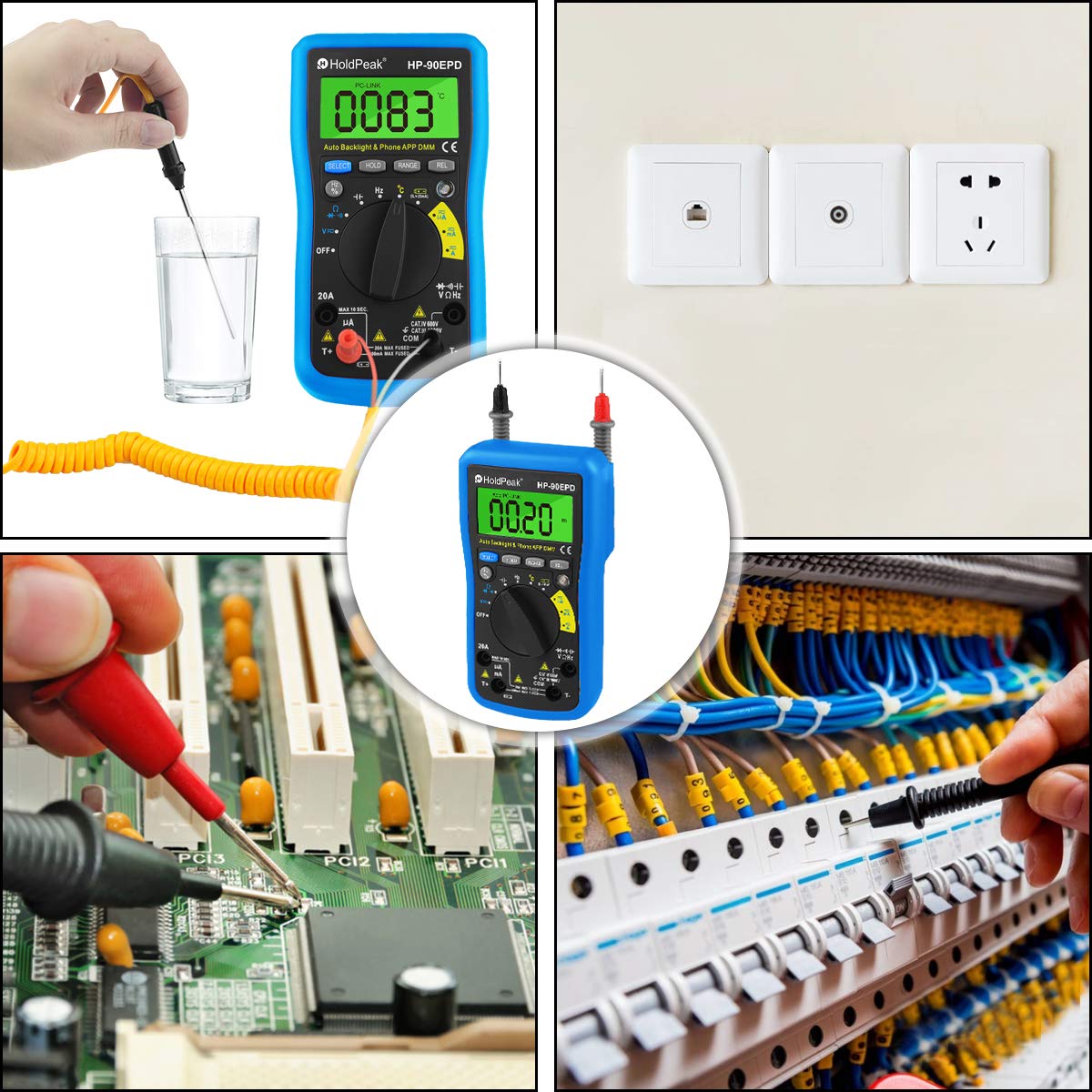
Figure 5.1: Location of the removable 9V battery compartment.
5.2 ການເຊື່ອມຕໍ່ແອັບມືຖື
The HOLDPEAK 90EPD can connect to a mobile application for enhanced data logging and display features.
- ຂັ້ນຕອນທີ 1: Scan the QR code provided in the manual (or on the product packaging) or search for "intelligent multimeter" in your phone's app store to download the application.
- ຂັ້ນຕອນທີ 2: Open your phone's Bluetooth settings and ensure Bluetooth is enabled. Then, launch the downloaded application.
- ຂັ້ນຕອນທີ 3: Turn on the multimeter. Your phone should automatically detect and connect to the multimeter via Bluetooth.
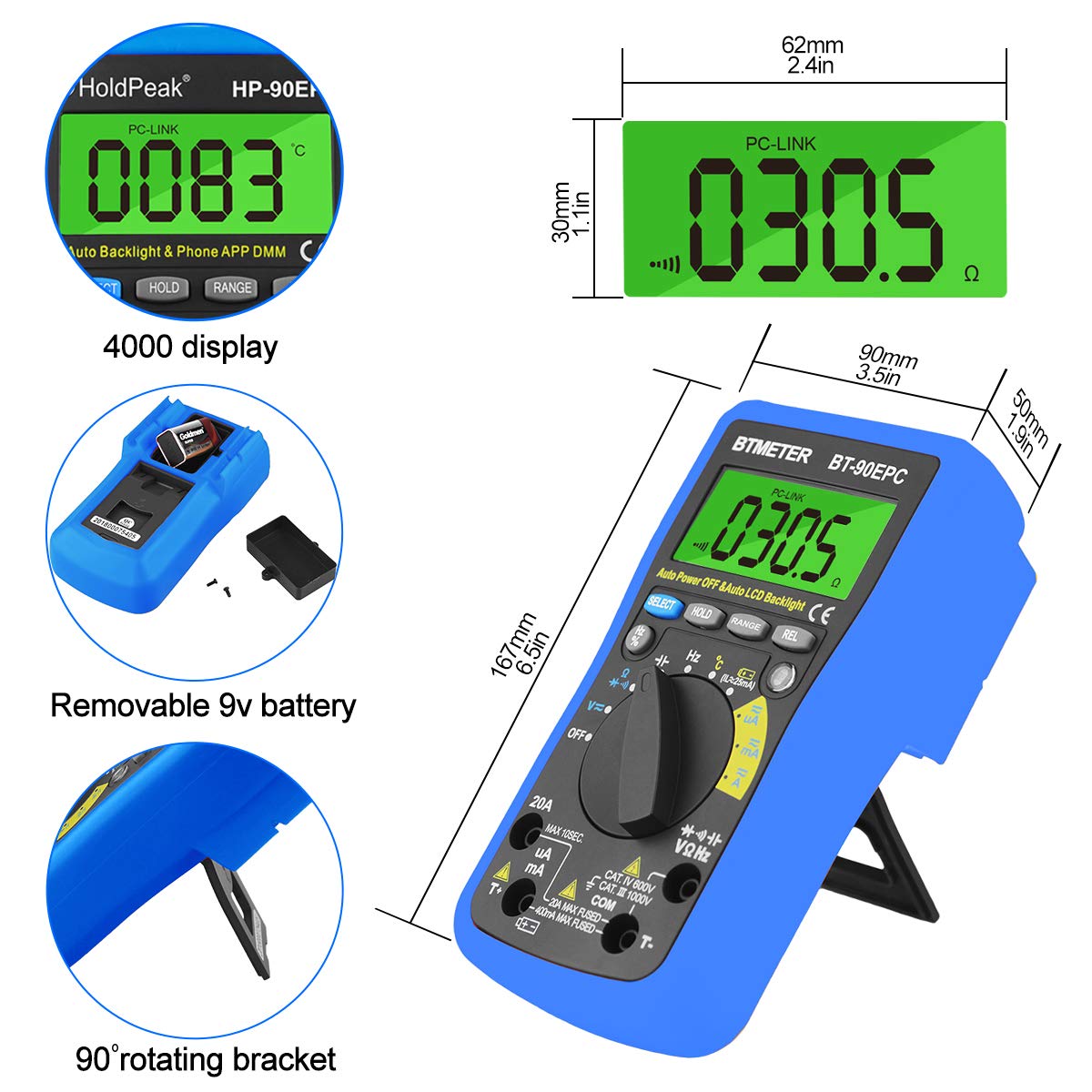
Figure 5.2: Steps for connecting the multimeter to a mobile phone application.
6. ຄໍາແນະນໍາການດໍາເນີນງານ
This section provides general guidance for using the HOLDPEAK 90EPD Multimeter for various measurements. Always refer to the specific function details in the full operating manual for precise instructions.
ການດໍາເນີນງານທົ່ວໄປ:
- ເປີດ/ປິດ: Rotate the central rotary switch to the desired measurement function to turn the meter on. Turn it to 'OFF' to power off.
- ລະດັບອັດຕະໂນມັດ: The meter automatically selects the appropriate range for most measurements, simplifying operation.
- ການຖືຂໍ້ມູນ: ກົດປຸ່ມ 'ຖື' ເພື່ອຢຸດການອ່ານປະຈຸບັນໃນຈໍສະແດງຜົນ. ກົດອີກຄັ້ງເພື່ອປ່ອຍ.
- Auto Back-Light: The display features an auto backlight for improved visibility in low-light conditions.
- ການວັດແທກທຽບເທົ່າ (REL): Press the 'REL' button to store the current reading as a reference value. Subsequent readings will be displayed as a deviation from this reference.
- ການເລືອກຟັງຊັນ (SELECT): For ranges with multiple functions (e.g., AC/DC voltage, diode/continuity), press the 'SELECT' button to toggle between them.
ຟັງຊັນການວັດແທກ:
- AC/DC Voltagອີ (V~ / V-): Connect test leads in parallel to the circuit. Select the appropriate voltage ຊ່ວງ.
- AC/DC Current (A~ / A-): Connect the meter in series with the circuit. Ensure the circuit is de-energized before connecting. Select the appropriate current range (µA, mA, A).
- ຄວາມຕ້ານທານ (Ω): ໃຫ້ແນ່ໃຈວ່າວົງຈອນຖືກ de-energized. ເຊື່ອມຕໍ່ການທົດສອບນໍາພາໃນທົ່ວອົງປະກອບ.
- ຄວາມຈຸ (F): Ensure the capacitor is discharged before testing. Connect test leads across the capacitor.
- ຄວາມຖີ່ (Hz) / ຮອບວຽນໜ້າທີ່ (%): ການທົດສອບການເຊື່ອມຕໍ່ນໍາໄປສູ່ແຫຼ່ງສັນຍານ.
- ການທົດສອບໄດໂອດ (→|): Use to check the forward voltage ການຫຼຸດລົງຂອງ diode ໄດ້.
- Continuity Test (•))): Use to check for open or closed circuits. An audible buzzer indicates continuity.
- ອຸນຫະພູມ (°C/°F): Connect the temperature test probe to the appropriate input jacks.
- Vol-Non-Contacttage (NCV): Use the NCV sensor to detect the presence of AC voltage ໂດຍບໍ່ມີການຕິດຕໍ່ໂດຍກົງ.
ຮູບທີ 6.1: ຕົວຢ່າງamples of the HoldPeak 90EPD Multimeter in various measurement scenarios.
7. ບໍາລຸງຮັກສາ
7.1 ການທໍາຄວາມສະອາດ
ເພື່ອເຮັດຄວາມສະອາດ multimeter, ໃຊ້ຜ້າອ່ອນ dampened with mild detergent. Do not use abrasives or solvents. Ensure the meter is powered off and disconnected from any circuits before cleaning.
7.2 ການເກັບຮັກສາ
When not in use for extended periods, remove the battery to prevent leakage. Store the multimeter in its carrying case in a cool, dry place, away from direct sunlight and extreme temperatures.
8. ການແກ້ໄຂບັນຫາ
If you encounter issues with your HOLDPEAK 90EPD Multimeter, refer to the common problems and solutions below:
- ບໍ່ມີຈໍສະແດງຜົນ/ພະລັງງານ:
- Check if the battery is installed correctly and has sufficient charge. Replace the 9V battery if necessary.
- Ensure the rotary switch is turned to an ON position.
- ການອ່ານທີ່ບໍ່ຖືກຕ້ອງ:
- Verify that the test leads are properly connected to the correct input jacks for the selected function.
- Ensure the correct measurement function is selected on the rotary switch.
- Check the battery level; low battery can affect accuracy.
- Ensure the circuit being tested is within the meter's specified range.
- ບັນຫາການເຊື່ອມຕໍ່ແອັບມືຖື:
- ໃຫ້ແນ່ໃຈວ່າ Bluetooth ຖືກເປີດໃຊ້ຢູ່ໃນໂທລະສັບສະຫຼາດຂອງທ່ານ.
- Make sure the multimeter is powered on and within Bluetooth range.
- Restart both the multimeter and the mobile application.
- ກວດເບິ່ງວ່າແອັບໄດ້ຖືກອັບເດດເປັນເວີຊັນຫຼ້າສຸດຫຼືບໍ່.
- "OL" Displayed (Overload):
- The measured value exceeds the selected range. The auto-ranging feature should typically handle this, but if manually ranged, switch to a higher range.
- Ensure the meter is not connected to a voltage or current exceeding its maximum input ratings.
9. ຂໍ້ມູນຈໍາເພາະ
| ຂໍ້ມູນຈໍາເພາະ | ມູນຄ່າ |
|---|---|
| ຄວາມປອດໄພ / ການປະຕິບັດຕາມ | IEC61010 CAT.III 1000V, CAT.IV 600V overvoltage ແລະມາດຕະຖານ insulation double |
| ຈໍສະແດງຜົນ | Maximum reading 4000, analogue bar graph 41 segments |
| ການເລືອກຊ່ວງ | ອັດຕະໂນມັດ |
| ຈໍສະແດງຜົນເກີນ | ສະແດງ OL |
| ຊິງຕັນດີຊີ voltage | 400mV/4V/40V/400V (±0.5%), 1000V (±0.8%) |
| AC voltage | 400mV (±1.2%), 4/40/400V (±0.8%), 750V (±1.2%) |
| ກະແສໄຟຟ້າ DC | 400uA/4000uA/40mA/400mA (±1.2%), 4/20A (±2.0%) |
| AC ປັດຈຸບັນ | 400uA/4000uA/40mA/400mA (±1.5%), 4/20A (±2.5%) |
| ຄວາມຈຸ | 51.2nF (±3.0%), 512nF/5.12uF/51.2uF (±2.5%), 100uF (±5.0%) |
| ການຕໍ່ຕ້ານ | 400ohm/4k/40k/400k/4Mohm (±1.0%), 40Mohm (±1.5%) |
| ຊ່ວງຄວາມຖີ່ | 5.12Hz ~ 5.12MHz (±0.1%) |
| ການທົດສອບ diode | ແມ່ນແລ້ວ |
| ການທົດສອບຢ່າງຕໍ່ເນື່ອງ | ແມ່ນແລ້ວ |
| ບໍ່ມີການຕິດຕໍ່ voltage ການຊອກຄົ້ນຫາ | ແມ່ນແລ້ວ |
| ມູນຄ່າທີ່ກ່ຽວຂ້ອງ | ແມ່ນແລ້ວ |
| APP ມືຖື | ແມ່ນແລ້ວ |
| ຂະໜາດ | 16.7 x 9 x 5 ຊມ (6.6" x 3.48" x 2.36") |
| ພະລັງງານ | ແບດເຕີຣີ້ມາດຕະຖານ 9V 6F22 |
| ນ້ຳໜັກ | 0.71 lb (ປະມານ 322g) |
| ຜູ້ຜະລິດ | Zhuhai Jida Huapu Instrument Co.,Ltd |
| ໝາຍເລກຕົວແບບ | 90EPD |
| ວັນທີທໍາອິດທີ່ມີ | ວັນທີ 1 ກັນຍາ 2016 |
10. ການຮັບປະກັນແລະການສະຫນັບສະຫນູນ
For detailed warranty information, technical support, or service inquiries, please refer to the official HoldPeak webເວັບໄຊ ຫຼືບັດຮັບປະກັນລວມຢູ່ໃນຜະລິດຕະພັນຂອງທ່ານ. ຮັກສາໃບຮັບເງິນການຊື້ຂອງທ່ານໄວ້ເປັນຫຼັກຖານການຊື້ສໍາລັບການຮ້ອງຂໍການຮັບປະກັນ.
Ask a question about this manual
Ask about setup, troubleshooting, compatibility, parts, safety, or missing instructions. Manuals+ will review the question and use this page’s manual context to help answer it.