
ແນະນຳ
Thank you for choosing the Divoom Onbeat 500 Portable Wireless Bluetooth Speaker. This device is designed to deliver powerful sound with convenient wireless connectivity. This manual will guide you through the setup, operation, and maintenance of your speaker to ensure optimal performance and longevity.
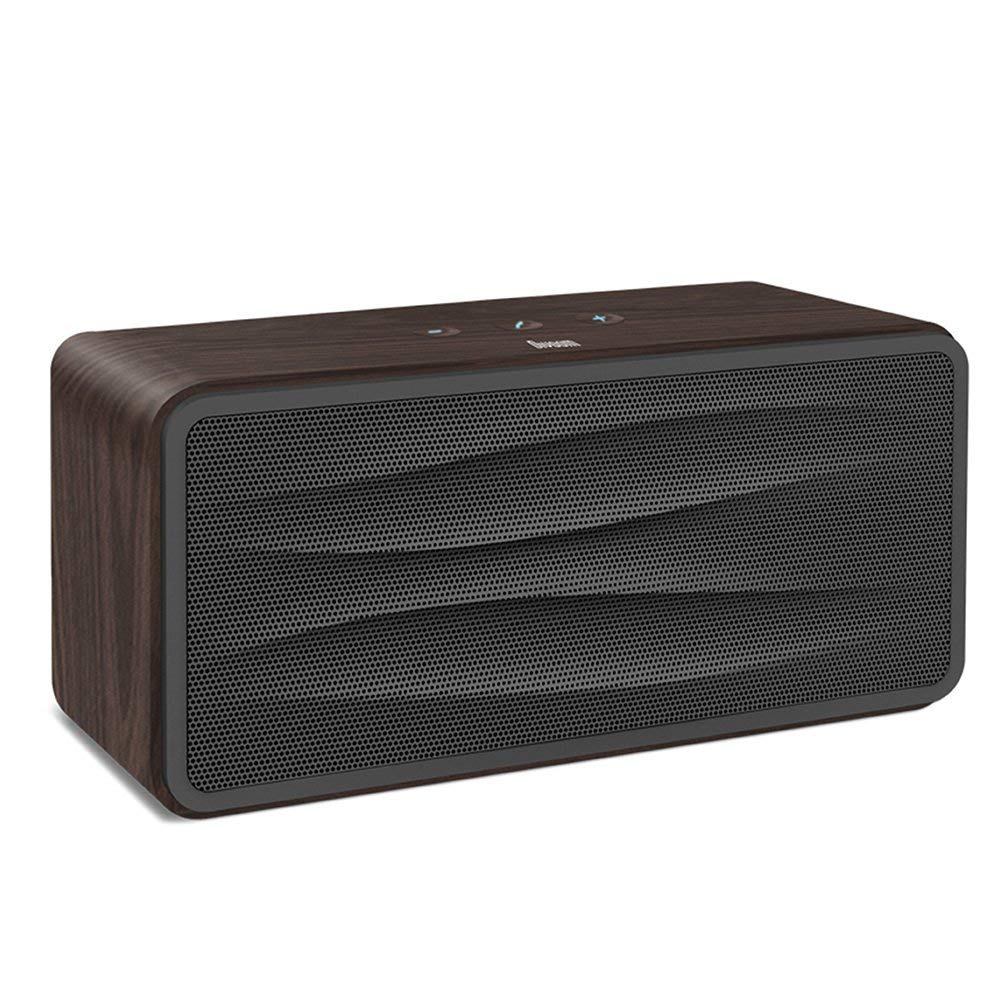
ຮູບທີ 1: ດ້ານໜ້າ view of the Divoom Onbeat 500 speaker. This image displays the speaker's main grille and overall design.
ເນື້ອໃນຊຸດ
ກະລຸນາກວດເບິ່ງຊຸດສຳລັບລາຍການຕໍ່ໄປນີ້:
- Divoom Onbeat 500 Speaker
- ສາຍສາກ Micro USB
- ສາຍເສີມ
- ຄູ່ມືຜູ້ໃຊ້ (ເອກະສານນີ້)
- ບັດຮັບປະກັນ
ຄຸນສົມບັດຜະລິດຕະພັນ
The Divoom Onbeat 500 speaker offers a range of features for an enhanced audio experience:
- ສຽງທີ່ມີອໍານາດ: 2.1 channel design with a proprietary passive bass radiator for rich audio.
- ເຕັກໂນໂລຊີ NFC: Tap-to-pair functionality for quick and easy Bluetooth connection.
- ການເຊື່ອມຕໍ່ Bluetooth: Wirelessly play and control music from up to 33 feet (10 meters) away.
- ລຳໂພງໃນຕົວ: Allows you to make and take calls directly from the speaker.
- ແບດເຕີຣີທີ່ຍາວນານ: Integrated 5000mAh battery provides extended playback time.
- ການປ້ອນຂໍ້ມູນຊ່ວຍ: ສຳລັບການເຊື່ອມຕໍ່ແບບມີສາຍກັບອຸປະກອນທີ່ບໍ່ແມ່ນ Bluetooth.
ຕັ້ງຄ່າ
1. ການສາກໄຟ ລຳ ໂພງ
Before initial use, fully charge your Divoom Onbeat 500 speaker. Use the provided Micro USB charging cable to connect the speaker to a USB power source (e.g., computer USB port, USB wall adapter). The charging indicator light will illuminate during charging and turn off or change color when fully charged. A full charge typically provides 8-10 hours of playback.
2. ເປີດ / ປິດພະລັງງານ
- ເພື່ອເປີດເຄື່ອງ: Press and hold the Power button for a few seconds until you hear an audible prompt or see the indicator light illuminate.
- ປິດເຄື່ອງ: ກົດປຸ່ມເປີດປິດຄ້າງໄວ້ອີກຄັ້ງເປັນເວລາສອງສາມວິນາທີຈົນກວ່າລຳໂພງຈະປິດລົງ.
3. ການຈັບຄູ່ Bluetooth
The Onbeat 500 offers two methods for wireless connection:
NFC (Near Field Communication) Pairing:
If your device supports NFC, you can pair quickly:
- Ensure NFC is enabled on your smartphone or tablet.
- With the Onbeat 500 powered on, gently tap your NFC-enabled device against the NFC area on the speaker.
- Confirm the pairing request on your device. The speaker will indicate a successful connection.
ການຈັບຄູ່ Bluetooth ມາດຕະຖານ:
For devices without NFC or for manual pairing:
- Power on the Divoom Onbeat 500 speaker. It will automatically enter Bluetooth pairing mode if no device is connected, or you may need to press a dedicated Bluetooth button (refer to speaker controls).
- On your audio device (smartphone, tablet, computer), go to the Bluetooth settings and enable Bluetooth.
- ຊອກຫາ available devices. You should see "Divoom Onbeat 500" in the list.
- Select "Divoom Onbeat 500" to connect. The speaker will confirm the connection with an audible prompt.
4. ການເຊື່ອມຕໍ່ AUX
To connect a device using the auxiliary cable:
- Connect one end of the provided auxiliary cable to the AUX-in port on the Divoom Onbeat 500.
- Connect the other end of the auxiliary cable to the headphone jack or audio output of your device.
- The speaker will automatically switch to AUX mode, or you may need to select it manually (refer to speaker controls).

ຮູບທີ 2: ຂ້າງ view of the Divoom Onbeat 500, illustrating the location of the charging port, AUX input, and control buttons.
ປະຕິບັດການລໍາໂພງ
1. ການຫຼິ້ນເພງ
Once connected via Bluetooth or AUX, you can control music playback from your connected device. The speaker may also have integrated controls for volume adjustment, play/pause, and track skipping. Refer to the speaker's physical buttons for these functions.
2. ການທໍາງານຂອງລໍາໂພງ
When connected to a smartphone via Bluetooth, the Divoom Onbeat 500 can be used as a speakerphone:
- ຕອບການໂທ: Press the Call button (often indicated by a phone icon) on the speaker.
- ສິ້ນສຸດການໂທ: ກົດປຸ່ມໂທຫາອີກເທື່ອຫນຶ່ງ.
- ການປະຕິເສດການໂທ: ກົດປຸ່ມໂທຄ້າງໄວ້.

ຮູບທີ 3: ຫລັງ view of the Divoom Onbeat 500, highlighting the passive bass radiator for enhanced low-frequency sound.
ບໍາລຸງຮັກສາ
1. ທໍາຄວາມສະອາດ
ເພື່ອຮັກສາຮູບລັກສະນະ ແລະການເຮັດວຽກຂອງລໍາໂພງຂອງທ່ານ:
- ເຊັດພາຍນອກດ້ວຍຜ້າອ່ອນ, ແຫ້ງ ແລະ ບໍ່ມີຂົນ.
- Do not use abrasive cleaners, alcohol, benzene, or other chemical solvents, as these may damage the finish.
- ຫຼີກເວັ້ນການໄດ້ຮັບຄວາມຊຸ່ມຊື່ນເຂົ້າໄປໃນຊ່ອງເປີດໃດໆ.
2. ການດູແລຫມໍ້ໄຟ
ເພື່ອຍືດອາຍຸຂອງຫມໍ້ໄຟ lithium-ion ໃນຕົວ:
- ຫຼີກລ້ຽງການປະຈຸຫມໍ້ໄຟຢ່າງເຕັມທີ່ເລື້ອຍໆ.
- ເກັບຮັກສາລຳໂພງໄວ້ໃນບ່ອນເຢັນ ແລະແຫ້ງເມື່ອບໍ່ໄດ້ໃຊ້ເປັນເວລາດົນ.
- Charge the speaker at least once every three months if stored for a long time to prevent deep discharge.
ການແກ້ໄຂບັນຫາ
If you encounter issues with your Divoom Onbeat 500, please refer to the following common solutions:
| ບັນຫາ | ການແກ້ໄຂທີ່ເປັນໄປໄດ້ |
|---|---|
| ລຳໂພງບໍ່ເປີດ | Ensure the battery is charged. Connect the speaker to a power source using the Micro USB cable and try again. |
| ບໍ່ມີສຽງຈາກລຳໂພງ | Check the volume level on both the speaker and your connected device. Ensure the speaker is correctly paired via Bluetooth or connected via AUX. Try re-pairing the Bluetooth device. |
| ການຈັບຄູ່ Bluetooth ລົ້ມເຫລວ | ກວດໃຫ້ແນ່ໃຈວ່າລຳໂພງຢູ່ໃນໂໝດຈັບຄູ່. ປິດ ແລະເປີດ Bluetooth ໃນອຸປະກອນຂອງທ່ານ. ຍ້າຍອຸປະກອນຂອງທ່ານເຂົ້າໃກ້ກັບລຳໂພງ. ລຶບລ້າງການເຊື່ອມຕໍ່ Bluetooth ທີ່ຜ່ານມາຢູ່ໃນອຸປະກອນຂອງທ່ານ ແລະລອງໃໝ່ອີກ. |
| ຄຸນນະພາບສຽງບໍ່ດີ | Ensure the speaker and connected device are within range (for Bluetooth). Check for interference from other wireless devices. Try a different audio source or cable. |
ຂໍ້ມູນຈໍາເພາະ
Detailed technical specifications for the Divoom Onbeat 500 speaker:
- ຊື່ຕົວແບບ: Divoom Onbeat 500
- ປະເພດລຳໂພງ: ລຳ ໂພງຄອມພິວເຕີ
- ເຕັກໂນໂລຍີການເຊື່ອມຕໍ່: Bluetooth
- ເຕັກໂນໂລຊີການສື່ສານໄຮ້ສາຍ: Bluetooth
- ວິທີການຄວບຄຸມ: ແຕະ
- ແຫຼ່ງພະລັງງານ: ພະລັງງານຫມໍ້ໄຟ
- ແບັດເຕີຣີ: ແບັດເຕີຣີລິທຽມໄອອອນ 1 ກ້ອນ (5000mAh)
- ສຽງວັດtage: 20 ວັດ
- ລຳໂພງກຳລັງຜົນຜະລິດສູງສຸດ: 100 ວັດ
- ການຕັ້ງຄ່າຊ່ອງສຽງອ້ອມຮອບ: 2.1
- ອຸປະກອນທີ່ເຂົ້າກັນໄດ້: Android, Windows, iPhone (iOS)
- ປະເພດຕົວເຊື່ອມຕໍ່: USB (ສໍາລັບການສາກໄຟ)
- ຂະໜາດຜະລິດຕະພັນ: 22.5 x 7.49 x 10.49 cm (LxWxH)
- ນ້ໍາຫນັກລາຍການ: 1.55 ກິໂລ
- ສີ: ຖ່ານ
- ຄຸນນະສົມບັດພິເສດ: NFC, Built-in Speakerphone, Passive Bass Radiator
ການຮັບປະກັນແລະການສະຫນັບສະຫນູນ
Your Divoom Onbeat 500 speaker comes with a limited warranty. Please refer to the included Warranty Card for detailed terms and conditions, including warranty period and coverage.
For technical support, service inquiries, or further assistance, please visit the official Divoom website or contact their customer service department using the information provided on your Warranty Card or product packaging. Please have your model number (Onbeat 500) and purchase details ready when contacting support.