
1. ບົດແນະນຳ
This manual provides essential instructions for the safe and efficient operation, setup, and maintenance of your Elna eXpressive 920 Sewing, Quilting, and Embroidery Machine. Please read this manual thoroughly before using the machine to ensure proper function and to prevent damage.
2. ຄໍາແນະນໍາຄວາມປອດໄພທີ່ສໍາຄັນ
ເມື່ອໃຊ້ເຄື່ອງໃຊ້ໄຟຟ້າ, ຄວນລະວັງຄວາມປອດໄພຂັ້ນພື້ນຖານສະເໝີ, ລວມທັງສິ່ງຕໍ່ໄປນີ້:
- ອ່ານຄໍາແນະນໍາທັງຫມົດກ່ອນທີ່ຈະໃຊ້ເຄື່ອງຫຍິບນີ້.
- ເອົານິ້ວມືຫ່າງຈາກທຸກໆສ່ວນທີ່ເຄື່ອນຍ້າຍ. ຕ້ອງມີການດູແລພິເສດຮອບເຂັມຂັດຂອງເຄື່ອງຫຍິບ.
- ໃຊ້ແຜ່ນເຂັມທີ່ຖືກຕ້ອງສະເໝີ. ແຜ່ນທີ່ບໍ່ຖືກຕ້ອງສາມາດເຮັດໃຫ້ເຂັມແຕກ.
- ປິດເຄື່ອງຈັກຫຍິບເມື່ອເຮັດການປັບແຕ່ງໃດໆໃນບໍລິເວນເຂັມ, ເຊັ່ນ: ການສອດເຂັມ, ການປ່ຽນເຂັມ, ການສອດກະບອກເຂັມ, ຫຼື ການປ່ຽນຕີນກົດ.
- ຖອດເຄື່ອງຫຍິບອອກຈາກປ່ຽງໄຟຟ້າທຸກເທື່ອເມື່ອຖອດຝາປິດ, ນໍ້າມັນຫຼໍ່ຫຼອມ, ຫຼືເມື່ອມີການປັບປ່ຽນການບໍລິການຜູ້ໃຊ້ອື່ນໆທີ່ໄດ້ກ່າວໄວ້ໃນຄູ່ມືຄໍາແນະນໍາ.
- ຢ່າໃຊ້ງານເຄື່ອງຖ້າມັນມີສາຍໄຟ ຫຼື ປລັກໄຟທີ່ເສຍຫາຍ, ຖ້າມັນເຮັດວຽກບໍ່ຖືກຕ້ອງ, ຫຼື ຖ້າມັນຖືກຕົກ ຫຼື ເສຍຫາຍ.
- ຢ່າໃຊ້ນອກ.
3. ຜະລິດຕະພັນເກີນview
The Elna eXpressive 920 is a versatile machine designed for sewing, quilting, and embroidery. It features a large workspace, an intuitive touch screen, and a wide array of built-in designs and stitches.

Figure 3.1: The Elna eXpressive 920 machine with its extension table attached, providing an expansive work surface for large projects like quilting.
ຄຸນນະສົມບັດທີ່ສໍາຄັນ:
- 350 Embroidery Designs: Includes a wide variety of built-in embroidery patterns.
- 10 Embroidery Fonts and 2 Alphabets: Offers extensive customization for lettering.
- High Sewing Speed: Adjustable up to 1,060 stitches per minute (spm).
- Automatic Presser Foot Lifter: Enhances ease of use and efficiency.
- Extra-High Presser Foot Lifter: Accommodates thicker fabrics and multiple layers.
- Large Color Touch Screen: For intuitive navigation and design selection.
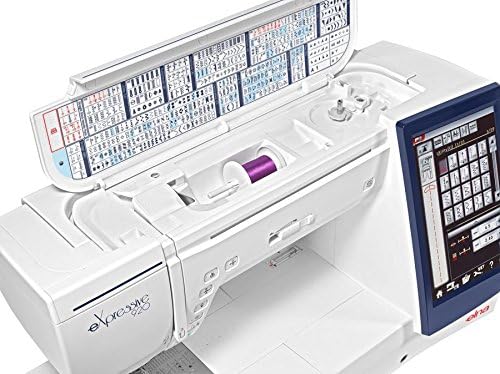
ຮູບທີ 3.2: ທາງເທິງ view of the Elna eXpressive 920, illustrating the accessible thread spool compartment and the convenient stitch guide located on the inside of the top cover.
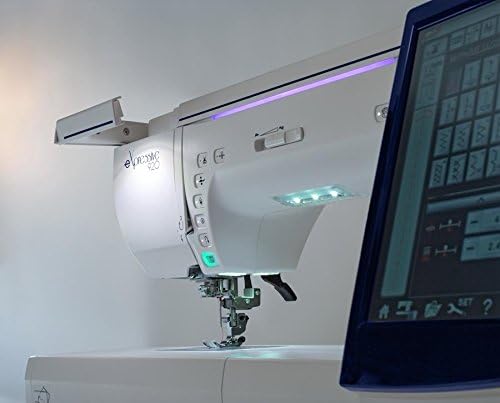
ຮູບທີ 3.3: ດ້ານທີ່ໃກ້ຊິດ view of the Elna eXpressive 920, highlighting the integrated LED lighting system and the easily accessible control buttons for various functions.
4. ຕັ້ງຄ່າ
4.1 ການຫຸ້ມຫໍ່ແລະການຈັດວາງ
- ເອົາເຄື່ອງຈັກອອກຈາກການຫຸ້ມຫໍ່ຢ່າງລະມັດລະວັງ. ເກັບຮັກສາວັດສະດຸຫຸ້ມຫໍ່ທັງໝົດໄວ້ເພື່ອການຂົນສົ່ງ ຫຼື ການເກັບຮັກສາໃນອະນາຄົດ.
- Place the machine on a stable, level surface. Ensure there is adequate space around the machine for comfortable operation and fabric handling.
- ເຊື່ອມຕໍ່ສາຍໄຟເຂົ້າກັບເຄື່ອງ ແລະ ຈາກນັ້ນເຂົ້າກັບປລັກໄຟຟ້າທີ່ເໝາະສົມ.
4.2 Attaching the Extension Table
For larger projects, such as quilting, attach the included extension table to expand your workspace.
- Align the pins on the extension table with the corresponding holes on the free arm of the machine.
- Gently push the table towards the machine until it clicks into place.
- Adjust the support legs on the extension table for stability.

Figure 4.1: The Elna eXpressive 920 with the extension table securely attached, demonstrating the expanded work area for larger sewing and quilting projects.
4.3 ການເກຍເຄື່ອງຈັກ
Proper threading is crucial for optimal stitch quality. Refer to the on-screen guide or the detailed instructions in the full manual for specific threading paths.
- ວາງຫຼອດດ້າຍໃສ່ກັບເຂັມຫຼອດດ້າຍ.
- Follow the numbered threading guides on the machine, ensuring the thread is seated correctly in each tension disc and guide.
- Thread the needle using the automatic needle threader or manually.
4.4 ການມ້ວນ ແລະ ການໃສ່ກະບອກມ້ວນ
The bobbin provides the lower thread for stitching.
- ວາງ bobbin ເປົ່າໃສ່ spindle bobbin winder.
- Follow the bobbin winding path and start winding. The machine will automatically stop when the bobbin is full.
- Open the bobbin cover plate and insert the wound bobbin into the bobbin case, following the indicated thread path.
5. ຄໍາແນະນໍາການດໍາເນີນງານ
5.1 Basic Sewing
- Turn on the machine using the power switch. The touch screen will illuminate.
- Select your desired stitch pattern from the touch screen. Adjust stitch length and width as needed.
- Place your fabric under the presser foot. Lower the presser foot using the lever or the automatic presser foot lifter.
- Begin sewing by pressing the foot controller or the Start/Stop button. Adjust sewing speed using the speed control slider.
- To finish, press the reverse stitch button for a few stitches, then press the thread cutter button or manually cut the threads.
5.2 ໜ້າທີ່ການປັກແສ່ວ
The Elna eXpressive 920 offers 350 built-in embroidery designs, 10 fonts, and 2 alphabets.
- Attach the embroidery unit and hoop to the machine.
- Select an embroidery design from the touch screen. You can resize, rotate, and combine designs.
- Hoop your fabric with stabilizer.
- Follow the on-screen prompts for thread color changes and other instructions.
- Start the embroidery process. The machine will automatically stitch the design.
5.3 Quilting
This machine is well-suited for quilting with its large workspace and various quilting stitches.
- Utilize the extension table for better support of large quilt projects.
- Select appropriate quilting stitches from the machine's menu.
- Consider using a walking foot (often included in accessories) for even feeding of multiple fabric layers.
- Adjust the presser foot pressure if necessary for different fabric thicknesses.
6. ບໍາລຸງຮັກສາ
Regular maintenance ensures the longevity and optimal performance of your Elna eXpressive 920.
6.1 ການທໍາຄວາມສະອາດ
- ຖອດປລັກເຄື່ອງກ່ອນທຳຄວາມສະອາດທຸກຄັ້ງ.
- ຖອດແຜ່ນເຂັມ ແລະ ກະບອກເຂັມອອກ.
- Use the provided brush to remove lint and dust from the feed dogs, bobbin area, and tension discs.
- ເຊັດດ້ານນອກຂອງເຄື່ອງດ້ວຍຜ້າອ່ອນໆແລະແຫ້ງ. ຢ່າໃຊ້ສານເຄມີທີ່ຮຸນແຮງ.
6.2 ການຫຼໍ່ຫຼອມ
Your Elna eXpressive 920 is designed to require minimal lubrication. Refer to the full instruction manual for specific lubrication points and frequency, if any are required. Over-oiling can cause issues.
6.3 ການທົດແທນເຂັມ
Replace the needle regularly (after 8-10 hours of sewing or when it becomes dull/bent) to prevent skipped stitches and fabric damage.
- ປິດແລະຖອດເຄື່ອງ.
- ພວນເຂັມ clamp ສະກູ.
- Remove the old needle and insert a new one with the flat side facing the back of the machine, pushing it up as far as it will go.
- Tighten ເຂັມ clamp screw ຢ່າງປອດໄພ.
7. ການແກ້ໄຂບັນຫາ
This section addresses common issues you might encounter. For more complex problems, consult the full service manual or contact customer support.
| ບັນຫາ | ສາເຫດທີ່ເປັນໄປໄດ້ | ການແກ້ໄຂ |
|---|---|---|
| ຂ້າມ Stitches | ເຂັມບໍ່ຖືກຕ້ອງ, ເຂັມງໍ, ເກຍບໍ່ຖືກຕ້ອງ, ຂະໜາດເຂັມຜິດສຳລັບຜ້າ. | ປ່ຽນເຂັມ, ສອດເຄື່ອງໃໝ່, ໃຊ້ປະເພດ/ຂະໜາດເຂັມທີ່ຖືກຕ້ອງ. |
| ກະທູ້ແຕກ | Improper threading, incorrect tension, burr on needle plate, poor quality thread. | Re-thread, adjust tension, check for burrs, use quality thread. |
| ການຍັບຍັ້ງຜ້າ | Incorrect tension, wrong stitch length, dull needle, no stabilizer for embroidery. | Adjust tension, increase stitch length, replace needle, use stabilizer. |
| ເຄື່ອງບໍ່ເລີ່ມຕົ້ນ | Power cord not connected, foot controller not plugged in, bobbin winder engaged. | Check power connections, ensure bobbin winder is disengaged. |
8. ຂໍ້ມູນຈໍາເພາະ
| ຄຸນສົມບັດ | ລາຍລະອຽດ |
|---|---|
| ໝາຍເລກຕົວແບບ | 920 |
| ຍີ່ຫໍ້ | Elna |
| ປະເພດ | Sewing, Quilting, and Embroidery Machine |
| ການອອກແບບຖັກແສ່ວ | 350 (including 10 fonts, 2 alphabets) |
| ຄວາມໄວການຫຍິບສູງສຸດ | 1,060 stitches per minute (spm) |
| ເຄື່ອງຍົກຕີນກົດ | Automatic and Extra-High |
| ແຫຼ່ງພະລັງງານ | ໄຟຟ້າສາຍ |
| ນ້ໍາຫນັກລາຍການ | 50 ປອນ |
| ສີ | ສີຂາວ |
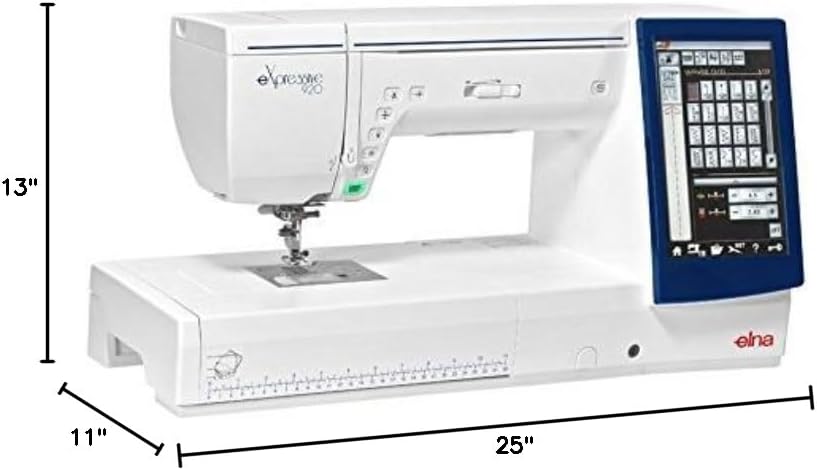
Figure 8.1: The Elna eXpressive 920 machine with its approximate dimensions: 25 inches in length, 11 inches in width, and 13 inches in height.

ຮູບທີ 8.2: ເອກະສານທີ່ຄົບຖ້ວນ view of the accessories included with the Elna eXpressive 920, featuring various presser feet, bobbins, needles, cleaning tools, and other essential components for diverse sewing and embroidery tasks.
9. ການຮັບປະກັນແລະການສະຫນັບສະຫນູນ
For warranty information, please refer to the warranty card included with your product or visit the official Elna webເວັບໄຊ.
For technical support, service, or to order replacement parts, please contact your authorized Elna dealer or Elna customer service. Keep your model number (eXpressive 920) and serial number (found on the machine's rating plate) ready when contacting support.
ຊັບພະຍາກອນອອນໄລນ໌: For additional guides, FAQs, and software updates, visit the official Elna support portal.