
1. ບົດແນະນຳ
The COTEC SP-4000-148 is a high-frequency pure sine wave inverter designed to convert 48VDC battery power into 120VAC household electricity. This inverter delivers a continuous output of 4000W, making it suitable for various applications requiring stable and clean AC power. Its robust design and advanced features ensure reliable performance and protection for your connected devices.
ຄຸນນະສົມບັດທີ່ສໍາຄັນ:
- ຜົນຜະລິດຄື້ນ sine ອັນບໍລິສຸດສໍາລັບເອເລັກໂຕຣນິກທີ່ລະອຽດອ່ອນ.
- ຄວາມສາມາດໃນການເປີດ / ປິດການຄວບຄຸມໄລຍະໄກ (ສີຂຽວ Terminal).
- Input & output ໂດດດ່ຽວຢ່າງເຕັມສ່ວນເພື່ອຄວາມປອດໄພທີ່ເພີ່ມຂຶ້ນ.
- Temperature & load controlled cooling fan.
- ການໂຕ້ຕອບຜູ້ເປັນມິດກັບຕົວຊີ້ບອກສະຖານະ LED 3 ສີ.
- ຄວາມຖີ່ຂອງຜົນຜະລິດ (50/60 Hz) ສາມາດເລືອກໄດ້ຜ່ານປຸ່ມ DIP.
- ຜົນຜະລິດ voltage ສາມາດເລືອກໄດ້ຜ່ານປຸ່ມ DIP.
- Power saving mode adjustable via variable resistor.
- Comprehensive input protections: Reverse Polarity (Fuse), Under Voltage, Over Voltage.
- Extensive output protections: Short Circuit, Overload, Over Temperature.
- ປະເພດ 1 ອະລູມິນຽມໃນລົ່ມ.
- E13 / UL / CE / FCC ອະນຸມັດ.
2. ຂໍ້ມູນຄວາມປອດໄພ
Read all instructions and warnings carefully before installing or operating the inverter. Failure to follow these instructions may result in electric shock, fire, serious injury, or death.
ຂໍ້ຄວນລະວັງຄວາມປອດໄພທົ່ວໄປ:
- ອັນຕະລາຍໄຟຟ້າ: This inverter produces high voltage AC power. Treat the output terminals with the same respect as any utility AC outlet.
- ບຸກຄະລາກອນທີ່ມີຄຸນວຸດທິ: ການຕິດຕັ້ງແລະການບໍລິການຄວນຈະຖືກປະຕິບັດໂດຍບຸກຄະລາກອນທີ່ມີຄຸນວຸດທິເທົ່ານັ້ນ.
- ການລະບາຍອາກາດ: ຮັບປະກັນການລະບາຍອາກາດທີ່ພຽງພໍອ້ອມຮອບອິນເວີເຕີ. ຢ່າອຸດຕັນຊ່ອງລະບາຍອາກາດ. ຄວາມຮ້ອນເກີນໄປສາມາດເຮັດໃຫ້ເກີດຄວາມເສຍຫາຍ ຫຼື ໄຟໄໝ້ໄດ້.
- ສະພາບແວດລ້ອມ: Do not expose the inverter to rain, snow, spray, or any liquids. Do not operate in areas with flammable fumes or gases.
- ການຕໍ່ດິນ: The inverter must be properly grounded. Refer to the installation section for grounding instructions.
- ຄວາມປອດໄພຫມໍ້ໄຟ: Work near lead-acid batteries is dangerous. Batteries can generate explosive gases. Ensure proper ventilation and wear eye protection.
- ການປ້ອນຂໍ້ມູນ DC: Connect the DC input cables with correct polarity. Reverse polarity will blow the internal fuse and void the warranty.
- ໂຫຼດເກີນ: Do not exceed the inverter's rated output power. Overloading can damage the inverter and connected appliances.
- ບໍາລຸງຮັກສາ: Before performing any maintenance or cleaning, disconnect all power sources (DC and AC).
3. ຜະລິດຕະພັນເກີນview
The COTEC SP-4000-148 inverter features a robust aluminum enclosure and clearly labeled connection points for ease of installation and operation. Familiarize yourself with the components before proceeding with installation.

ຮູບທີ 3.1: ໂດຍລວມ view of the COTEC SP-4000-148 Pure Sine Wave Inverter. This image shows the blue aluminum casing and the grey end caps with ventilation slots.
Front Panel (AC Output Side):
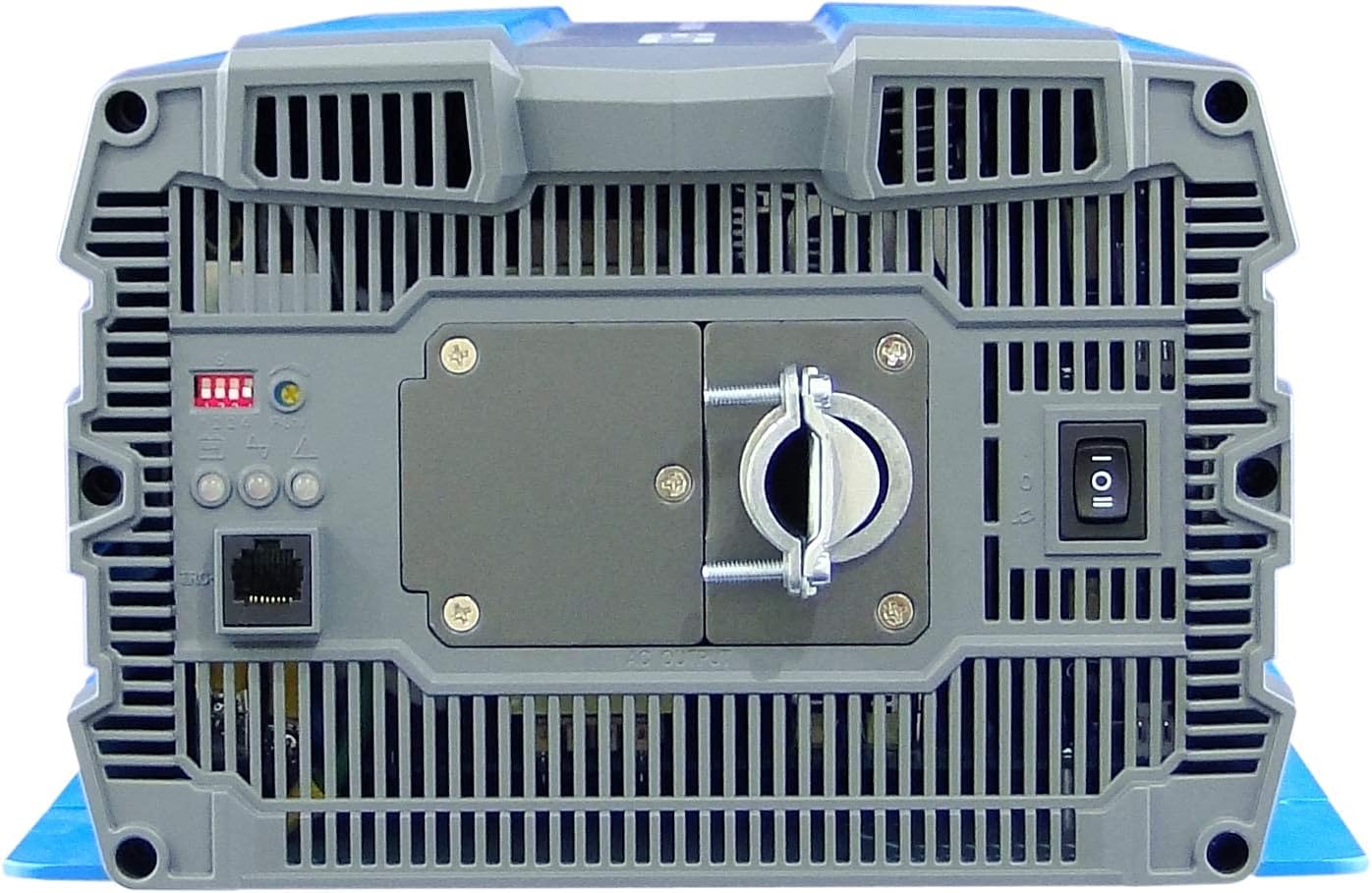
Figure 3.2: Front panel of the inverter. This view highlights the AC output terminal, the remote control terminal (green), LED status indicators, DIP switches, and the main power switch.
- ສະຖານີສົ່ງອອກ AC: Hardwire connection for 120VAC output.
- Remote Control Terminal (Green): For connecting an optional remote ON/OFF switch.
- ຕົວຊີ້ວັດສະຖານະ LED: Provide visual feedback on inverter status (Power, Fault, Overload).
- ສະວິດ DIP: Used to select output frequency (50/60 Hz) and output voltage.
- Power Saving Mode Resistor: Adjustable resistor for fine-tuning power saving mode.
- ສັບປ່ຽນພະລັງງານຫລັກ: ຄວບຄຸມພະລັງງານຂອງອິນເວີເຕີ.
Rear Panel (DC Input Side):

Figure 3.3: Rear panel of the inverter. This view shows the DC input terminals (red for positive, black for negative) and the chassis ground connection point.
- ຂົ້ວຕໍ່ຂາເຂົ້າ DC: Heavy-duty terminals for connecting to the 48VDC battery bank. Ensure correct polarity (Red for Positive, Black for Negative).
- Chassis Ground Terminal: For connecting the inverter to an earth ground.
- Cooling Fan Vents: Ensure these vents are not obstructed for proper heat dissipation.
4. ການຕິດຕັ້ງ
Proper installation is crucial for the safe and efficient operation of your inverter. Follow these steps carefully.
4.1 ການຕິດຕັ້ງ Inverter
- Choose a dry, well-ventilated location away from direct sunlight, heat sources, and moisture.
- Mount the inverter on a non-combustible surface.
- Ensure there is at least 6 inches (15 cm) of clear space around all sides of the inverter for proper airflow.
- Use appropriate fasteners to secure the inverter firmly to the mounting surface.
4.2 DC ການເຊື່ອມຕໍ່ຂາເຂົ້າ
ຄຳເຕືອນ: Ensure the battery bank is disconnected or isolated before making any connections. Use appropriately sized cables and fuses/breakers.
- Connect the positive (+) DC cable (typically red) from your 48VDC battery bank to the red positive (+) terminal on the inverter's rear panel.
- Connect the negative (-) DC cable (typically black) from your 48VDC battery bank to the black negative (-) terminal on the inverter's rear panel.
- Ensure all DC connections are tight and secure to prevent loose connections and arcing.
- Install an external DC fuse or circuit breaker between the battery bank and the inverter's positive terminal, as close to the battery as possible. Consult the specifications for appropriate fuse sizing.
4.3 ການເຊື່ອມຕໍ່ຂາອອກ AC
The SP-4000-148 uses a hardwire AC output connection.
- Ensure the inverter is OFF and all DC power is disconnected.
- Connect your AC load wiring to the designated AC output terminal block on the front panel.
- Follow all local electrical codes for AC wiring.
- Ensure all AC connections are secure.
4.4 ການຖົມດິນ
The inverter chassis must be properly grounded.
- Connect a ground wire from the chassis ground terminal on the inverter's rear panel to a reliable earth ground point.
- Ensure the ground connection is secure and meets all local electrical codes.
4.5 ການເຊື່ອມຕໍ່ການຄວບຄຸມໄລຍະໄກ (ທາງເລືອກ)
If using an optional remote control, connect it to the green terminal block on the front panel according to the remote control's instructions.
5. ການດໍາເນີນງານ
Once the inverter is properly installed and all connections are secure, you can begin operation.
5.1 ການເປີດ/ປິດ
- Ensure all DC and AC connections are correct and secure.
- If an external DC breaker is installed, ensure it is closed (ON).
- Flip the main power switch on the inverter's front panel to the 'ON' position.
- The LED indicators will illuminate, and the cooling fan may briefly activate.
- ເພື່ອປິດເຄື່ອງ, ໃຫ້ເລື່ອນສະວິດໄຟຫຼັກໄປທີ່ຕຳແໜ່ງ 'ປິດ'.
5.2 ຕົວຊີ້ບອກສະຖານະ LED
The inverter features 3-color LED indicators to display its operational status:
- LED ສີຂຽວ: ຊີ້ໃຫ້ເຫັນການດໍາເນີນງານປົກກະຕິ.
- LED ສີເຫຼືອງ: Indicates a warning or abnormal condition (e.g., low battery, minor overload). Refer to troubleshooting.
- ໄຟແດງ: Indicates a fault or critical error (e.g., severe overload, over-temperature, short circuit). The inverter will typically shut down. Refer to troubleshooting.
5.3 DIP Switch Settings
The DIP switches on the front panel allow configuration of output frequency and voltage. Refer to the detailed specifications or the label on the inverter for specific switch positions for desired settings.
- ຄວາມຖີ່ຂອງຜົນຜະລິດ: Select between 50 Hz or 60 Hz.
- ຜົນໄດ້ຮັບ Voltage: Select desired AC output voltage (e.g., 100V, 110V, 115V, 120V).
ໝາຍເຫດ: Always power off the inverter before changing DIP switch settings.
5.4 ຮູບແບບປະຢັດພະລັງງານ
The power saving mode can be adjusted via the variable resistor on the front panel. This mode reduces standby power consumption when no load or a very light load is detected. Adjust the resistor to set the threshold for entering/exiting power saving mode.
6. ບໍາລຸງຮັກສາ
ການບໍາລຸງຮັກສາເປັນປົກກະຕິຮັບປະກັນອາຍຸຍືນແລະການປະຕິບັດທີ່ດີທີ່ສຸດຂອງ inverter ຂອງທ່ານ.
- ທໍາຄວາມສະອາດ: ທຳຄວາມສະອາດດ້ານນອກຂອງອິນເວີເຕີເປັນໄລຍະດ້ວຍຜ້າແຫ້ງ ແລະ ອ່ອນນຸ້ມ. ຮັບປະກັນວ່າຊ່ອງລະບາຍອາກາດບໍ່ມີຝຸ່ນ ແລະ ສິ່ງເສດເຫຼືອ. ຢ່າໃຊ້ນ້ຳຢາທຳຄວາມສະອາດ.
- ກວດສອບການເຊື່ອມຕໍ່: Annually inspect all DC and AC connections for tightness. Loose connections can cause overheating and damage.
- ການບໍາລຸງຮັກສາຫມໍ້ໄຟ: Follow the battery manufacturer's recommendations for maintenance, including checking electrolyte levels (for flooded batteries) and terminal cleanliness.
- ສະພາບແວດລ້ອມ: ໃຫ້ແນ່ໃຈວ່າສະພາບແວດລ້ອມການດໍາເນີນງານຍັງຄົງຢູ່ພາຍໃນຂອບເຂດອຸນຫະພູມແລະຄວາມຊຸ່ມຊື່ນທີ່ກໍານົດໄວ້.
7. ການແກ້ໄຂບັນຫາ
ພາກນີ້ສະຫນອງການແກ້ໄຂບັນຫາທົ່ວໄປທີ່ທ່ານອາດຈະພົບກັບ inverter ຂອງທ່ານ.
| ບັນຫາ | ສາເຫດທີ່ເປັນໄປໄດ້ | ການແກ້ໄຂ |
|---|---|---|
| Inverter does not turn on (No LEDs) | No DC input power; Blown DC fuse/breaker; Loose DC connections; Reverse polarity. | ກວດເບິ່ງຫມໍ້ໄຟ voltage; Check external DC fuse/breaker; Verify DC connections are tight and correct polarity. |
| Red LED illuminates, inverter shuts down | Overload; Short circuit on AC output; Over-temperature; Input over/under voltage. | Reduce AC load; Check AC wiring for short circuits; Allow inverter to cool down; Verify battery voltage ຢູ່ໃນຂອບເຂດການດໍາເນີນງານ. |
| Yellow LED illuminates, intermittent operation | Minor overload; Low battery voltage warning; High temperature warning. | Reduce AC load; Recharge batteries; Ensure adequate ventilation. |
| No AC output, Green LED is on | AC output wiring issue; Faulty AC appliance. | Check AC output connections; Test with a different AC appliance. |
| Cooling fan runs constantly or loudly | High ambient temperature; Heavy load; Obstructed vents. | Ensure proper ventilation; Reduce load if possible; Clean vents. |
8. ຂໍ້ມູນຈໍາເພາະ
The following table details the technical specifications for the COTEC SP-4000-148 Pure Sine Wave Inverter.

Figure 8.1: Detailed technical specifications for the COTEC SP-4000 series, including input, output, protection, and environmental parameters.
| ຂໍ້ມູນຈໍາເພາະ | ມູນຄ່າ |
|---|---|
| ຍີ່ຫໍ້ | COTEK |
| ຊື່ຕົວແບບ | ຊຸດ SP |
| ວັດtage | 4000 ວັດ |
| ການປ້ອນຂໍ້ມູນ Voltage | 48 volts DC |
| ພະລັງງານຜົນຜະລິດ | 4000 ວັດ |
| ຄວາມຖີ່ຂອງຜົນຜະລິດ | 60 Hz (Selectable) |
| ປລັກສຽບໄຟທັງໝົດ | 1 (Hardwire) |
| Standby Power Shutoff | High Efficiency (Adjustable) |
| ປະເພດການປິດລ້ອມ | Type 1 Indoor Aluminum Enclosure |
| ການອະນຸມັດ | E13 / UL / CE / FCC |
| UPC | 648152674771 |
| ໝາຍເລກສ່ວນ Mfr | SP-4000-148 |
ຮູບແຕ້ມກົນຈັກ:

Figure 8.2: Mechanical drawings providing dimensions for the COTEC SP-4000 series inverter, useful for installation planning.
9. ການຮັບປະກັນແລະການສະຫນັບສະຫນູນ
COTEK products are manufactured to high-quality standards. This product is covered by a manufacturer's warranty against defects in materials and workmanship. Please refer to the warranty card included with your product or visit the official COTEC webເວັບໄຊສໍາລັບເງື່ອນໄຂການຮັບປະກັນລາຍລະອຽດ.
ການຊ່ວຍເຫຼືອລູກຄ້າ:
For technical assistance, troubleshooting, or warranty claims, please contact COTEC customer support through their official channels. Have your product model number (SP-4000-148) and purchase information ready when contacting support.
- Webເວັບໄຊ: www.cotek.com.tw (ຕ. ຢample, ກະລຸນາຢືນຢັນຢ່າງເປັນທາງການ webສະຖານທີ່)
- ອີເມວ: support@cotek.com (Exampເລ)
- ໂທລະສັບ: +1-XXX-XXX-XXXX (Exampເລ)