
1. ບົດແນະນຳ
This manual provides essential information for the safe and efficient operation of your Cotek SP-3000-112 High Frequency Pure Sine Wave Inverter. This device converts 12V DC power from batteries into 120V AC power, suitable for a wide range of electronic appliances. Please read this manual thoroughly before installation and use, and retain it for future reference.
2. ຂໍ້ມູນຄວາມປອດໄພ
Failure to follow these safety instructions may result in electric shock, fire, serious injury, or death. Always exercise caution when working with electrical equipment.
- ອ່ານຄຳແນະນຳທັງໝົດ: Before operating the inverter, read all instructions and cautionary markings on the inverter, the batteries, and all appropriate sections of this manual.
- ບຸກຄະລາກອນທີ່ມີຄຸນວຸດທິ: Installation and servicing should be performed by qualified personnel familiar with batteries and inverters.
- ການລະບາຍອາກາດ: Ensure adequate ventilation around the inverter. Do not install in a zero-clearance compartment.
- ຫຼີກລ້ຽງການນ້ໍາ: Do not expose the inverter to rain, snow, spray, or bilge water.
- ການຕັ້ງພື້ນທີ່ເຫມາະສົມ: ອິນເວີເຕີຕ້ອງໄດ້ຮັບການຕໍ່ສາຍດິນຢ່າງຖືກຕ້ອງ.
- ຄວາມປອດໄພຫມໍ້ໄຟ: Work near lead-acid batteries is dangerous. Batteries generate explosive gases during normal operation. Ensure proper ventilation and wear appropriate personal protective equipment.
- ຕັດການເຊື່ອມຕໍ່ພະລັງງານ: Always disconnect the battery supply before performing any maintenance or troubleshooting.
- ຖືກຕ້ອງ Voltage: ຮັບປະກັນການປ້ອນຂໍ້ມູນ DC voltage matches the inverter's specifications (12VDC for this model).


3. ຜະລິດຕະພັນເກີນview
3.1 ລັກສະນະທີ່ສໍາຄັນ
- ຜົນຜະລິດຄື້ນ sine ອັນບໍລິສຸດສໍາລັບເອເລັກໂຕຣນິກທີ່ລະອຽດອ່ອນ.
- ຄວາມສາມາດໃນການເປີດ / ປິດການຄວບຄຸມໄລຍະໄກ (ສີຂຽວ Terminal).
- Input & output ໂດດດ່ຽວຢ່າງເຕັມສ່ວນເພື່ອຄວາມປອດໄພທີ່ເພີ່ມຂຶ້ນ.
- Temperature & load controlled cooling fan for optimal performance.
- ການໂຕ້ຕອບຜູ້ເປັນມິດກັບຕົວຊີ້ບອກສະຖານະ LED 3 ສີ.
- Multiple protection features: Reverse Polarity (Fuse), Under Voltage / Over Voltage, Output Protection (Short Circuit / Overload / Over Temperature).
- E-13 / UL / CE / FCC approved.
3.2 Inverter Components

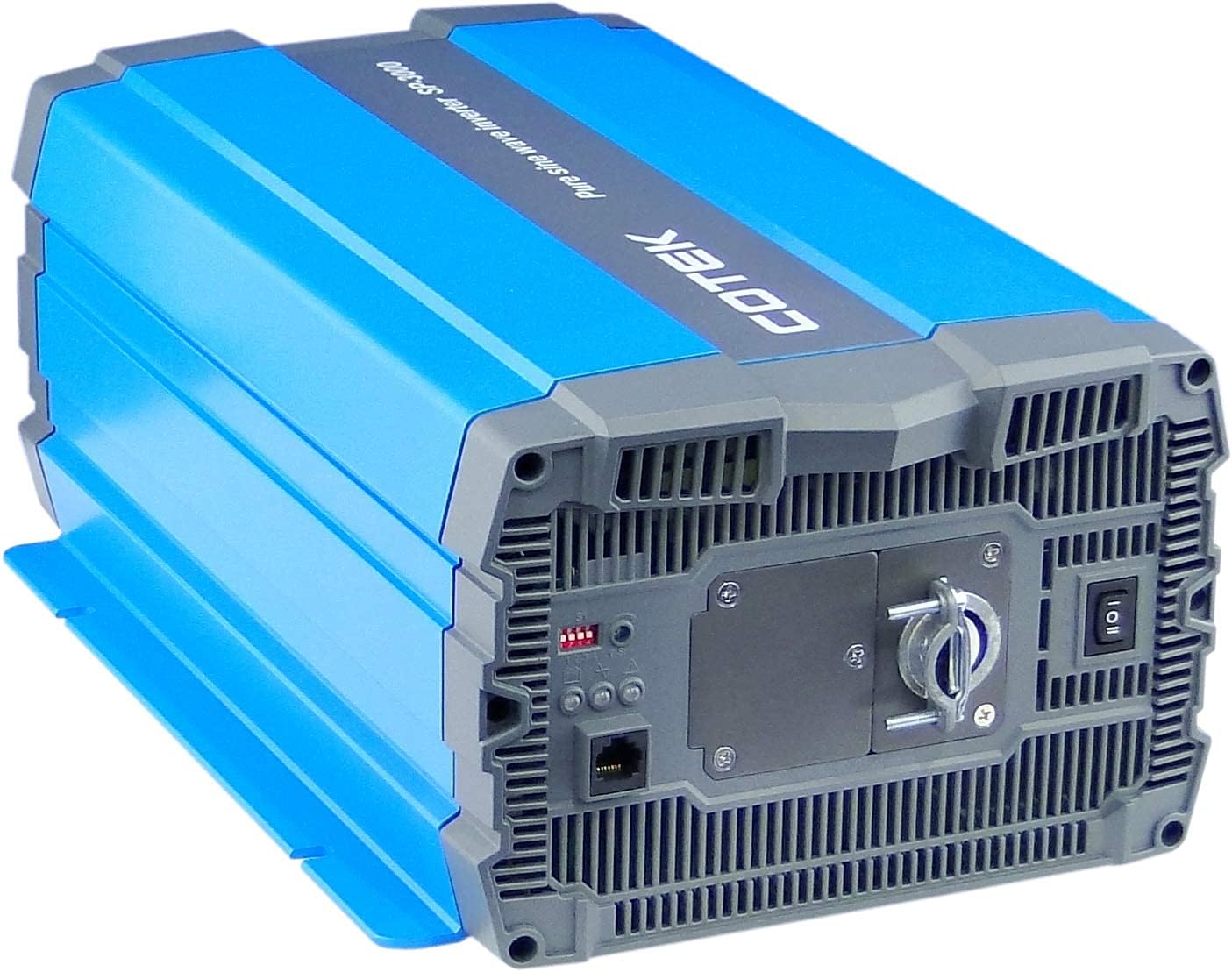
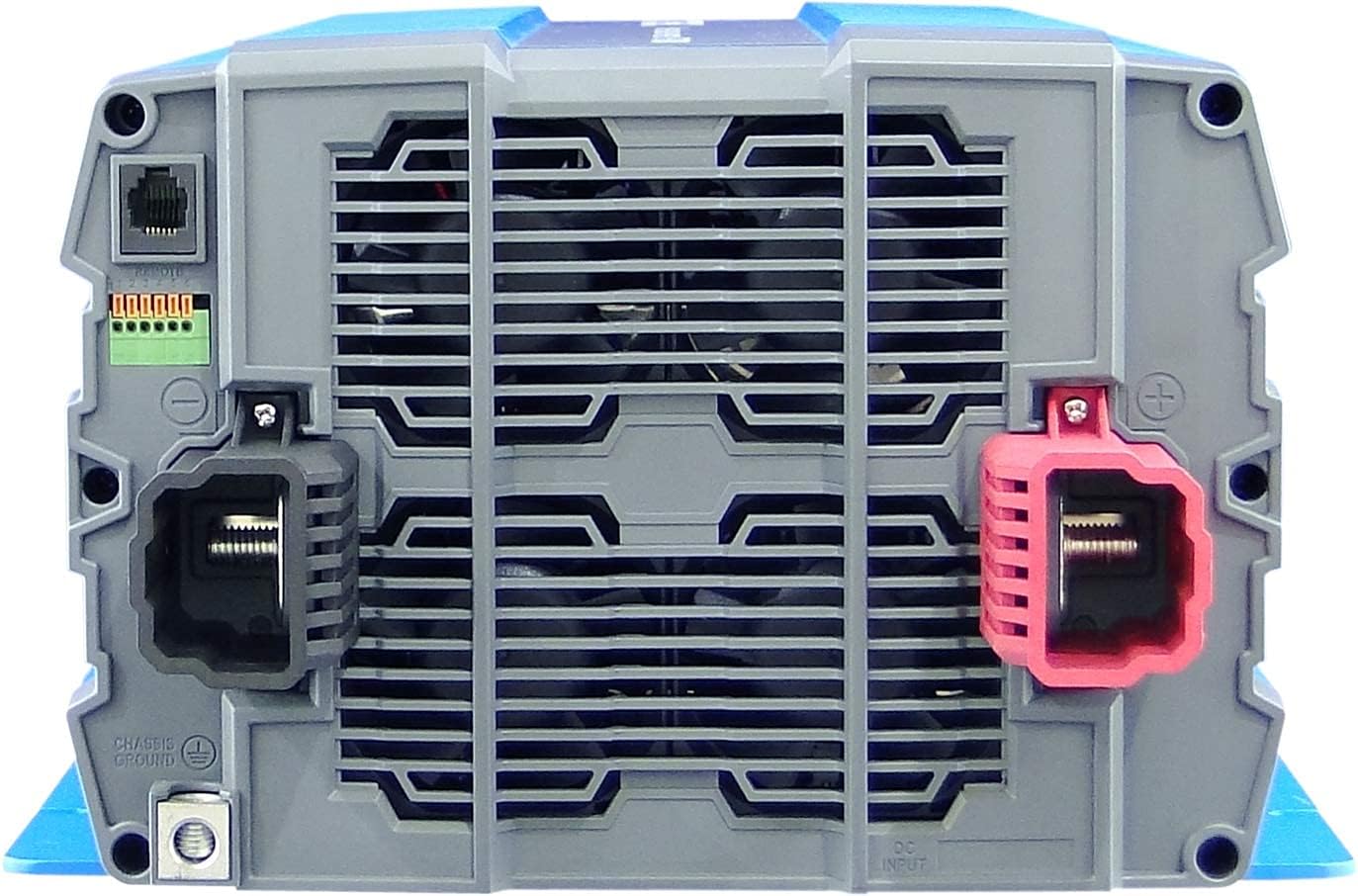
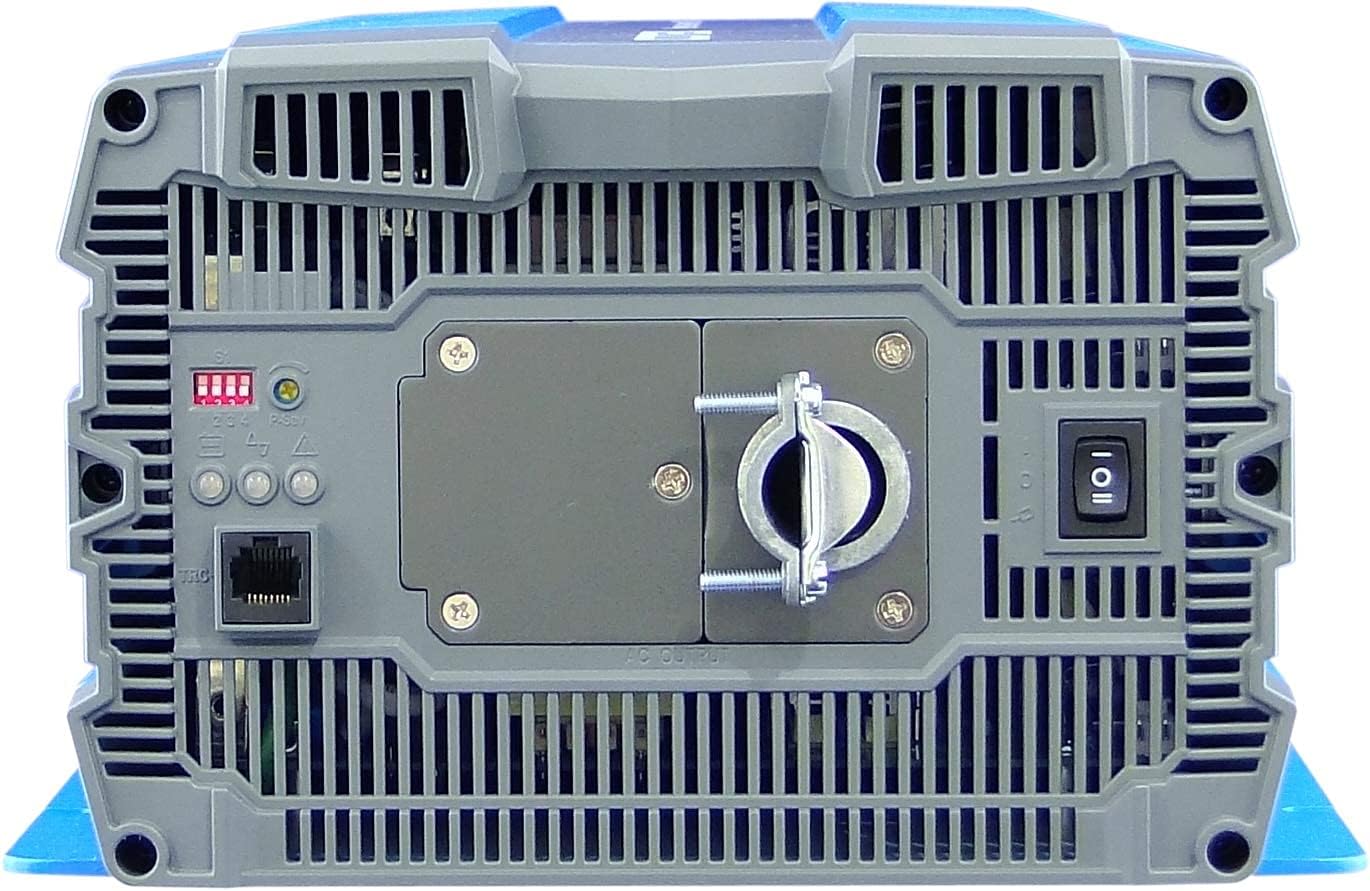
4. ການຕິດຕັ້ງແລະການຕິດຕັ້ງ
Proper installation is crucial for the safe and efficient operation of your inverter. Refer to local electrical codes and standards.
4.1 ການຈັດວາງ
- Install the inverter in a dry, well-ventilated area, away from direct sunlight, heat sources, and flammable materials.
- Ensure sufficient clearance around the inverter for proper airflow, especially around the cooling fan vents.
- Mount the inverter securely on a stable, non-combustible surface.
- Avoid areas where dust, moisture, or corrosive fumes are present.
4.2 ສາຍໄຟ
All wiring must comply with applicable electrical codes and be performed by a qualified electrician.
- ການຕໍ່ດິນ: Connect the inverter's chassis ground terminal to a reliable earth ground using appropriate gauge wire.
- DC Input Connection:
- Ensure the battery bank voltage ແມ່ນ 12VDC.
- Use appropriately sized cables for the DC input to minimize voltage drop and ensure safety. Refer to cable sizing charts based on current and distance.
- Connect the positive (+) terminal of the battery bank to the red (+) terminal on the inverter.
- Connect the negative (-) terminal of the battery bank to the black (-) terminal on the inverter.
- Install a DC-rated fuse or circuit breaker between the battery bank and the inverter's positive terminal, as close to the battery as possible.
- ການເຊື່ອມຕໍ່ຂາອອກ AC:
- Connect your AC loads to the hardwire AC output terminal block.
- Ensure the total load does not exceed the inverter's continuous power rating (3000W).
- ການຄວບຄຸມໄລຍະໄກ (ທາງເລືອກ): Connect the remote control unit to the RJ45 port or use the green terminal for external ON/OFF control if desired.
5. ຄໍາແນະນໍາການດໍາເນີນງານ
5.1 ການເປີດ/ປິດ
- ເພື່ອເປີດເຄື່ອງ: Ensure all DC and AC connections are secure. Flip the main power switch on the inverter's rear panel to the 'ON' position. The Power LED indicator should illuminate.
- ປິດເຄື່ອງ: Disconnect all AC loads from the inverter. Flip the main power switch to the 'OFF' position.
5.2 ຕົວຊີ້ວັດ LED
The inverter features 3-color LED status indicators on the control panel (refer to Figure 4) to provide operational feedback:
- LED ສີຂຽວ: Indicates normal operation and power output.
- LED ສີເຫຼືອງ: Indicates a warning condition, such as low battery voltage or high temperature. The inverter may continue to operate but requires attention.
- ໄຟແດງ: Indicates a fault condition, such as overload, short circuit, or severe over/under voltage. The inverter will shut down to protect itself and connected devices.
5.3 DIP Switch Settings
The DIP switches on the control panel allow for customization of certain inverter parameters, such as output voltage, frequency, and power saving mode. Refer to the detailed specifications table (Figure 5) or the product datasheet for specific configurations. Always adjust DIP switches when the inverter is powered off.
6. ບໍາລຸງຮັກສາ
ການບຳລຸງຮັກສາເປັນປະຈຳຮັບປະກັນອາຍຸການໃຊ້ງານທີ່ຍາວນານ ແລະ ການເຮັດວຽກທີ່ໜ້າເຊື່ອຖືຂອງອິນເວີເຕີຂອງທ່ານ.
- ທໍາຄວາມສະອາດ: ທຳຄວາມສະອາດດ້ານນອກຂອງອິນເວີເຕີເປັນໄລຍະດ້ວຍຜ້າແຫ້ງ. ຮັບປະກັນວ່າຊ່ອງລະບາຍອາກາດບໍ່ມີຝຸ່ນ ແລະ ສິ່ງເສດເຫຼືອ. ຢ່າໃຊ້ນ້ຳຢາທຳຄວາມສະອາດ.
- ການເຊື່ອມຕໍ່: Regularly check all electrical connections (DC input, AC output, ground) for tightness and corrosion. Loose connections can cause overheating and poor performance.
- ການກວດກາຫມໍ້ໄຟ: Inspect batteries for signs of damage, corrosion, or electrolyte leakage. Ensure battery terminals are clean and tight.
- ສະພາບແວດລ້ອມ: ກວດສອບວ່າສະພາບແວດລ້ອມການປະຕິບັດຍັງຄົງຢູ່ພາຍໃນລະດັບອຸນຫະພູມແລະຄວາມຊຸ່ມຊື່ນທີ່ກໍານົດໄວ້.
7. ການແກ້ໄຂບັນຫາ
ພາກນີ້ໃຫ້ວິທີແກ້ໄຂບັນຫາທົ່ວໄປທີ່ທ່ານອາດຈະພົບ. ຖ້າບັນຫາຍັງຄົງຢູ່, ໃຫ້ຕິດຕໍ່ຝ່າຍສະໜັບສະໜູນລູກຄ້າ.
| ບັນຫາ | ສາເຫດທີ່ເປັນໄປໄດ້ | ການແກ້ໄຂ |
|---|---|---|
| ອິນເວີເຕີບໍ່ເປີດ. | No DC input power; Loose battery connections; Blown DC fuse/breaker; Inverter switch OFF. | ກວດເບິ່ງຫມໍ້ໄຟ voltage; Tighten connections; Replace fuse/reset breaker; Turn inverter switch ON. |
| ບໍ່ມີຜົນຜະລິດ AC. | Overload; Short circuit; Over-temperature shutdown; Low/High DC input voltage. | Reduce AC load; Check for short circuits in wiring/appliances; Allow inverter to cool; Check battery voltage. |
| Yellow LED illuminated. | ຫມໍ້ໄຟຕ່ໍາ voltage warning; High temperature warning. | Recharge batteries; Ensure adequate ventilation, reduce load. |
| Red LED illuminated / Inverter shut down. | Overload; Short circuit; Over-temperature; Under/Over voltage. | Identify and correct the fault (e.g., reduce load, fix short, allow cooling, check battery voltage), then restart the inverter. |
| Cooling fan runs constantly or loudly. | High internal temperature due to heavy load or poor ventilation. | Reduce load; Improve ventilation around the inverter. |
8. ຂໍ້ມູນຈໍາເພາະ
The following table outlines the technical specifications for the Cotek SP-3000 Series Pure Sine Wave Inverter, specifically for the SP-3000-112 model.

| ປະເພດ | ພາລາມິເຕີ | SP-3000-112 |
|---|---|---|
| ຜົນຜະລິດ | AC Voltage | 100 / 110 / 115 / 120VAC ± 5% |
| ລະດັບພະລັງງານ | 3000W | |
| Surge Power (1 Sec.) | 6000W | |
| ພະລັງງານອອກສູງສຸດ (1 ນາທີ) | 3450W | |
| Output Waveform | Pure Sine Wave (THD<3%) | |
| ຄວາມຖີ່ | 50 / 60 Hz ± 0.5% | |
| ປ້ອນຂໍ້ມູນ | ຊິງຕັນດີຊີ Voltage | 12VDC |
| ສະບັບtage ຂອບເຂດ | 10.5 ~ 16.5VDC | |
| ບໍ່ມີ Load Current | <3.0A@12VDC | |
| ໂໝດປະຢັດພະລັງງານ | <0.4A@12VDC | |
| ປະສິດທິພາບ (ສູງສຸດ) | 90% | |
| ການປົກປ້ອງ | Input Under - Voltage ການປົກປ້ອງ | 10.5 ± 0.3VDC |
| Input Under - Voltage ປຸກ | 11.0 ± 0.3VDC | |
| Input Under - Voltage ການກູ້ຄືນ | 12.0 ± 0.3VDC | |
| Input Over - Voltage ການປົກປ້ອງ | 16.5 ± 0.3VDC | |
| Input Over - Voltage ການກູ້ຄືນ | 14.5 ± 0.3VDC | |
| Output Overload | ປິດການສົ່ງອອກ voltage, restart ເພື່ອຟື້ນຕົວ | |
| ຜົນໄດ້ຮັບສັ້ນ | ປິດການສົ່ງອອກ voltage, restart ເພື່ອຟື້ນຕົວ | |
| ສະພາບແວດລ້ອມ | ອຸນຫະພູມປະຕິບັດການ. | -20°C ~ +40°C |
| ອຸນຫະພູມການເກັບຮັກສາ & ຄວາມຊຸ່ມຊື່ນ | -30°C ~ +70°C, 10 ~ 95% RH | |
| ທົ່ວໄປ | ຂະໜາດ (ກວ້າງ x ສູງ x ຍາວ) | 442 x 214 x 102 ມມ (17.4 x 8.4 x 4.0 ນິ້ວ) |
| ນ້ຳໜັກ | 8.2 ກິໂລ (18.1 ປອນ) | |
| ຄວາມເຢັນ | ພັດລົມເຢັນຄວບຄຸມອຸນຫະພູມ ແລະໂຫຼດໄດ້ |

9. ການຮັບປະກັນແລະການສະຫນັບສະຫນູນ
9.1 ຂໍ້ມູນການຮັບປະກັນ
The Cotek SP-3000-112 Pure Sine Wave Inverter comes with a ການຮັບປະກັນຜູ້ຜະລິດ 2 ປີ. ການຮັບປະກັນນີ້ກວມເອົາຂໍ້ບົກພ່ອງຂອງວັດສະດຸແລະການເຮັດວຽກພາຍໃຕ້ການນໍາໃຊ້ປົກກະຕິ. ກະລຸນາຮັກສາຫຼັກຖານການຊື້ຂອງທ່ານສໍາລັບການຮຽກຮ້ອງການຮັບປະກັນ.
9.2 ສະຫນັບສະຫນູນລູກຄ້າ
For technical assistance, troubleshooting beyond this manual, or warranty inquiries, please contact Cotek customer support through their official website or your point of purchase. Provide your model number (SP-3000-112) and a detailed description of the issue to expedite service.