
1. ບົດແນະນຳ
This manual provides detailed instructions for the setup, operation, and maintenance of your Enover TS18 7-Day Programmable Digital Timer. This device is designed to automate the control of electrical appliances by setting specific ON/OFF times throughout the week, offering convenience and energy management.
2. ຄຸນລັກສະນະຂອງຜະລິດຕະພັນ
- ການກຳນົດເວລາແບບຍືດຫຍຸ່ນ: Program up to 10 distinct ON/OFF cycles within a 7-day period. Each program repeats weekly.
- ການຄຸ້ມຄອງພະລັງງານ: Automatically controls lamps, holiday lights, humidifiers, and other electrical devices. Includes a feature to protect devices from overcharge.
- Security Function: Features a random ON/OFF option to vary lighting times, simulating occupancy when away from home.
- ການໂຕ້ຕອບຜູ້ເປັນມິດ: Equipped with a large LCD display for clear visibility and a manual override switch for immediate control adjustments.
- ແບັດ ສຳ ຮອງ: An integrated battery retains programmed settings during power outages, ກຳຈັດຄວາມຕ້ອງການໃນການຂຽນໂປຣແກຣມຄືນໃໝ່.

Image: Enover TS18 Digital Timer highlighting key features for easy home automation.
3. ເນື້ອໃນຊຸດ
ຊຸດປະກອບມີລາຍການຕໍ່ໄປນີ້:
- 1 x Enover Digital Timer Switch (Model TS18)
- 1 x ຄູ່ມືຜູ້ໃຊ້

Image: Contents of the Enover TS18 Digital Timer package, including the timer and manual.
4. ຜະລິດຕະພັນເກີນview
The Enover TS18 Digital Timer features a clear LCD display and intuitive buttons for easy programming. It plugs directly into a standard electrical outlet.

ຮູບພາບ: ທາງຫນ້າ view of the Enover TS18 Digital Timer, displaying the time and control buttons.
ຟັງຊັນປຸ່ມ:
- ອາທິດ: Sets the day(s) for programs.
- ຊົ່ວໂມງ: Adjusts the hour for time and program settings.
- ນາທີ: Adjusts the minute for time and program settings.
- RES/RCL: Resets or recalls settings.
- ໂມງ: Enters or exits clock setting mode.
- ໂມງຈັບເວລາ: Cycles through program settings (P1 ON, P1 OFF, P2 ON, etc.).
- ເປີດ/ອັດຕະໂນມັດ/ປິດ: Selects operating mode (Always ON, Automatic, Always OFF).
- ມາດຕະຖານ: Activates or deactivates the random ON/OFF function.
- ຣີເຊັດ: Small button (requires a pointed object) to clear all settings and reset the device.
Video: A brief demonstration of the Enover Digital Timer's basic functions and display.
5. ຕັ້ງຄ່າ
5.1 ຄ່າບໍລິການເບື້ອງຕົ້ນ
Before first use, plug the timer into an electrical outlet for approximately 5-10 minutes to charge the internal battery. This ensures the display is active and settings can be retained.
5.2 ກໍານົດເວລາແລະວັນໃນປະຈຸບັນ
- ກົດຄ້າງໄວ້ ໂມງ ປຸ່ມ.
- ໃນຂະນະທີ່ຖື ໂມງ, ກົດ ອາທິດ ກົດປຸ່ມຊ້ຳໆເພື່ອກຳນົດມື້ປັດຈຸບັນຂອງອາທິດ.
- ໃນຂະນະທີ່ຖື ໂມງ, ກົດ ຊົ່ວໂມງ button repeatedly to set the current hour (AM/PM will display).
- ໃນຂະນະທີ່ຖື ໂມງ, ກົດ ນາທີ ກົດປຸ່ມຊ້ຳໆເພື່ອຕັ້ງນາທີປັດຈຸບັນ.
- ປ່ອຍຕົວ ໂມງ ກົດປຸ່ມເພື່ອບັນທຶກການຕັ້ງຄ່າ.
6. ຄໍາແນະນໍາການດໍາເນີນງານ
6.1 ວົງຈອນການເປີດ/ປິດການຂຽນໂປຣແກຣມ
ໂມງຈັບເວລາອະນຸຍາດໃຫ້ຕັ້ງໂປຣແກຣມເປີດ/ປິດໄດ້ສູງສຸດ 10 ໂປຣແກຣມ. ໃຫ້ປະຕິບັດຕາມຂັ້ນຕອນເຫຼົ່ານີ້ເພື່ອຕັ້ງໂປຣແກຣມ:
- ກົດ ເວລາ ປຸ່ມຫນຶ່ງຄັ້ງ. ຈໍສະແດງຜົນຈະສະແດງ "1 ON".
- ກົດ ອາທິດ to select the day(s) for this program (e.g., MO, TU, WE, TH, FR, SA, SU, MO TU WE TH FR, SA SU, MO TU WE TH FR SA SU, etc.).
- ກົດ ຊົ່ວໂມງ ເພື່ອຕັ້ງຊົ່ວໂມງເປີດທີ່ຕ້ອງການ.
- ກົດ ນາທີ ເພື່ອຕັ້ງນາທີເປີດທີ່ຕ້ອງການ.
- ກົດ ເວລາ ກົດປຸ່ມອີກຄັ້ງ. ໜ້າຈໍຈະສະແດງ "1 OFF".
- Repeat steps 2-4 to set the desired OFF time for Program 1. Ensure the correct day(s) are selected for the OFF time.
- ສືບຕໍ່ກົດ ເວລາ to cycle through and set additional programs (2 ON, 2 OFF, up to 10 ON, 10 OFF).
- ຫຼັງຈາກການຕັ້ງຄ່າໂຄງການທີ່ຕ້ອງການທັງຫມົດ, ໃຫ້ກົດປຸ່ມ ໂມງ ເພື່ອກັບຄືນໄປຫາການສະແດງເວລາປັດຈຸບັນ.
- ໃຫ້ແນ່ໃຈວ່າໂມງຈັບເວລາຢູ່ໃນ ອັດຕະໂນມັດ mode for programs to execute. Press ເປີດ/ອັດຕະໂນມັດ/ປິດ ຖີບລົດໄປ ອັດຕະໂນມັດ.
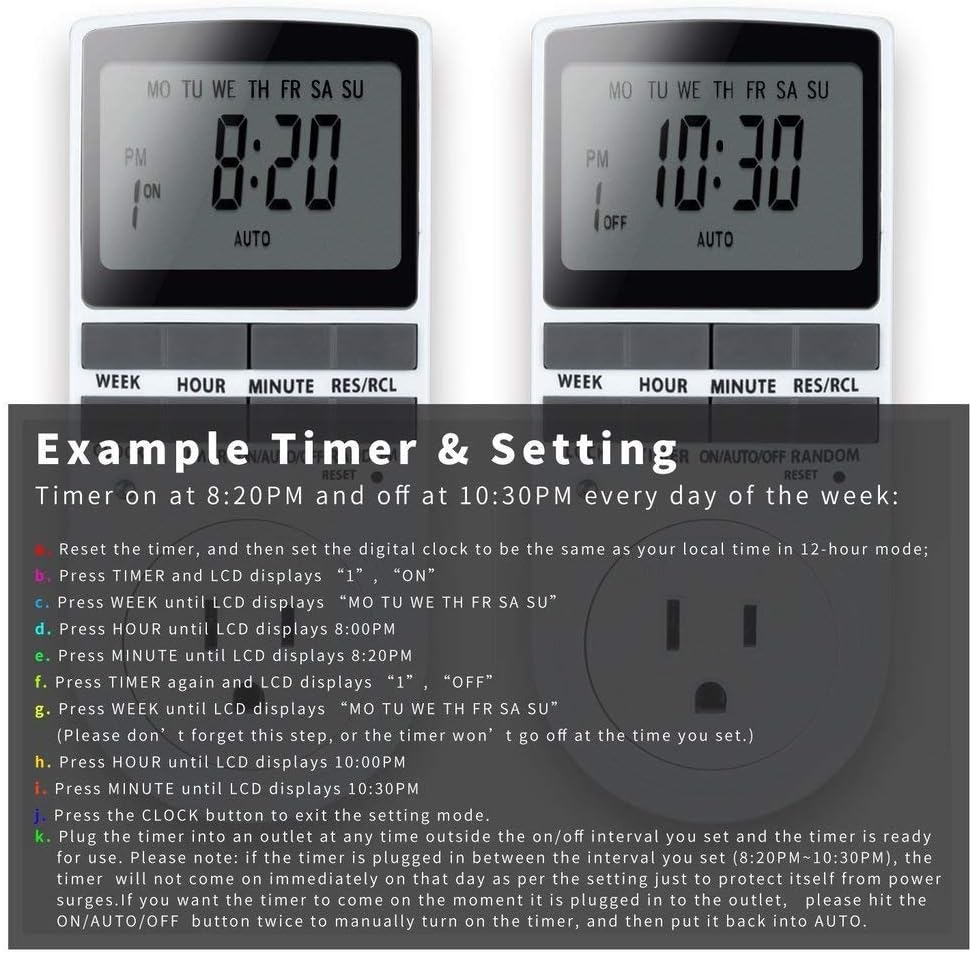
Image: Visual guide for setting an example timer program (ON at 8:20 PM, OFF at 10:30 PM daily).
6.2 Random Function (Anti-theft)
To activate the random ON/OFF feature:
- ກົດ Random button. The word "RANDOM" will appear on the display.
- In random mode, the timer will turn ON and OFF at varying times within a set period, typically around the programmed ON/OFF times, to simulate occupancy.
- ເພື່ອປິດການໃຊ້ງານ, ກົດປຸ່ມ Random ປຸ່ມອີກເທື່ອຫນຶ່ງ.

Image: The anti-theft random feature of the Enover TS18 Digital Timer, designed to deter intruders.
6.3 ການຍົກເລີກຄູ່ມື
To manually switch the timer's output without affecting programmed settings:
- ກົດ ເປີດ/ອັດຕະໂນມັດ/ປິດ ປຸ່ມເພື່ອຮອບວຽນຜ່ານໂຫມດ: ON (always on), ອັດຕະໂນມັດ (follows programs), ປິດ (always off).
- Select the desired temporary mode. The timer will revert to ອັດຕະໂນມັດ mode at the next programmed ON/OFF event.
Video: A detailed demonstration of setting programs and using the manual override function on the Enover Digital Timer.
7. ຄໍາຮ້ອງສະຫມັກ
The Enover TS18 Digital Timer can be used to automate various household devices, enhancing convenience and energy efficiency.
- Coffee Makers: Program your coffee maker to start brewing before you wake up.
- Aquarium Lights/Pumps: Automate the lighting and filtration cycles for your aquarium.
- Indoor Grow Lights: Maintain consistent light schedules for plants.
- ການຕົກແຕ່ງວັນພັກ: Set festive lights to turn on and off automatically.
- Fans/Humidifiers: Control environmental devices to operate only when needed.
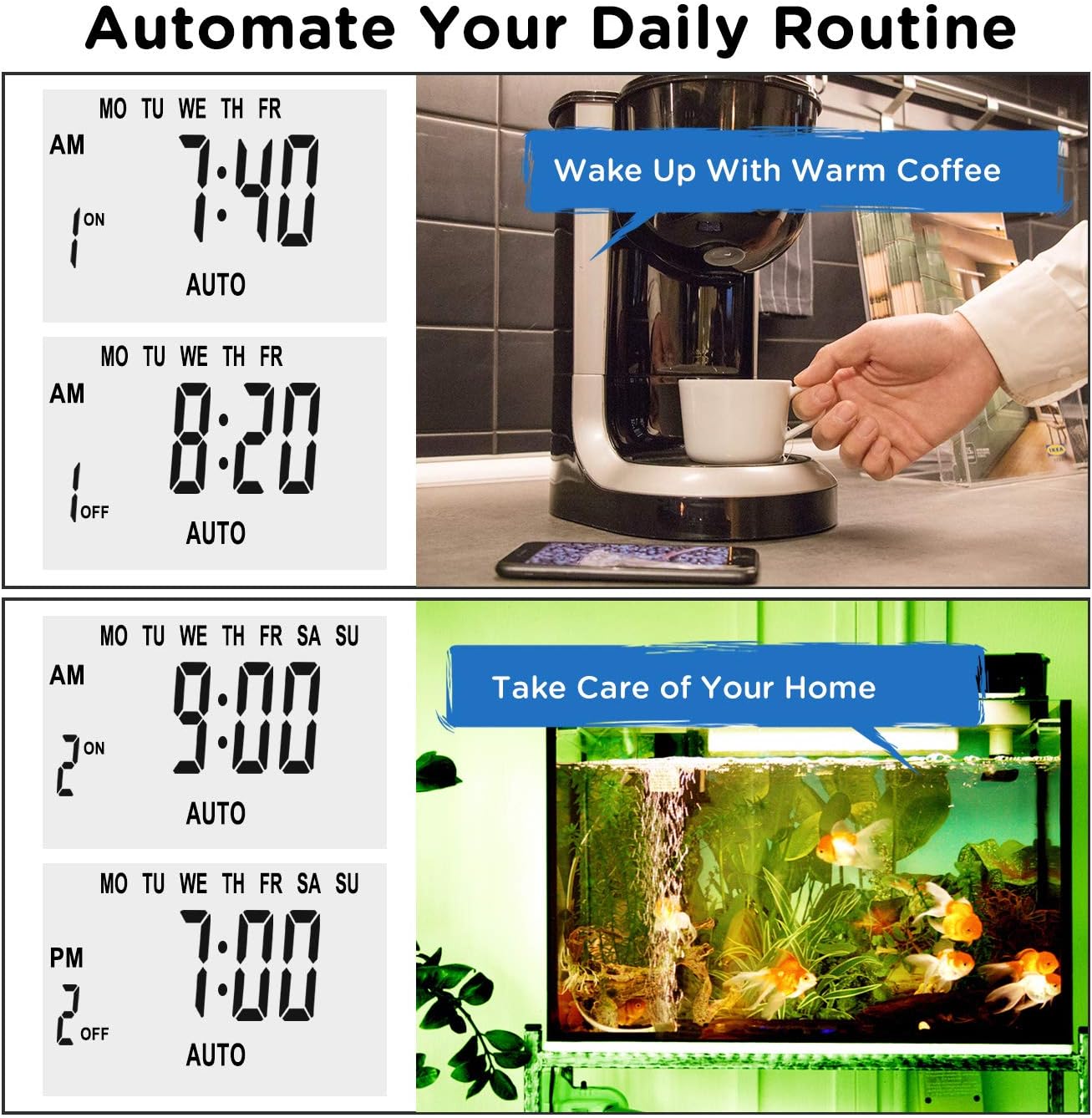
ຮູບພາບ: Examples of automating daily routines with the Enover TS18 Digital Timer, such as a coffee maker and aquarium.
8. ຂໍ້ມູນຈໍາເພາະ
| ໝາຍເລກຕົວແບບ | TS18 |
| ຍີ່ຫໍ້ | ເອໂນເວີ |
| ສີ | ສີຂາວ |
| ວັດສະດຸ | ພາດສະຕິກ |
| ຈໍານວນການຕັ້ງຄ່າ | 10 (ໂປຣແກຣມເປີດ/ປິດ) |
| ສະບັບtage | 120 ໂວນ |
| ວັດtage | 1800 ວັດ |
| Ampຄວາມອາດສາມາດ erage | 15 Amps |
| ວິທີການຕິດຕັ້ງ | ປລັກອິນ |
| ປະເພດການຕິດຕັ້ງ | ສຽບໃສ່ Mount |
| ຮູບແບບສຽບ | B - ແບບສະຫະລັດພ້ອມປລັກດິນ |
| ຄຸນນະສົມບັດພິເສດ | 3-wire grounded plug and 3-prong grounded outlet |
| ການນໍາໃຊ້ | ໃຊ້ພາຍໃນເຮືອນເທົ່ານັ້ນ |
| ນ້ໍາຫນັກລາຍການ | 6.4 ອອນ |
| ຂະໜາດແພັກເກັດ | 5.67 x 3.31 x 2.6 ນິ້ວ |
| ປະເພດເຊລຫມໍ້ໄຟ | NiMH |
| ຊີວິດຫມໍ້ໄຟ | 100 days (backup) |
9. ການແກ້ໄຂບັນຫາ
- ໂມງຈັບເວລາບໍ່ເປີດ/ປິດຕາມທີ່ຕັ້ງໄວ້:
- ໃຫ້ແນ່ໃຈວ່າໂມງຈັບເວລາຢູ່ໃນ ອັດຕະໂນມັດ ໂໝດ.
- ກວດສອບວ່າເວລາແລະມື້ປະຈຸບັນໄດ້ຖືກຕັ້ງໄວ້ຖືກຕ້ອງ.
- Check that the ON and OFF times for the specific program are correctly entered and assigned to the desired days.
- Confirm the appliance connected to the timer is switched ON.
- ຈໍສະແດງຜົນຫວ່າງເປົ່າ ຫຼືມືດ:
- Plug the timer into an active electrical outlet for 5-10 minutes to charge the internal battery.
- ການຕັ້ງຄ່າທັງໝົດສູນເສຍໄປຫຼັງຈາກປິດເຄື່ອງtage:
- The internal battery may not be sufficiently charged. Ensure the timer is regularly plugged in to maintain battery charge.
- To clear all settings:
- Use a pointed object (like a pen tip) to press the ຣີເຊັດ button. This will clear all programs and reset the clock. You will need to re-enter all settings.
10. ການຮັບປະກັນແລະການສະຫນັບສະຫນູນ
For warranty information or technical support, please refer to the contact details provided on the product packaging or the official Enover webເວັບໄຊ. ຮັກສາໃບຮັບເງິນການຊື້ຂອງທ່ານສໍາລັບການຮ້ອງຂໍການຮັບປະກັນ.