
1. ບົດແນະນຳ
This manual provides detailed instructions for the operation and maintenance of your Supersonic SC-1495BT Bluetooth AM/FM Boombox. Please read this manual thoroughly before using the device to ensure proper function and to maximize your listening experience.
2. ຂໍ້ມູນຄວາມປອດໄພ
- ຫ້າມບໍ່ໃຫ້ອຸປະກອນຖືກຝົນ ຫຼື ຄວາມຊຸ່ມຊື້ນເພື່ອປ້ອງກັນໄຟ ຫຼື ໄຟຟ້າຊັອດ.
- ຫ້າມປິດຊ່ອງລະບາຍອາກາດ. ຮັບປະກັນພື້ນທີ່ພຽງພໍຮອບຫນ່ວຍສໍາລັບການໄຫຼຂອງອາກາດທີ່ເຫມາະສົມ.
- ຫຼີກລ້ຽງການວາງເຄື່ອງໄວ້ໃກ້ກັບແຫຼ່ງຄວາມຮ້ອນເຊັ່ນລັງສີ, ເຄື່ອງເຮັດຄວາມຮ້ອນ, ເຕົາໄຟ, ຫຼືອຸປະກອນອື່ນໆ (ລວມທັງ amplifiers) ທີ່ຜະລິດຄວາມຮ້ອນ.
- ໃຊ້ພຽງແຕ່ໄຟລ໌ແນບ/ອຸປະກອນເສີມທີ່ລະບຸໂດຍຜູ້ຜະລິດ.
- ຖອດອຸປະກອນນີ້ອອກໃນເວລາມີພາຍຸຟ້າຜ່າ ຫຼືເມື່ອບໍ່ໄດ້ໃຊ້ເປັນເວລາດົນນານ.
- ອ້າງເຖິງການບໍລິການທັງtoົດໃຫ້ກັບພະນັກງານບໍລິການທີ່ມີຄຸນວຸດທິ. ຕ້ອງການການບໍລິການເມື່ອອຸປະກອນໄດ້ຮັບຄວາມເສຍຫາຍໃນທາງໃດທາງ ໜຶ່ງ.
3. ເນື້ອໃນຊຸດ
ຫຼັງຈາກການຍົກເລີກການຫຸ້ມຫໍ່, ກະລຸນາແນ່ໃຈວ່າລາຍການທັງຫມົດທີ່ລະບຸໄວ້ຂ້າງລຸ່ມນີ້ແມ່ນມີ:
- Supersonic SC-1495BT Bluetooth AM/FM Boombox
- ສາຍໄຟ AC
4. ຄຸນລັກສະນະຂອງຜະລິດຕະພັນ
The Supersonic SC-1495BT Boombox offers a variety of features for versatile audio playback:
- Bluetooth Version 3.0 for wireless music streaming
- Built-in USB input for media playback
- Built-in SD card and Micro SD card slot for media playback
- 3.5 mm Line-in (AUX) jack for external audio devices
- Four-band radio: AM, FM, SW1, SW2
- Integrated rechargeable battery for portable use
- ຈໍ LCD ທີ່ຊັດເຈນ
- Fast forward and rewind functions for media playback
- 360-degree rod antenna for enhanced radio reception
- ການຄວບຄຸມປະລິມານ Rotary
- ຊ່ອງສຽບຫູຟັງສໍາລັບການຟັງສ່ວນຕົວ
- AC/DC operation for flexible power options
5. ການຄວບຄຸມແລະການເຊື່ອມຕໍ່
Familiarize yourself with the various controls and connection ports on your boombox.
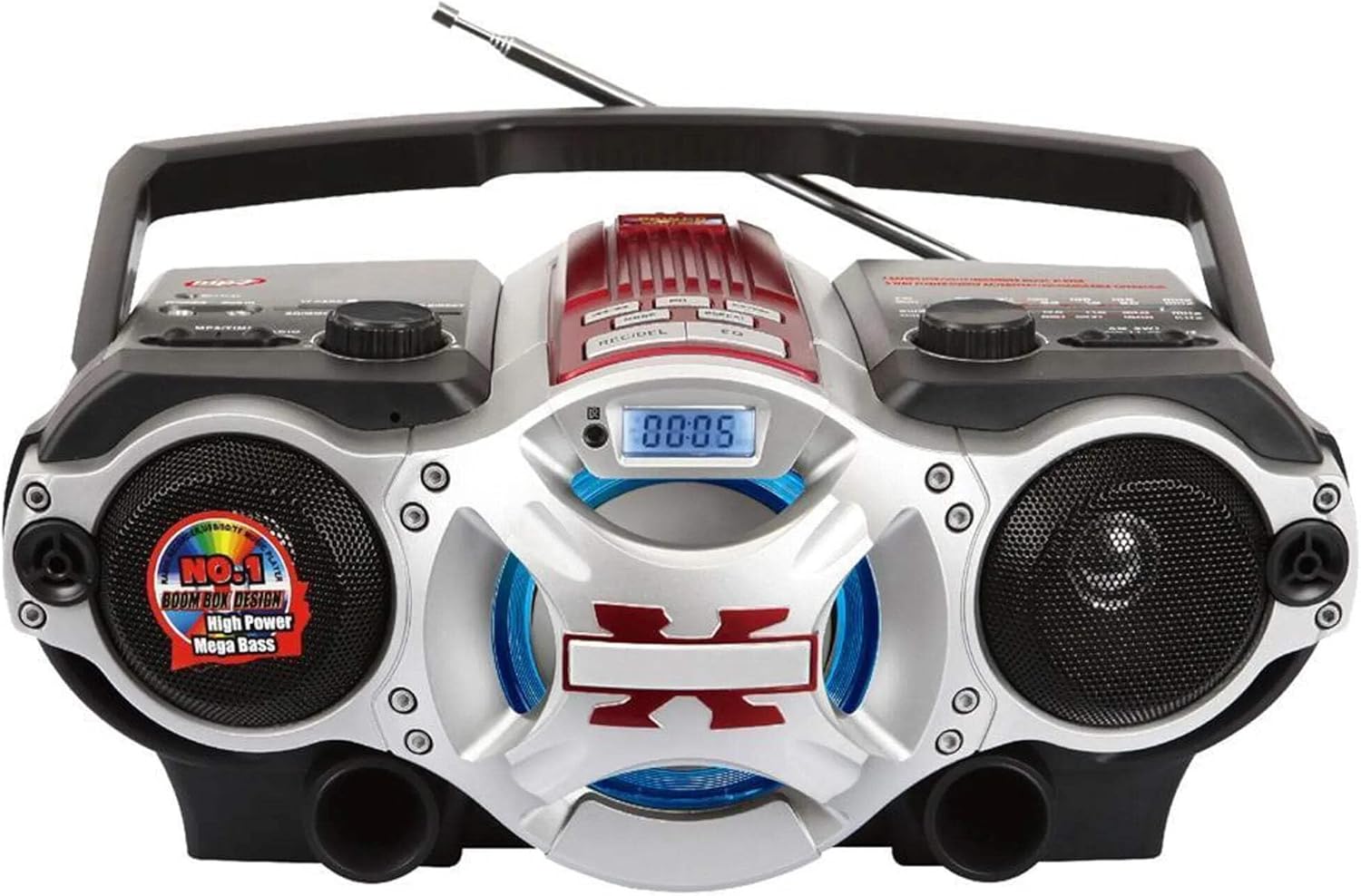
ຮູບທີ 1: ດ້ານໜ້າ view of the Supersonic SC-1495BT Boombox, showing the speakers, central display, and main control area.

ຮູບທີ 2: Left side controls, including USB input, SD/Micro SD card slot, AUX IN, PHONES jack, BT/MP3/RADIO mode switch, and Rotary Volume control.

ຮູບທີ 3: Right side controls, featuring the AM/FM/SW1/SW2 band selector, TUNING knob, and playback control buttons (Play/Pause, Skip, Mode, Clock, EQ).
6. ຕັ້ງຄ່າ
6.1 ການເຊື່ອມຕໍ່ພະລັງງານ
- ໄຟຟ້າ AC: Connect the included AC power cord to the AC input on the back of the boombox and then plug it into a standard wall outlet. The internal rechargeable battery will begin charging.
- DC Power (Battery): The boombox has a built-in rechargeable battery. Ensure it is charged before portable use. The unit can also operate on DC power from the internal battery when not connected to AC.
6.2 ການປັບສາຍອາກາດ
Extend the 360-degree rod antenna for optimal radio reception, especially for FM and SW bands. Adjust its position for the clearest signal.
7. ຄໍາແນະນໍາການດໍາເນີນງານ
7.1 ເປີດ/ປິດ ແລະເລືອກໂໝດ
- To power on the unit, slide the BT/MP3/RADIO switch to the desired mode (BT, MP3, or RADIO).
- To power off, slide the switch to the OFF position.
7.2 ການດໍາເນີນງານ Bluetooth
- ເລື່ອນສະຫຼັບໂໝດໄປໃສ່ BT (Bluetooth). The LCD display will indicate Bluetooth mode, and the unit will enter pairing mode.
- ໃນອຸປະກອນທີ່ເປີດໃຊ້ Bluetooth ຂອງທ່ານ (ໂທລະສັບສະຫຼາດ, ແທັບເລັດ, ແລະອື່ນໆ), ເປີດໃຊ້ Bluetooth ແລະຄົ້ນຫາອຸປະກອນທີ່ມີຢູ່.
- Select "SC-1495BT" from the list of devices. Once paired, the unit will emit a confirmation sound.
- You can now play audio from your device through the boombox. Use your device or the boombox's playback controls (Play/Pause, Skip) to manage music.
7.3 Radio Operation (AM/FM/SW1/SW2)
- ເລື່ອນສະຫຼັບໂໝດໄປໃສ່ ວິທະຍຸ.
- Select the desired band (AM, FM, SW1, or SW2) using the band selector switch.
- Extend and adjust the rod antenna for optimal reception.
- ໝຸນ Tuning knob to scan for radio stations. The frequency will be displayed on the LCD.
7.4 ການຫຼິ້ນບັດ USB/SD
- ເລື່ອນສະຫຼັບໂໝດໄປໃສ່ MP3.
- Insert a USB flash drive into the USB input or an SD/Micro SD card into the corresponding slot. Ensure the card is inserted correctly.
- The unit will automatically detect and begin playing MP3 audio files ຈາກສື່ແຊກ.
- Use the playback control buttons (Play/Pause, Skip, Fast Forward, Rewind) to navigate tracks.
7.5 ການເຊື່ອມຕໍ່ເຂົ້າ (AUX)
- ເລື່ອນສະຫຼັບໂໝດໄປໃສ່ MP3.
- ເຊື່ອມຕໍ່ອຸປະກອນສຽງພາຍນອກ (ເຊັ່ນ: ຜູ້ນ MP3, ໂທລະສັບສະຫຼາດ) ກັບ AUX ໃນ ໂດຍໃຊ້ສາຍສຽງ 3.5 ມມ (ບໍ່ລວມ).
- Play audio from your external device. The sound will be routed through the boombox speakers. Control playback from your external device.
7.6 ການຄວບຄຸມປະລິມານ
ໝຸນ ປະລິມານ ບິດຕາມເຂັມໂມງເພື່ອເພີ່ມປະລິມານ ແລະ ທວນເຂັມໂມງເພື່ອຫຼຸດມັນ.
7.7 ຊ່ອງສຽບຫູຟັງ
For private listening, plug standard 3.5mm earphones (not included) into the ໂທລະສັບ jack. The main speakers will be muted.
8. ບໍາລຸງຮັກສາ
- ທໍາຄວາມສະອາດ: ໃຊ້ຜ້າປຽກແຫ້ງເພື່ອເຮັດຄວາມສະອາດດ້ານນອກຂອງເຄື່ອງ. ຢ່າໃຊ້ເຄື່ອງເຮັດຄວາມສະອາດຂັດຫຼືສານລະລາຍ.
- ການເກັບຮັກສາ: ເມື່ອບໍ່ໄດ້ໃຊ້ເປັນເວລາດົນ, ໃຫ້ເກັບຮັກສາ boombox ໄວ້ໃນບ່ອນທີ່ເຢັນ, ແຫ້ງແລ້ງຫ່າງຈາກແສງແດດໂດຍກົງ ແລະ ອຸນຫະພູມທີ່ຮຸນແຮງ.
- ການດູແລຫມໍ້ໄຟ: To prolong the life of the built-in rechargeable battery, avoid fully discharging it frequently. Charge the unit regularly, even if not in use.
9. ການແກ້ໄຂບັນຫາ
If you encounter issues with your boombox, refer to the following common problems and solutions:
| ບັນຫາ | ສາເຫດທີ່ເປັນໄປໄດ້ | ການແກ້ໄຂ |
|---|---|---|
| ບໍ່ມີພະລັງງານ | AC cord not connected; Battery discharged; Power switch off | Ensure AC cord is securely plugged in; Charge the battery; Slide power switch to ON/BT/MP3/RADIO. |
| ບໍ່ມີສຽງ | Volume too low; Mute activated (if applicable); Incorrect mode selected; Earphones connected | Increase volume; Ensure correct mode (BT, MP3, RADIO) is selected; Disconnect earphones. |
| Bluetooth ບໍ່ໄດ້ຈັບຄູ່ | Boombox not in pairing mode; Device Bluetooth off; Too far from boombox | Ensure boombox is in BT mode; Enable Bluetooth on your device; Move device closer (within 30 feet/10 meters); Try re-pairing. |
| ການຮັບວິທະຍຸທີ່ບໍ່ດີ | ເສົາອາກາດບໍ່ໄດ້ຂະຫຍາຍ/ປັບ; ພື້ນທີ່ສັນຍານອ່ອນ | Fully extend and adjust the rod antenna; Try moving the unit to a different location. |
| ບໍ່ສາມາດຫຼິ້ນ USB/SD card ໄດ້ | ບໍ່ຖືກຕ້ອງ file ຟໍແມັດ; ໃສ່ກາດ/ໄດຣຟ໌ບໍ່ຖືກຕ້ອງ; ເສຍຫາຍ files | ຮັບປະກັນ files are MP3 format; Re-insert card/drive; Try a different USB drive or SD card. |
10. ຂໍ້ມູນຈໍາເພາະ
- ຕົວແບບ: SC-1495BT
- ຍີ່ຫໍ້: ສຽງສູງ
- ການເຊື່ອມຕໍ່: Bluetooth (Ver. 3.0), USB, SD/Micro SD, 3.5mm AUX
- ແຖບວິທະຍຸ: AM, FM, SW1, SW2
- ຮູບແບບສຽງທີ່ຮອງຮັບ: MP3
- ແຫຼ່ງພະລັງງານ: AC 110-220V, Built-in Rechargeable Battery
- ລໍາໂພງ: 2 (ສະເຕຣິໂອ)
- ຂະໜາດ (L x W x H): 15 x 10 x 12 ນິ້ວ
- ນ້ຳໜັກ: 4.3 ປອນ
- ຜູ້ຜະລິດ: Capitol Sales Company
- UPC: 639131814950
11. ການຮັບປະກັນ
This product comes with a 1-year limited warranty. Please retain your proof of purchase for warranty claims. For specific warranty terms and conditions, refer to the documentation included with your purchase or contact Supersonic customer support.
12. ສະຫນັບສະຫນູນ
For further assistance, technical support, or inquiries regarding your Supersonic SC-1495BT Boombox, please visit the official Supersonic webເວັບໄຊ ຫຼືຕິດຕໍ່ພະແນກບໍລິການລູກຄ້າຂອງເຂົາເຈົ້າ. ຂໍ້ມູນການຕິດຕໍ່ໂດຍປົກກະຕິສາມາດພົບເຫັນຢູ່ໃນຜູ້ຜະລິດຂອງ webສະຖານທີ່ຫຼືການຫຸ້ມຫໍ່ຜະລິດຕະພັນ.