
1. ບົດແນະນຳ
This manual provides essential instructions for the proper setup, operation, and maintenance of your Mitel Aastra 612D Handset with Charger Base. Please read this manual thoroughly before using the device to ensure optimal performance and safety.
2. ຜະລິດຕະພັນເກີນview
The Mitel Aastra 612D is a robust cordless DECT handset designed for professional communication environments. It features a clear display, intuitive keypad, and comes with a dedicated charger base for convenient power management.
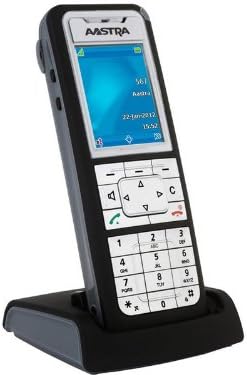
Figure 1: Mitel Aastra 612D Handset and Charger Base. The image displays the Aastra 612D cordless handset docked in its black charger base. The handset features a monochrome display showing 'AASTRA', '567', 'Aara', '22-Jan-2012', and '15:52'. Below the screen is a navigation cluster, function keys, and a standard numeric keypad with '0' through '9', '*', and '#' keys. The handset is primarily dark gray with a silver faceplate.
3. ຕັ້ງຄ່າ
3.1 ການຫຸ້ມຫໍ່
- ເອົາສ່ວນປະກອບທັງຫມົດອອກຈາກການຫຸ້ມຫໍ່ຢ່າງລະມັດລະວັງ.
- Verify that all items listed in the package contents are present.
- ຮັກສາການຫຸ້ມຫໍ່ສໍາລັບການຂົນສົ່ງຫຼືການເກັບຮັກສາໃນອະນາຄົດ.
3.2 ການສາກໄຟໂທລະສັບມືຖື
- Connect the power adapter to the charger base and plug it into a power outlet.
- Place the handset firmly into the charger base. Ensure the charging contacts align.
- The handset display or an indicator light will confirm charging status.
- ອະນຸຍາດໃຫ້ມືຖືສາກໄຟຢ່າງໜ້ອຍ 8-12 ຊົ່ວໂມງກ່ອນການນຳໃຊ້ໃນເບື້ອງຕົ້ນເພື່ອຮັບປະກັນຄວາມຈຸຂອງແບັດເຕີຣີເຕັມ.
3.3 ການເປີດເຄື່ອງເບື້ອງຕົ້ນ
- After charging, remove the handset from the base.
- Press and hold the power button (if applicable) or a designated key to turn on the handset.
- ປະຕິບັດຕາມຄຳແນະນຳໃນໜ້າຈໍສຳລັບການຕັ້ງຄ່າເບື້ອງຕົ້ນ, ເຊັ່ນ: ການເລືອກພາສາ ຫຼື ການຕັ້ງຄ່າວັນທີ/ເວລາ.
4. ຄໍາແນະນໍາການດໍາເນີນງານ
4.1 ໂທອອກ
- Ensure the handset is powered on and registered to your system.
- ກົດເບີໂທລະສັບທີ່ຕ້ອງການໂດຍໃຊ້ປຸ່ມກົດ.
- Press the green call key (often marked with a phone icon) to initiate the call.
- ເພື່ອວາງສາຍ, ກົດປຸ່ມສີແດງ.
4.2 ການຮັບສາຍ
- When the handset rings, press the green call key to answer.
- Alternatively, if the auto-answer feature is enabled, simply lifting the handset from the charger base may answer the call.
4.3 ການ ນຳ ທາງເມນູ
- Use the navigation keys (up, down, left, right) to scroll through menu options on the display.
- Press the 'OK' or 'Select' key (often the center key of the navigation cluster) to confirm a selection.
- Press the 'Back' or 'Cancel' key to return to the previous menu or exit a function.
5. ບໍາລຸງຮັກສາ
5.1 ການທໍາຄວາມສະອາດ
To clean the handset and charger base, use a soft, dry, lint-free cloth. For stubborn dirt, slightly dampen the cloth with water. Do not use harsh chemicals, cleaning solvents, or abrasive materials, as these can damage the device. Ensure no moisture enters openings.
5.2 ການດູແລຫມໍ້ໄຟ
To prolong battery life, avoid exposing the handset to extreme temperatures. If the handset will not be used for an extended period, store it in a cool, dry place. Replace the battery when its performance significantly degrades.
6. ການແກ້ໄຂບັນຫາ
This section addresses common issues you might encounter with your Mitel Aastra 612D Handset.
| ບັນຫາ | ການແກ້ໄຂ |
|---|---|
| ມືຖືບໍ່ເປີດ. | Ensure the battery is correctly inserted and fully charged. Place the handset on the charger base for several minutes. |
| ບໍ່ມີສຽງໂທ. | Verify the handset is registered to the base station. Check the connection of the charger base to the power outlet and the telephone system. |
| ຄຸນນະພາບການໂທບໍ່ດີ ຫຼືຄົງທີ່. | Move closer to the base station to improve signal strength. Check for sources of interference (e.g., other electronic devices). |
| ມືຖືບໍ່ໄດ້ສາກ. | Ensure the charger base power adapter is securely connected. Clean the charging contacts on both the handset and the base with a dry cloth. |
7. ຂໍ້ມູນຈໍາເພາະ
| ຄຸນສົມບັດ | ລາຍລະອຽດ |
|---|---|
| ໝາຍເລກຕົວແບບ | 80E00011AAA-A |
| ຂະໜາດສິນຄ້າ | 10 x 10 x 6 ນິ້ວ |
| ນ້ໍາຫນັກລາຍການ | 4 ປອນ |
| ASIN | B01DJT69CG |
| ຜູ້ຜະລິດ | ອາສະຕຣາ |
| ວັນທີທໍາອິດທີ່ມີ | ວັນທີ 1 ພະຈິກ 2013 |
8. ຂໍ້ມູນການຮັບປະກັນ
This product is covered by a standard manufacturer's warranty. Please refer to the warranty card included with your purchase or contact your vendor for specific terms and conditions. Keep your proof of purchase for warranty claims.
9. ສະຫນັບສະຫນູນ
For technical assistance, further information, or if you encounter issues not covered in this manual, please contact your product supplier or Mitel customer support. You may find additional resources, FAQs, and software updates on the official Mitel webເວັບໄຊ.