
1. ບົດແນະນຳ
This manual provides essential information for the safe and efficient operation, installation, and maintenance of your Daitsu ADDH10 Digital Dehumidifier. Please read these instructions thoroughly before using the appliance and retain them for future reference.
The Daitsu ADDH10 is designed to reduce humidity levels in indoor environments, helping to prevent mold, mildew, and other moisture-related issues. It features a digital display and automatic functions for user convenience.
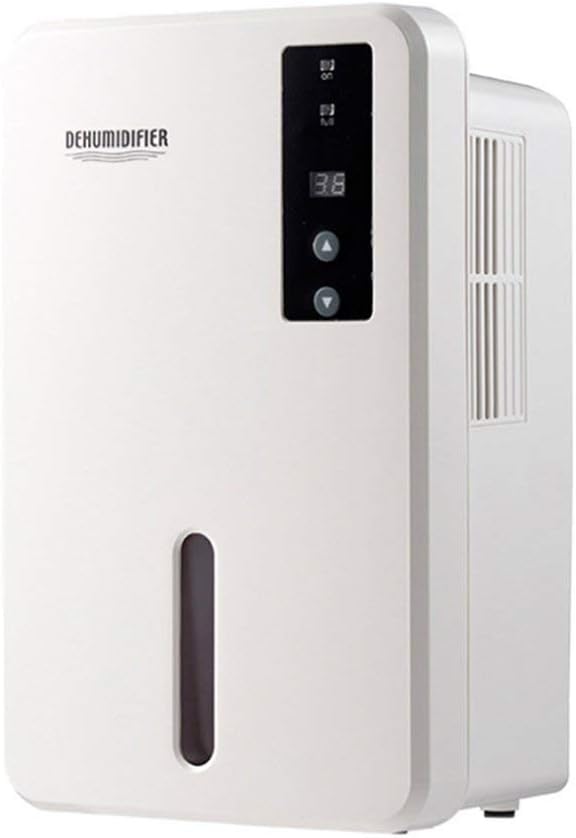
ຮູບພາບ 1.1: ດ້ານຫນ້າ view of the Daitsu ADDH10 Digital Dehumidifier, showing the control panel and water tank window.
2. ຂໍ້ມູນຄວາມປອດໄພ
ປະຕິບັດຕາມຄວາມລະມັດລະວັງດ້ານຄວາມປອດໄພຂັ້ນພື້ນຖານສະເໝີເມື່ອໃຊ້ເຄື່ອງໃຊ້ໄຟຟ້າເພື່ອຫຼຸດຜ່ອນຄວາມສ່ຽງຕໍ່ການເກີດອັກຄີໄພ, ໄຟຟ້າຊອດ ແລະ ການບາດເຈັບ.
- ອ່ານຄໍາແນະນໍາທັງຫມົດກ່ອນທີ່ຈະໃຊ້ເຄື່ອງດູດຄວາມຊຸ່ມຊື່ນ.
- ໃຫ້ແນ່ໃຈວ່າການສະຫນອງພະລັງງານກົງກັບ voltage ລະບຸໄວ້ໃນປ້າຍການຈັດອັນດັບ.
- ຫ້າມໃຊ້ເຄື່ອງດູດຝຸ່ນດ້ວຍສາຍໄຟ ຫຼືປລັກສຽບທີ່ເສຍຫາຍ.
- ເກັບຮັກສາອຸປະກອນໃຫ້ຫ່າງຈາກແຫຼ່ງຄວາມຮ້ອນ, ແສງແດດໂດຍກົງ ແລະ ວັດສະດຸໄວໄຟ.
- Do not block the air inlet or outlet. Ensure adequate air circulation around the unit.
- ວາງເຄື່ອງດູດຄວາມຊຸ່ມໄວ້ເທິງພື້ນຜິວທີ່ໝັ້ນຄົງ ແລະ ຮາບພຽງສະເໝີ.
- Unplug the unit before cleaning, maintenance, or when not in use for extended periods.
- ເຄື່ອງໃຊ້ນີ້ບໍ່ໄດ້ມີຈຸດປະສົງເພື່ອໃຊ້ໂດຍບຸກຄົນ (ລວມທັງເດັກນ້ອຍ) ທີ່ມີຄວາມສາມາດທາງຮ່າງກາຍ, ຄວາມຮູ້ສຶກ ຫຼືຈິດໃຈທີ່ຫຼຸດລົງ, ຫຼືຂາດປະສົບການ ແລະຄວາມຮູ້, ເວັ້ນເສຍແຕ່ວ່າພວກເຂົາໄດ້ຮັບການຊີ້ນໍາ ຫຼືຄໍາແນະນໍາກ່ຽວກັບການນໍາໃຊ້ເຄື່ອງໃຊ້ໂດຍບຸກຄົນທີ່ຮັບຜິດຊອບຄວາມປອດໄພຂອງເຂົາເຈົ້າ.

Image 2.1: Illustration of the dehumidifier's double security protection, including automatic shut-off when the water tank is full and over-temperature protection (auto-stop if heat sink exceeds 80°C).
3. ອົງປະກອບ ແລະຄຸນສົມບັດຂອງຜະລິດຕະພັນ
ຄຸ້ນເຄີຍກັບສ່ວນປະກອບຫຼັກຂອງເຄື່ອງດູດຄວາມຊຸ່ມຂອງທ່ານ:
- ກະດານຄວບຄຸມ: ຈໍສະແດງຜົນດິຈິຕອນ ແລະ ປຸ່ມສຳລັບໃຊ້ງານ.
- ສາຍການບິນ: ບ່ອນທີ່ອາກາດຊຸ່ມຊື້ນເຂົ້າໄປໃນຫນ່ວຍບໍລິການ.
- ຊ່ອງສຽບອາກາດ: ບ່ອນທີ່ອາກາດແຫ້ງຖືກຂັບໄລ່ອອກ.
- ຖັງນໍ້າ: Collects condensed water. Features a transparent window to monitor water level.
- Water Tank Handle/Lid: For easy removal and emptying.

Image 3.1: Diagram showing the key components: Air outlet, Control panel, Air inlet, and the 1.5L water tank capacity.
The dehumidifier has a 1.5-liter water tank capacity and features automatic shut-off when the tank is full, indicated by a float sensor. It also includes over-temperature protection.
4. ການຕິດຕັ້ງແລະການຕິດຕັ້ງ
4.1 ການຫຸ້ມຫໍ່
- ເອົາເຄື່ອງດູດຄວາມຊຸ່ມອອກຈາກບັນຈຸພັນຂອງມັນຢ່າງລະມັດລະວັງ.
- ເອົາວັດສະດຸຫຸ້ມຫໍ່, ເທບ, ແລະຮູບເງົາປ້ອງກັນທັງຫມົດ.
- Inspect the unit for any signs of damage. If damaged, do not operate and contact your retailer.
4.2 ການຈັດວາງ
- ວາງເຄື່ອງລະບາຍຄວາມຊຸ່ມຊື້ນໄວ້ເທິງພື້ນຜິວທີ່ແໜ້ນໜາ, ສາມາດຮັບນ້ຳໜັກໄດ້ເມື່ອຖັງນ້ຳເຕັມ.
- Ensure there is at least 20 cm (8 inches) of space around the air inlet and outlet for proper air circulation.
- Avoid placing the unit near walls, furniture, or curtains that could obstruct airflow.
- Do not place the unit in direct sunlight or near heat-generating appliances.
- ສໍາລັບປະສິດທິພາບທີ່ດີທີ່ສຸດ, ດໍາເນີນການ dehumidifier ໃນພື້ນທີ່ປິດລ້ອມ. ປິດປະຕູ ແລະປ່ອງຢ້ຽມທັງໝົດໃນຫ້ອງ.
4.3 ການເຊື່ອມຕໍ່ພະລັງງານ
- Ensure your hands are dry before plugging in the unit.
- ສຽບສາຍໄຟໃສ່ບ່ອນສຽບໄຟຟ້າທີ່ມີດິນຢ່າງຖືກຕ້ອງ.
5. ຄໍາແນະນໍາການດໍາເນີນງານ
5.1 ກະດານຄວບຄຸມຫຼາຍກວ່າview
The control panel features a digital display and control buttons:
- ຈໍດິຈິຕອນ: Shows current humidity level or settings.
- ປຸ່ມເປີດປິດ: ເປີດ ຫຼືປິດເຄື່ອງ.
- ປຸ່ມຂຶ້ນ/ລົງ: Adjust desired humidity level or other settings.

Image 5.1: Various angles of the dehumidifier, highlighting the digital control panel with up/down buttons and the transparent water tank.
5.2 ການດໍາເນີນງານພື້ນຖານ
- ເປີດ: Press the Power button to turn on the dehumidifier. The digital display will light up, showing the current room humidity.
- ຕັ້ງຄວາມຊຸ່ມຊື່ນທີ່ຕ້ອງການ: Use the Up and Down buttons to set your desired humidity level. The unit will operate until the room humidity reaches the set level, then cycle on and off to maintain it.
- ປິດ: Press the Power button again to turn off the dehumidifier.
5.3 ການລ້າງຖັງນໍ້າ
When the water tank is full, the dehumidifier will automatically stop operating, and an indicator light (if available) may illuminate. The unit will not resume operation until the tank is emptied and reinserted correctly.
- ຄ່ອຍໆດຶງຖັງນໍ້າອອກຈາກດ້ານໜ້າຂອງຕົວເຄື່ອງ.
- ເອົາຖັງໃສ່ບ່ອນຫລົ້ມຈົມຫຼືລະບາຍນ້ໍາຢ່າງລະມັດລະວັງ.
- Remove the tank lid (if applicable) and pour out the collected water.
- Replace the lid securely and slide the empty water tank back into the dehumidifier until it clicks into place.
- The unit will resume operation automatically if the power is on and the desired humidity level has not been reached.

Image 5.2: The transparent water tank, designed for easy removal and emptying.
6. ບໍາລຸງຮັກສາ
ການບຳລຸງຮັກສາເປັນປະຈຳຮັບປະກັນປະສິດທິພາບທີ່ດີທີ່ສຸດ ແລະ ຍືດອາຍຸການໃຊ້ງານຂອງເຄື່ອງດູດຄວາມຊຸ່ມຂອງທ່ານ. ໃຫ້ຖອດປລັກເຄື່ອງອອກສະເໝີກ່ອນປະຕິບັດການບຳລຸງຮັກສາໃດໆ.
6.1 ການທໍາຄວາມສະອາດຖັງນໍ້າ
- Clean the water tank regularly (e.g., every few weeks) to prevent mold and bacteria growth.
- Remove the water tank as described in Section 5.3.
- Wash the tank with mild detergent and warm water. Rinse thoroughly.
- Dry the tank completely before reinserting it into the unit.
6.2 ການອະນາໄມພາຍນອກ
- ເຊັດພາຍນອກຂອງ dehumidifier ອ່ອນໆ, damp ຜ້າ.
- ຢ່າໃຊ້ນໍ້າຢາເຮັດຄວາມສະອາດທີ່ມີສີຂັດ, ຕົວລະລາຍ ຫຼື ສານເຄມີຮຸນແຮງ, ເພາະວ່າສິ່ງເຫຼົ່ານີ້ສາມາດທໍາລາຍພື້ນຜິວໄດ້.
- ໃຫ້ແນ່ໃຈວ່າບໍ່ມີນ້ໍາເຂົ້າໄປໃນອົງປະກອບພາຍໃນ.
6.3 ການເກັບຮັກສາ
- ຖ້າເກັບຮັກສາເຄື່ອງດູດຄວາມຊຸ່ມເປັນເວລາດົນ, ໃຫ້ຮັບປະກັນວ່າຖັງນໍ້າຫວ່າງເປົ່າ ແລະ ສະອາດ.
- ເຮັດຄວາມສະອາດດ້ານນອກຂອງຫນ່ວຍງານ.
- ເກັບຮັກສາເຄື່ອງຢູ່ໃນຕໍາແຫນ່ງຕັ້ງຊື່ໃນບ່ອນທີ່ເຢັນ, ແຫ້ງ, ຫ່າງຈາກແສງແດດໂດຍກົງແລະອຸນຫະພູມທີ່ສຸດ.
7. ການແກ້ໄຂບັນຫາ
ກ່ອນທີ່ຈະຕິດຕໍ່ຫາຝ່າຍສະໜັບສະໜູນລູກຄ້າ, ກະລຸນາອ້າງອີງຄູ່ມືການແກ້ໄຂບັນຫາຕໍ່ໄປນີ້ສຳລັບບັນຫາທົ່ວໄປ:
| ບັນຫາ | ສາເຫດທີ່ເປັນໄປໄດ້ | ການແກ້ໄຂ |
|---|---|---|
| ເຄື່ອງດູດຄວາມຊຸ່ມຊື້ນບໍ່ເປີດ. | ບໍ່ມີການສະຫນອງພະລັງງານ. ສາຍໄຟບໍ່ໄດ້ສຽບຢ່າງປອດໄພ. |
ກວດເບິ່ງວ່າປລັກສຽບໄຟເຮັດວຽກຫຼືບໍ່. ກວດໃຫ້ແນ່ໃຈວ່າໄດ້ສຽບສາຍໄຟໃສ່ເຄື່ອງ ແລະປລັກສຽບໃສ່ຝາຢ່າງແໜ້ນໜາ. |
| ຫນ່ວຍບໍລິການກໍາລັງແລ່ນແຕ່ບໍ່ເກັບນ້ໍາ. | ຄວາມຊຸ່ມຊື່ນໃນຫ້ອງຕໍ່າຢູ່ແລ້ວ. ອຸນຫະພູມຕໍ່າເກີນໄປ. ການໄຫຼຂອງອາກາດຖືກສະກັດ. |
Check the current humidity level on the display. If it's below your set point, the unit will not collect water. ເຄື່ອງດູດຄວາມຊຸ່ມມີປະສິດທິພາບໜ້ອຍລົງໃນສະພາບແວດລ້ອມທີ່ໜາວເຢັນຫຼາຍ. ໃຫ້ແນ່ໃຈວ່າຊ່ອງສຽບອາກາດແລະທາງອອກບໍ່ໄດ້ຂັດຂວາງ. |
| Unit stops operating and indicator light is on. | ຖັງນ້ຳເຕັມແລ້ວ. ບໍ່ໄດ້ໃສ່ຖັງນໍ້າຢ່າງຖືກຕ້ອງ. |
ລ້າງຖັງນ້ໍາ. Reinsert the water tank correctly until it clicks into place. |
| ສິ່ງລົບກວນຜິດປົກກະຕິໃນລະຫວ່າງການປະຕິບັດງານ. | ຫນ່ວຍງານບໍ່ໄດ້ຢູ່ໃນລະດັບ. ບັນຫາອົງປະກອບພາຍໃນ. |
ໃຫ້ແນ່ໃຈວ່າເຄື່ອງໄດ້ຖືກວາງຢູ່ເທິງພື້ນຜິວທີ່ມີລະດັບຄວາມຫມັ້ນຄົງ. ຖ້າສຽງດັງຍັງຄົງຢູ່, ໃຫ້ຢຸດການນຳໃຊ້ ແລະຕິດຕໍ່ຝ່າຍຊ່ວຍເຫຼືອລູກຄ້າ. |
8. ຂໍ້ມູນຈໍາເພາະ
| ຄຸນສົມບັດ | ຂໍ້ມູນຈໍາເພາະ |
|---|---|
| ຍີ່ຫໍ້ | Daitsu |
| ໝາຍເລກຕົວແບບ | ADDH10 (Technical Model: bb_S0403263) |
| ສີ | ສີຂາວ |
| ນ້ໍາຫນັກລາຍການ | 10 ກິໂລກຣາມ |
| ຂະໜາດສິນຄ້າ (ປະມານ) | 286mm (ສູງ) x 180mm (ກວ້າງ) x 134mm (ຄວາມເລິກ) |
| ຄວາມອາດສາມາດຂອງຖັງນໍ້າ | 1.5 ລິດ |
| ຮູບແບບການເຮັດວຽກ | ອັດຕະໂນມັດ |
| ອົງປະກອບລວມ | ເຄື່ອງປັບຄວາມຊຸ່ມຊື່ນ |
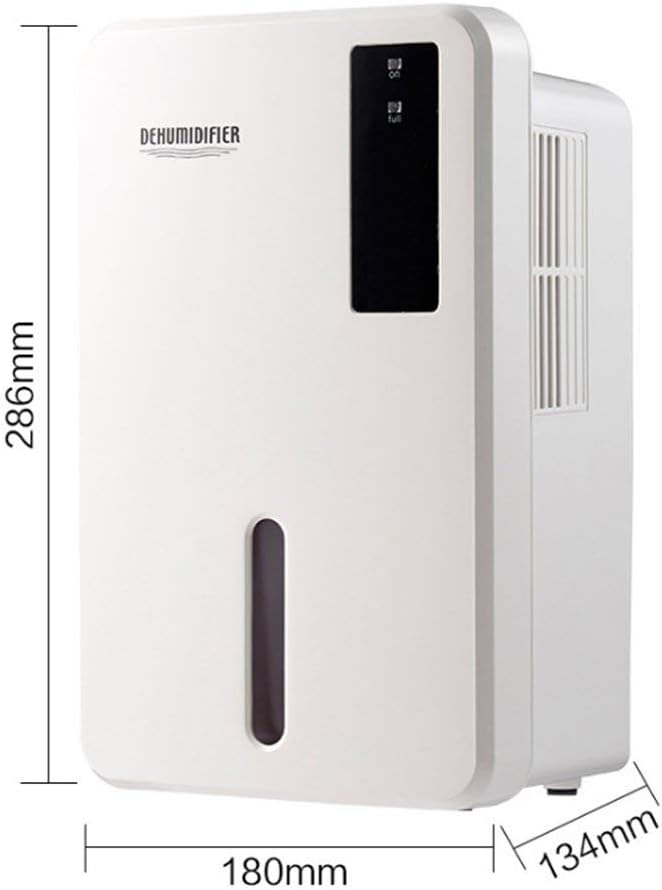
Image 8.1: Diagram illustrating the dimensions of the dehumidifier: 286mm height, 180mm width, and 134mm depth.
9. ການຮັບປະກັນແລະການສະຫນັບສະຫນູນ
For warranty information, please refer to the documentation included with your product packaging or visit the official Daitsu webເວັບໄຊ. ຂໍ້ກໍານົດແລະເງື່ອນໄຂການຮັບປະກັນອາດຈະແຕກຕ່າງກັນໄປຕາມພາກພື້ນແລະຮ້ານຂາຍຍ່ອຍ.
If you encounter issues not covered in the troubleshooting section or require further assistance, please contact your retailer or the manufacturer's customer support. Have your model number (ADDH10) and purchase details ready when contacting support.