
1. ບົດແນະນຳ
ຂອບໃຈສໍາລັບການຊື້asing the Caliber HPG415BT/B Portable Bluetooth Speaker. This manual provides important information regarding the safe and efficient operation of your device. Please read it thoroughly before use and retain it for future reference.
ເນື້ອໃນຊຸດ
- Caliber HPG415BT/B Portable Bluetooth Speaker
- USB to Mini USB Charging Cable
- ສາຍສຽງ 3.5 ມມ
- ການຄວບຄຸມໄລຍະໄກ
- ຄູ່ມືການສອນ
2. ຂໍ້ມູນຄວາມປອດໄພ
ເພື່ອຮັບປະກັນການເຮັດວຽກທີ່ປອດໄພ ແລະປ້ອງກັນຄວາມເສຍຫາຍ, ກະລຸນາປະຕິບັດຕາມຄໍາແນະນໍາດ້ານຄວາມປອດໄພຕໍ່ໄປນີ້:
- ຢ່າເຮັດໃຫ້ອຸປະກອນຖືກຝົນ, ຄວາມຊຸ່ມຊື່ນ, ຫຼືອຸນຫະພູມທີ່ຮຸນແຮງ.
- ຫຼີກເວັ້ນການວາງລໍາໂພງຢູ່ໃກ້ກັບແຫຼ່ງຄວາມຮ້ອນເຊັ່ນ: ລັງສີ, ເຕົາ, ຫຼືເຄື່ອງໃຊ້ຜະລິດຄວາມຮ້ອນອື່ນໆ.
- ຫ້າມຖອດປະກອບ, ສ້ອມແປງ ຫຼື ດັດແປງເຄື່ອງດ້ວຍຕົວທ່ານເອງ. ໃຫ້ສົ່ງບໍລິການທັງໝົດໄປຫາພະນັກງານທີ່ມີຄຸນວຸດທິ.
- Use only the specified charging cable and power adapter (5V USB) to charge the battery.
- ຮັກສາອຸປະກອນໃຫ້ຫ່າງຈາກສະຫນາມແມ່ເຫຼັກທີ່ເຂັ້ມແຂງ.
- Clean the device only with a dry, soft cloth. Do not use liquid cleaners.
3. ຄຸນລັກສະນະຂອງຜະລິດຕະພັນ
The Caliber HPG415BT/B speaker offers a range of features for versatile audio playback:
- ເທັກໂນໂລຍີ Bluetooth ແບບໄຮ້ສາຍ: Connect wirelessly to compatible devices within a 10-meter range (Bluetooth version 2.1, supports A2DP and AVRCP profiles).
- ຕົວເລືອກການຫຼິ້ນຫຼາຍອັນ: Play audio from USB drives and SD cards (up to 32GB).
- ວິທະຍຸ FM: Enjoy your favorite radio stations with automatic search and storage functions.
- ຈໍສະແດງຜົນ LED: Provides clear information on current mode and status.
- High Power Sound: Equipped with 2x 3W speakers for a total of 6W RMS output.
- ແບັດເຕີຣີທີ່ສາມາດສາກໄດ້ແບບປະສົມປະສານ: Offers up to 5 hours of continuous playback.
- ການຄວບຄຸມ intuitive: Features buttons for previous/next track, play/pause, mode selection, EQ adjustment, and volume control.
- ວັດສະດຸປ້ອນສຽງ 3.5 ມມ: Connect external audio devices via the included audio cable.
- ການຄວບຄຸມໄລຍະໄກ: Conveniently operate the speaker from a distance.
4. ການຄວບຄຸມແລະການເຊື່ອມຕໍ່
Familiarize yourself with the speaker's controls and connection ports:
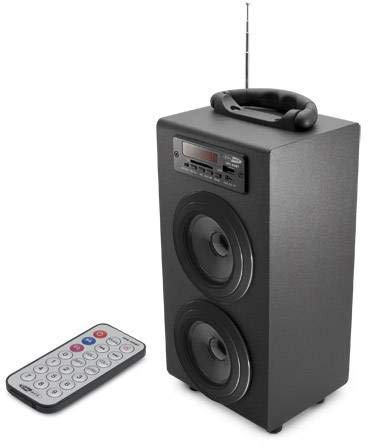
Image 1: Caliber HPG415BT/B Portable Bluetooth Speaker. This image shows the overall design of the speaker, featuring a tubular shape, front-facing speakers, and a control panel on the top or front.
Control Panel (Typical Layout)
- ປຸ່ມ MODE: Switches between Bluetooth, FM Radio, USB, SD, and AUX modes.
- ປຸ່ມ PLAY/PAUSE: ເລີ່ມຕົ້ນຫຼືຢຸດຊົ່ວຄາວການຫຼິ້ນ.
- PREVIOUS/NEXT Buttons: Skips tracks in media modes or changes radio stations in FM mode.
- ປຸ່ມປັບລະດັບສຽງ +/-: ປັບລະດັບສຽງອອກ.
- ປຸ່ມ EQ: ຮອບວຽນຜ່ານ presets equalizer.
- ປິດ/ເປີດພະລັງງານ: Located typically on the rear or side.
Connection Ports (Typical Layout)
- ພອດ USB: ສໍາລັບການເຊື່ອມຕໍ່ USB flash drive.
- ຊ່ອງໃສ່ບັດ SD: ສໍາລັບການໃສ່ກາດຫນ່ວຍຄວາມຈໍາ SD.
- AUX Input (3.5mm): ສຳລັບການເຊື່ອມຕໍ່ອຸປະກອນສຽງພາຍນອກຜ່ານສາຍ.
- Mini USB Charging Port: ສໍາລັບການເຊື່ອມຕໍ່ສາຍສາກໄຟ.
5. ຕັ້ງຄ່າ
5.1 ການສາກໄຟເບື້ອງຕົ້ນ
- Before first use, fully charge the speaker's internal battery.
- Connect the supplied Mini USB cable to the speaker's charging port.
- Connect the other end of the USB cable to a 5V USB power source (e.g., a computer USB port or a USB wall adapter, not included).
- The LED indicator will show charging status. Once fully charged, the indicator may change color or turn off.
5.2 ການເປີດ/ປິດ
- To power on, slide the Power ON/OFF switch to the 'ON' position. The LED display will light up.
- To power off, slide the Power ON/OFF switch to the 'OFF' position.
6. ຄໍາແນະນໍາການດໍາເນີນງານ
6.1 ແບບບູທູດ
- Power on the speaker. It will automatically enter Bluetooth pairing mode, indicated by a flashing Bluetooth icon on the LED display.
- ເປີດໃຊ້ Bluetooth ໃນໂທລະສັບສະຫຼາດ, ແທັບເລັດ, ຫຼືອຸປະກອນອື່ນໆທີ່ເປີດໃຊ້ Bluetooth ຂອງທ່ານ.
- ຊອກຫາ available Bluetooth devices and select "HPG415BT" from the list.
- ເມື່ອຈັບຄູ່ແລ້ວ, ລຳໂພງຈະສົ່ງສຽງຢືນຢັນ, ແລະໄອຄອນ Bluetooth ໃນໜ້າຈໍຈະຢຸດກະພິບ.
- You can now play audio from your connected device through the speaker. Use the PLAY/PAUSE and PREVIOUS/NEXT buttons on the speaker or remote to control playback.
ໂໝດວິທະຍຸ 6.2 FM
- ກົດ ໂໝດ button repeatedly until "FM" appears on the LED display.
- To perform an automatic station scan, press and hold the ຫຼິ້ນ/ຢຸດຊົ່ວຄາວ button. The speaker will scan and save available FM stations.
- ໃຊ້ ກ່ອນ / ຕໍ່ໄປ ປຸ່ມເພື່ອນໍາທາງຜ່ານສະຖານີທີ່ບັນທຶກໄວ້.
6.3 ການຫຼິ້ນບັດ USB/SD
- ສຽບ USB flash drive ເຂົ້າໄປໃນຜອດ USB ຫຼື SD card ເຂົ້າໄປໃນຊ່ອງ SD card.
- ລຳໂພງຈະປ່ຽນເປັນໂໝດ USB ຫຼື SD ໂດຍອັດຕະໂນມັດ ແລະ ເລີ່ມຫຼິ້ນສຽງ fileຖ້າບໍ່, ໃຫ້ກົດປຸ່ມ ໂໝດ ປຸ່ມເພື່ອເລືອກແຫຼ່ງທີ່ຖືກຕ້ອງ.
- ໃຊ້ ຫຼິ້ນ/ຢຸດຊົ່ວຄາວ ແລະ ກ່ອນ / ຕໍ່ໄປ ປຸ່ມເພື່ອຄວບຄຸມການຫຼິ້ນ.
6.4 ໂໝດປ້ອນຂໍ້ມູນ AUX
- Connect one end of the supplied 3.5mm audio cable to the speaker's AUX input port.
- ເຊື່ອມຕໍ່ປາຍອີກດ້ານໜຶ່ງຂອງສາຍເຂົ້າກັບຊ່ອງສຽບຫູຟັງ ຫຼື ຊ່ອງສຽບສຽງອອກຂອງອຸປະກອນສຽງພາຍນອກຂອງທ່ານ.
- ກົດ ໂໝດ button repeatedly until "AUX" appears on the LED display.
- Control playback and volume directly from your external audio device.
7. ການສາກແບັດເຕີຣີ
When the battery is low, the speaker may emit an audible warning or the LED indicator will show a low battery status. To charge:
- Connect the Mini USB charging cable to the speaker's charging port.
- Connect the USB end to a 5V USB power source.
- The charging indicator will illuminate. Charging typically takes several hours.
- Once fully charged, the indicator will change or turn off. Disconnect the charging cable.
8. ບໍາລຸງຮັກສາ
- ທໍາຄວາມສະອາດ: ໃຊ້ຜ້າອ່ອນໆແຫ້ງເຊັດດ້ານນອກຂອງລຳໂພງ. ຢ່າໃຊ້ນໍ້າຢາເຮັດຄວາມສະອາດທີ່ມີສີຂັດ, ຂີ້ເຜີ້ງ ຫຼື ຕົວລະລາຍ.
- ການເກັບຮັກສາ: ເມື່ອບໍ່ໄດ້ໃຊ້ເປັນເວລາດົນ, ໃຫ້ເກັບຮັກສາລຳໂພງໄວ້ໃນບ່ອນເຢັນ, ແຫ້ງ, ຫ່າງຈາກແສງແດດໂດຍກົງ ແລະ ອຸນຫະພູມທີ່ຮ້າຍກາດ.
- ການດູແລຫມໍ້ໄຟ: ເພື່ອຍືດອາຍຸແບັດເຕີລີ, ຫຼີກເວັ້ນການຖອດແບດເຕີລີ່ເຕັມເລື້ອຍໆ. ໄລ່ມັນເປັນປົກກະຕິ, ເຖິງແມ່ນວ່າບໍ່ໄດ້ຢູ່ໃນການນໍາໃຊ້.
9. ການແກ້ໄຂບັນຫາ
| ບັນຫາ | ສາເຫດທີ່ເປັນໄປໄດ້ | ການແກ້ໄຂ |
|---|---|---|
| ບໍ່ມີພະລັງງານ | Battery is discharged; Power switch is OFF. | Charge the battery; Slide the power switch to ON. |
| ບໍ່ມີສຽງ | ລະດັບສຽງຕໍ່າເກີນໄປ; ເລືອກໂໝດບໍ່ຖືກຕ້ອງ; ອຸປະກອນບໍ່ໄດ້ເຊື່ອມຕໍ່ຢ່າງຖືກຕ້ອງ. | Increase volume; Press MODE to select correct source; Reconnect device. |
| Bluetooth ບໍ່ເຊື່ອມຕໍ່ | ລຳໂພງບໍ່ໄດ້ຢູ່ໃນໂໝດຈັບຄູ່; Bluetooth ຂອງອຸປະກອນປິດຢູ່; ລຳໂພງຢູ່ໄກຈາກອຸປະກອນເກີນໄປ. | Ensure speaker is in Bluetooth mode and flashing; Enable Bluetooth on your device; Move devices closer (within 10m). |
| ວິທະຍຸ FM ຄົງທີ່ | ສັນຍານອ່ອນ; ແຊກແຊງ. | Relocate the speaker for better reception; Perform an auto-scan again. |
10. ຂໍ້ມູນຈໍາເພາະ
- ຕົວແບບ: HPG415BT/B
- ພະລັງງານອອກ: 6W RMS (2x 3W)
- ລຸ້ນ Bluetooth: 2.1
- ຊ່ວງການເຮັດວຽກ Bluetooth: ເຖິງ 10 ແມັດ
- ການເຊື່ອມຕໍ່: Bluetooth, USB, SD Card, 3.5mm AUX Input
- ສື່ມວນຊົນສະຫນັບສະຫນູນ: USB drives, SD cards (up to 32GB)
- ວິທະຍຸ FM: Yes, with auto-scan
- ຈໍສະແດງຜົນ: LED
- ປະເພດຫມໍ້ໄຟ: Integrated Rechargeable
- ຊີວິດຫມໍ້ໄຟ: ສູງສຸດ 5 ຊົ່ວໂມງ
- ການສາກໄຟ: USB 5V
- ຂະໜາດ (L x W x H): 140 x 120 x 280 ມມ
- ນ້ຳໜັກ: ປະມານ 1.04 kg (2.29 lbs)
- ປະເພດການຄວບຄຸມ: Buttons, Remote Control
11. ການຮັບປະກັນແລະການສະຫນັບສະຫນູນ
Caliber products are designed and manufactured to the highest quality standards. For warranty information or technical support, please refer to the warranty card included with your product or visit the official Caliber webເວັບໄຊທ for ສໍາລັບລາຍລະອຽດການຕິດຕໍ່.