
ແນະນຳ
This manual provides essential information for the safe operation, maintenance, and care of your Hyper Tough 2.4A Orbit Sander, Model 2112. Please read and understand all instructions before using the product to ensure proper function and to prevent injury.
The Hyper Tough 2.4A Orbit Sander is designed for dry sanding on painted surfaces, wood, plastic, and metal. It is suitable for smoothing rough surfaces, removing old finishes, and preparing surfaces for new paint or other finishes.
ຂໍ້ມູນຄວາມປອດໄພທົ່ວໄປ
ຄຳເຕືອນ: ອ່ານຄຳເຕືອນຄວາມປອດໄພທັງໝົດ, ຄຳແນະນຳ, ຮູບປະກອບ, ແລະຂໍ້ສະເພາະທີ່ສະໜອງໃຫ້ກັບເຄື່ອງມືໄຟຟ້ານີ້. ການບໍ່ປະຕິບັດຕາມຄໍາແນະນໍາທັງຫມົດທີ່ລະບຸໄວ້ຂ້າງລຸ່ມນີ້ອາດຈະເຮັດໃຫ້ໄຟຟ້າຊ໊ອກ, ໄຟໄຫມ້, ແລະ / ຫຼືການບາດເຈັບທີ່ຮ້າຍແຮງ.
ຄວາມປອດໄພໃນພື້ນທີ່ເຮັດວຽກ
- ຮັກສາພື້ນທີ່ເຮັດວຽກໃຫ້ສະອາດ ແລະ ມີແສງສະຫວ່າງດີ. ພື້ນທີ່ວຸ້ນວາຍ ຫຼືບ່ອນມືດພາໃຫ້ເກີດອຸປະຕິເຫດ.
- ຫ້າມໃຊ້ເຄື່ອງມືໄຟຟ້າໃນບັນຍາກາດທີ່ລະເບີດ, ເຊັ່ນໃນທີ່ປະທັບຂອງຂອງແຫຼວ, ອາຍແກັສ, ຫຼືຝຸ່ນ. ເຄື່ອງມືພະລັງງານສ້າງປະກາຍໄຟທີ່ອາດຈະຕິດເຊື້ອຂີ້ຝຸ່ນຫຼືຄວັນ.
- ຮັກສາເດັກນ້ອຍ ແລະຜູ້ຢືນຢູ່ຫ່າງໆ ໃນຂະນະທີ່ໃຊ້ເຄື່ອງມືໄຟຟ້າ. ສິ່ງລົບກວນສາມາດເຮັດໃຫ້ເຈົ້າສູນເສຍການຄວບຄຸມ.
ຄວາມປອດໄພທາງໄຟຟ້າ
- ປລັກເຄື່ອງມືໄຟຟ້າຕ້ອງກົງກັບປລັກສຽບໄຟ. ບໍ່ເຄີຍດັດແປງປລັກສຽບໃນທາງໃດກໍ່ຕາມ.
- ຫຼີກເວັ້ນການສໍາຜັດກັບຮ່າງກາຍກັບພື້ນດິນຫຼືຫນ້າດິນ, ເຊັ່ນ: ທໍ່, radiators, ຂອບເຂດ, ແລະຕູ້ເຢັນ. ມີຄວາມສ່ຽງສູງຕໍ່ການເກີດໄຟຟ້າຊັອດ ຖ້າຮ່າງກາຍຂອງເຈົ້າຖືກດິນ ຫຼືດິນ.
- ຫ້າມບໍ່ໃຫ້ເຄື່ອງໃຊ້ໄຟຟ້າຖືກຝົນ ຫຼືສະພາບທີ່ປຽກ. ນ້ໍາເຂົ້າໄປໃນເຄື່ອງມືໄຟຟ້າຈະເພີ່ມຄວາມສ່ຽງຕໍ່ການຊ໊ອກໄຟຟ້າ.
- ຢ່າໃຊ້ສາຍບື. ຫ້າມໃຊ້ສາຍເພື່ອຖື, ດຶງ, ຫຼືຖອດສາຍໄຟ. ຮັກສາສາຍໄຟໃຫ້ຫ່າງຈາກຄວາມຮ້ອນ, ນໍ້າມັນ, ແຄມແຫຼມ, ຫຼືພາກສ່ວນທີ່ເຄື່ອນຍ້າຍ. ສາຍບືທີ່ເສຍຫາຍ ຫຼື ສາຍບື ເພີ້ມຄວາມສ່ຽງຕໍ່ການເກີດໄຟຟ້າຊັອດ.
ຄວາມປອດໄພສ່ວນຕົວ
- ໃສ່ເຄື່ອງປ້ອງກັນຕາສະເໝີ. ໃຊ້ແວ່ນຕານິລະໄພ ຫຼືແວ່ນຕາ.
- Wear appropriate personal protective equipment such as a dust mask, non-skid safety shoes, hard hat, or hearing protection for appropriate conditions.
- ບໍ່ເກີນ. ຮັກສາຕີນທີ່ຖືກຕ້ອງແລະສົມດຸນຢູ່ຕະຫຼອດເວລາ. ນີ້ເຮັດໃຫ້ການຄວບຄຸມເຄື່ອງມືພະລັງງານທີ່ດີກວ່າໃນສະຖານະການທີ່ບໍ່ຄາດຄິດ.
- ແຕ່ງຕົວໃຫ້ຖືກຕ້ອງ. ຢ່າໃສ່ເຄື່ອງນຸ່ງຫລູຫລາຫຼືເຄື່ອງປະດັບ. ຮັກສາຜົມ ແລະເຄື່ອງນຸ່ງຂອງເຈົ້າໃຫ້ຫ່າງຈາກພາກສ່ວນທີ່ເຄື່ອນຍ້າຍ. ເຄື່ອງນຸ່ງຫລູຫລາ, ເຄື່ອງປະດັບ, ຫຼືຜົມຍາວສາມາດຈັບໄດ້ໃນສ່ວນທີ່ເຄື່ອນຍ້າຍ.
ສິນຄ້າເກີນview
Familiarize yourself with the components of your Hyper Tough 2.4A Orbit Sander before operation.
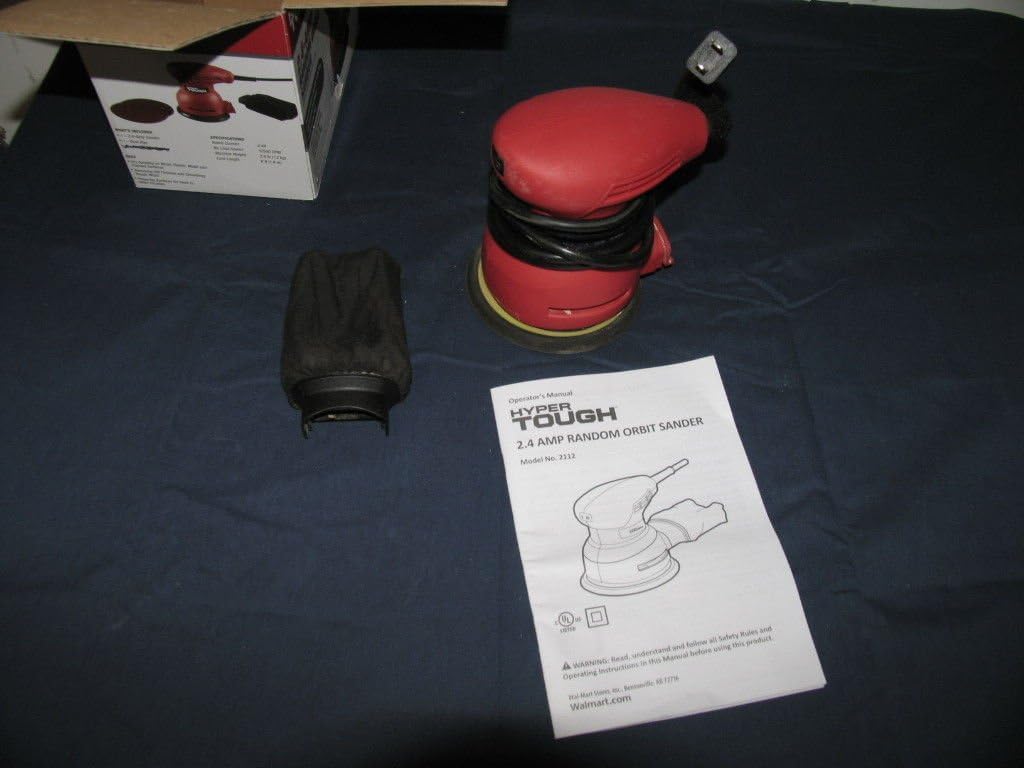
ຮູບທີ 1: Hyper Tough 2.4A Orbit Sander with accessories and manual.

ຮູບທີ 2: Underside of the sander with dust bag attached.
ອົງປະກອບທີ່ສໍາຄັນ:
- ແຜ່ນຂັດ: Hook-and-loop system for quick sandpaper changes.
- ຖົງເກັບຂີ້ຝຸ່ນ: Attaches to the sander for dust extraction.
- ປຸ່ມເປີດ/ປິດ: Sealed to prevent dust ingress.
- ສາຍໄຟ: 6-foot length for extended reach.
ຕັ້ງຄ່າ
ການຕິດເຈ້ຍຊາຍ
- ໃຫ້ແນ່ໃຈວ່າໄດ້ຖອດ sander ອອກຈາກແຫຼ່ງພະລັງງານ.
- Select the appropriate grit sandpaper for your task. The sander uses hook-and-loop sandpaper.
- Align the holes on the sandpaper with the holes on the sanding pad to ensure proper dust extraction.
- Press the sandpaper firmly onto the sanding pad, ensuring it is securely attached across the entire surface.
ຕິດຖົງເກັບຂີ້ຝຸ່ນ
- ກວດໃຫ້ແນ່ໃຈວ່າໄດ້ຖອດປລັກ sander ແລ້ວ.
- Locate the dust extraction port on the sander.
- Slide the dust collection bag onto the port until it is firmly seated. Ensure a tight fit to maximize dust collection efficiency.
ຄໍາແນະນໍາການດໍາເນີນງານ
ກ່ອນທີ່ຈະດໍາເນີນການ
- Always wear safety glasses and a dust mask.
- ໃຫ້ແນ່ໃຈວ່າ workpiece ໄດ້ຢ່າງປອດໄພ clampຖືກບີບ ຫຼື ຖືກະໄວ້ເພື່ອປ້ອງກັນການເຄື່ອນທີ່ໃນລະຫວ່າງການຂັດ.
- Check that the sandpaper is correctly attached and the dust bag is securely in place.
- ສຽບ sander ເຂົ້າໄປໃນປ່ຽງໄຟຟ້າທີ່ເຫມາະສົມ.
Sanding Procedure
- ຖື sander ແຫນ້ນດ້ວຍມືທັງສອງ.
- Place the sanding pad flat on the workpiece before turning the tool on.
- Press the On/Off switch to start the sander.
- Move the sander slowly and evenly over the surface in overlapping circular or linear patterns. Avoid applying excessive pressure; the weight of the tool is usually sufficient.
- Keep the sander moving to prevent gouging or creating swirl marks. The mechanical pad brake helps reduce free-spin to minimize gouging.
- When finished, lift the sander from the workpiece before turning it off.
- Press the On/Off switch to turn the sander off.
- Unplug the sander from the power source after use.
ໝາຍເຫດ: For best results, start with a coarser grit sandpaper to remove material quickly, then switch to finer grits for a smoother finish.
ບໍາລຸງຮັກສາ
ທໍາຄວາມສະອາດ
- ຖອດປລັກ sander ກ່ອນທຳຄວາມສະອາດທຸກຄັ້ງ.
- ເຊັດດ້ານນອກຂອງເຄື່ອງມືໃຫ້ສະອາດ, ງamp ຜ້າ. ຢ່າໃຊ້ສານເຄມີທີ່ຮຸນແຮງຫຼືເຄື່ອງເຮັດຄວາມສະອາດຂັດ.
- ທຳຄວາມສະອາດຊ່ອງລະບາຍອາກາດເປັນໄລຍະເພື່ອປ້ອງກັນຄວາມຮ້ອນເກີນໄປ. ໃຊ້ລົມອັດຖ້າມີ.
ຖົງເກັບຂີ້ຝຸ່ນ
- Empty the dust collection bag frequently, especially when sanding fine dust. A full bag reduces dust extraction efficiency.
- To empty, remove the bag from the sander and shake out the dust.
- Clean the inside of the bag periodically to ensure optimal airflow.
ແຜ່ນຂັດ
- Inspect the sanding pad regularly for wear or damage. Replace if necessary to maintain sanding performance.
- Ensure the hook-and-loop surface is clean and free of debris for proper sandpaper adhesion.
ການແກ້ໄຂບັນຫາ
| ບັນຫາ | ສາເຫດທີ່ເປັນໄປໄດ້ | ການແກ້ໄຂ |
|---|---|---|
| Sander ບໍ່ໄດ້ເລີ່ມຕົ້ນ. | ບໍ່ມີການສະຫນອງພະລັງງານ. ສະຫຼັບຜິດພາດ. | ກວດເບິ່ງສາຍໄຟ ແລະປລັກສຽບໄຟ. Contact customer support for switch replacement. |
| ການເກັບຂີ້ຝຸ່ນທີ່ບໍ່ດີ. | ຖົງຂີ້ຝຸ່ນເຕັມຫຼືຕິດກັນບໍ່ຖືກຕ້ອງ. ຮູກະດາດຊາຍບໍ່ຕົງກັນ. | ຖອກຝຸ່ນອອກໃຫ້ໝົດ ແລະ ຕິດຖົງຂີ້ຝຸ່ນຄືນໃຫ້ແໜ້ນ. Ensure sandpaper holes align with pad holes. |
| ການສັ່ນສະເທືອນຫຼືສຽງດັງເກີນໄປ. | ແຜ່ນຂັດທີ່ເສຍຫາຍ. ກະດາດຊາຍວ່າງ. | ກວດສອບ ແລະ ປ່ຽນແຜ່ນຂັດຖ້າເສຍຫາຍ. Reattach sandpaper firmly. |
| Sander ປ່ອຍໃຫ້ເຄື່ອງຫມາຍ swirl. | Applying too much pressure. Not moving the sander evenly. ເຈ້ຍຊາຍ. | ຫຼຸດຜ່ອນຄວາມກົດດັນ. Move sander smoothly and evenly. ປ່ຽນເຈ້ຍຊາຍ. |
ຂໍ້ມູນຈໍາເພາະ
- ໝາຍເລກຕົວແບບ: 2112
- ຍີ່ຫໍ້: Hyper Tough
- ແຫຼ່ງພະລັງງານ: ໄຟຟ້າ
- AC ອະແດບເຕີໃນປະຈຸບັນ: 2.4 Amps
- ປະເພດ Grit: Medium (typically ships with 80 grit)
- ນ້ໍາຫນັກລາຍການ: 5 ປອນ (ປະມານ 2.27 ກິໂລ)
- ຂະໜາດຜະລິດຕະພັນ: 7 x 5 x 4.8 ນິ້ວ (ປະມານ 17.8 x 12.7 x 12.2 ຊມ)
- ຄວາມຍາວສາຍ: 6 ຟຸດ (ປະມານ 1.83 ແມັດ)
- ແຜ່ນຂັດ: ລະບົບ Hook-and-loop
ການຮັບປະກັນແລະການສະຫນັບສະຫນູນ
This product is tested and certified to look and work like new. For specific warranty information or technical support, please refer to the documentation included with your purchase or contact the manufacturer directly. Keep your purchase receipt as proof of purchase.
For further assistance, please visit the Hyper Tough webເວັບໄຊ ຫຼືຕິດຕໍ່ພະແນກບໍລິການລູກຄ້າຂອງເຂົາເຈົ້າ.