
SHARP IG-HC15-B
SHARP Plasmacluster Ion Generator IG-HC15-B Instruction Manual
Model: IG-HC15-B
1. ບົດແນະນຳ
ຂອບໃຈສໍາລັບການຊື້asing the SHARP Plasmacluster Ion Generator IG-HC15-B. This device is designed to improve the air quality in your vehicle by generating high-density Plasmacluster 25000 ions. It effectively reduces odors, collects pollen, and fine dust particles, providing a more comfortable environment. Please read this manual thoroughly before use to ensure proper operation and maintenance.
2. ຂໍ້ຄວນລະວັງຄວາມປອດໄພ
To prevent injury to yourself and others, or damage to the product, always observe the following safety precautions:
- Do not disassemble, repair, or modify the unit. This may cause electric shock, fire, or malfunction.
- Do not allow water or any liquids to enter the unit. This may cause electric shock or fire.
- Use only the provided USB car adapter and USB cable. Using incompatible power sources may cause fire or damage.
- Ensure the unit is securely placed in a cup holder and does not obstruct the driver's view or interfere with driving operations.
- Keep the air inlet and outlet clear of obstructions. Blocked airflow can reduce performance or cause overheating.
- Do not use the unit in extremely hot or humid environments, or where flammable gases are present.
3. ເນື້ອໃນຊຸດ
ກວດສອບວ່າລາຍການທັງຫມົດແມ່ນມີຢູ່ໃນຊຸດ:
- SHARP Plasmacluster Ion Generator (Main Unit)
- ອະແດັບເຕີລົດ USB
- USB Cable (approx. 1.5m)
- ແປງຫົວຫນ່ວຍ
4. ຜະລິດຕະພັນເກີນview
The SHARP Plasmacluster Ion Generator IG-HC15-B is designed to fit conveniently into your vehicle's cup holder. It features a sleek black design and intuitive controls.

ຮູບພາບ 1: ດ້ານຫນ້າ view of the SHARP Plasmacluster Ion Generator IG-HC15-B, showing the main unit with its cup holder design and USB cable connection.
ອົງປະກອບທີ່ສໍາຄັນ:
- ຊ່ອງສຽບອາກາດ: Where purified air and Plasmacluster ions are released.
- ກະດານຄວບຄຸມ: Features large buttons for easy operation (Power, Mode selection).
- ສາຍການບິນ: Located at the bottom, draws in ambient air.
- ພອດ USB: ສໍາລັບການເຊື່ອມຕໍ່ພະລັງງານ.
5. ຕັ້ງຄ່າ
Follow these steps to set up your Plasmacluster Ion Generator:
- ວາງຫົວຫນ່ວຍ: Insert the main unit firmly into a vehicle cup holder. Ensure it is stable and does not wobble during driving.
- ເຊື່ອມຕໍ່ສາຍ USB: Connect one end of the provided USB cable to the USB port on the bottom of the ion generator.
- ເຊື່ອມຕໍ່ກັບພະລັງງານ: Plug the other end of the USB cable into the provided USB car adapter. Then, insert the USB car adapter into your vehicle's 12V accessory power outlet (cigarette lighter socket).
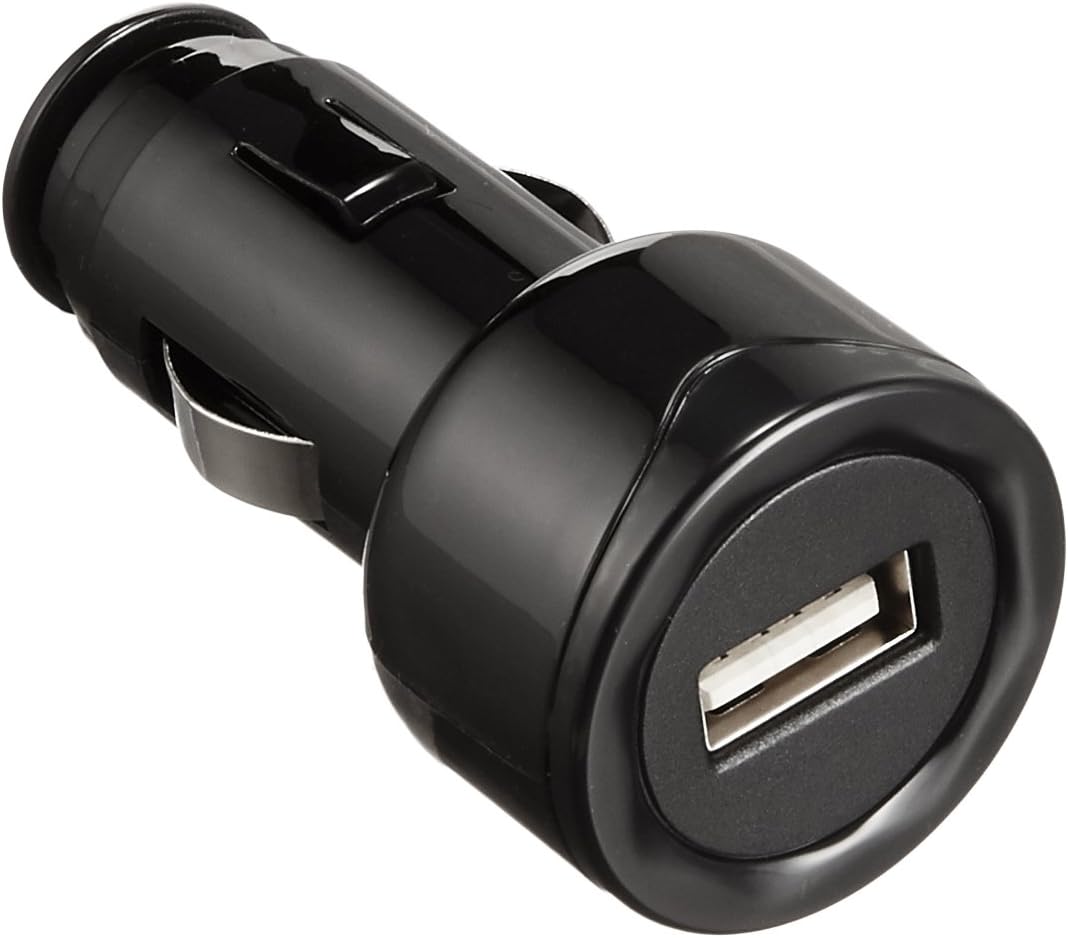
Image 2: The included USB car adapter, used to power the unit from your vehicle's accessory outlet.
6. ຄໍາແນະນໍາການດໍາເນີນງານ
The unit is designed for simple operation with large, easy-to-press buttons.
ເປີດ/ປິດ:
- ເພື່ອເປີດເຄື່ອງ, ກົດປຸ່ມ ພະລັງງານ button. The unit will start in the default operating mode.
- ເພື່ອປິດເຄື່ອງ, ກົດປຸ່ມ ພະລັງງານ ປຸ່ມອີກເທື່ອຫນຶ່ງ.
ຮູບແບບການເຮັດວຽກ:
ກົດ ໂໝດ ປຸ່ມເພື່ອວົງຈອນຜ່ານໂຫມດປະຕິບັດງານທີ່ມີຢູ່:
- ໂໝດມາດຕະຖານ: Provides balanced air purification and ion generation for everyday use.
- ໂໝດ Turbo: Activates high-speed operation for approximately double the deodorization speed. Ideal for quickly removing strong odors.
- ແບບງຽບ: Operates at a reduced fan speed for quieter performance, suitable for use in a quiet vehicle environment. The operating noise level is approximately 36dB in this mode.
Airflow Angle Adjustment:
The unit features a 2-stage switching mechanism for adjusting the blowing angle of the airflow. Manually adjust the top part of the unit to direct the airflow as desired.
7. ບໍາລຸງຮັກສາ
Regular cleaning ensures optimal performance and extends the lifespan of your ion generator.
ທໍາຄວາມສະອາດຫນ່ວຍບໍລິການຕົ້ນຕໍ:
- Before cleaning, ensure the unit is powered off and disconnected from the power source.
- ເຊັດດ້ານນອກຂອງເຄື່ອງດ້ວຍຜ້າອ່ອນ, ແຫ້ງ. ຢ່າໃຊ້ເຄື່ອງເຮັດຄວາມສະອາດຂັດຫຼືສານລະລາຍ.
- Use the provided unit cleaning brush to gently remove dust and debris from the air inlet and outlet grilles.
Cleaning the Ion Generating Unit:
The ion generating unit requires periodic cleaning to maintain ion generation efficiency. Refer to the detailed instructions in the full product manual for specific steps on how to access and clean this component using the cleaning brush.
8. ການແກ້ໄຂບັນຫາ
If you encounter any issues with your ion generator, please refer to the following common problems and solutions:
| ບັນຫາ | ສາເຫດທີ່ເປັນໄປໄດ້ | ການແກ້ໄຂ |
|---|---|---|
| ຫນ່ວຍບໍລິການບໍ່ເປີດ. | ບໍ່ມີການສະຫນອງພະລັງງານຫຼືການເຊື່ອມຕໍ່ວ່າງ. | Check if the USB cable is securely connected to both the unit and the USB car adapter. Ensure the car adapter is properly inserted into the vehicle's power outlet and the vehicle's power outlet is functional. |
| ອາກາດອ່ອນ ຫຼື ບໍ່ມີກະແສລົມ. | Air inlet/outlet blocked by dust or foreign objects. | Turn off and unplug the unit. Use the cleaning brush to clear any obstructions from the air inlet and outlet. |
| ສິ່ງລົບກວນຜິດປົກກະຕິໃນລະຫວ່າງການປະຕິບັດງານ. | Foreign object inside the unit or unstable placement. | Turn off and unplug the unit. Check for any foreign objects near the fan or air inlets. Ensure the unit is placed stably in the cup holder. |
| Odor reduction is not effective. | Ion generating unit is dirty or operating mode is not optimal. | Clean the ion generating unit as per maintenance instructions. Try using the Turbo Mode for stronger odor removal. |
9. ຂໍ້ມູນຈໍາເພາະ
Technical specifications for the SHARP Plasmacluster Ion Generator IG-HC15-B:

Image 3: Diagram showing the dimensions of the SHARP Plasmacluster Ion Generator, approximately 17 cm (6.7 inches) in height.
| ຄຸນສົມບັດ | ລາຍລະອຽດ |
|---|---|
| ໝາຍເລກຕົວແບບ | IG-HC15-B |
| ຂະໜາດ (ເສັ້ນຜ່າສູນກາງ x ສູງ) | 7.4 cm x 16.2 cm (approx. 2.9 x 6.4 inches) |
| ນ້ໍາຫນັກລາຍການ | 0.26 kg (ປະມານ 0.57 lbs) |
| ແຫຼ່ງພະລັງງານ | Car Adapter (USB 5V) |
| ການບໍລິໂພກພະລັງງານ (ສູງສຸດ) | ປະມານ. 1.9W |
| Operating Noise (Max) | ປະມານ. 36dB |
| ຄວາມຍາວຂອງສາຍໄຟ | ປະມານ. 1.5m |
| ລວມອຸປະກອນເສີມ | USB Car Adapter, USB Cable, Unit Cleaning Brush |
10. ການຮັບປະກັນແລະການສະຫນັບສະຫນູນ
For warranty information, technical support, or service inquiries, please contact SHARP customer service or visit the official SHARP webເວັບໄຊ. ຮັກສາໃບຮັບເງິນການຊື້ຂອງທ່ານໄວ້ເປັນຫຼັກຖານການຊື້ສໍາລັບການຮ້ອງຂໍການຮັບປະກັນ.
Official SHARP Webເວັບໄຊ: https://global.sharp/
Ask a question about this manual
Ask about setup, troubleshooting, compatibility, parts, safety, or missing instructions. Manuals+ will review the question and use this page’s manual context to help answer it.