
1. ບົດແນະນຳ
This manual provides essential instructions for the installation, operation, maintenance, and troubleshooting of the APC Smart-UPS SRT3000RMXLT 3kVA 208V Rackmount Uninterruptible Power Supply (UPS). Please read this manual thoroughly before installing or operating the equipment to ensure proper usage and safety.
2. ຂໍ້ມູນຄວາມປອດໄພ
Observe all warnings and operating instructions in this manual. Failure to do so may result in injury or equipment damage.
- ຄວາມປອດໄພທາງໄຟຟ້າ: ຫນ່ວຍນີ້ປະກອບດ້ວຍ vol ອັນຕະລາຍtages. Do not attempt to disassemble the UPS. Servicing should only be performed by qualified personnel.
- ຄວາມປອດໄພຫມໍ້ໄຟ: Batteries can present a risk of electrical shock and high short-circuit current. Remove watches, rings, or other metal objects before handling batteries. Use tools with insulated handles.
- ນ້ຳໜັກ: The UPS is heavy. Use proper lifting techniques and ensure adequate support during installation.
- ສະພາບແວດລ້ອມ: Install the UPS indoors in a controlled environment, free from excessive dust, moisture, and extreme temperatures.
3. ເນື້ອໃນຊຸດ
Carefully unpack the UPS and inspect for shipping damage. The package should contain the following items:
- APC Smart-UPS SRT3000RMXLT Unit
- Power Supply (Built-In)
- ຮາດແວຕິດຕັ້ງ
- CD ເອກະສານ
- ສາຍ USB
- ສາຍ Serial
4. ຕັ້ງຄ່າ
4.1 ການຕິດຕັ້ງທາງດ້ານຮ່າງກາຍ
The SRT3000RMXLT is designed for rack installation. Ensure the rack is stable and capable of supporting the UPS weight (approximately 69 pounds).
- Mount the UPS into a standard 19-inch rack using the provided rack-mounting hardware.
- ຮັບປະກັນໃຫ້ມີກະແສລົມໄຫຼວຽນພຽງພໍອ້ອມຮອບເຄື່ອງ. ຢ່າອຸດຕັນຊ່ອງລະບາຍອາກາດ.

ຮູບ 4.1: ດ້ານຫນ້າ view of the APC Smart-UPS SRT3000RMXLT. This image shows the front panel with the display and ventilation grille.
4.2 ການເຊື່ອມຕໍ່ UPS
Connect the UPS to the utility power and your equipment.
- Connect the UPS input power cord to a dedicated 208V AC outlet. The UPS uses a Type B - 3 pin (North American) power plug.
- Connect your equipment to the output receptacles on the rear of the UPS. The unit provides 12 IEC 320 C13/C14 outlets.
- For communication, connect the USB cable or serial cable from the UPS to your computer or network management card.
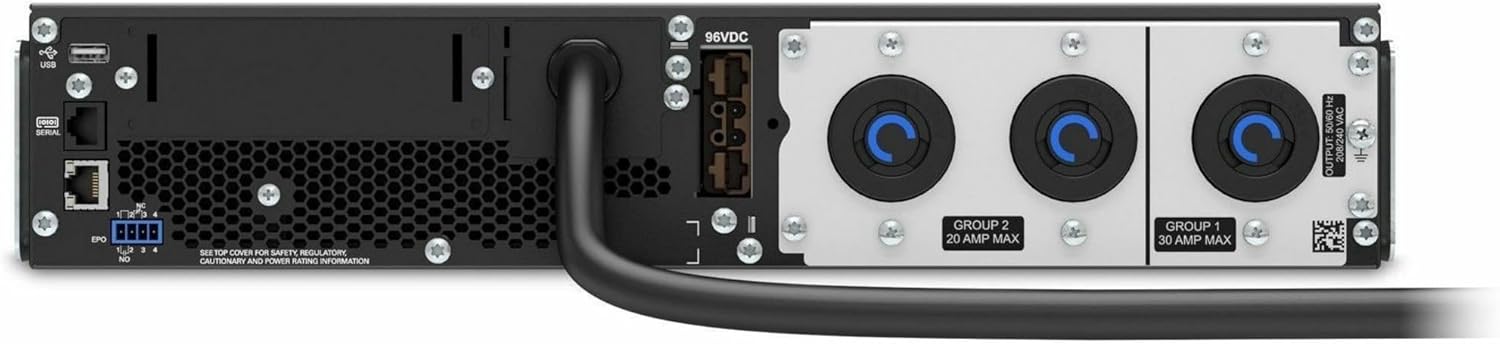
ຮູບ 4.2: ດ້ານຫລັງ view of the APC Smart-UPS SRT3000RMXLT. This image displays the various input and output ports, including USB, serial, EPO, and the 12 output receptacles, along with the main power input.
4.3 ການເປີດພະລັງງານເບື້ອງຕົ້ນ
ຫຼັງຈາກການເຊື່ອມຕໍ່ທັງຫມົດແມ່ນປອດໄພ:
- Press the power button on the front panel to turn on the UPS.
- The UPS will perform a self-test and the display will show the current status.
- Allow the batteries to charge for at least 6 hours before relying on them for extended backup time.
5. ປະຕິບັດການ UPS
5.1 Front Panel Display and Controls
The front panel features an LCD display and control buttons for monitoring and configuring the UPS.
- ຈໍ LCD: Shows real-time status, load, battery charge, input/output voltage, and event logs.
- ປຸ່ມ ESC: ອອກຈາກເມນູປັດຈຸບັນ ຫຼື ຍົກເລີກການດຳເນີນງານ.
- ປຸ່ມຕົກລົງ: ຢືນຢັນການເລືອກ ຫຼືໃສ່ເມນູ.
- ລູກສອນຂຶ້ນ/ລົງ: ນຳທາງຜ່ານຕົວເລືອກເມນູ ຫຼື ປັບການຕັ້ງຄ່າ.
5.2 ການດໍາເນີນງານພື້ນຖານ
- ເປີດ: ກົດປຸ່ມເປີດປິດຄ້າງໄວ້ຈົນກວ່າຈໍສະແດງຜົນຈະສະຫວ່າງ.
- ປິດ: Press and hold the power button until the UPS powers down. Ensure all connected equipment is safely shut down first.
- ໂໝດແບັດເຕີຣີ: ໃນກໍລະນີຂອງພະລັງງານ outage, the UPS will automatically switch to battery power. The display will indicate 'On Battery'.
- ການທົດສອບຕົນເອງ: Initiate a manual self-test through the front panel menu to verify battery and UPS functionality.
6. ບໍາລຸງຮັກສາ
6.1 ການທົດແທນຫມໍ້ໄຟ
The UPS uses sealed lead-acid batteries. Battery life is typically 3-5 years, depending on environmental conditions and usage. Replace batteries when the UPS indicates a 'Battery Fault' or 'Replace Battery' warning.
- Contact APC support or a certified service technician for battery replacement.
- Always use genuine APC replacement battery cartridges (RBCs) to ensure compatibility and optimal performance.
- ເອົາແບັດເຕີຣີເກົ່າຄືນໃໝ່ຢ່າງມີຄວາມຮັບຜິດຊອບ.
6.2 ການທໍາຄວາມສະອາດ
Keep the UPS free from dust and debris to ensure proper ventilation.
- Use a soft, dry cloth to clean the exterior of the UPS.
- ຢ່າໃຊ້ນໍ້າຢາທໍາຄວາມສະອາດ ຫຼື ຕົວລະລາຍ.
- ໃຫ້ແນ່ໃຈວ່າການເປີດລະບາຍອາກາດມີຄວາມຊັດເຈນຂອງສິ່ງກີດຂວາງ.
7. ການແກ້ໄຂບັນຫາ
ພາກນີ້ສະຫນອງການແກ້ໄຂບັນຫາທົ່ວໄປ. ສໍາລັບບັນຫາທີ່ສັບສົນຫຼາຍ, ຕິດຕໍ່ສະຫນັບສະຫນູນດ້ານວິຊາການ.
| ບັນຫາ | ສາເຫດທີ່ເປັນໄປໄດ້ | ການແກ້ໄຂ |
|---|---|---|
| UPS ບໍ່ເປີດ | No input power; Battery disconnected or discharged | Check power cord connection; Ensure utility power is present; Allow batteries to charge. |
| UPS beeps ຢ່າງຕໍ່ເນື່ອງ | ກ່ຽວກັບພະລັງງານຫມໍ້ໄຟ; ເງື່ອນໄຂການໂຫຼດເກີນ | Check utility power; Reduce connected load. |
| 'Replace Battery' indicator | ແບັດເຕີຣີໃກ້ຈະໝົດອາຍຸແລ້ວ | Order and replace the battery cartridge. |
| UPS not providing power to outlets | Output circuit breaker tripped; UPS in fault mode | Reset circuit breaker; Check display for fault codes and consult manual. |
8. ຂໍ້ມູນຈໍາເພາະ
Key technical specifications for the APC Smart-UPS SRT3000RMXLT.
| ຄຸນສົມບັດ | ຂໍ້ມູນຈໍາເພາະ |
|---|---|
| ໝາຍເລກຕົວແບບ | SRT3000RMXLT |
| ຍີ່ຫໍ້ | APC |
| ຄວາມອາດສາມາດພະລັງງານຜົນຜະລິດ | 3000 VA / 2700 ວັດ |
| Voltage | 208V AC |
| Vol Input ທີ່ລະບຸtage | 208V AC / 230V AC |
| ຄວາມຖີ່ຂອງການປ້ອນຂໍ້ມູນ | 60 Hz |
| ການເຊື່ອມຕໍ່ຂາອອກ | 12 x IEC 320 C13/C14 |
| ປະເພດຫມໍ້ໄຟ | ທາດອາຊິດ |
| ເວລາເຕີມເງິນປົກກະຕິ | 6 ຊົ່ວໂມງ |
| Typical Backup Time (Full Load) | 4 ນາທີ |
| ປັດໄຈແບບຟອມ | Rack |
| ຂະໜາດ (H x W x D) | 9 x 23 x 34 ນິ້ວ |
| ນ້ຳໜັກ | 69 ປອນ |
| ອຸນຫະພູມປະຕິບັດການ | 0 - 40 °C (32 - 104 °F) |
9. ການຮັບປະກັນແລະການສະຫນັບສະຫນູນ
9.1 ຂໍ້ມູນການຮັບປະກັນ
APC provides a standard warranty for this product. Please refer to the warranty card included with your product or visit the official APC webເວັບໄຊສໍາລັບເງື່ອນໄຂການຮັບປະກັນລາຍລະອຽດສະເພາະກັບພາກພື້ນຂອງທ່ານ.
9.2 ສະຫນັບສະຫນູນດ້ານວິຊາການ
For technical assistance, product information, or troubleshooting beyond the scope of this manual, please contact APC customer support. Have your model number (SRT3000RMXLT) and serial number ready when contacting support.
- Visit the official APC webເວັບໄຊສໍາລັບຊັບພະຍາກອນສະຫນັບສະຫນູນ, FAQs, ແລະຂໍ້ມູນການຕິດຕໍ່.
- Online resources often include updated manuals, firmware, and diagnostic tools.