
1. ຜະລິດຕະພັນເກີນview
The Grandstream GXP1630 is a powerful Gigabit IP phone designed for small businesses. This Linux-based, 3-line IP Phone model includes 8 BLF keys and 4-way conferencing. It features a 132x64 backlit LCD screen for clear display, dual HD audio, multi-language support, integrated Power over Ethernet (PoE), and 3 XML programmable soft keys. The GXP1630 incorporates state-of-the-art security encryption technology (SRTP and TLS) and supports various automated provisioning options for easy mass deployment.
ຄຸນນະສົມບັດທີ່ສໍາຄັນ:
- 3 SIP accounts, 3 line keys, 4-way conferencing
- 3 XML programmable context-sensitive soft keys
- ສຽງ HD ໃນລຳໂພງ ແລະ ມືຖື
- Up to 1000 contacts, call history up to 200 records
- Dual-switched Gigabit ports, integrated PoE
- 8 dual-colored BLF/speed dial keys
- EHS support for Plantronics headsets
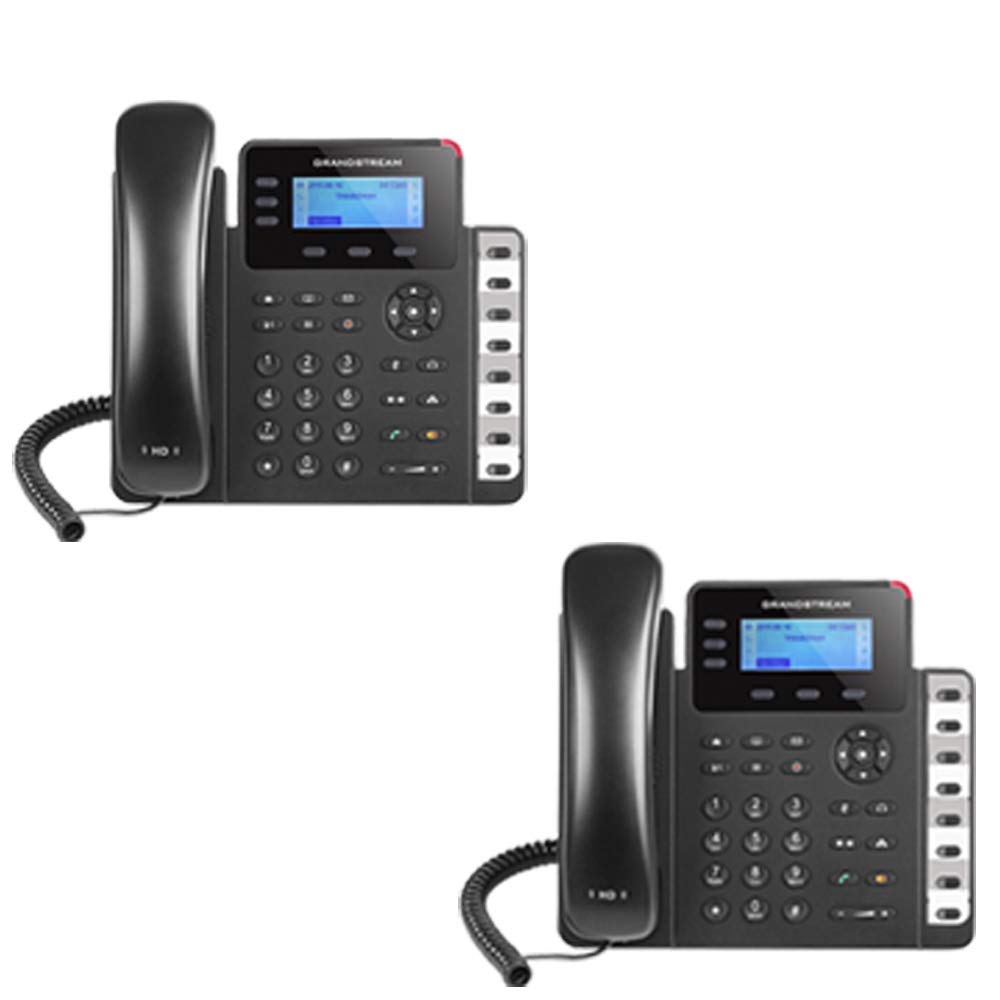
Figure 1: Grandstream GXP1630 Gigabit IP Phone
2. ການຕິດຕັ້ງແລະການຕິດຕັ້ງ
2.1 ເນື້ອໃນຊຸດ
ໃຫ້ແນ່ໃຈວ່າອົງປະກອບທັງໝົດມີຢູ່:
- ໜ່ວຍໂທລະສັບ IP Grandstream GXP1630
- ມືຖືແລະສາຍເຊືອກ
- ສາຍອີເທີເນັດ
- ອະແດບເຕີໄຟຟ້າ (ຖ້າບໍ່ໃຊ້ PoE)
- ຂາຕັ້ງໂທລະສັບ
2.2 ການເຊື່ອມຕໍ່ໂທລະສັບ
- Connect the coiled cord to the handset and the handset port on the phone base.
- Connect the Ethernet cable from your network switch (with PoE) or router to the LAN port on the phone. If not using PoE, connect the power adapter to the phone and a power outlet.
- Optionally, connect a headset to the headset port.
- Attach the phone stand to the base unit.
2.3 Initial Power-Up and Provisioning
Once connected, the phone will power on and begin the boot-up sequence. The LCD screen will display status information. The GXP1630 supports automated provisioning options, including zero-configuration with Grandstream’s UCM series IP PBXs, encrypted XML files, and TR-069, to facilitate easy mass deployment and configuration.
3. ປະຕິບັດການໂທລະສັບ
3.1 Using the Headset or Speaker
- To turn the speaker on or off during a call, press the ລໍາໂພງ ປຸ່ມ.
- To use a connected headset, press the ຊຸດຫູຟັງ ປຸ່ມ.
ວິດີໂອ 1: ຫຼາຍກວ່າview of using headset and speaker functions on Grandstream GXP1600 series IP phones.
3.2 ໂທອອກ
There are three primary ways to initiate a call:
- ມືຖື/ຫູຟັງ: ຍົກມືຖືຂຶ້ນ ຫຼືກົດປຸ່ມ ຊຸດຫູຟັງ ປຸ່ມ.
- ລຳໂພງ: ກົດ ລໍາໂພງ ປຸ່ມ.
- ການເລືອກກະແຈແຖວ: Press an available line key.
Once you hear a dial tone (the corresponding line key will turn green), enter the phone number using the keypad. Then, press the ສົ່ງ ປຸ່ມ ຫຼື # key to place the call. To use a different SIP account, simply press a different line key before dialing.
3.3 Redialing a Number
ເພື່ອປ່ຽນເລກສຸດທ້າຍທີ່ເອີ້ນວ່າ:
- ຍົກມືຖືຂຶ້ນ ຫຼືກົດປຸ່ມ ລໍາໂພງ ປຸ່ມ.
- ກົດ ສົ່ງ ປຸ່ມ ຫຼື ແດງຄືນ soft key displayed on the phone screen.
The phone will redial using the same SIP account as the previous call.
3.4 ການຮັບສາຍ
When an incoming call rings:
- ສາຍໂທເຂົ້າດຽວ: Lift the handset, press the ລໍາໂພງ ປຸ່ມ, ຫຼືກົດປຸ່ມເສັ້ນກະພິບທີ່ສອດຄ້ອງກັນ.
- Multiple Incoming Calls (Call Waiting): If you are on an active call and another call comes in, you will hear a call waiting tone. The new incoming call's line key will flash red. Press the flashing red line key to answer the new call. Your current call will be placed on hold. You can toggle between calls by pressing the line key corresponding to each call.
3.5 ສິ້ນສຸດການໂທ
ເພື່ອວາງສາຍໂທອອກ:
- ວາງສາຍໂທລະສັບ.
- ກົດ ສິ້ນສຸດການໂທ soft key on the phone screen.
3.6 Hold and Resume a Call
- ເພື່ອວາງສາຍຄ້າງໄວ້, ໃຫ້ກົດປຸ່ມ ຖື button. The line key will typically flash.
- ເພື່ອສືບຕໍ່ການໂທທີ່ຄ້າງໄວ້, ໃຫ້ກົດປຸ່ມສາຍກະພິບທີ່ສອດຄ້ອງກັນ.
3.7 Volume Adjustment and Mute
- When the phone is idle, use the ປະລິມານ ປຸ່ມເພື່ອປັບລະດັບສຽງແຫວນ.
- ໃນລະຫວ່າງການໂທທີ່ມີການເຄື່ອນໄຫວ, ກົດປຸ່ມ ປະລິມານ button to adjust the call volume for the handset, headset, or speaker.
- To mute or unmute your microphone during a call, press the ປິດສຽງ ປຸ່ມ.
4. ບໍາລຸງຮັກສາ
To ensure optimal performance and longevity of your Grandstream GXP1630 IP Phone, consider the following maintenance tips:
- ທໍາຄວາມສະອາດ: ໃຊ້ຜ້າອ່ອນໆແຫ້ງເພື່ອທຳຄວາມສະອາດໜ້າຜິວໂທລະສັບ. ຫຼີກລ່ຽງນ້ຳຢາທຳຄວາມສະອາດທີ່ມີສີຂັດ ຫຼື ຕົວລະລາຍ.
- ການອັບເດດເຟີມແວ: Regularly check for and apply firmware updates provided by Grandstream. Keeping the firmware up to date can improve performance, add new features, and address security vulnerabilities.
- ເງື່ອນໄຂສິ່ງແວດລ້ອມ: Operate the phone within recommended temperature and humidity ranges to prevent damage.
5. ການແກ້ໄຂບັນຫາ
If you encounter issues with your GXP1630 IP Phone, try the following basic troubleshooting steps:
- ບໍ່ມີໂທນໂທ / ບໍ່ສາມາດໂທອອກໄດ້: Check all cable connections (Ethernet, handset, power). Ensure the phone is properly registered with your SIP server.
- ບໍ່ມີພະລັງງານ: Verify the power adapter is securely connected to both the phone and a working power outlet, or that your network switch is providing Power over Ethernet (PoE).
- ຄຸນະພາບສຽງບໍ່ດີ: Check network connectivity. Ensure the handset/headset cord is properly connected. Adjust the call volume using the volume buttons.
- Phone Unresponsive: As with any electronic device, occasional reboots can resolve minor issues. Disconnect the power for a few seconds and then reconnect it.
- ສະແດງບັນຫາ: If the screen is blank or frozen, try rebooting the phone.
For more advanced issues, consult your IT administrator or Grandstream's official support resources.
6. ຂໍ້ມູນຈໍາເພາະ
| ຄຸນສົມບັດ | ລາຍລະອຽດ |
|---|---|
| ບັນຊີ SIP | 3 |
| ປຸ່ມສາຍ | 3 |
| ກອງປະຊຸມ | 4 ທາງ |
| BLF/ປຸ່ມກົດຄວາມໄວ | 8 ສີສອງສີ |
| ສຽງ | ສຽງ HD ໃນລຳໂພງ ແລະ ມືຖື |
| ການເຊື່ອມໂຍງເຄືອຂ່າຍ | ພອດ Gigabit ທີ່ມີສະຫຼັບຄູ່ |
| ປ | Integrated Power over Ethernet |
| ຈໍສະແດງຜົນ | LCD backlit 132x64 |
| ຂະໜາດ | 8 x 12 x 6 ນິ້ວ |
| ນ້ຳໜັກ | 6 ປອນ |
| ສີ | ດຳ |
| ວັດສະດຸ | ພາດສະຕິກ |
| ອຸປະກອນທີ່ເຂົ້າກັນໄດ້ | Grandstream IP phones, Plantronics headsets with EHS feature, devices supporting TR-069 and XML config files |
7. ການຮັບປະກັນແລະການສະຫນັບສະຫນູນ
7.1 ການຮັບປະກັນຂອງຜູ້ຜະລິດ
The Grandstream GXP1630 IP Phone comes with a 1 ປີຮັບປະກັນຜູ້ຜະລິດ. ກະລຸນາຮັກສາຫຼັກຖານການຊື້ຂອງທ່ານສໍາລັບການຮຽກຮ້ອງການຮັບປະກັນ.
7.2 ສະຫນັບສະຫນູນດ້ານວິຊາການ
For technical assistance, product registration, or to access additional resources, please visit the official Grandstream website or contact your product vendor. Support resources often include FAQs, knowledge bases, and community forums.