
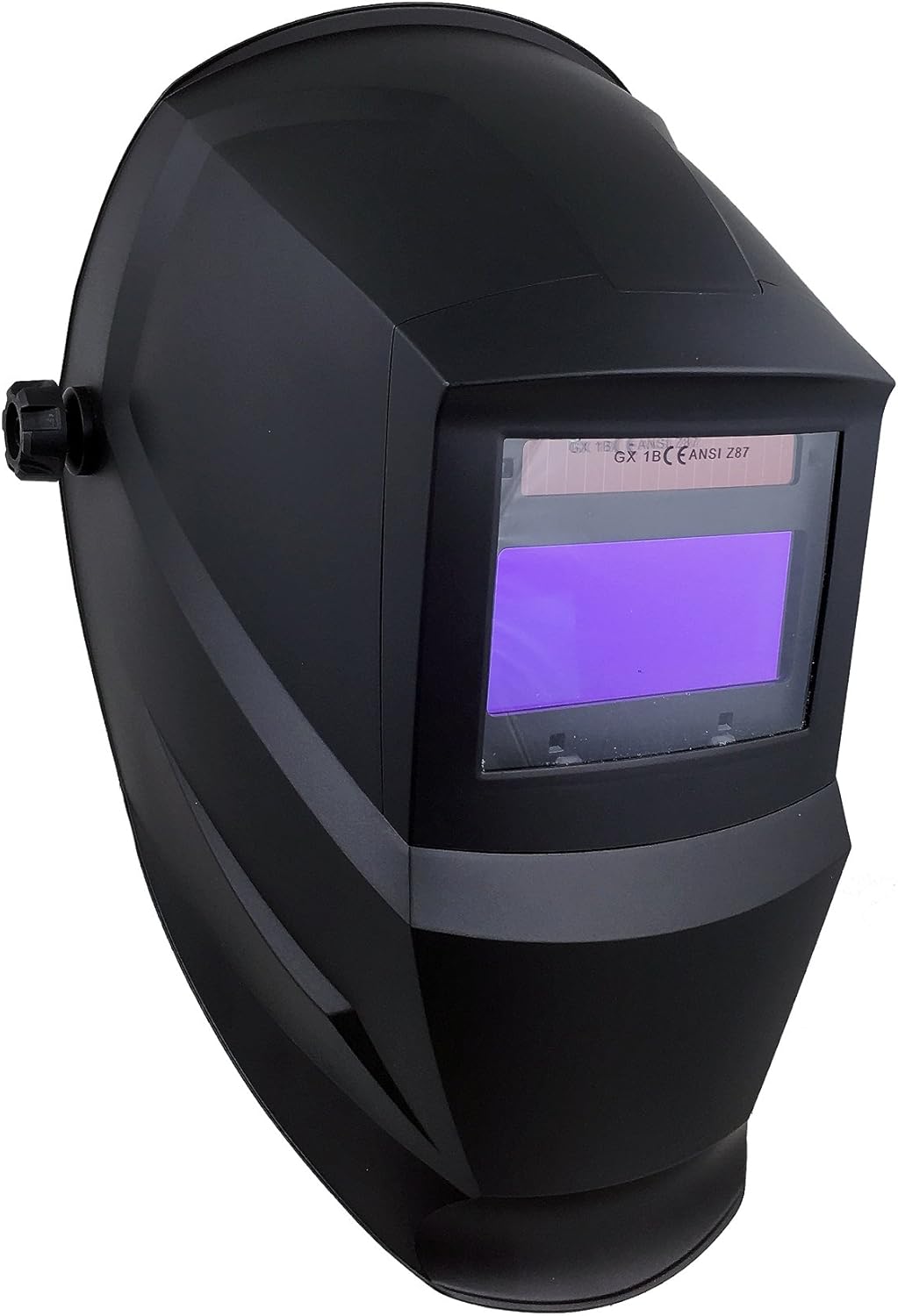
ຮູບພາບ 1: The Instapark ADF Series GX600 Solar Powered Auto-Darkening Welding Helmet, shown from a front-side perspective.
ແນະນຳ
This manual provides essential instructions for the safe and effective use of your Instapark ADF Series GX600 Solar Powered Auto-Darkening Welding Helmet. Please read this manual thoroughly before operation to ensure proper function, safety, and longevity of the product. Retain this manual for future reference.
ຂໍ້ຄວນລະວັງຄວາມປອດໄພ
ໃຫ້ຄວາມສຳຄັນກັບຄວາມປອດໄພສະເໝີເມື່ອເຊື່ອມໂລຫະ. ໝວກກັນກະທົບນີ້ຖືກອອກແບບມາເພື່ອປົກປ້ອງຕາ ແລະ ໃບໜ້າຂອງທ່ານຈາກประกายໄຟ, ການກະແຈກກະຈາຍ, ແລະ ລັງສີທີ່ເປັນອັນຕະລາຍພາຍໃຕ້ສະພາບການເຊື່ອມໂລຫະປົກກະຕິ. ເຖິງຢ່າງໃດກໍ່ຕາມ, ມັນບໍ່ໄດ້ໃຫ້ການປົກປ້ອງຈາກອັນຕະລາຍທີ່ຮຸນແຮງ, ອຸປະກອນລະເບີດ, ຫຼື ຂອງແຫຼວທີ່ກັດກ່ອນ. ໃຫ້ໃສ່ແວ່ນຕາຄວາມປອດໄພທີ່ເໝາະສົມຢູ່ໃຕ້ໝວກກັນກະທົບສະເໝີ.
- Do not use the helmet if the auto-darkening filter (ADF) is damaged or cracked.
- Ensure the helmet is properly adjusted to your head for a secure and comfortable fit.
- ຢ່າເອົາໝວກກັນກະທົບໃສ່ນ້ຳ.
- Replace front cover lenses regularly to maintain clear vision.
- Always inspect the helmet before each use for any signs of damage.
ອົງປະກອບແລະຄຸນສົມບັດ
The Instapark ADF Series GX600 welding helmet is equipped with advanced features for optimal performance and user comfort.

ຮູບພາບ 2: Diagram illustrating key features of the Instapark ADF Series GX600 welding helmet, including solar cells, dual arc sensors, UV/IR coated auto-darkening lens, external shade selection, 5-point adjustable ratcheting headgear, and impact-resistant Nylon construction.
- ຕົວກອງເຮັດໃຫ້ມືດອັດຕະໂນມັດ (ADF): Automatically switches from light to dark in 1/25000s when an arc is struck.
- ພະລັງງານແສງອາທິດ: Built-in solar panel charges the internal battery.
- Dual Arc Sensors: Ensures instantaneous auto-darkening.
- Adjustable Shade Range: Variable shade from #5 to #13, with a resting shade of #4.
- ກວ້າງ Viewເຂດພື້ນທີ່: ສະຫນອງຄວາມຊັດເຈນ view of the welding area.
- ການປົກປ້ອງ UV/IR: Constant DIN 16 protection against harmful ultraviolet and infrared radiation.
- Ratcheting Headgear: 5-point adjustable system for a custom, comfortable fit.
- ຟັງຊັນການບີບ: Allows the helmet to be used in grinding mode without darkening.
ການຕັ້ງຄ່າແລະການປັບ
Before using your welding helmet, proper setup and adjustment are crucial for comfort and safety.
1. ການປັບໝວກ

ຮູບພາບ 3: ພາຍໃນ view of the Instapark ADF Series GX600 welding helmet, highlighting the adjustable ratcheting headgear and the auto-darkening filter module.
- Loosen the tension knob on the side of the helmet to adjust the helmet's position relative to your face.
- Adjust the top strap to fit the crown of your head.
- Use the ratcheting knob at the back of the headgear to tighten or loosen the band around your head until it feels secure and comfortable.
- Ensure the helmet sits evenly and the viewing area is centered with your eyes.
2. ການຕິດຕັ້ງ/ກວດສອບຫມໍ້ໄຟ
The helmet is powered by a solar cell and two replaceable CR2032 lithium batteries (included). The solar cell extends battery life, but the CR2032 batteries provide primary power and backup.
- The helmet is fully automatic; there is no manual on/off switch.
- Ensure the CR2032 batteries are correctly installed with the positive (+) side facing up.
- A low volume alarm will sound if the batteries are low, indicating they need replacement.
ຄໍາແນະນໍາການດໍາເນີນງານ
Familiarize yourself with the controls before beginning any welding task.

ຮູບພາບ 4: ຂ້າງຫນ້າ view of the Instapark ADF Series GX600 welding helmet, showing the external shade selection knob for convenient adjustment.
1. Shade Adjustment
- The external dial on the side of the helmet allows for continuous adjustment of the dark shade from #5 to #13.
- Select the appropriate shade level based on your welding process and amperage. Refer to standard welding shade charts for guidance.
- The resting shade is DIN 4.
2. ການຄວບຄຸມຄວາມອ່ອນໄຫວ
- The sensitivity control (usually an internal knob) adjusts how much light is required to trigger the auto-darkening function.
- Adjust from Low to High continuously to suit different ambient light conditions and welding processes. Higher sensitivity is generally used for low ampການເຊື່ອມໂລຫະ TIG ແບບອັດຕະໂນມັດ.
3. Delay Control (Dark to Light)
- The delay control (usually an internal dial) adjusts the time it takes for the filter to return from dark to light state after the arc stops.
- Adjustable from 0.1 to 1.0 seconds. A longer delay helps prevent eye fatigue from afterglow or multiple short arcs.
4. Grinding Function
- The helmet includes a grinding function. Activate this mode (typically via an internal switch) to prevent the filter from darkening while grinding.
- Always ensure the grinding function is OFF before welding to ensure eye protection.
5. Welding Applications
This helmet is suitable for most Stick (arc welding), MIG (Metal Inert Gas), and TIG (Tungsten Inert Gas) applications. For TIG welding, the low amperage capability is ≥ 5A (DC).
ບໍາລຸງຮັກສາ
Regular maintenance ensures the optimal performance and longevity of your welding helmet.
- ທໍາຄວາມສະອາດ: Clean the helmet shell with mild soap and water. Do not use harsh solvents. Clean the auto-darkening filter and cover lenses with a soft, lint-free cloth.
- Cover Lens Replacement: Replace the front and inner cover lenses when they become scratched, pitted, or too dirty to clean effectively.
- ການປ່ຽນແບັດເຕີຣີ: Replace the CR2032 batteries when the low volume alarm sounds or if the ADF fails to darken. Ensure correct polarity.
- ການເກັບຮັກສາ: ເກັບຮັກສາໝວກກັນກະທົບໄວ້ໃນສະພາບແວດລ້ອມແຫ້ງ, ສະອາດ ແລະ ຫ່າງຈາກແສງແດດໂດຍກົງ ແລະ ອຸນຫະພູມທີ່ຮຸນແຮງ.
ການແກ້ໄຂບັນຫາ
| ບັນຫາ | ສາເຫດທີ່ເປັນໄປໄດ້ | ການແກ້ໄຂ |
|---|---|---|
| ADF ຈະບໍ່ມືດລົງເມື່ອມີຮອຍໂຄ້ງ. |
|
|
| Poor visibility through the filter. |
|
|
| ໝວກກັນກະທົບຮູ້ສຶກບໍ່ສະບາຍ ຫຼື ວ່າງ. |
|
|
ຂໍ້ມູນຈໍາເພາະ
- ຫ້ອງຮຽນ Optical: 1/1/1/2
- Number of Arc Sensors: 2
- Light Shade Number: DIN 4
- ລັດມືດ: Variable shade, 5 ~ 13
- ເປີດ/ປິດ: ອັດຕະໂນມັດຢ່າງເຕັມສ່ວນ
- ການຄວບຄຸມຄວາມອ່ອນໄຫວ: Low — High, continuously adjustable
- ການປົກປ້ອງ UV/IR: DIN 16 (constant)
- ການສະຫນອງພະລັງງານ: Solar cell, 2×CR2032 lithium battery (included)
- ເວລາປ່ຽນ (ແສງຫາມືດ): 1/25000ວິ
- Dark to Light Delay: 0.1~1.0S by dial control knob
- ຕໍ່າ Amperage TIG: ≥ 5A (DC)
- ຟັງຊັນການບີບ: ແມ່ນແລ້ວ
- Low Volume Alarm: ແມ່ນແລ້ວ
- ADF ການກວດສອບຕົນເອງ: ແມ່ນແລ້ວ
- Viewເຂດພື້ນທີ່: 4 x 2 ນິ້ວ
- ວັດສະດຸ: Plastic (Impact-resistant Nylon)
- ນ້ຳໜັກ: 680 g
- ຂະໜາດ: 23.88 x 23.11 x 34.04 cm
- ມາດຕະຖານ: Conforms to GS, DIN-Geprüft, CE, ANSI Z87.1, CSA Z94.3, AS/NZS standards.
ການຮັບປະກັນແລະການສະຫນັບສະຫນູນ
Specific warranty details are not provided within this manual. For information regarding warranty coverage, technical support, or replacement parts, please refer to the original purchase documentation or contact Instapark customer service directly. Contact information can typically be found on the product packaging or the official Instapark webເວັບໄຊ.