
ແນະນຳ
This manual provides comprehensive instructions for the safe and efficient operation, maintenance, and troubleshooting of your KitchenAid 2.0 cu. ft. Over-the-Range Microwave with Sensor Cooking. Please read all instructions carefully before using the appliance and retain this manual for future reference.

ຮູບພາບ: ທາງຫນ້າ view of the KitchenAid 2.0 cu. ft. Over-the-Range Microwave in Stainless Steel.
ຄໍາແນະນໍາຄວາມປອດໄພທີ່ສໍາຄັນ
ເມື່ອນໍາໃຊ້ເຄື່ອງໃຊ້ໄຟຟ້າ, ຄວນລະມັດລະວັງຄວາມປອດໄພຂັ້ນພື້ນຖານ, ລວມທັງດັ່ງຕໍ່ໄປນີ້:
- ອ່ານຄໍາແນະນໍາທັງຫມົດກ່ອນທີ່ຈະໃຊ້ເຄື່ອງໃຊ້.
- ຫ້າມໃຊ້ເຕົາອົບຖ້າປະທັບຕາປະຕູຫຼືປະຕູເສຍຫາຍ.
- ຫ້າມໃຫ້ຄວາມຮ້ອນຂອງແຫຼວ ຫຼື ອາຫານອື່ນໆໃນພາຊະນະທີ່ປິດ ເພາະມັນມັກຈະລະເບີດໄດ້.
- ຢ່າພະຍາຍາມ tamper ກັບຫຼືເຮັດການປັບຫຼືການສ້ອມແປງປະຕູ, ແຜງຄວບຄຸມ, ສະຫຼັບ interlock ຄວາມປອດໄພ, ຫຼືພາກສ່ວນອື່ນໆຂອງເຕົາອົບ.
- ພຽງແຕ່ອະນຸຍາດໃຫ້ເດັກນ້ອຍໃຊ້ເຕົາອົບໂດຍບໍ່ມີການຄວບຄຸມໃນເວລາທີ່ໄດ້ຮັບຄໍາແນະນໍາຢ່າງພຽງພໍເພື່ອໃຫ້ເດັກສາມາດນໍາໃຊ້ເຕົາອົບໄດ້ຢ່າງປອດໄພແລະເຂົ້າໃຈເຖິງອັນຕະລາຍຂອງການນໍາໃຊ້ທີ່ບໍ່ຖືກຕ້ອງ.
- ຫ້າມໃຊ້ສານເຄມີຫຼືສານລະເຫີຍທີ່ລະລາຍໃນເຄື່ອງໃຊ້ນີ້.
- Always ensure proper ventilation during operation.
ຕັ້ງຄ່າ
ການຫຸ້ມຫໍ່ແລະການຈັດວາງ
Carefully remove all packaging materials. Ensure the microwave is placed on a flat, stable surface or properly installed over a range. Refer to the separate installation instructions for detailed mounting procedures. Ensure adequate clearance around the appliance for proper ventilation.

Image: KitchenAid microwave installed above a range in a kitchen setting.
ການຕິດຕັ້ງແບບຫັນປ່ຽນ
Place the turntable support ring in the center of the microwave oven cavity. Position the glass turntable plate securely on the support ring. Ensure the turntable rotates freely.
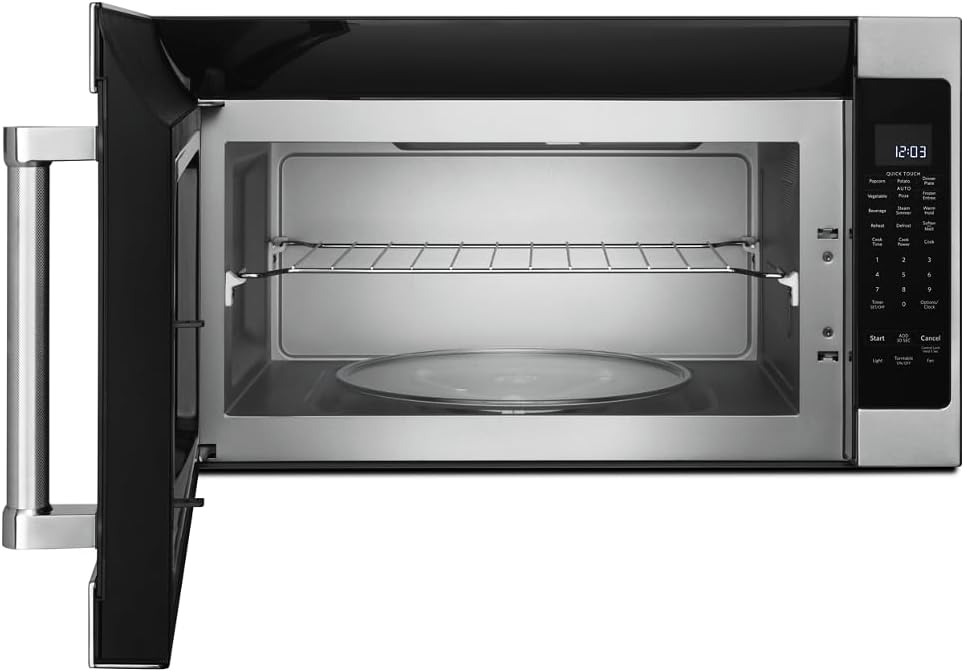
ຮູບພາບ: ພາຍໃນ view of the microwave showing the glass turntable and support ring.
ຄໍາແນະນໍາການດໍາເນີນງານ
ການດໍາເນີນງານພື້ນຖານ
- ການຕັ້ງຄ່າໂມງ: Press 'Options/Clock', then enter the current time using the number pad. Press 'Options/Clock' again to confirm.
- ເລີ່ມດ່ວນ: Press 'Start' to begin cooking immediately for 30 seconds at 100% power. Press 'Add 30 Sec' to add 30 seconds to the cooking time.
- ເວລາແຕ່ງກິນ: Press 'Cook Time', enter the desired cooking time, then press 'Start'.
- Cook Power: After setting 'Cook Time', press 'Cook Power', enter the desired power level (1-10, 10 being 100%), then press 'Start'.
ຮູບພາບ: ລາຍລະອຽດ view of the microwave's control panel with various cooking options.
Quick Touch Functions
The microwave features several one-touch cooking options:
- Popcorn: For automatic popcorn popping.
- ມັນຕົ້ນ: ສໍາລັບ baking ມັນຕົ້ນ.
- ພິຊຊ່າ: ສໍາລັບ reheating ຕ່ອນ pizza.
- ເຄື່ອງດື່ມ: ສໍາລັບການໃຫ້ຄວາມຮ້ອນເຄື່ອງດື່ມ.
- ຮ້ອນຄືນໃໝ່: For reheating various food items.
- ລະລາຍນ້ ຳ ແຂງ: ສຳລັບການລະລາຍອາຫານຕາມນ້ຳໜັກ ຫຼື ເວລາ.
ເຊັນເຊີປຸງອາຫານ
The sensor cooking feature automatically adjusts cooking time and power levels based on the food's moisture content. Select the desired sensor cooking option (e.g., 'Vegetable', 'Frozen Entree', 'Dinner Plate') and press 'Start'. The microwave will detect when the food is cooked.

Image: Interior of the microwave showing food items on the turntable and a removable rack.
ຄຸນນະສົມບັດພິເສດ
- Steam Simmer: For steaming or simmering foods.
- ການຖືທີ່ອົບອຸ່ນ: Keeps cooked food warm for an extended period.
- ອ່ອນ/ລະລາຍ: For softening butter, melting chocolate, or other similar tasks.
- ແສງ: Controls the under-cabinet light.
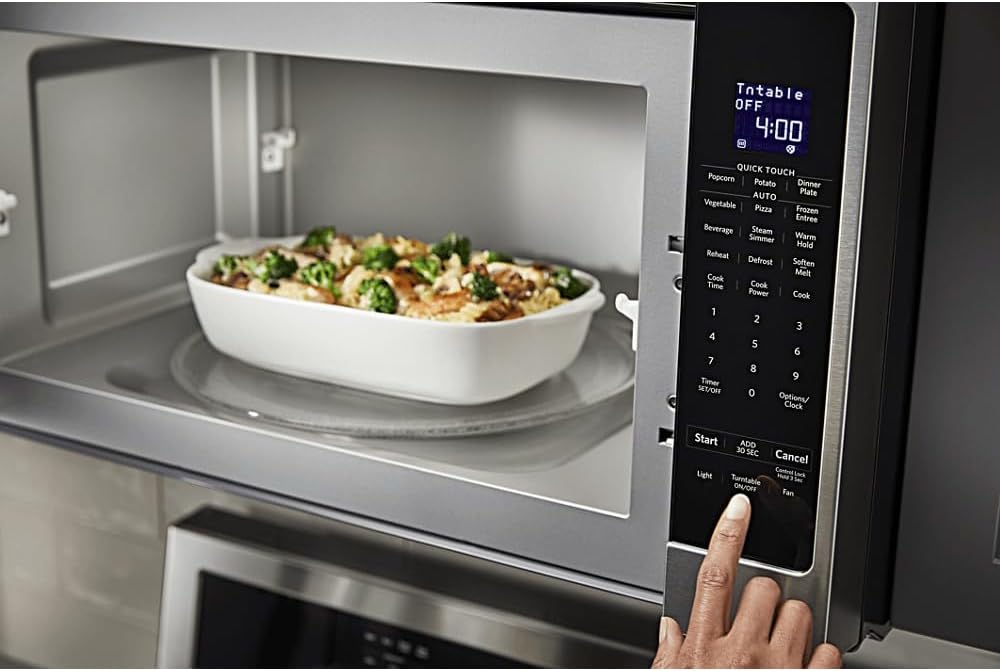
- ເປີດ/ປິດແຜ່ນສຽງ: ຊ່ວຍໃຫ້ທ່ານສາມາດຢຸດການໝຸນຂອງໂຕະໝຸນສຳລັບຖ້ວຍຂະໜາດໃຫຍ່ກວ່າ.
- ພັດລົມ: ຄວບຄຸມຄວາມໄວຂອງພັດລົມດູດອາກາດ.

Image: A person's hand operating the control panel of the KitchenAid microwave.
ບໍາລຸງຮັກສາ
ທໍາຄວາມສະອາດພາຍໃນ
Clean the interior of the microwave regularly with a mild detergent and a soft cloth. For stubborn food splatters, place a bowl of water with lemon slices inside and microwave for a few minutes to loosen residue, then wipe clean.
ທໍາຄວາມສະອາດພາຍນອກ
Wipe the exterior surfaces, including the control panel and door, with a soft cloth and mild detergent. For stainless steel surfaces, use a stainless steel cleaner and polish in the direction of the grain.
ບໍາລຸງຮັກສາການກັ່ນຕອງ
The microwave is equipped with grease filters and may have a charcoal filter. Clean the grease filters monthly by washing them in hot, soapy water or in a dishwasher. Replace the charcoal filter (if present) approximately every 6 to 12 months, depending on usage.
ການແກ້ໄຂບັນຫາ
If you experience issues with your microwave, consult the following common problems and solutions:
| ບັນຫາ | ສາເຫດທີ່ເປັນໄປໄດ້ | ການແກ້ໄຂ |
|---|---|---|
| ໄມໂຄເວຟບໍ່ເລີ່ມຕົ້ນ | ປະຕູປິດບໍ່ຖືກຕ້ອງ; ຖອດສາຍໄຟ; ຟິວປໍ/ຕົວຕັດວົງຈອນປິດ. | Ensure door is securely closed; Check power connection; Reset circuit breaker or replace fuse. |
| ອາຫານບໍ່ຮ້ອນເທົ່າທຽມກັນ | Food not stirred/rotated; Incorrect power level; Turntable not rotating. | Stir or rotate food during cooking; Adjust power level; Ensure turntable is correctly placed and functioning. |
| ສຽງຜິດປົກກະຕິໃນລະຫວ່າງການປະຕິບັດງານ | turntable ນັ່ງບໍ່ຖືກຕ້ອງ; ວັດຖຸຕ່າງປະເທດຢູ່ໃນຮູ. | ວາງໂຕະໝຸນຄືນ; ກວດສອບ ແລະ ເອົາສິ່ງກີດຂວາງອອກ. |
ຖ້າບັນຫາຍັງຄົງຢູ່ຫຼັງຈາກພະຍາຍາມແກ້ໄຂເຫຼົ່ານີ້, ກະລຸນາຕິດຕໍ່ຝ່າຍຊ່ວຍເຫຼືອລູກຄ້າ.
ຂໍ້ມູນຈໍາເພາະ
| ຄຸນສົມບັດ | ລາຍລະອຽດ |
|---|---|
| ຍີ່ຫໍ້ | KitchenAid |
| ໝາຍເລກຕົວແບບ | KMHS120ESS |
| ຂະໜາດສິນຄ້າ (ກວ້າງ x ຍາວ x ສູງ) | 16.13" x 30" x 17.13" |
| ຄວາມອາດສາມາດ | 2.0 ລູກບາດຟຸດ |
| ວັດtage | 1000 ວັດ |
| ວັດສະດຸ | ສະແຕນເລດ |
| ປະເພດການຕິດຕັ້ງ | ເກີນຂອບເຂດ |
| ຄຸນນະສົມບັດພິເສດ | Turntable, Sensor Cooking |
| ປະເພດການຄວບຄຸມ | ປຸ່ມ |
| ຈໍານວນໂຄງການ | 10 |
| ຟັງຊັນຈັບເວລາ | ມີໃຫ້ |
| ອົງປະກອບລວມ | Glass Turntable, Turntable Support Ring, Removable Rack |
ການຮັບປະກັນແລະການສະຫນັບສະຫນູນ
ຂໍ້ມູນການຮັບປະກັນ
This KitchenAid appliance comes with a limited warranty. Please refer to the warranty card included with your product for specific terms, conditions, and duration of coverage. Keep your proof of purchase for warranty claims.
ການຊ່ວຍເຫຼືອລູກຄ້າ
For technical assistance, service, or to order replacement parts, please contact KitchenAid Customer Service. Contact details can typically be found on the manufacturer's webເວັບໄຊທ໌ ຫຼື ໃນບັດລົງທະບຽນຜະລິດຕະພັນຂອງທ່ານ.
ສະຫນັບສະຫນູນອອນໄລນ໌: Visit the official KitchenAid website for FAQs, product registration, and service scheduling.
ໂທລະສັບສະຫນັບສະຫນູນ: ກະລຸນາອ້າງອີງເອກະສານຜະລິດຕະພັນຂອງທ່ານສຳລັບເບີໂທລະສັບບໍລິການລູກຄ້າທີ່ເໝາະສົມໃນພາກພື້ນຂອງທ່ານ.