
1. ບົດແນະນຳ
The Sony SBH54 is a versatile Stereo Bluetooth Headset designed for wireless communication and audio playback. It offers both handset and headset functionalities, allowing you to take and make calls, view messages, listen to music, and tune into FM radio directly from its display. Crafted from premium metal with a splash-proof design, it combines elegance with durability.
Key features include Bluetooth Wireless 3.0, NFC technology for easy pairing, an OLED display, and built-in noise cancellation for clear audio during calls. The headset supports A2DP profile and can connect to two devices simultaneously.
2. ຜະລິດຕະພັນເກີນview
The SBH54 features a compact design that fits comfortably in your hand. It includes an OLED display for information at a glance and physical controls for media and call management.
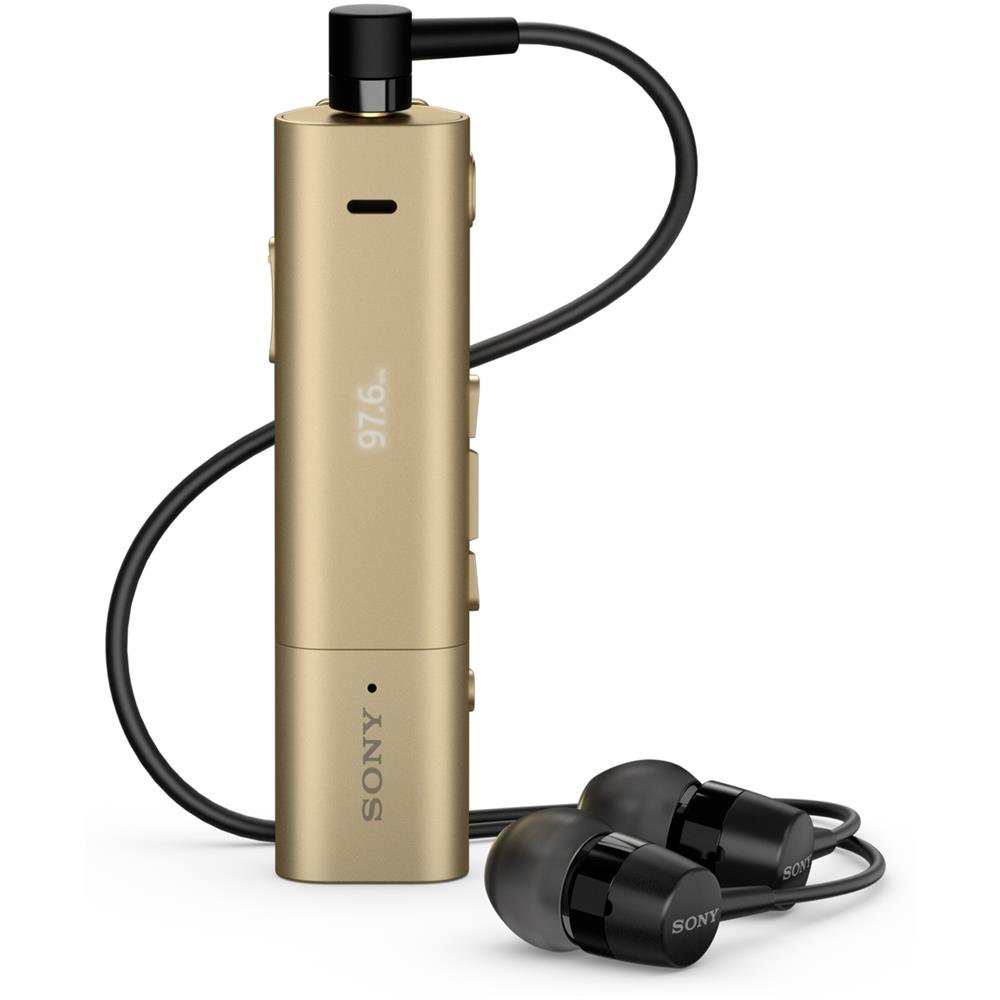
Image: Sony SBH54 Gold Stereo Bluetooth Headset. This image displays the compact, gold-colored headset with its integrated clip and display screen.
ການຄວບຄຸມ ແລະຕົວຊີ້ວັດ:
- ຈໍສະແດງຜົນ OLED: Shows caller ID, messages, music track information, and FM radio frequency.
- ປຸ່ມຫຼາຍຟັງຊັນ: For call answering/ending, play/pause music.
- ປຸ່ມລະດັບສຽງ: ປັບລະດັບສຽງ.
- ປຸ່ມນຳທາງ: For menu navigation and track skipping.
- ໄມໂຄຣໂຟນ: Integrated for voice calls.
- ຫູຟັງ Jack: 3.5mm port for connecting the included premium headphones.
- ຊ່ອງສາກໄຟ: ພອດ Micro USB ສໍາລັບການສາກໄຟອຸປະກອນ.
3. ຕັ້ງຄ່າ
3.1 ການສາກຫູຟັງ
- Connect the supplied USB cable to the headset's charging port and to a USB power adapter or a computer's USB port.
- ຕົວຊີ້ບອກຫມໍ້ໄຟໃນຈໍສະແດງຜົນຈະສະແດງສະຖານະການສາກໄຟ.
- ສາກຫູຟັງໃຫ້ເຕັມກ່ອນທີ່ຈະໃຊ້ຄັ້ງທໍາອິດ.
3.2 Pairing with a Device (Bluetooth)
- Ensure the headset is charged and turned off.
- Press and hold the power button until the headset enters pairing mode (indicated by a specific light pattern or message on the display).
- ໃນສະມາດໂຟນຂອງທ່ານ ຫຼືອຸປະກອນທີ່ເປີດໃຊ້ Bluetooth, ເປີດໃຊ້ Bluetooth ແລະຊອກຫາອຸປະກອນທີ່ມີຢູ່.
- ເລືອກ "SBH54" ຈາກບັນຊີລາຍຊື່ຂອງອຸປະກອນທີ່ພົບເຫັນ.
- If prompted, enter the passcode "0000" (four zeros).
- ເມື່ອຈັບຄູ່ແລ້ວ, ຊຸດຫູຟັງຈະຊີ້ບອກວ່າການເຊື່ອມຕໍ່ສຳເລັດແລ້ວ.
3.3 Pairing with a Device (NFC)
For devices with NFC (Near Field Communication):
- ໃຫ້ແນ່ໃຈວ່າ NFC ເປີດໃຊ້ງານຢູ່ໃນໂທລະສັບສະຫຼາດຂອງທ່ານແລະຫນ້າຈໍໄດ້ຖືກປົດລັອກ.
- Touch the NFC detection area of your smartphone to the NFC detection area on the SBH54 headset.
- ປະຕິບັດຕາມການກະຕຸ້ນໃນຫນ້າຈໍໃດຫນຶ່ງເພື່ອສໍາເລັດຂະບວນການການຈັບຄູ່.
4. ການໃຊ້ງານຊຸດຫູຟັງ
4.1 ເປີດ/ປິດ
- ເພື່ອເປີດເຄື່ອງ: ກົດປຸ່ມເປີດປິດຄ້າງໄວ້ຈົນກວ່າຈໍສະແດງຜົນຈະສະຫວ່າງຂຶ້ນ.
- ປິດເຄື່ອງ: ກົດປຸ່ມເປີດປິດຄ້າງໄວ້ຈົນກວ່າໜ້າຈໍຈະປິດ.
4.2 ໂທອອກ ແລະ ຮັບສາຍ
- ຕອບການໂທ: When a call comes in, press the multi-function button.
- ສິ້ນສຸດການໂທ: During a call, press the multi-function button.
- ການປະຕິເສດການໂທ: Press and hold the multi-function button when a call comes in.
- ໂທອອກ: Dial the number on your phone. The call will automatically route to the headset. You can also use voice commands if supported by your phone.
- Handset Function: The compact SBH54 can be used as an unobtrusive handset for calls.
- ການຕັດສຽງລົບກວນ: The headset features echo, wind, and noise cancellation for clear voice transmission.
- ສຽງ HD: Enhances voice clarity for both parties during a call.
4.3 ການຫລີ້ນດົນຕີ
- ຫຼິ້ນ/ຢຸດ: ກົດປຸ່ມຫຼາຍໜ້າທີ່.
- ເພງຕໍ່ໄປ: Press the forward navigation button.
- ຕິດຕາມກ່ອນ ໜ້າ ນີ້: Press the backward navigation button.
- ການຄວບຄຸມລະດັບສຽງ: ໃຊ້ປຸ່ມລະດັບສຽງຂຶ້ນ/ລົງ.
ວິທະຍຸ 4.4 FM
- ເປີດໃຊ້ວິທະຍຸ FM: Navigate through the headset menu to select the FM Radio function.
- ສະຖານີຮັບຟັງ: Use the navigation buttons to scan or manually tune to FM frequencies.
- ບັນທຶກ Presets: The headset may allow saving favorite stations (refer to on-screen prompts).
5. ບໍາລຸງຮັກສາ
- ທໍາຄວາມສະອາດ: ເຊັດຫູຟັງດ້ວຍຜ້າອ່ອນ, ແຫ້ງ. ຫຼີກເວັ້ນການນໍາໃຊ້ສານເຄມີທີ່ຮຸນແຮງຫຼືວັດສະດຸຂັດ.
- ຄວາມຕ້ານທານນ້ໍາ: The SBH54 has a splash-proof design. This means it can withstand light splashes of water but should not be submerged or exposed to heavy rain. Ensure the charging port cover is securely closed.
- ການເກັບຮັກສາ: ເກັບຮັກສາຊຸດຫູຟັງໄວ້ໃນບ່ອນທີ່ເຢັນ, ແຫ້ງ, ຫ່າງຈາກແສງແດດໂດຍກົງ ແລະອຸນຫະພູມທີ່ຮຸນແຮງ.
- ການດູແລຫມໍ້ໄຟ: ເພື່ອຍືດອາຍຸການໃຊ້ງານຂອງແບັດເຕີຣີ, ຄວນຫຼີກລ່ຽງການສາກແບັດເຕີຣີໃຫ້ໝົດເລື້ອຍໆ. ໃຫ້ສາກໄຟເປັນປະຈຳ.
6. ການແກ້ໄຂບັນຫາ
ບັນຫາທົ່ວໄປ ແລະການແກ້ໄຂ:
- ຊຸດຫູຟັງເປີດບໍ່ໄດ້: ໃຫ້ແນ່ໃຈວ່າໄດ້ສາກໄຟແລ້ວ. ເຊື່ອມຕໍ່ຫາແຫຼ່ງພະລັງງານແລ້ວລອງໃໝ່ອີກຄັ້ງ.
- ບໍ່ສາມາດຈັບຄູ່ກັບອຸປະກອນໄດ້:
- ກວດໃຫ້ແນ່ໃຈວ່າຊຸດຫູຟັງຢູ່ໃນໂໝດຈັບຄູ່.
- ໃຫ້ແນ່ໃຈວ່າ Bluetooth ຖືກເປີດໃຊ້ຢູ່ໃນອຸປະກອນຂອງທ່ານ.
- ຍ້າຍຫູຟັງເຂົ້າໃກ້ອຸປະກອນຂອງທ່ານ.
- ຣີສະຕາດທັງຫູຟັງ ແລະອຸປະກອນຂອງທ່ານ.
- ລຶບລ້າງການເຊື່ອມຕໍ່ Bluetooth ທີ່ຜ່ານມາຢູ່ໃນອຸປະກອນຂອງທ່ານ ແລະລອງຈັບຄູ່ອີກຄັ້ງ.
- ບໍ່ມີສຽງ ຫຼືຄຸນນະພາບສຽງບໍ່ດີ:
- ກວດເບິ່ງລະດັບສຽງໃນທັງຊຸດຫູຟັງ ແລະອຸປະກອນທີ່ເຊື່ອມຕໍ່ຂອງທ່ານ.
- Ensure the headset is within range of your device.
- ຕັດການເຊື່ອມຕໍ່ ແລະເຊື່ອມຕໍ່ Bluetooth ຄືນໃໝ່.
- Ensure the headphones are properly plugged into the 3.5mm jack.
- ວິທະຍຸ FM ບໍ່ເຮັດວຽກ: Ensure you are in an area with good FM signal reception.
7. ຂໍ້ມູນຈໍາເພາະ
| ຄຸນສົມບັດ | ລາຍລະອຽດ |
|---|---|
| ຍີ່ຫໍ້ | Sony |
| ໝາຍເລກຕົວແບບ | SBH54GD |
| ສີ | ຄໍາ |
| ການຈັດວາງຫູ | ໃນຫູ |
| ປັດໄຈແບບຟອມ | ໃນຫູ |
| ການຄວບຄຸມສິ່ງລົບກວນ | Active Noise Cancellation |
| ນ້ໍາຫນັກລາຍການ | 0.1 ກິໂລກຣາມ |
| ປະເພດໄດເວີສຽງ | ໄດນາມິກໄດເວີ |
| ຊ່ວງຄວາມຖີ່ | 20 Hz - 20,000 Hz |
| ວັດສະດຸຫຸ້ມຫໍ່ | ໂລຫະ |
| ອຸປະກອນທີ່ເຂົ້າກັນໄດ້ | ໂທລະສັບສະຫຼາດ, ແລັບທັອບ, ແທັບເລັດ, ອຸປະກອນທີ່ເປີດໃຊ້ Bluetooth |
| ລະດັບຄວາມຕ້ານທານນ້ໍາ | Water Resistant (Splash-proof) |
| ເຕັກໂນໂລຊີການເຊື່ອມຕໍ່ | Bluetooth, NFC |
| ເຕັກໂນໂລຊີໄຮ້ສາຍ | Bluetooth, NFC |
| ລຸ້ນ Bluetooth | 3.0 |
| ປະເພດການຄວບຄຸມ | ການຄວບຄຸມສື່ |
| ວິທີການຄວບຄຸມ | ໄລຍະໄກ |
8. ການຮັບປະກັນແລະການສະຫນັບສະຫນູນ
ສໍາລັບຂໍ້ມູນການຮັບປະກັນແລະການສະຫນັບສະຫນູນລູກຄ້າ, ກະລຸນາເບິ່ງເອກະສານທີ່ມີຢູ່ໃນການຊື້ຂອງທ່ານຫຼືໄປຢ້ຽມຢາມສະຫນັບສະຫນູນ Sony ຢ່າງເປັນທາງການ webເວັບໄຊ. ເງື່ອນໄຂການຮັບປະກັນສະເພາະອາດຈະແຕກຕ່າງກັນໄປຕາມພາກພື້ນ ແລະຮ້ານຂາຍຍ່ອຍ.
ສະຫນັບສະຫນູນອອນໄລນ໌: www.sony.com/electronics/support