
1. ບົດແນະນຳ
The ProForm Hybrid Trainer is a versatile fitness machine designed to provide the benefits of both an elliptical and a recumbent exercise bike. This innovative equipment offers a low-impact workout experience in the comfort of your home, allowing for varied training routines. It is compatible with iFIT personal training, offering access to a library of on-demand video workouts.
ຄຸນນະສົມບັດທີ່ສໍາຄັນປະກອບມີ:
- ການທໍາງານສອງ: Seamlessly switch between elliptical and recumbent bike modes.
- iFIT Compatibility: Stream live and on-demand workouts with trainers who can auto-adjust resistance.
- LCD Window Display: Track essential workout metrics such as distance, cadence, and estimated calorie burn.
- ລະດັບຄວາມຕ້ານທານດິຈິຕອນ 16 ລະດັບ: Utilize SMR Silent Magnetic Resistance for smooth adjustments.
- ບ່ອນວາງແທັບເລັດແບບປະສົມປະສານ: Securely place your smart device for iFIT workouts or entertainment.
- Oversized Pedals: Designed for comfort and stability during workouts.
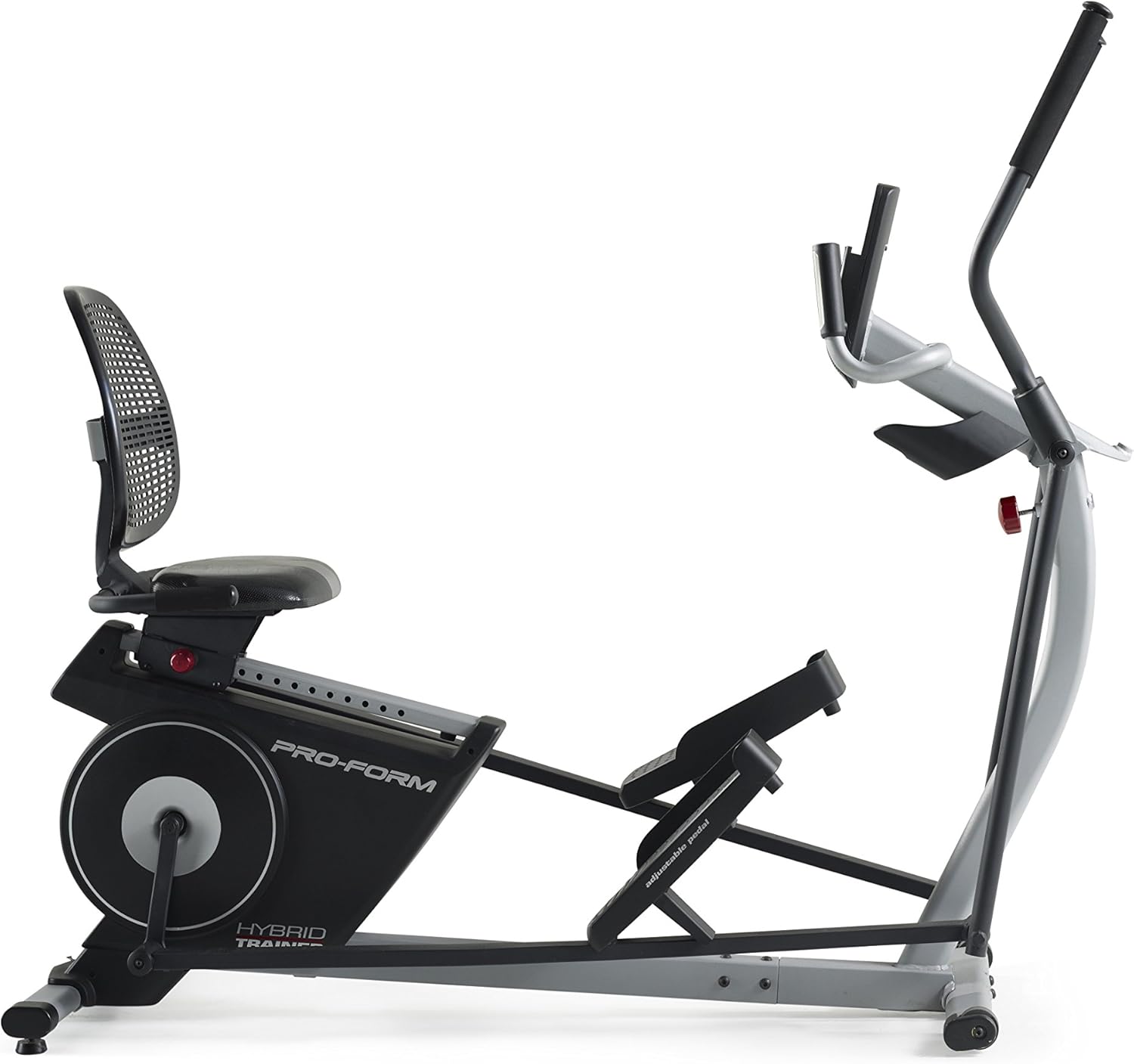
Figure 1: The ProForm Hybrid Trainer, showcasing its dual design.
2. ຂໍ້ມູນຄວາມປອດໄພ
Before using this equipment, please read all instructions carefully. ProForm assumes no responsibility for personal injury or property damage sustained by or through the use of this product.
- ປຶກສາແພດກ່ອນທີ່ຈະເລີ່ມໂຄງການອອກກໍາລັງກາຍໃດໆ.
- ຮັກສາເດັກນ້ອຍ ແລະສັດລ້ຽງຢູ່ຫ່າງຈາກອຸປະກອນໃນເວລານຳໃຊ້.
- Place the equipment on a level surface with at least 2 feet (0.6 m) of clearance around it.
- ໃສ່ເຄື່ອງນຸ່ງແລະເກີບກິລາທີ່ເຫມາະສົມ.
- Do not use the equipment if you feel pain or dizziness.
- ໃຫ້ແນ່ໃຈວ່າທຸກພາກສ່ວນຖືກຮັດຢ່າງຖືກຕ້ອງກ່ອນທີ່ຈະໃຊ້ແຕ່ລະຄັ້ງ.
- The maximum user weight capacity for this machine is 350 pounds (158 kg).
3. ການຕິດຕັ້ງແລະການປະກອບ
Assembly of the ProForm Hybrid Trainer typically requires 1 to 2 people and can take approximately 1.5 to 4 hours. Follow the detailed instructions provided in the separate assembly guide that accompanies your product. Ensure all components are present before beginning assembly.
ຄຳແນະນຳສຳຄັນກ່ຽວກັບການປະກອບ:
- ຄໍາຮ້ອງສະຫມັກ Grease: Apply grease to all indicated moving parts during assembly. A packet of white grease is typically included. Proper lubrication ensures smooth operation and reduces noise.
- ການຕິດຕັ້ງຫມໍ້ໄຟ: The console requires four (4) D-cell batteries (not included). Install these batteries into the console compartment as directed in the assembly guide.
- ສາຍໄຟ: Exercise caution when connecting wires to avoid damage.
ຍ້າຍອຸປະກອນການ:
The Hybrid Trainer is equipped with transport wheels for easier relocation. To move the machine, carefully lift the rear end by the frame until the transport wheels engage the floor, then push or pull it to the desired location.

Figure 2: Moving the Hybrid Trainer using its transport wheels.
4. ຄໍາແນະນໍາການດໍາເນີນງານ
4.1 Switching Between Elliptical and Recumbent Bike Modes
The ProForm Hybrid Trainer allows for quick conversion between its two primary modes:
- Elliptical Mode: Stand on the oversized pedals and grasp the moving handlebars. This mode provides a full-body, low-impact cardio workout.
- ໂໝດລົດຖີບນອນ: Adjust the seat to your desired position. Sit on the seat and place your feet on the pedals. The console can be tilted forward for optimal viewing in this mode. This mode focuses on lower body cardio with back support.
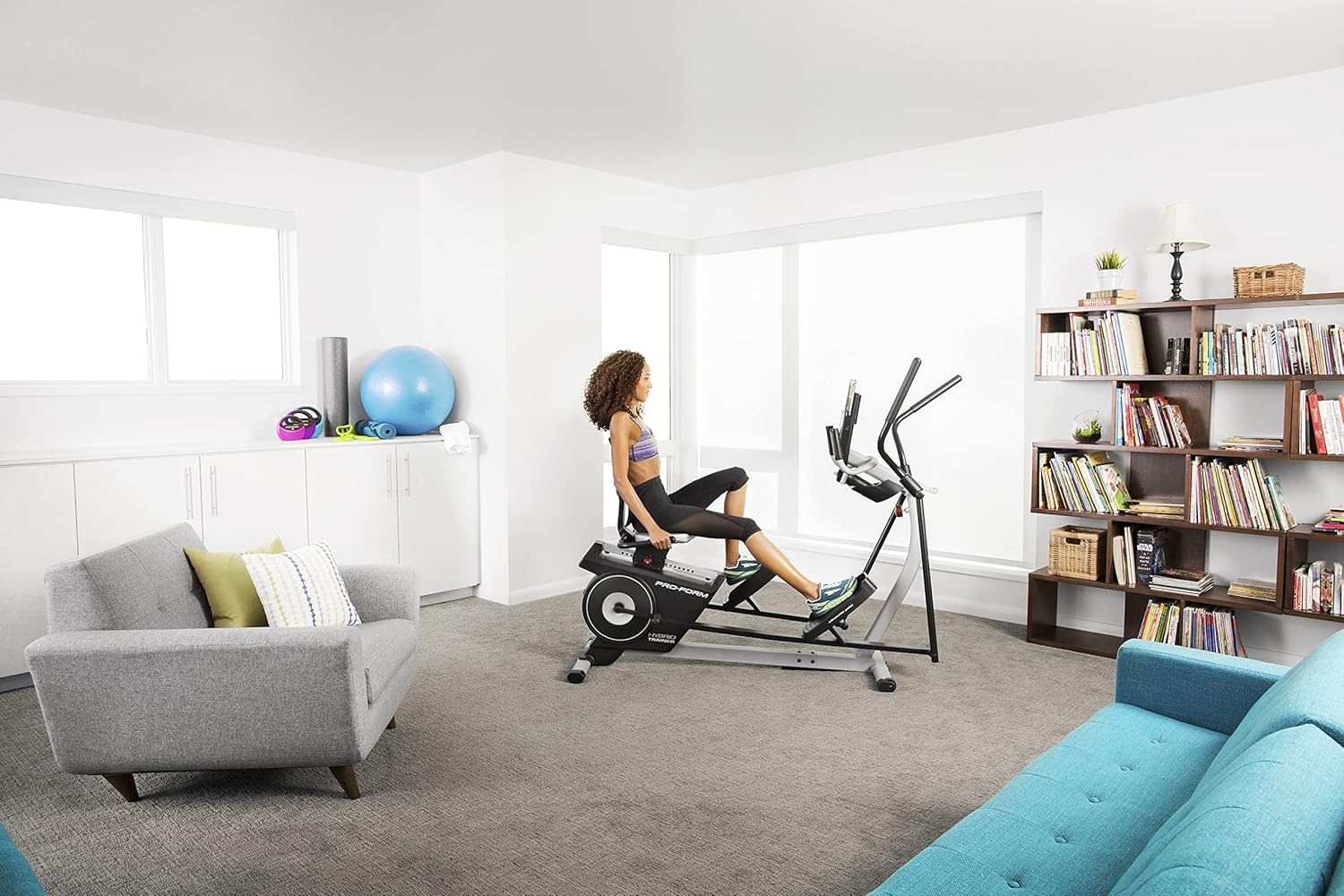
Figure 3: User operating the Hybrid Trainer in recumbent bike mode.
4.2 ຟັງຊັນຄອນໂຊ
The console provides essential workout feedback and control over your training session.

Figure 4: Console with integrated tablet holder.
- ຈໍ LCD: Shows workout data such as time, distance, speed (cadence), resistance level, and estimated calorie burn.
- Resistance Controls: Use the '+' and '-' buttons to manually adjust the 16 digital resistance levels.
- ປຸ່ມໂຄງການ: Select from pre-programmed workouts designed for various fitness goals.
- ບ່ອນວາງແທັບເລັດແບບປະສົມປະສານ: Securely holds your personal tablet or smartphone, allowing you to follow iFIT workouts or enjoy media.
- ເຄື່ອງຈັບອັດຕາການເຕັ້ນຂອງຫົວໃຈ: Hold the metal sensors on the stationary handlebars to display your heart rate on the console.
- ພອດສຽງ: Connect your audio device via the 3.5mm jack to play music through the console's speakers.
- ການເຊື່ອມຕໍ່ Bluetooth: Pair with compatible heart rate monitors or connect to the iFIT app on your smart device.
4.3 iFIT Personal Training
The ProForm Hybrid Trainer is iFIT compatible. An iFIT membership (sold separately) provides access to a vast library of interactive workouts. With iFIT, expert trainers can automatically adjust your machine's resistance in real-time during global workouts and studio classes, optimizing your training experience.
To activate manual mode without an iFIT account, press and hold the Bluetooth button on the console for approximately 20 seconds during initial setup or if prompted to activate iFIT.
5. ບໍາລຸງຮັກສາ
Regular maintenance ensures the longevity and optimal performance of your ProForm Hybrid Trainer.
- ທໍາຄວາມສະອາດ: ເຊັດອຸປະກອນຫຼັງຈາກໃຊ້ແຕ່ລະຄັ້ງດ້ວຍໂຄສະນາamp ຜ້າເພື່ອເອົາເຫື່ອແລະຝຸ່ນ. ຫຼີກລ້ຽງການເຮັດຄວາມສະອາດຂັດ.
- ການລະບາຍສີ: Periodically check and re-apply grease to all moving pivot points and joints as indicated in the assembly guide. This helps maintain smooth operation and prevents squeaking.
- Tighten Bolts: Regularly inspect all bolts, nuts, and screws to ensure they are securely tightened. Loose fasteners can lead to instability and noise.
- ການປ່ຽນແບັດເຕີຣີ: Replace the D-cell batteries in the console when the display becomes dim or unresponsive.
6. ການແກ້ໄຂບັນຫາ
If you encounter issues with your ProForm Hybrid Trainer, refer to the following common solutions:
- Console Display Not Working:
- Check if the four (4) D-cell batteries are correctly installed and have sufficient charge. Replace if necessary.
- Ensure all console cables are securely connected.
- If prompted for iFIT activation, hold the Bluetooth button for approximately 20 seconds to bypass and enter manual mode.
- Squeaking or Noise During Use:
- Inspect all assembly bolts and tighten any that are loose.
- Apply grease to all pivot points and moving parts, especially where metal components rub together.
- ຄວາມຕ້ານທານບໍ່ປ່ຽນແປງ:
- Ensure the console is powered on and functioning correctly.
- Check for any obstructions around the flywheel or resistance mechanism.
- Heart Rate Monitor Inaccurate:
- Ensure your hands are firmly and completely gripping both metal sensors on the handlebars.
- Moisture on hands can improve conductivity.
7. ຂໍ້ມູນຈໍາເພາະ
| ຄຸນສົມບັດ | ລາຍລະອຽດ |
|---|---|
| ຊື່ຕົວແບບ | ProForm Hybrid Trainer Recumbent Bike and Rear Drive Elliptical |
| ໝາຍເລກຕົວແບບ | PFEL03815K |
| ຍີ່ຫໍ້ | ແບບຟອມ |
| ຂະໜາດສິນຄ້າ (L x W x H) | 70.5" x 24.5" x 60.5" (179 cm x 62 cm x 154 cm) |
| ນ້ໍາຫນັກລາຍການ | 135 ປອນ (61.24 ກິໂລ) |
| ວັດສະດຸ | ເຫຼັກໂລຫະປະສົມ |
| ກົນໄກການຕໍ່ຕ້ານ | ແມ່ເຫຼັກ |
| ຈໍານວນລະດັບຄວາມຕ້ານທານ | 16 |
| ຄຳແນະນຳກ່ຽວກັບນ້ຳໜັກສູງສຸດຂອງຜູ້ໃຊ້ | 350 ປອນ (158 ກິໂລ) |
| ແຫຼ່ງພະລັງງານ | 4 D-cell batteries (not included) or optional AC adapter |
8. ການຮັບປະກັນແລະການສະຫນັບສະຫນູນ
ຂໍ້ມູນການຮັບປະກັນ:
The ProForm Hybrid Trainer PFEL03815K is protected by the following warranty:
- ກອບ: ຮັບປະກັນ 5 ປີ
- ຊິ້ນສ່ວນ ແລະແຮງງານ: ການຮັບປະກັນ 90-Day
Please retain your proof of purchase for warranty claims. The warranty period begins from the date of purchase.
ການຊ່ວຍເຫຼືອລູກຄ້າ:
For technical assistance, parts replacement, or warranty inquiries, please contact ProForm customer support. Refer to the contact information provided in your product packaging or visit the official ProForm webເວັບໄຊທ໌ສໍາລັບລາຍລະອຽດສະຫນັບສະຫນູນທີ່ທັນສະໄຫມທີ່ສຸດ.