
1. ບົດແນະນຳ
The Qolsys IQ Siren is a wireless, ultra-loud Z-Wave siren designed to complement your security system. It provides an audible alarm at 105 dB and features integrated LED strobe lights during alarm events. Additionally, it functions as a Z-Wave repeater to enhance the performance and range of your Z-Wave network. This manual provides essential information for the proper setup, operation, and maintenance of your IQ Siren.
2. ຄຸນສົມບັດ
- Plugs into any standard electrical outlet for power.
- Three integrated LEDs strobe during alarm events for visual indication.
- Produces an ear-splitting 105 dB siren sound.
- Includes a 3-hour backup battery to ensure operation during power outages.
- Acts as a Z-Wave repeater to extend the range of your Z-Wave network.
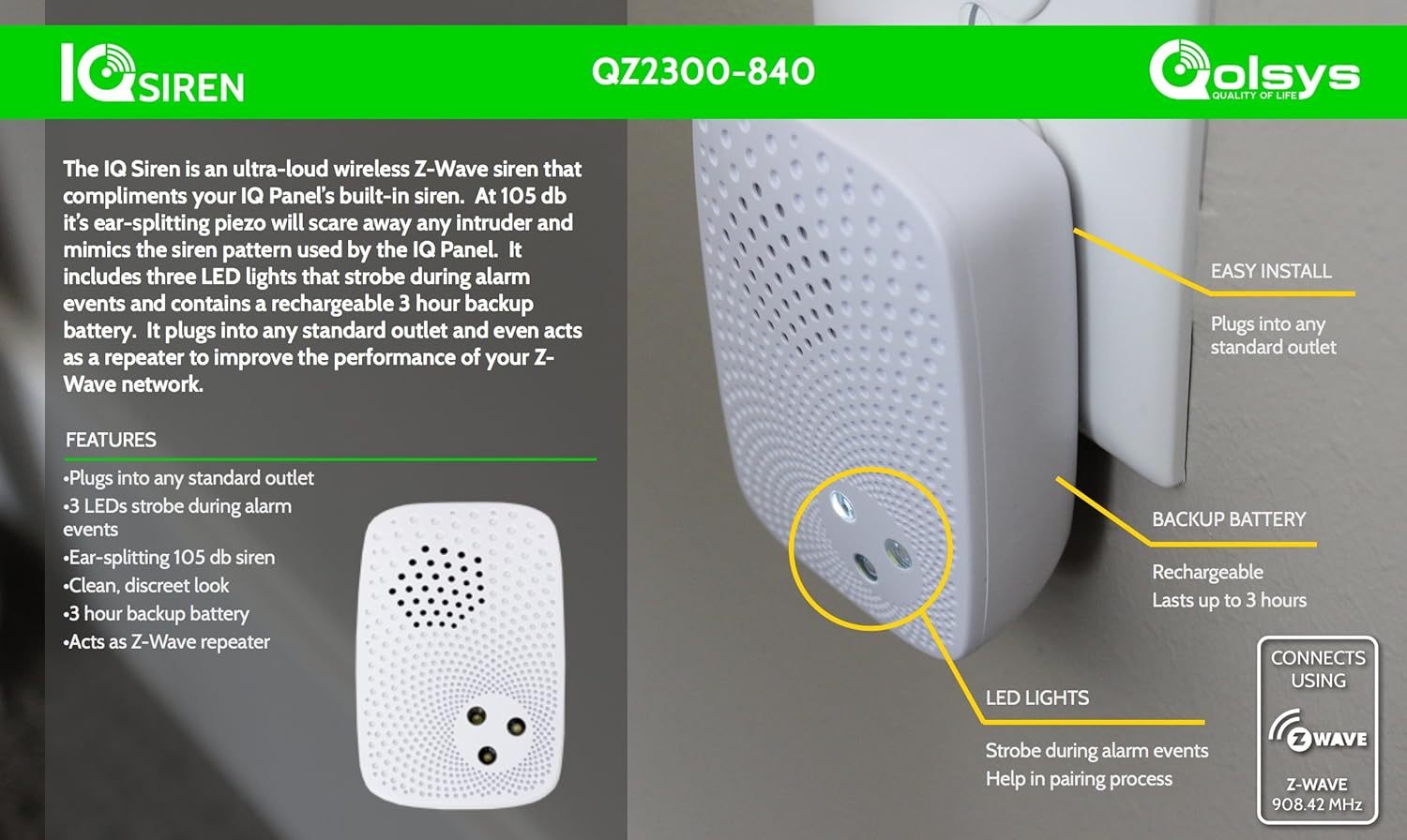
Image: The Qolsys IQ Siren highlighting its key features, including LED lights, backup battery, and Z-Wave connectivity.
3. ຂໍ້ມູນຄວາມປອດໄພ
Please read and understand all safety instructions before using the IQ Siren. Failure to follow these instructions may result in injury or damage to the device.
- Loud Noise Warning: The siren produces a very loud sound (105 dB) which can cause hearing discomfort or damage if exposed for prolonged periods or at close range. Do not activate the siren near your ears.
- ຄວາມປອດໄພທາງໄຟຟ້າ: Plug the device into a standard, properly grounded electrical outlet. Do not use with extension cords or adapters unless absolutely necessary and rated for the device. Do not expose to water or excessive moisture.
- ຄວາມປອດໄພຫມໍ້ໄຟ: The device contains a backup battery. Do not attempt to replace the battery yourself unless specifically instructed. Dispose of batteries according to local regulations.
- ການຈັດວາງ: Install the siren in a location where it is not easily accessible to children or pets. Ensure it is securely plugged in and not obstructed.
- ບໍາລຸງຮັກສາ: ຢ່າພະຍາຍາມເປີດຫຼືສ້ອມແປງອຸປະກອນ. ອ້າງອີງການບໍລິການທັງໝົດໃຫ້ກັບບຸກຄະລາກອນທີ່ມີຄຸນວຸດທິ.
4. ເນື້ອໃນຊຸດ
ກວດສອບວ່າລາຍການທັງຫມົດແມ່ນມີຢູ່ໃນຊຸດຂອງທ່ານ:
- Qolsys IQ Siren (Z-Wave) Unit
- ຄູ່ມືເລີ່ມຕົ້ນດ່ວນ (ຖ້າລວມ)
5. ການຕິດຕັ້ງແລະການຕິດຕັ້ງ
Follow these steps to install and pair your IQ Siren with your Z-Wave compatible security system.
5.1 ການຕິດຕັ້ງທາງດ້ານຮ່າງກາຍ
- Select a suitable indoor location for the siren, preferably centrally located within your Z-Wave network's range and near a standard electrical outlet.
- Plug the IQ Siren directly into a standard 120V AC wall outlet. Ensure it is securely seated.

Image: The Qolsys IQ Siren plugged into a standard wall outlet, ready for operation.
5.2 Z-Wave Pairing (Inclusion)
To integrate the IQ Siren into your Z-Wave network, you must "include" it with your Z-Wave controller (e.g., Qolsys IQ Panel or other compatible Z-Wave hub).
- Put your Z-Wave controller into "inclusion" or "add device" mode. Refer to your controller's manual for specific instructions.
- With the IQ Siren plugged in, press the small button on the side of the siren (often indicated by a small LED or indentation). The LED on the siren should begin to flash, indicating it is attempting to pair.
- Once successfully paired, your Z-Wave controller should confirm the inclusion, and the siren's LED may change to a solid state or turn off.
- Test the siren's functionality through your Z-Wave controller to ensure it responds correctly to commands.
ຫມາຍເຫດກ່ຽວກັບຄວາມເຂົ້າກັນໄດ້: While the IQ Siren is Z-Wave compatible, optimal performance and full feature integration are typically achieved with Qolsys IQ Panels. Compatibility with other Z-Wave hubs (e.g., Samsung SmartThings) may vary, and full functionality is not guaranteed. Always check your Z-Wave controller's compatibility list.
5.3 Z-Wave Exclusion (Removal)
If you need to remove the IQ Siren from your Z-Wave network or reset it, follow these steps:
- Put your Z-Wave controller into "exclusion" or "remove device" mode.
- Press the small button on the side of the IQ Siren. The controller should confirm the device's removal.

Image: Qolsys IQ Siren branding with a QR code. Scan this QR code for additional video instructions and setup guides: http://scan.me/wcd2x2v
6. ຄໍາແນະນໍາການດໍາເນີນງານ
Once successfully paired with your Z-Wave controller, the IQ Siren operates automatically in conjunction with your security system.
- ການເປີດໃຊ້ໂມງປຸກ: When your Z-Wave security system triggers an alarm event, the IQ Siren will activate, emitting a 105 dB sound and flashing its LED strobe lights.
- ການປິດການນຳໃຊ້ໂມງປຸກ: The siren will cease sounding and strobing when the alarm event is cleared or disarmed through your Z-Wave controller.
- Z-Wave Repeater: The IQ Siren continuously functions as a Z-Wave repeater, strengthening the signals between your Z-Wave controller and other Z-Wave devices in its vicinity. This helps to improve the reliability and range of your overall Z-Wave network.
7. ບໍາລຸງຮັກສາ
The Qolsys IQ Siren requires minimal maintenance.
- ທໍາຄວາມສະອາດ: Wipe the exterior of the siren with a soft, dry cloth. Do not use liquid cleaners or abrasive materials.
- ແບັດເຕີຣີສຳຮອງ: The internal backup battery provides power for up to 3 hours during a power outage. The siren will automatically recharge the battery when main power is restored. No user intervention is required for battery maintenance under normal conditions.
- ການອັບເດດເຟີມແວ: Any firmware updates would typically be managed through your Z-Wave controller or security panel. Consult your panel's documentation for details.
8. ການແກ້ໄຂບັນຫາ
If you encounter issues with your IQ Siren, refer to the following common troubleshooting steps:
| ບັນຫາ | ສາເຫດທີ່ເປັນໄປໄດ້ | ການແກ້ໄຂ |
|---|---|---|
| Siren does not pair with Z-Wave controller. |
|
|
| Siren does not sound during an alarm. |
|
|
| LEDs do not strobe during alarm. |
|
|
If problems persist after attempting these solutions, contact Qolsys customer support or your security system provider for further assistance.
9. ຂໍ້ມູນຈໍາເພາະ
| ຄຸນລັກສະນະ | ລາຍລະອຽດ |
|---|---|
| ຍີ່ຫໍ້ | Qolsys |
| ຕົວແບບ | IQ Siren |
| ສີ | ສີຂາວ |
| ແຫຼ່ງພະລັງງານ | AC Plug-in with 3-hour Battery Backup |
| ອຸປະກອນທີ່ເຂົ້າກັນໄດ້ | Z-Wave compatible devices and systems (optimized for Qolsys IQ Panels) |
| ປະເພດແບັດເຕີຣີ (ສຳຮອງ) | ສາມາດສາກໄດ້ພາຍໃນ |
| ສະບັບtage | 9 ໂວນ (DC) |
| ວິທີການຄວບຄຸມ | Z-Wave (Touch button for pairing) |
| ສຽງດັງ | 105 Decibels |
| ປະເພດການຕິດຕັ້ງ | Wall Outlet Plug-in |
| UPC | 854545006412 |
10. ການຮັບປະກັນແລະການສະຫນັບສະຫນູນ
For warranty information, please refer to the documentation provided with your purchase or visit the official Qolsys website. For technical support, contact your security system installer or Qolsys customer service directly. Ensure you have your product model and serial number available when seeking support.