
ແນະນຳ
This manual provides detailed instructions for the installation, operation, and maintenance of your Zenec Z-E3726 2-DIN Car Radio Navigation System. The Z-E3726 is specifically designed for FIAT Ducato, Citroën Jumper, and Peugeot Boxer vehicles, offering advanced multimedia and navigation functionalities. Please read this manual thoroughly before using the device to ensure proper operation and to maximize your user experience.
ການຕິດຕັ້ງແລະການຕິດຕັ້ງ
The Zenec Z-E3726 is engineered for optimal integration into FIAT Ducato, Citroën Jumper, and Peugeot Boxer dashboards. Professional installation is recommended.
ການປະສົມປະສານຂອງຍານພາຫະນະ
- The unit's design and amber key illumination are specifically matched to these vehicle models.
- An optionally available Stalk interface allows connection to an existing multifunction steering wheel, supporting audio and phone functions.
ຫລັງ View ການເຊື່ອມຕໍ່ກ້ອງ
The Z-E3726 supports easy connection of a rear-view ກ້ອງຖ່າຍຮູບ.
- Connect the camera to the designated input on the device.
- The camera activates automatically when reverse gear is engaged.
- Optional guidelines can be displayed on the screen for improved distance estimation, regardless of the camera model.
- The E>GO is compatible with cameras featuring integrated microphones.
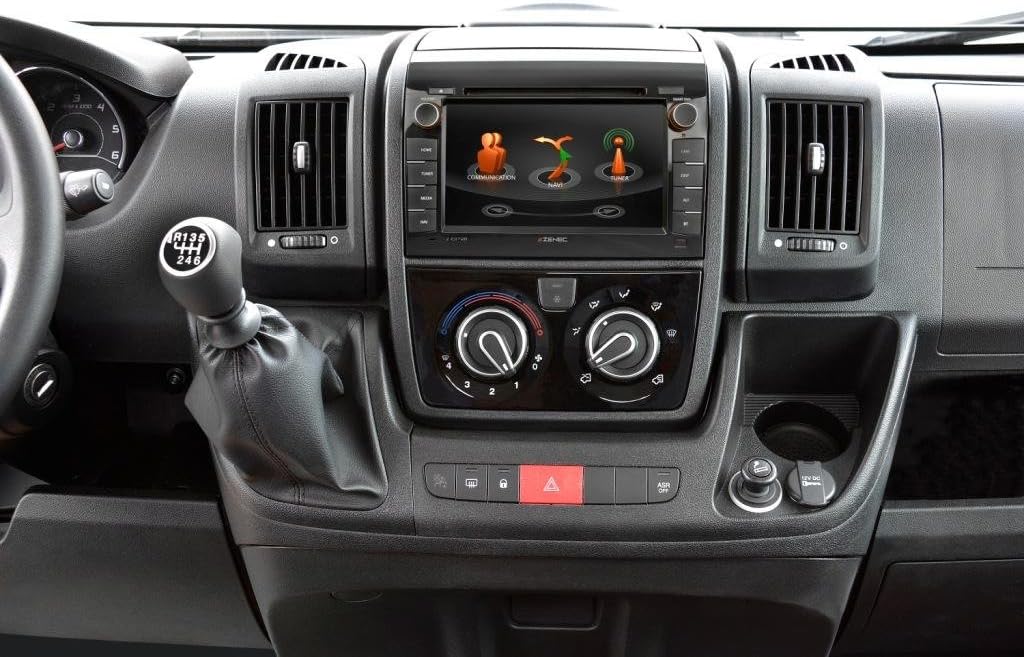
Image: The Zenec Z-E3726 unit seamlessly integrated into the dashboard of a compatible vehicle, showcasing its 7-inch display and physical control buttons.

ຮູບພາບ: A ລາຍລະອຽດ view of the Zenec Z-E3726 within the vehicle's interior, demonstrating its fit and the interactive display showing communication and navigation options.
ຄໍາແນະນໍາການດໍາເນີນງານ
The Z-E3726 features a high-resolution 7-inch (17.8 cm) touchscreen for intuitive control. The menu is available in 28 languages.
ລະບົບນໍາທາງ
- The system uses the Zenec Primo NextGen navigation engine with an EU map package covering 47 countries.
- Includes over 6 million Premium Points of Interest (P.O.I.).
- Features detailed 3D maps, TMC (Traffic Message Channel), auto-zoom, and lane assist.
- CampingSchaf P.O.I. Database: A pre-installed, comprehensive database (in German) provides detailed information on approximately 20,000 camping and parking sites across Europe.
- Route planning can be optimized by selecting a vehicle profile and entering vehicle-specific data.
- Map updates are available for free for one year after initial use via the Naviextras portal.

Image: The Zenec Z-E3726 screen displaying a detailed navigation map, including route information and options for alternative routes.
ຄຸນສົມບັດມັນຕິມີເດຍ
- DAB+ Tuner: Enjoy a wide variety of digital radio programs with crystal-clear reception through the multituner system.
- CD/DVD Drive: Integrated drive supports various audio and video formats.
- ພອດ USB: A rear USB port (with 80 cm cable extension) supports modern audio and video formats.
- Audio Optimization: Features a 4 x 50 watt amplifier with a DSP suite, including runtime correction and an equalizer with presets.
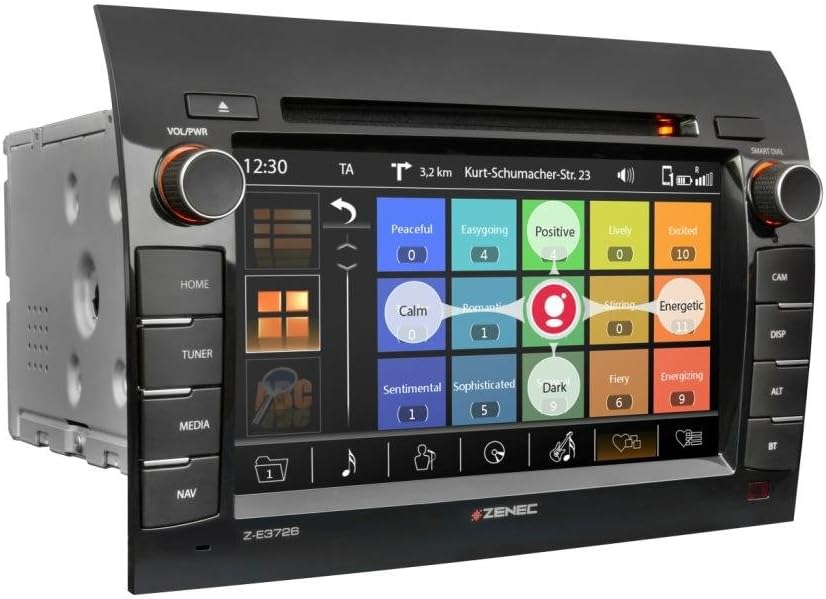
Image: The Zenec Z-E3726 interface displaying multimedia options, possibly for music selection based on mood or genre.
ການເຊື່ອມຕໍ່ Bluetooth
- A powerful, database-supported Parrot Bluetooth unit enables hands-free calling.
- Supports comfortable music streaming while driving.

Image: The Zenec Z-E3726 screen showing an incoming call interface, demonstrating its Bluetooth phone functionality.
ຫລັງ View ການດໍາເນີນງານກ້ອງຖ່າຍຮູບ
- In addition to automatic activation, the Z-E3726 features a dedicated CAM button on the front panel for direct selection.
- This allows manual activation of the rear-view camera system whenever needed, aiding in maneuvering and parking.
ບໍາລຸງຮັກສາ
- ທໍາຄວາມສະອາດຫນ້າຈໍ: Use a soft, lint-free cloth to gently wipe the touchscreen. For stubborn marks, slightly dampໃສ່ຜ້າດ້ວຍນ້ໍາຫຼືເຄື່ອງເຮັດຄວາມສະອາດຫນ້າຈໍທີ່ປອດໄພ. ຫຼີກລ້ຽງການວັດສະດຸຂັດຫຼືສານເຄມີທີ່ຮ້າຍແຮງ.
- ອັບເດດຊອບແວ: Regularly check the official Zenec website or the Naviextras portal for available software and map updates to ensure optimal performance and access to the latest features.
- ການດູແລທົ່ວໄປ: ຮັກສາເຄື່ອງໃຫ້ປອດຈາກຂີ້ຝຸ່ນ ແລະສິ່ງເສດເຫຼືອ. ຮັບປະກັນການລະບາຍອາກາດທີ່ເຫມາະສົມຮອບຫນ່ວຍເພື່ອປ້ອງກັນຄວາມຮ້ອນເກີນ.
ການແກ້ໄຂບັນຫາ
If you encounter issues with your Z-E3726, refer to the following common problems and solutions:
| ບັນຫາ | ສາເຫດທີ່ເປັນໄປໄດ້ | ການແກ້ໄຂ |
|---|---|---|
| ບໍ່ມີພະລັງງານ / ຫນ່ວຍງານບໍ່ເປີດ. | ສາຍໄຟບໍ່ຖືກຕ້ອງ, ຟິວເປົ່າ, ບັນຫາຫມໍ້ໄຟລົດ. | Check power connections and fuses. Ensure vehicle battery is charged. Consult a professional installer. |
| ບໍ່ມີສຽງ. | ລະດັບສຽງຕໍ່າເກີນໄປ, ປິດສຽງແລ້ວ, ແຫຼ່ງສຽງບໍ່ຖືກຕ້ອງ, ມີບັນຫາກ່ຽວກັບສາຍໄຟລຳໂພງ. | ເພີ່ມລະດັບສຽງ. ກວດສອບວ່າປິດສຽງຢູ່ຫຼືບໍ່. ເລືອກແຫຼ່ງສຽງທີ່ຖືກຕ້ອງ. ກວດສອບການເຊື່ອມຕໍ່ລຳໂພງ. |
| Navigation not working or inaccurate. | GPS signal loss, outdated maps, incorrect settings. | ຮັບປະກັນຄວາມຊັດເຈນ view of the sky for GPS signal. Update maps via Naviextras. Check navigation settings. |
| ບັນຫາການເຊື່ອມຕໍ່ Bluetooth. | Device not paired, Bluetooth off on phone, interference. | ໃຫ້ແນ່ໃຈວ່າ Bluetooth ຖືກເປີດໃຊ້ງານຢູ່ໃນອຸປະກອນທັງສອງ. ສ້ອມແປງອຸປະກອນຄືນໃໝ່. ຍ້າຍເຂົ້າໃກ້ເຄື່ອງຫຼາຍຂຶ້ນ. |
| ໜ້າຈໍສຳຜັດບໍ່ຕອບສະໜອງ ຫຼືຊ້າ. | Temporary software glitch, dirty screen, system overload. | Restart the unit. Clean the screen. Perform a system reset if necessary (refer to advanced settings). |
If the problem persists after attempting these solutions, please contact Zenec customer support or a qualified service technician.
ຂໍ້ມູນຈໍາເພາະ
| ຄຸນສົມບັດ | ລາຍລະອຽດ |
|---|---|
| ຍີ່ຫໍ້ | ເຊເນກ |
| ຊື່ຕົວແບບ | Z-E3726 |
| ໝາຍເລກຕົວແບບ | 02027Z-E3726 |
| ຂະໜາດໜ້າຈໍ | 7 ນິ້ວ (17.8 ຊຕມ) |
| ຄວາມລະອຽດ | 1024 x 600 |
| ປະເພດການຕິດຕັ້ງ | Dashboard Mount |
| ປະເພດການບໍລິການພາຫະນະ | Fiat Ducato, Citroën Jumper, Peugeot Boxer |
| ຄຸນນະສົມບັດພິເສດ | Bluetooth, Navigation, DAB+ |
| ເຕັກໂນໂລຊີການເຊື່ອມຕໍ່ | Bluetooth, USB |
| ປະເພດແຜນທີ່ | Europe (47 countries) |
| ຮູບແບບການອອກສຽງ | Digital, Stereo |
| ຂະໜາດແພັກເກັດ | 31.8 x 28 x 20.6 cm |
| ນ້ໍາຫນັກລາຍການ | 3.94 ກິໂລ |
| ວັນທີທີ່ມີໃຫ້ທໍາອິດ | ວັນທີ 15 ມັງກອນ 2020 |
ຂໍ້ມູນການຮັບປະກັນ
Zenec products are covered by a manufacturer's warranty. Please refer to the warranty card included with your product or visit the official Zenec webເວັບໄຊສໍາລັບຂໍ້ກໍານົດແລະເງື່ອນໄຂລະອຽດ. ຮັກສາຫຼັກຖານການຊື້ຂອງທ່ານສໍາລັບການຮ້ອງຂໍການຮັບປະກັນ.
Map updates are guaranteed for one year free of charge after initial activation via the Naviextras portal.
ການຊ່ວຍເຫຼືອລູກຄ້າ
For technical assistance, troubleshooting, or general inquiries regarding your Zenec Z-E3726, please contact Zenec customer support.
- ສະຫນັບສະຫນູນອອນໄລນ໌: Visit the official Zenec website for FAQs, software downloads, and contact forms.
- ຕົວແທນຈຳໜ່າຍທີ່ໄດ້ຮັບອະນຸຍາດ: For installation support or service, contact your authorized Zenec dealer.