
1. ບົດແນະນຳ
This manual provides detailed instructions for the installation, operation, and maintenance of your Aquatic AV AQ-MP-5UBT-H AM/FM Radio with Bluetooth and MP3 Media Player. This unit is specifically designed as a factory replacement for Harley-Davidson touring motorcycles manufactured between 1998 and 2013. It offers advanced audio features, including Bluetooth connectivity, MP3 playback, and a 3-inch color LCD display, while integrating seamlessly with existing factory handlebar controls and wiring.
2. ຂໍ້ມູນຄວາມປອດໄພ
Please read all safety instructions carefully before installing and operating the AQ-MP-5UBT-H stereo. Failure to follow these instructions may result in injury or damage to the unit or motorcycle.
- Always disconnect the motorcycle's battery before beginning any electrical installation.
- ໃຫ້ແນ່ໃຈວ່າການເຊື່ອມຕໍ່ສາຍໄຟທັງຫມົດແມ່ນປອດໄພແລະຖືກ insulated ຢ່າງຖືກຕ້ອງເພື່ອປ້ອງກັນບໍ່ໃຫ້ວົງຈອນສັ້ນ.
- Do not operate the stereo in a manner that distracts you from safe motorcycle operation.
- This unit is designed to be waterproof; however, avoid direct high-pressure water jets on the display or connections.
- ປຶກສາຫາລືກັບນັກວິຊາການທີ່ມີຄຸນວຸດທິຖ້າທ່ານບໍ່ແນ່ໃຈກ່ຽວກັບຂັ້ນຕອນການຕິດຕັ້ງຫຼືສາຍໄຟ.
3. ເນື້ອໃນຊຸດ
ກວດສອບວ່າລາຍການທັງຫມົດແມ່ນມີຢູ່ໃນຊຸດກ່ອນທີ່ຈະສືບຕໍ່ການຕິດຕັ້ງ:
- Aquatic AV AQ-MP-5UBT-H Stereo Unit
- Wiring Harness (pre-attached or separate)
- Mounting Hardware (if applicable, typically uses existing Harley-Davidson bracket)
- ຄູ່ມືຜູ້ໃຊ້ (ເອກະສານນີ້)
4. ການຕິດຕັ້ງ
The AQ-MP-5UBT-H is designed for a direct factory replacement, utilizing the existing Harley-Davidson stereo mounting bracket and wiring connections for a plug-and-play installation. However, some modifications may be required for rear speaker wiring.
4.1. ການກະກຽມ
- Park your motorcycle on a level surface and engage the parking brake.
- Disconnect the negative terminal of the motorcycle battery to prevent electrical shorts.
- Carefully remove the existing factory stereo unit from your Harley-Davidson touring motorcycle (1998-2013 model). Refer to your motorcycle's service manual for specific removal instructions.
4.2. Connecting the Stereo
- Connect the AQ-MP-5UBT-H wiring harness to the motorcycle's existing factory wiring harness. This is typically a direct plug-and-play connection.
- If your motorcycle has rear speakers, you may need to cut and wire the rear speaker wires from the new stereo's harness to the existing rear speaker wiring. Ensure proper polarity (+/-) for each speaker.
- Secure any loose wiring to prevent interference or damage.
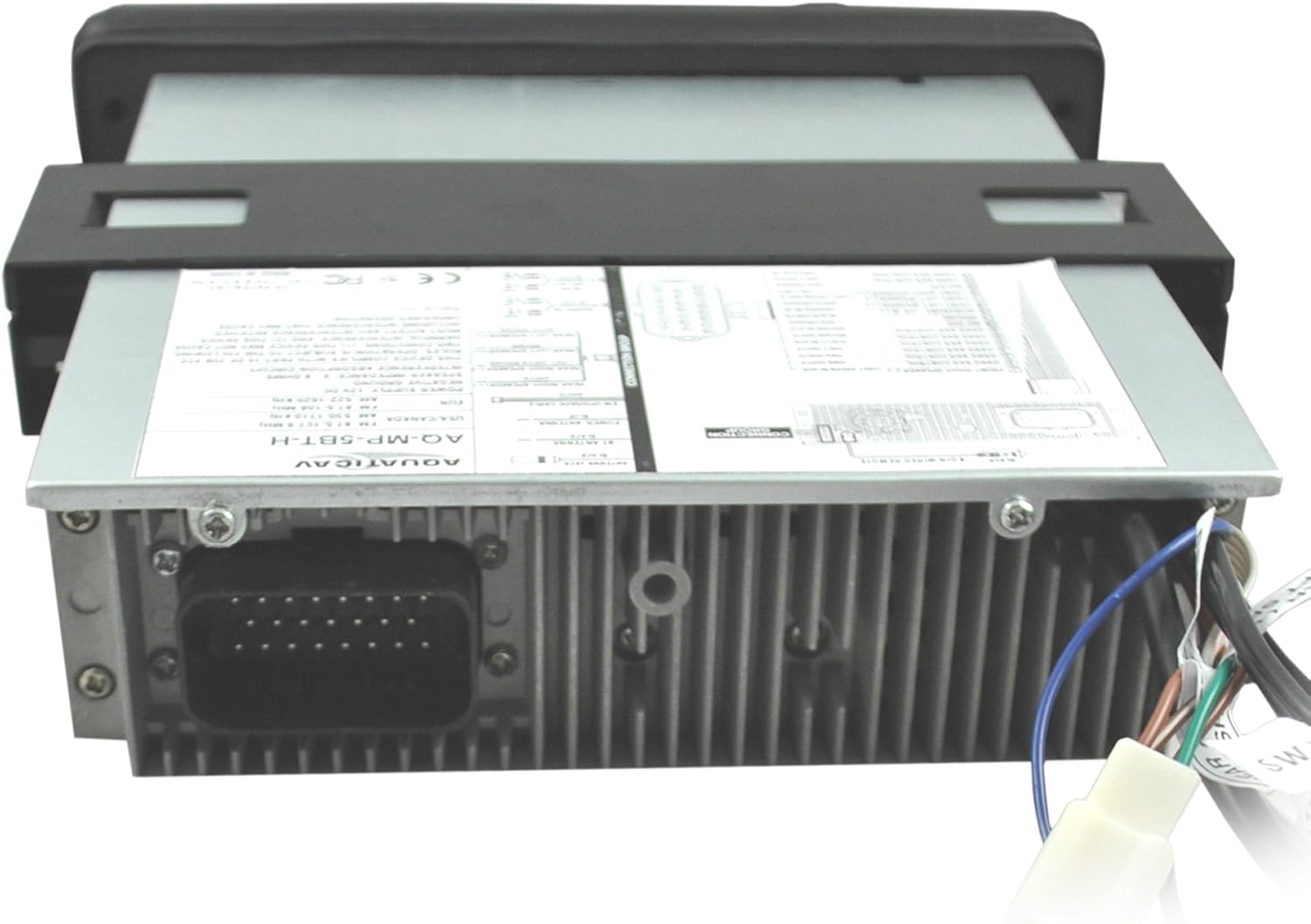
ຮູບພາບ: ດ້ານຫລັງ view of the AQ-MP-5UBT-H unit showing the main wiring harness connection.

ຮູບພາບ: ຂ້າງ view of the AQ-MP-5UBT-H unit, illustrating the mounting bracket.
4.3. Mounting the Stereo
- Carefully slide the AQ-MP-5UBT-H unit into the dashboard opening, ensuring all wires are clear and not pinched.
- Secure the stereo using the existing factory mounting bracket and screws. Some users report difficulty with the inner left mounting screw; ensure proper alignment.
- Reconnect the motorcycle battery's negative terminal.
- Test the stereo's basic functions before fully reassembling the dashboard.
5. ການຕິດຕັ້ງເບື້ອງຕົ້ນ
ຫຼັງຈາກຕິດຕັ້ງແລ້ວ, ໃຫ້ປະຕິບັດຕາມຂັ້ນຕອນການຕັ້ງຄ່າເບື້ອງຕົ້ນຕໍ່ໄປນີ້:
- ເປີດ: Turn the motorcycle ignition to the ACC or ON position. The stereo should power on.
- Language/Region: Follow any on-screen prompts to set the desired language and radio region (e.g., USA, Europe).
- ການຕັ້ງຄ່າສຽງ: Access the menu to adjust basic audio settings such as Bass, Treble, Balance, and Fader to your preference.
6. ຄໍາແນະນໍາການດໍາເນີນງານ
The AQ-MP-5UBT-H stereo can be controlled via its front panel buttons, rotary knob, and your motorcycle's factory handlebar controls.
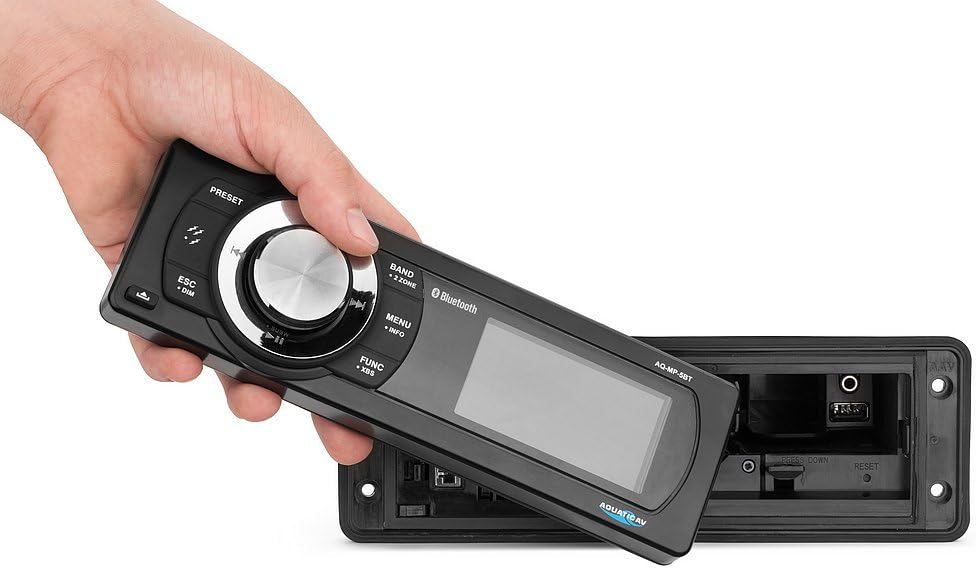
Image: The removable faceplate of the AQ-MP-5UBT-H, showing the main controls and display.
6.1. ແຜງຄວບຄຸມດ້ານໜ້າ
| ການຄວບຄຸມ | ຟັງຊັນ |
|---|---|
| ປຸ່ມພະລັງງານ/ປະລິມານ | Press to turn unit ON/OFF. Rotate to adjust volume. |
| ປຸ່ມແຖບ | Switches between AM/FM radio bands or input sources. |
| ປຸ່ມເມນູ/ຂໍ້ມູນ | Accesses system settings and displays track/station information. |
| FUNC/XBS Button | Accesses various functions; long press for XBS (eXtreme Bass System). |
| ESC/DIM Button | Exits current menu; long press to adjust display dimmer. |
| ປຸ່ມທີ່ຕັ້ງໄວ້ລ່ວງໜ້າ (1-6) | Recall stored radio stations or perform other functions depending on mode. |
| Track/Tune Buttons | Skip tracks (Bluetooth/MP3) or tune radio stations. |
6.2. ປະຕິບັດການວິທະຍຸ (AM/FM)
- ກົດ ແຖບ button to select AM or FM.
- ໃຊ້ Track/Tune ປຸ່ມເພື່ອປັບດ້ວຍຕົນເອງ ຫຼືຊອກຫາສະຖານີ.
- ເພື່ອບັນທຶກຄ່າທີ່ຕັ້ງໄວ້ລ່ວງໜ້າ: ປັບແຕ່ງໄປຫາສະຖານີທີ່ຕ້ອງການ, ຈາກນັ້ນກົດປຸ່ມຄ້າງໄວ້. ປຸ່ມທີ່ຕັ້ງໄວ້ລ່ວງໜ້າ (1-6) until you hear a confirmation beep.
6.3. MP3 Playback (USB/Auxiliary)
The unit supports MP3 playback via a USB connection or a 3.5mm auxiliary input.

Image: The internal compartment of the stereo, revealing the USB port and 3.5mm auxiliary input.

Image: A smartphone being placed into the internal storage compartment, which houses the USB and auxiliary connections.
- USB: ໃສ່ USB drive ທີ່ບັນຈຸ MP3 files into the USB port located within the internal compartment. The unit will automatically switch to USB mode and begin playback.
- ຜູ້ຊ່ວຍ: Connect an audio device (e.g., MP3 player, smartphone) to the 3.5mm auxiliary input jack. Press the ແຖບ button to select AUX input.
- ໃຊ້ Track/Tune buttons to navigate tracks (USB only) or the connected device's controls (Auxiliary).
7. ການຈັບຄູ່ Bluetooth
Pair your Bluetooth-enabled smartphone or MP3 device to the AQ-MP-5UBT-H for wireless audio streaming.
- ໃຫ້ແນ່ໃຈວ່າ Bluetooth ຖືກເປີດໃຊ້ງານຢູ່ໃນອຸປະກອນມືຖືຂອງທ່ານ.
- On the AQ-MP-5UBT-H, press the ແຖບ button until "Bluetooth" mode is selected. The display will show "Pairing" or similar.
- On your mobile device, search for available Bluetooth devices. Select "Aquatic AV" or "AQ-MP-5UBT-H" from the list.
- Once paired, the stereo will confirm the connection. You can now stream audio wirelessly.
- For Apple devices, the 3-inch color LCD screen can display album artwork when paired via Bluetooth using IAP (Information Apple Protocol).
8. ບໍາລຸງຮັກສາ
- ທໍາຄວາມສະອາດ: ໃຊ້ອ່ອນ, ງamp cloth to clean the display and front panel. Avoid abrasive cleaners or solvents.
- ການເຊື່ອມຕໍ່: ກວດເບິ່ງທຸກສາຍເຊື່ອມຕໍ່ແຕ່ລະໄລຍະເພື່ອຮັບປະກັນວ່າພວກມັນປອດໄພ ແລະ ບໍ່ມີການກັດກ່ອນ.
- ອັບເດດຊອບແວ: Check the Aquatic AV webເວັບໄຊທ໌ສຳລັບການອັບເດດເຟີມແວທີ່ມີໃຫ້ສຳລັບຮຸ່ນຂອງທ່ານ.
9. ການແກ້ໄຂບັນຫາ
| ບັນຫາ | ສາເຫດ / ການແກ້ໄຂທີ່ເປັນໄປໄດ້ |
|---|---|
| ບໍ່ມີພະລັງງານ |
|
| ບໍ່ມີສຽງ |
|
| Bluetooth ບໍ່ເຊື່ອມຕໍ່ |
|
| Stereo Reboots on Ignition Cycle | This unit may reboot when the motorcycle ignition is cycled (e.g., from ON to ACC and back). This is a characteristic of the unit's power management and not a fault. |
| No Clock Display | The AQ-MP-5UBT-H model does not feature a dedicated clock display. Time information is typically managed by connected devices or the motorcycle's own instrumentation. |
10. ຂໍ້ມູນຈໍາເພາະ
| ຄຸນສົມບັດ | ລາຍລະອຽດ |
|---|---|
| ໝາຍເລກຕົວແບບ | AQ-MP-5UBT-H |
| ຂະໜາດສິນຄ້າ | 14 x 4 x 13 ນິ້ວ |
| ນ້ໍາຫນັກລາຍການ | 3.88 ປອນ |
| ເຕັກໂນໂລຊີການເຊື່ອມຕໍ່ | Bluetooth |
| ການສື່ສານໄຮ້ສາຍ | Bluetooth |
| ຄຸນສົມບັດການສະແດງ | ຈໍ LCD ສີ 3 ນິ້ວ |
| ສີ | ດຳ |
| ປະເພດການຄວບຄຸມ | Android, iOS (via Bluetooth) |
| ອຸປະກອນທີ່ເຂົ້າກັນໄດ້ | Speaker, Smartphone, MP3 Player |
| ປະເພດຕົວເຊື່ອມຕໍ່ | Jack 3.5mm, RCA |
| ການເຂົ້າລະຫັດສຽງ | ສະເຕຣິໂອ |
| ຮູບແບບການອອກສຽງ | ສະເຕຣິໂອ |
| Surround Sound Channel Config | 4 ຊ່ອງ |
11. ການຮັບປະກັນແລະການສະຫນັບສະຫນູນ
The Aquatic AV AQ-MP-5UBT-H stereo comes with a ການຮັບປະກັນ 1 ປີຈໍາກັດ from the date of purchase when purchased from an authorized dealer. This warranty covers defects in materials and workmanship under normal use.
For technical support, warranty claims, or further assistance, please contact Aquatic AV customer service or visit their official webເວັບໄຊ. ຮັກສາຫຼັກຖານການຊື້ຂອງທ່ານສໍາລັບການຮັບປະກັນຄວາມຖືກຕ້ອງ.