
1. ບົດແນະນຳ
This manual provides comprehensive instructions for the installation, operation, and maintenance of your Speco Technologies HT5941T Intense IR HD TVI Dome Camera. This camera is designed to deliver high-definition surveillance with advanced features such as True WDR, Intense IR, and day/night operation. Please read this manual thoroughly before installation and use to ensure proper functionality and safety.
2. ຂໍ້ມູນຄວາມປອດໄພ
- ການສະຫນອງພະລັງງານ: Use only the specified 12VDC or 24VAC power supply. Incorrect voltagອາດຈະເຮັດໃຫ້ກ້ອງຖ່າຍຮູບເສຍຫາຍໄດ້.
- ການຕິດຕັ້ງ: Ensure the camera is securely mounted to prevent accidental falls. Professional installation is recommended.
- ສະພາບແວດລ້ອມ: ຢ່າໃຫ້ກ້ອງຖ່າຍຮູບຖືກອຸນຫະພູມສູງ, ຄວາມຊຸ່ມຊື່ນ ຫຼື ສະພາບແວດລ້ອມທີ່ມີການກັດກ່ອນນອກເໜືອຈາກເງື່ອນໄຂການເຮັດວຽກທີ່ລະບຸໄວ້.
- ທໍາຄວາມສະອາດ: ຕັດການເຊື່ອມຕໍ່ໄຟຟ້າກ່ອນທຳຄວາມສະອາດ. ໃຊ້ຜ້າອ່ອນແລະແຫ້ງ. ຫຼີກລ່ຽງສານເຄມີທີ່ຮຸນແຮງ.
- ການບໍລິການ: Do not attempt to disassemble or service the camera yourself. Refer all servicing to qualified personnel.
3. ເນື້ອໃນຊຸດ
ກວດສອບວ່າລາຍການທັງຫມົດແມ່ນມີຢູ່ໃນຊຸດຂອງທ່ານ:
- HT5941T Dome Camera
- Chameleon Cover
- ຮາດແວຕິດຕັ້ງ (ສະກູ, ສະມໍ)
- ຄູ່ມືເລີ່ມຕົ້ນດ່ວນ (ຖ້າມີ)
4. ການຕິດຕັ້ງແລະການຕິດຕັ້ງ
4.1 ຕິດຕັ້ງກ້ອງ
The HT5941T camera supports 3-axis adjustment for both wall and ceiling mounting. Ensure the mounting surface is strong enough to support the camera's weight.
- ເລືອກສະຖານທີ່ຕິດຕັ້ງທີ່ເຫມາະສົມ.
- Use the provided mounting template (if included) or the camera base to mark drilling points.
- ເຈາະຮູນັກບິນ ແລະ ໃສ່ບ່ອນຍຶດຕິດຝາ ຖ້າຈຳເປັນ.
- ຍຶດຖານກ້ອງໃຫ້ແໜ້ນກັບໜ້າຕິດໂດຍໃຊ້ສະກູທີ່ໃຫ້ໄວ້.
- ປັບມຸມກ້ອງໃຫ້ເໝາະສົມທີ່ສຸດ viewing.
4.2 ສາຍໄຟ ແລະ ການເຊື່ອມຕໍ່ໄຟຟ້າ
The HT5941T is an HD-TVI output only camera, providing full HD resolution over coaxial cable.
- Connect a coaxial cable (RG59 or similar) from the camera's BNC output to your HD-TVI DVR or monitor.
- Connect the power cable to the camera's power input. The camera supports dual voltage operation (12VDC or 24VAC). Ensure the power supply matches the camera's requirements.
- ກວດສອບການເຊື່ອມຕໍ່ທັງຫມົດແມ່ນປອດໄພກ່ອນທີ່ຈະນໍາໃຊ້ໄຟ.
4.3 Chameleon Cover Installation
The included Chameleon Cover can be painted to match your décor.
- If desired, paint the Chameleon Cover before installation. Allow it to dry completely.
- Align the cover with the camera body and snap it into place.
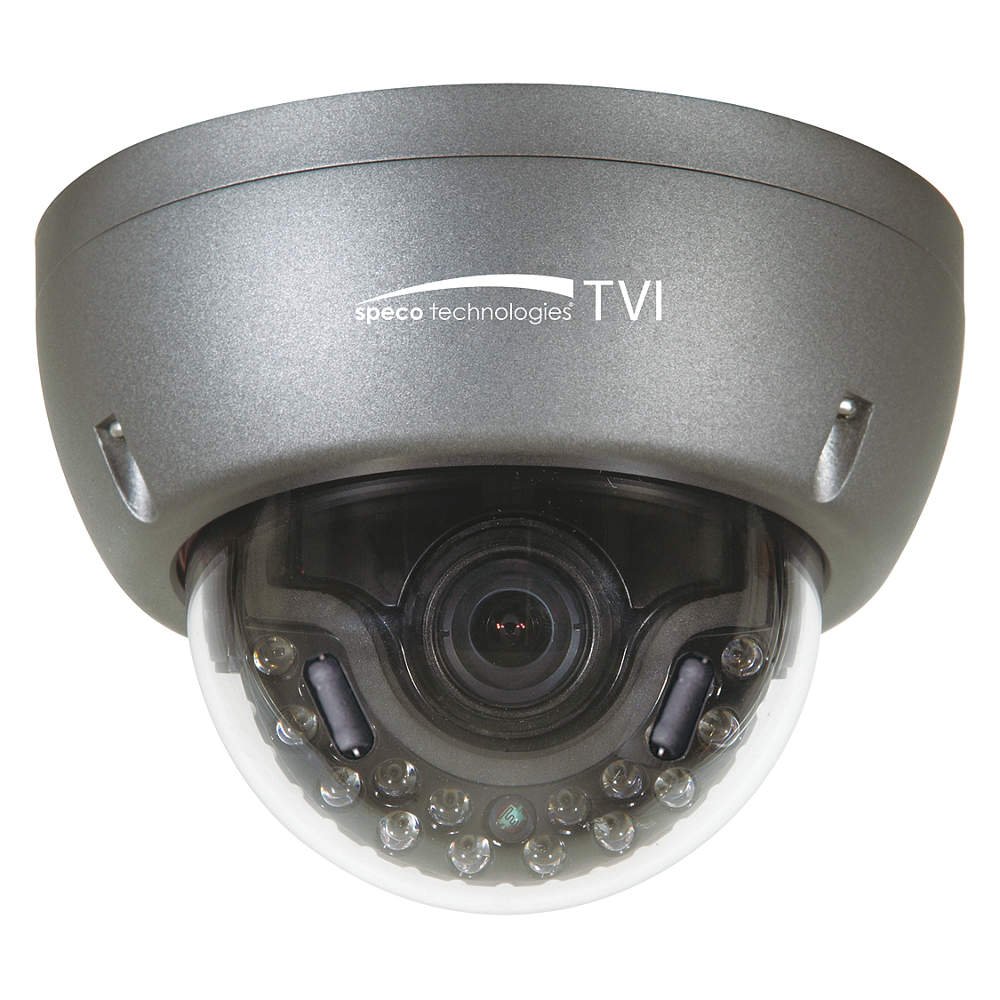
Figure 1: Speco Technologies HT5941T Dome Camera with its dark gray housing and dome design.
5. ຄໍາແນະນໍາການດໍາເນີນງານ
5.1 Powering On and Initial View
Once the camera is properly wired and powered, it will automatically begin transmitting video. Connect your HD-TVI DVR or monitor to view ອາຫານສົດ.
5.2 ເມນູການສະແດງເທິງໜ້າຈໍ (OSD).
The camera features a full OSD menu for configuration, accessible via on-board controls or UTC (Up The Coax) control from a compatible DVR.
- ການເຂົ້າເຖິງ OSD: Use the joystick or buttons on the camera (if present) or the UTC control function on your DVR to bring up the OSD menu.
- ການນໍາທາງ: Use the directional controls to navigate through menu options. Select options to adjust settings such as exposure, white balance, and image enhancements.
- ຄຸນນະສົມບັດທີ່ສໍາຄັນ:
- WDR ທີ່ແທ້ຈິງ: Wide Dynamic Range for clear images in high-contrast lighting.
- Intense IR: Adapts IR intensity to the subject, preventing saturation and providing vivid night vision.
- Day/Night Operation: Mechanical IR cut filter automatically switches between color (day) and monochrome (night) modes for optimal image quality.
6. ບໍາລຸງຮັກສາ
6.1 ການທໍາຄວາມສະອາດ
ການທໍາຄວາມສະອາດປົກກະຕິຈະຊ່ວຍຮັກສາຄຸນນະພາບຮູບພາບທີ່ດີທີ່ສຸດ.
- Gently wipe the camera lens and housing with a soft, lint-free cloth.
- ສໍາລັບຝຸ່ນ stubborn, ເລັກນ້ອຍ dampen the cloth with water or a mild lens cleaning solution. Avoid abrasive cleaners.
- ໃຫ້ແນ່ໃຈວ່າກ້ອງຖ່າຍຮູບຖືກປິດແລ້ວກ່ອນທຳຄວາມສະອາດ.
6.2 ການພິຈາລະນາດ້ານສິ່ງແວດລ້ອມ
The HT5941T features heater circuitry and anti-moisture glass to reduce fog or condensation in various weather conditions. No specific user maintenance is required for these features, but ensure the camera's power supply is stable to allow these functions to operate effectively.
7. ການແກ້ໄຂບັນຫາ
| ບັນຫາ | ສາເຫດທີ່ເປັນໄປໄດ້ | ການແກ້ໄຂ |
|---|---|---|
| ບໍ່ມີຜົນຜະລິດວິດີໂອ | No power; Loose cable connection; Incorrect video format (not HD-TVI compatible DVR) | Check power supply and connections; Ensure DVR supports HD-TVI input. |
| ຄຸນນະພາບຮູບພາບບໍ່ດີ (ມົວ, ບິດເບືອນ) | Dirty lens; Improper focus; Cable interference; Insufficient lighting | Clean the lens; Adjust focus via OSD; Use shielded coaxial cable; Verify adequate lighting or IR function. |
| IR ບໍ່ເຮັດວຽກໃນຕອນກາງຄືນ | Insufficient power; Day/Night setting incorrect; IR sensor blocked | Check power supply; Verify Day/Night mode in OSD; Ensure nothing obstructs the IR LEDs or sensor. |
| OSD menu not appearing | Incorrect control method; DVR not compatible with UTC | Try on-board controls if available; Consult DVR manual for UTC compatibility and operation. |
8. ຂໍ້ມູນຈໍາເພາະ
| ຄຸນສົມບັດ | ຂໍ້ມູນຈໍາເພາະ |
|---|---|
| ໝາຍເລກຕົວແບບ | HT5941T |
| ຍີ່ຫໍ້ | ເຕັກໂນໂລຢີ Speco |
| ຄວາມລະອຽດການຖ່າຍວິດີໂອ | 1080p (Full HD) |
| ອັດຕາເຟຣມ | 30 fps |
| ເຕັກໂນໂລຊີການເຊື່ອມຕໍ່ | HD-TVI (Coaxial) |
| ແຫຼ່ງພະລັງງານ | 12VDC & 24VAC Dual Voltage |
| ປະເພດການຕິດຕັ້ງ | Wall Mount (3-axis adjustment) |
| ປັດໄຈແບບຟອມ | ຫໍ |
| ເຕັກໂນໂລຊີແສງສະຫວ່າງຕ່ໍາ | Day/Night, Intense IR |
| ຄຸນນະສົມບັດພິເສດ | True WDR, Heater circuitry, Anti-moisture glass, Chameleon Cover |
| ການຈັດອັນດັບການປົກປ້ອງສາກົນ | IP67 |
| ຂະໜາດ (L x W x H) | 5.12 x 4.84 x 3.66 ນິ້ວ |
| ນ້ໍາຫນັກລາຍການ | 1.5 ປອນ |
| ວັດສະດຸ | Glass (lens) |
9. ການຮັບປະກັນແລະການສະຫນັບສະຫນູນ
For warranty information and technical support, please refer to the official Speco Technologies webເວັບໄຊ ຫຼືຕິດຕໍ່ພະແນກບໍລິການລູກຄ້າຂອງເຂົາເຈົ້າ. ຮັກສາໃບຮັບເງິນການຊື້ຂອງທ່ານໄວ້ເປັນຫຼັກຖານການຊື້ສໍາລັບການຮ້ອງຂໍການຮັບປະກັນ.
Speco Technologies Official Webເວັບໄຊ: www.specotech.com