
Tornado 43ES1500E
ຄູ່ມືຜູ້ໃຊ້ TORNADO Smart LED TV 43ES1500E
Model: 43ES1500E
1. ບົດແນະນຳ
This manual provides essential information for the safe and efficient operation of your TORNADO Smart LED TV 43ES1500E. Please read these instructions thoroughly before using your television and retain them for future reference.

Image: The TORNADO Smart LED TV 43ES1500E displayed in a modern living room environment.
The TORNADO Smart LED TV 43ES1500E features a 43-inch Full HD display, integrated Wi-Fi, and multiple connectivity options including RF, USB, and HDMI. It operates on the TORNADO Smart Portal operating system, offering access to various applications and internet browsing capabilities.
ວິດີໂອ: ຫຼາຍກວ່າview of the TORNADO Smart LED TV, demonstrating its features and setup process.
2. ຕັ້ງຄ່າ
2.1 Unboxing ແລະເນື້ອໃນ
Carefully open the television packaging. Ensure all components are present and undamaged. The box should contain:
- TORNADO Smart LED TV Unit
- ການຄວບຄຸມໄລຍະໄກ
- ຂາຕັ້ງໂທລະທັດ (2 ໜ່ວຍ)
- screws ສໍາລັບການຕິດຕັ້ງ Stand
- ສາຍໄຟ
- ຄູ່ມືຜູ້ໃຊ້ ແລະບັດຮັບປະກັນ
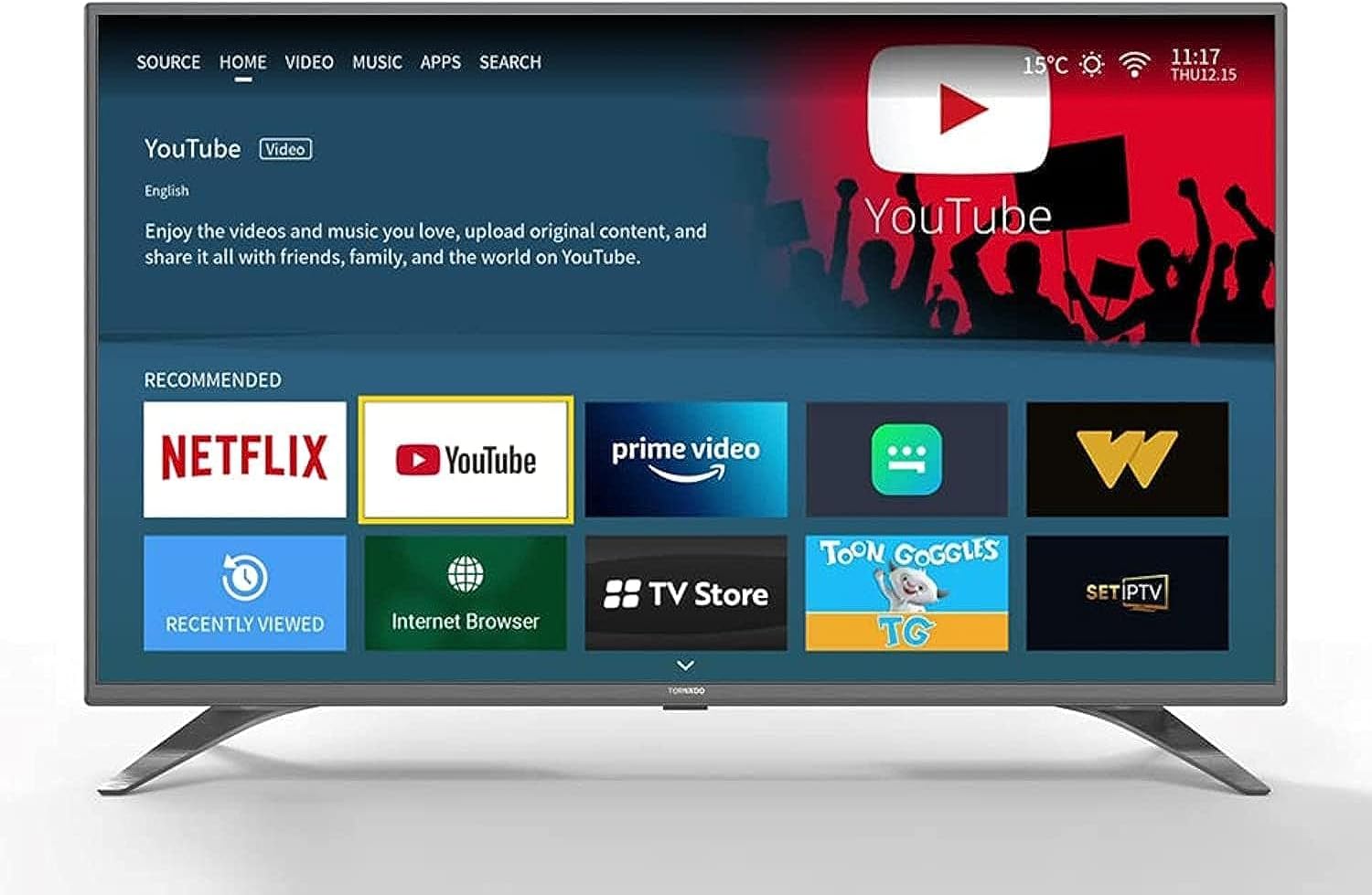
Image: The TORNADO Smart LED TV and its accompanying accessories, including the remote control, stands, and documentation.
2.2 ການຕິດຕັ້ງຂາຕັ້ງ
ເພື່ອຕິດຕັ້ງຂາຕັ້ງໂທລະພາບ:
- ວາງຈໍໂທລະທັດລົງເທິງພື້ນຜິວທີ່ຮາບພຽງເພື່ອປ້ອງກັນຮອຍຂີດຂ່ວນ.
- ຈັດວາງແຕ່ລະຂາຕັ້ງດ້ວຍຊ່ອງທີ່ສອດຄ້ອງກັນຢູ່ດ້ານລຸ່ມຂອງໂທລະພາບ.
- ຮັບປະກັນແຕ່ລະຂາຕັ້ງໂດຍໃຊ້ສະກູທີ່ໃຫ້ໄວ້. ໃຫ້ແນ່ໃຈວ່າພວກມັນຖືກຮັດແຫນ້ນຢ່າງແຫນ້ນຫນາ.

ຮູບພາບ: ທາງຫນ້າ view of the TORNADO Smart LED TV 43ES1500E with its two stands securely attached.
2.3 ການຕິດຝາ (ທາງເລືອກ)
If you choose to wall-mount your TV, ensure you use a compatible wall mount bracket for the TV's size and weight. It is recommended to have a qualified technician perform the installation to ensure safety and proper mounting.
- Remove any pre-installed screws from the back of the TV if they interfere with the wall mount.
- Attach the wall mount brackets to the TV using the appropriate screws, ensuring they are securely fastened to the VESA mounting points.
- Mount the TV to the wall bracket according to the wall mount manufacturer's instructions.
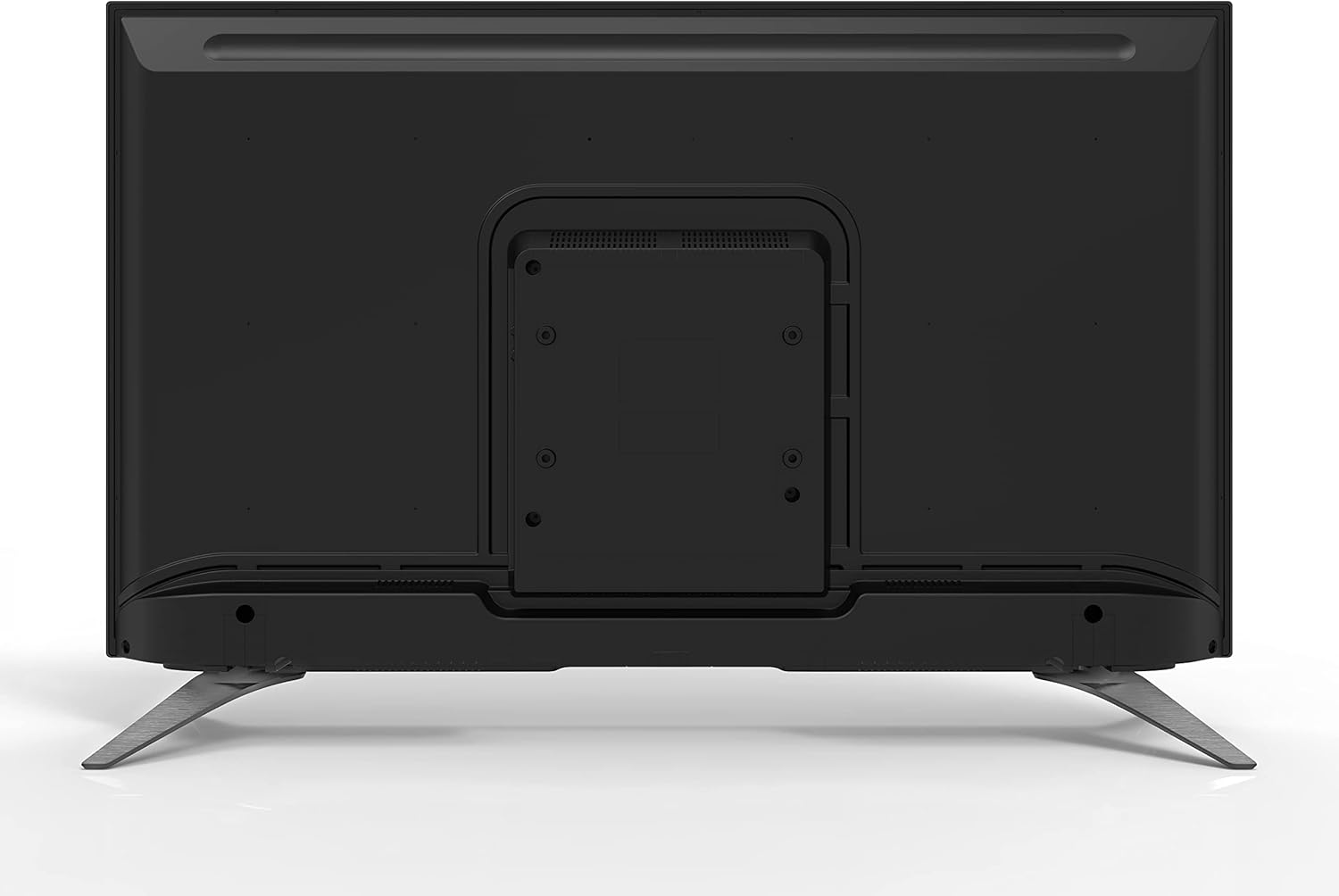
ຮູບພາບ: ດ້ານຫລັງ view of the TORNADO Smart LED TV 43ES1500E, highlighting the VESA mounting points for wall installation.
2.4 Connecting Power and Initial Power-Up
Connect the power cable to the TV's power input and then to a wall outlet. Ensure the outlet is easily accessible. Press the power button on the remote control or the TV to turn it on. Follow the on-screen instructions for initial setup, including language selection, network connection, and channel scanning.

ຮູບພາບ: Side profile of the TORNADO Smart LED TV 43ES1500E, displaying its connectivity ports including HDMI and USB.
3. ຄໍາແນະນໍາການດໍາເນີນງານ
3.1 ຫນ້າທີ່ຄວບຄຸມໄລຍະໄກ
The remote control allows you to navigate the TV's menus and control various functions. Familiarize yourself with the button layout for optimal use.
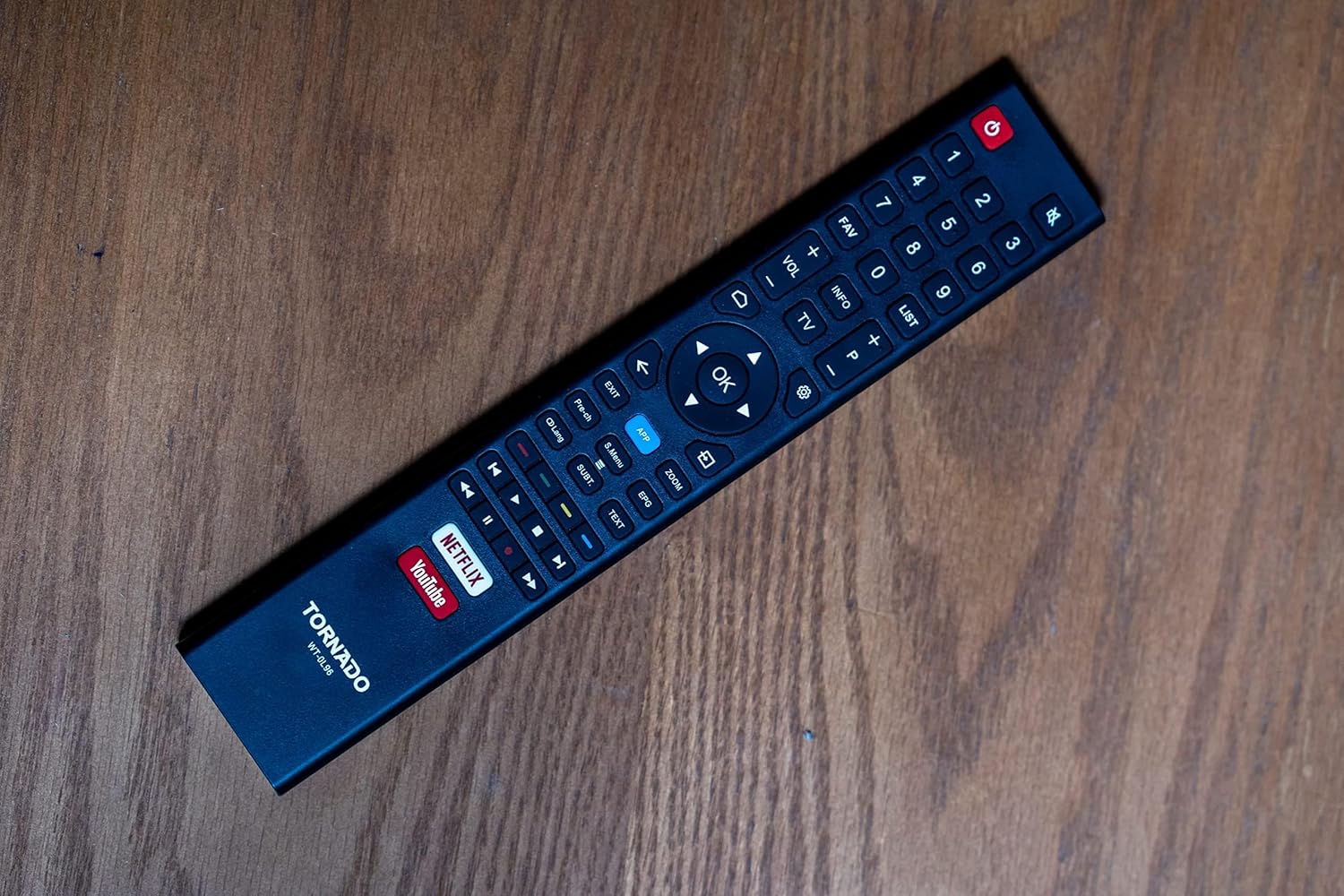
Image: The remote control for the TORNADO Smart LED TV 43ES1500E, showing its various buttons and layout.
3.2 ຄຸນສົມບັດ Smart TV
Your TORNADO Smart LED TV runs on the TORNADO Smart Portal operating system, providing access to a range of smart features:
- Web ຕົວທ່ອງເວັບ: ເຂົ້າເຖິງອິນເຕີເນັດໂດຍກົງຈາກໂທລະພາບຂອງທ່ານ.
- ແອັບພລິເຄຊັນທີ່ຕິດຕັ້ງໄວ້ລ່ວງໜ້າ: Enjoy popular streaming services like Netflix, YouTube, and Prime Video.
- ການສະທ້ອນໜ້າຈໍ: Connect your mobile device to the TV to display content from your phone or tablet on the larger screen.

Image: The smart TV interface of the TORNADO 43ES1500E, showing recommended applications like Netflix, YouTube, and Prime Video.
3.3 ຟັງຊັນ PVR (ເຄື່ອງບັນທຶກວິດີໂອສ່ວນຕົວ)
The PVR function allows you to record live television broadcasts directly to a USB storage device connected to your TV. To use this feature, ensure a USB drive with sufficient storage is connected.
3.4 Time Shift Function
With the Time Shift function, you can pause live TV and resume watching later. This feature also requires a USB storage device to be connected to the TV.
Video: A demonstration of the TORNADO Smart LED TV's PVR and Time Shift functions, showing how to record and pause live television.
4. ບໍາລຸງຮັກສາ
To ensure the longevity and optimal performance of your TORNADO Smart LED TV, follow these maintenance guidelines:
- ທໍາຄວາມສະອາດຫນ້າຈໍ: ເຊັດໜ້າຈໍຄ່ອຍໆດ້ວຍຜ້າອ່ອນ, ແຫ້ງ, ບໍ່ມີສານຂັດ. ສໍາລັບຮອຍແຂງ, ເລັກນ້ອຍ dampໃສ່ຜ້າດ້ວຍນ້ໍາຫຼືເຄື່ອງເຮັດຄວາມສະອາດຫນ້າຈໍພິເສດ (ຢ່າສີດໃສ່ຫນ້າຈໍໂດຍກົງ).
- ທໍາຄວາມສະອາດຮ່າງກາຍ: ໃຊ້ຜ້າປຽກແຫ້ງເພື່ອເຮັດຄວາມສະອາດຂອບ ແລະ ແຜງດ້ານຫຼັງຂອງໂທລະທັດ.
- ການລະບາຍອາກາດ: ໃຫ້ແນ່ໃຈວ່າຊ່ອງລະບາຍອາກາດຢູ່ດ້ານຫຼັງຂອງໂທລະທັດບໍ່ໄດ້ຖືກປິດກັ້ນເພື່ອປ້ອງກັນຄວາມຮ້ອນເກີນໄປ.
- ປິດພະລັງງານ: Always turn off the TV and unplug it from the power outlet before cleaning or when it will not be used for an extended period.
5. ການແກ້ໄຂບັນຫາ
This section addresses common issues you might encounter with your TORNADO Smart LED TV.
5.1 Image Distortion or Interference
If the image appears distorted, blurry, or has interference (repeated or overlapping images):
- ກວດສອບການເຊື່ອມຕໍ່: Ensure all antenna/satellite (RF) and HDMI cables are securely connected to the TV and external devices.
- ຫຼຸດຜ່ອນການລົບກວນ: Keep the TV away from other electronic devices that might cause electromagnetic interference, such as hair dryers or other appliances. Ensure signal cables are not running parallel to power cables.
5.2 TV Turns Off Automatically
If the TV turns off by itself:
- Check Sleep Timer: Verify that the sleep timer function is not activated in the TV settings.
- ສະແຕນບາຍອັດຕະໂນມັດ: Ensure the automatic standby feature (if available) is not set to turn off the TV after a specific period of inactivity. Adjust or disable this setting in the system menu.
5.3 ການຄວບຄຸມໄລຍະໄກບໍ່ເຮັດວຽກ
If the remote control is unresponsive:
- ກວດສອບຫມໍ້ໄຟ: Replace the batteries in the remote control with new ones, ensuring correct polarity.
- ອຸປະສັກ: ໃຫ້ແນ່ໃຈວ່າບໍ່ມີສິ່ງກີດຂວາງລະຫວ່າງການຄວບຄຸມໄລຍະໄກ ແລະເຊັນເຊີອິນຟາເຣດຂອງໂທລະພາບ.
Video: Troubleshooting guide for common issues with the TORNADO Smart LED TV, including image problems and remote control functionality.
6. ຂໍ້ມູນຈໍາເພາະ
Detailed technical specifications for the TORNADO Smart LED TV 43ES1500E:
| ຄຸນສົມບັດ | ຂໍ້ມູນຈໍາເພາະ |
|---|---|
| ໝາຍເລກຕົວແບບ | 43ES1500E |
| ຂະໜາດໜ້າຈໍ | 43 ນິ້ວ |
| ເຕັກໂນໂລຊີການສະແດງ | LED |
| ຄວາມລະອຽດ | 1920 x 1080 (Full HD) |
| ອັດຕາສ່ວນ | 16:9 |
| ອັດຕາສ່ວນກົງກັນຂ້າມ | 1:3000 |
| Viewໃນມຸມ | 178° |
| ອັດຕາການໂຫຼດຂໍ້ມູນຄືນໃໝ່ | 60 Hz |
| Broadcasting Type | Digital (DVB-T/T2/S2) |
| ລະບົບປະຕິບັດການ | TORNADO Smart Portal |
| ການເຊື່ອມຕໍ່ | Wi-Fi, RF, USB (2), HDMI (2), Video In (1) |
| ພະລັງງານສຽງອອກ | 2 x 10 ວັດ |
| ຄຸນນະສົມບັດພິເສດ | Built-in Receiver, Web Browser, Netflix, YouTube, Screen Mirroring, PVR, Time Shift |
| ຂະໜາດ (ບໍ່ມີຂາຕັ້ງ) | 970 x 566 x 85 ມມ |
| ຂະໜາດ (ພ້ອມຂາຕັ້ງ) | 970 x 618 x 220 ມມ |
| ນ້ຳໜັກສຸດທິ | 7.3 ກິໂລກຣາມ |
| ນ້ຳໜັກລວມ | 9.8 ກິໂລກຣາມ |
| ຫ້ອງຮຽນປະສິດທິພາບພະລັງງານ | A |
| ປະເທດຕົ້ນກໍາເນີດ | ປະເທດເອຢິບ |

Image: The TORNADO Smart LED TV 43ES1500E with its key dimensions (width, height, depth) clearly indicated.
7. ການຮັບປະກັນແລະການສະຫນັບສະຫນູນ
Your TORNADO Smart LED TV 43ES1500E comes with a ຮັບປະກັນ 3 ປີເຕັມຟຣີ from the manufacturer. For warranty claims, technical support, or service inquiries, please refer to the contact information provided on your warranty card or visit the official Tornado service center.
ກະລຸນາເກັບຫຼັກຖານການຊື້ຂອງທ່ານໄວ້ເພື່ອກວດສອບການຮັບປະກັນ.
Ask a question about this manual
Ask about setup, troubleshooting, compatibility, parts, safety, or missing instructions. Manuals+ will review the question and use this page’s manual context to help answer it.