
1. ບົດແນະນຳ
This manual provides instructions for the proper use and care of your DeltaTrak 11047 Digital Lollipop Min/Max Probe Thermometer. This device is designed for accurate temperature measurement in various applications, featuring a digital display and Min/Max temperature recording capabilities.
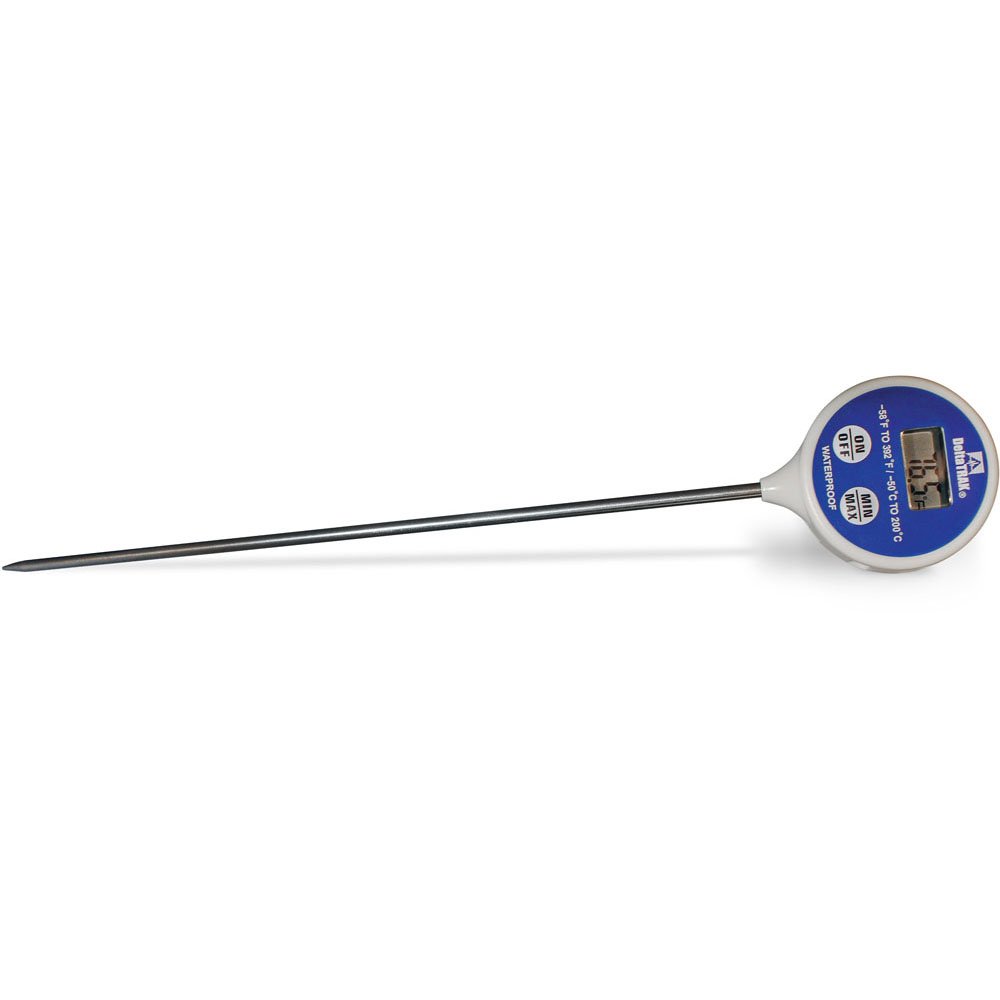
ຮູບທີ 1: DeltaTrak 11047 Digital Lollipop Min/Max Probe Thermometer. This image shows the thermometer with its digital display and probe.
2. ຂໍ້ມູນຄວາມປອດໄພ
Please read all safety instructions before using the thermometer to ensure safe operation and prevent damage to the device or injury to yourself.
- Do not expose the thermometer to extreme temperatures outside its specified operating range.
- Do not immerse the main body of the thermometer in water or other liquids. The probe is designed for immersion, but the display unit is not waterproof.
- ຮັກສາໃຫ້ໄກຈາກເດັກນ້ອຍ.
- Do not attempt to disassemble or modify the thermometer. This will void the warranty and may cause damage.
- ຖິ້ມແບດເຕີລີ່ຕາມກົດລະບຽບທ້ອງຖິ່ນ.
3. ຕັ້ງຄ່າ
3.1. ການຕິດຕັ້ງຫມໍ້ໄຟ
The DeltaTrak 11047 thermometer requires batteries for operation (not included). Follow these steps to install them:
- ຊອກຫາຝາປິດຊ່ອງໃສ່ຫມໍ້ໄຟຢູ່ດ້ານຫຼັງຂອງເຄື່ອງວັດແທກອຸນຫະພູມ.
- ໃຊ້ໄຂຄວງຂະໜາດນ້ອຍ ຫຼື ຫຼຽນເພື່ອເປີດຊ່ອງໃສ່ແບັດເຕີຣີ.
- Insert the required batteries, ensuring correct polarity (+ and -). Refer to the markings inside the compartment.
- Replace the battery compartment cover and secure it firmly.
3.2. ການເປີດເຄື່ອງເບື້ອງຕົ້ນ
After battery installation, press the ເປີດ/ປິດ button to power on the device. The display will show the current temperature.
4. ຄໍາແນະນໍາການດໍາເນີນງານ
4.1. Taking a Temperature Reading
- ກວດໃຫ້ແນ່ໃຈວ່າເຄື່ອງວັດແທກອຸນຫະພູມເປີດຢູ່.
- Insert the stainless steel probe into the substance or environment you wish to measure. Ensure the probe tip is fully immersed or positioned correctly for accurate readings.
- Wait for the temperature reading on the digital display to stabilize. This usually takes a few seconds.
4.2. Min/Max Temperature Function
The thermometer can record the minimum and maximum temperatures measured during a session.
- ກົດ MIN / MAX button once to display the maximum temperature recorded since the last reset.
- ກົດ MIN / MAX button a second time to display the minimum temperature recorded.
- ກົດ MIN / MAX button a third time to return to the current temperature display.
- To reset the Min/Max values, press and hold the MIN / MAX button for approximately 3 seconds while in Min or Max display mode.
4.3. ການເລືອກຫົວໜ່ວຍ (°C/°F)
ເພື່ອສະຫຼັບລະຫວ່າງເຊວຊຽດ (°C) ແລະຟາເຣນຮາຍ (°F):
- ຄົ້ນຫາສະຖານທີ່ ° C / ° F button, usually found near the display or battery compartment.
- Press this button to toggle between the two temperature units.
5. ບໍາລຸງຮັກສາ
5.1. ທໍາຄວາມສະອາດ
As per product care instructions, the thermometer should be cleaned by wiping it. Use a damp cloth with mild soap or a sanitizing wipe to clean the probe and the body of the thermometer. Do not use abrasive cleaners or immerse the main unit in water.
5.2. ການເກັບຮັກສາ
When not in use, store the thermometer in a clean, dry place at room temperature. Ensure the probe is clean and dry before storage. The thermometer often comes with a protective sheath for the probe; use this to prevent damage.
5.3. ການທົດແທນຫມໍ້ໄຟ
If the display becomes dim or the thermometer stops functioning, it may be time to replace the batteries. Follow the battery installation steps in Section 3.1.
6. ການແກ້ໄຂບັນຫາ
| ບັນຫາ | ສາເຫດທີ່ເປັນໄປໄດ້ | ການແກ້ໄຂ |
|---|---|---|
| ບໍ່ມີຈໍສະແດງຜົນ ຫຼື ມືດ | ແບັດເຕີຣີໝົດ ຫຼື ອ່ອນ; ການຕິດຕັ້ງແບັດເຕີຣີບໍ່ຖືກຕ້ອງ. | ປ່ຽນແບັດເຕີລີ, ຮັບປະກັນການຂົ້ວທີ່ຖືກຕ້ອງ. |
| ການອ່ານບໍ່ຖືກຕ້ອງ | Probe not fully immersed; probe damaged; thermometer outside operating range. | Ensure probe is correctly positioned; check for visible damage; use within specified temperature range. |
| ເຄື່ອງວັດແທກອຸນຫະພູມບໍ່ເປີດ | Batteries not installed; power button malfunction. | Install or replace batteries; if problem persists, contact support. |
7. ຂໍ້ມູນຈໍາເພາະ
- ຍີ່ຫໍ້: DeltaTrak
- ໝາຍເລກຕົວແບບ: 11047
- UPC: 700779110473
- ວັດສະດຸນອກ: Glass (Note: This likely refers to the display or a component, the probe is typically stainless steel)
- ສະເພາະໄດ້ພົບກັບ: NIST
- ນ້ໍາຫນັກລາຍການ: 36.3 g
- ຂະໜາດແພັກເກດ: 26.8 x 5.41 x 2.79 cm
- ອົງປະກອບລວມ: ເຄື່ອງວັດແທກອຸນຫະພູມ
- ຄໍາແນະນໍາການດູແລຜະລິດຕະພັນ: ເຊັດສະອາດ
- ແບັດເຕີຣີ: ບໍ່ລວມ
8. ການຮັບປະກັນແລະການສະ ໜັບ ສະ ໜູນ
8.1. ຂໍ້ມູນການຮັບປະກັນ
DeltaTrak products are manufactured to high-quality standards. For specific warranty details regarding your DeltaTrak 11047 thermometer, please refer to the warranty card included with your purchase or visit the official DeltaTrak webເວັບໄຊ. ຮັກສາໃບຮັບເງິນການຊື້ຂອງທ່ານໄວ້ເປັນຫຼັກຖານການຊື້ສໍາລັບການຮ້ອງຂໍການຮັບປະກັນ.
8.2. ການຊ່ວຍເຫຼືອລູກຄ້າ
If you encounter any issues not covered in this manual or require further assistance, please contact DeltaTrak customer support. Contact information can typically be found on the product packaging or the official DeltaTrak webເວັບໄຊ.
ສໍາລັບຂໍ້ມູນເພີ່ມເຕີມ, ໄປຢ້ຽມຢາມ: www.deltatrak.com