
1. ບົດແນະນຳ
This manual provides detailed instructions for the installation, operation, and maintenance of your Antec P50 Window R Mid-Tower PC Case. The Antec P50 Window R is designed for silent computing with optimized airflow and support for Micro ATX and Mini-ITX motherboards. It features a dual-chamber structure, liquid cooling support, and multiple drive bays for a versatile build.
ກະລຸນາອ່ານຄູ່ມືນີ້ຢ່າງລະອຽດກ່ອນທີ່ຈະເລີ່ມຕົ້ນການຕິດຕັ້ງເພື່ອຮັບປະກັນການຕິດຕັ້ງທີ່ເຫມາະສົມແລະເພື່ອເພີ່ມປະສິດທິພາບແລະຄວາມຍາວນານຂອງລະບົບຂອງທ່ານ.
2. ການຕິດຕັ້ງແລະການຕິດຕັ້ງ
2.1 ການຫຸ້ມຫໍ່ແລະການກວດກາ
Carefully remove the PC case from its packaging. Inspect the case for any signs of damage that may have occurred during shipping. Retain the packaging for future transport or warranty claims.
2.2 ການຖອດແຜງດ້ານຂ້າງ
Locate and unscrew the thumbscrews on the rear of the case. Slide the side panels backward and lift them off to access the interior.

ຮູບພາບ: ມຸມ view of the Antec P50 Window R PC Case, showing its compact mid-tower design and front panel.
2.3 ການຕິດຕັ້ງເມນບອດ
- ຕິດຕັ້ງ I/O ໄສ້ເຂົ້າໄປໃນຊ່ອງເປີດດ້ານຫລັງຂອງກໍລະນີ.
- Ensure the motherboard standoffs are correctly aligned for your Micro ATX or Mini-ITX motherboard.
- ວາງເມນບອດໃສ່ຈຸດຢືນຢ່າງລະມັດລະວັງ, ຈັດວາງຮູສະກູ.
- ຮັບປະກັນ motherboard ດ້ວຍ screws ທີ່ສະຫນອງໃຫ້.

ຮູບພາບ: ພາຍໃນ view of the Antec P50 Window R PC Case, highlighting the motherboard tray and cable routing options.
2.4 ການຕິດຕັ້ງແຫຼ່ງຈ່າຍໄຟ
The P50 Window R supports bottom-mount power supplies. Install your power supply into the designated compartment at the bottom rear of the case and secure it with screws.
2.5 ການຕິດຕັ້ງ Drive
The case features 6 drive bays:
- One 5.25" external drive bay (for optical drives).
- Three 3.5" HDD drive bays.
- Two 2.5" SSD drive bays.
Follow the case's internal guides for tool-less or screw-based installation of your storage devices.

ຮູບພາບ: ພາຍໃນ view of the Antec P50 Window R PC Case, showing the rear of the motherboard tray with cable management space and drive bay locations.
2.6 ການຕິດຕັ້ງບັດຂະຫຍາຍ
The case provides 4 expansion slots. Remove the slot covers as needed and install your graphics card or other expansion cards, securing them with screws.
2.7 ການຕິດຕັ້ງພັດລົມ ແລະລັງສີ
The P50 Window R comes with pre-installed fans: two 120mm fans and one 80mm fan at the front, and one 80mm fan at the rear. It supports additional 80mm/120mm fan mounts and a 240mm radiator in the front or top for liquid cooling.
- For liquid cooling, install the 240mm radiator in the designated front or top mounting points.
- ຮັບປະກັນວ່າພັດລົມຖືກຕັ້ງຢ່າງຖືກຕ້ອງສໍາລັບການໄຫຼວຽນຂອງອາກາດທີ່ເຫມາະສົມ (ການດູດເອົາຢູ່ດ້ານຫນ້າ, ທໍ່ລະບາຍອາກາດຢູ່ຫລັງ / ເທິງ).
2.8 ການຈັດການສາຍ
ນຳໃຊ້ແຜ່ນຕັດເສັ້ນທາງສາຍເຄເບິນ ແລະຈຸດຜູກລົງທາງຫຼັງຖາດເມນບອດເພື່ອຈັດການສາຍ. ນີ້ປັບປຸງການໄຫຼຂອງອາກາດແລະຄວາມງາມ.
2.9 Connecting Front Panel I/O
ເຊື່ອມຕໍ່ສາຍໄຟດ້ານໜ້າ (USB 3.0, USB 2.0, HD Audio, ສະວິດເປີດເຄື່ອງ, ສະວິດຣີເຊັດ, ໄຟ LED ເປີດເຄື່ອງ, ໄຟ LED HDD) ກັບຫົວຕໍ່ທີ່ສອດຄ້ອງກັນຢູ່ເທິງເມນບອດຂອງທ່ານ. ໃຫ້ອ້າງອີງເຖິງຕຳແໜ່ງຂອງຫົວຕໍ່ໃນຄູ່ມືເມນບອດຂອງທ່ານ.
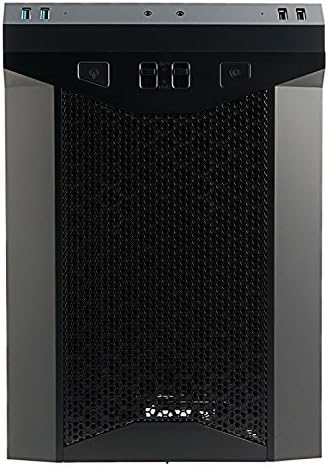
ຮູບພາບ: ທາງຫນ້າ view of the Antec P50 Window R PC Case, showing the mesh intake and front panel controls.
3. ການດໍາເນີນງານ
3.1 ການຄວບຄຸມແຜງດ້ານໜ້າ ແລະ ພອດຕ່າງໆ
ແຜງດ້ານໜ້າໃຫ້ການເຂົ້າເຖິງທີ່ສະດວກສະບາຍຕໍ່:
- ປຸ່ມເປີດປິດ: ເພື່ອເປີດ ຫຼື ປິດລະບົບ.
- ປຸ່ມຣີເຊັດ: ເພື່ອຣີສະຕາດລະບົບ.
- ຜອດ USB 3.0 (x2): ສໍາລັບການໂອນຂໍ້ມູນຄວາມໄວສູງ.
- ຜອດ USB 2.0 (x2): ສໍາລັບອຸປະກອນ USB ມາດຕະຖານ.
- ສຽງ Jacks: ສຳລັບຫູຟັງ ແລະ ໄມໂຄຣໂຟນ.
- ການຄວບຄຸມພັດລົມ: Two fan control switches are available to adjust fan speeds for optimal balance between cooling and noise.
3.2 ການໄຫຼວຽນຂອງອາກາດ ແລະ ຄວາມເຢັນ
The P50 Window R features a dual-chamber structure designed for direct airflow, separating heat-generating components. The pre-installed fans and additional mounting options ensure efficient cooling for your system.
4. ບໍາລຸງຮັກສາ
4.1 ການເຮັດຄວາມສະອາດຕົວກອງຝຸ່ນ
Regularly clean the dust filters to maintain optimal airflow and prevent dust buildup inside the case. Dust filters are typically located at the front, top, and bottom (for the power supply intake). Gently remove them and clean with compressed air or rinse with water (ensure they are completely dry before reinstallation).
4.2 ການທໍາຄວາມສະອາດທົ່ວໄປ
ໃຊ້ອ່ອນ, ງamp cloth to clean the exterior surfaces of the case. Avoid abrasive cleaners. For interior cleaning, use compressed air to remove dust from components and internal surfaces.
5. ການແກ້ໄຂບັນຫາ
5.1 ລະບົບບໍ່ເປີດ
- Ensure all power cables (24-pin ATX, 8-pin CPU, GPU power) are securely connected to the motherboard and components.
- ກວດສອບໃຫ້ແນ່ໃຈວ່າສະວິດແຫຼ່ງຈ່າຍໄຟຢູ່ໃນຕຳແໜ່ງ 'ເປີດ'.
- Check that the front panel power switch cable is correctly connected to the motherboard header.
5.2 ສຽງດັງເກີນໄປ
- Check if any cables are obstructing fan blades.
- Ensure all fans are securely mounted.
- Utilize the front panel fan controls to adjust fan speeds.
5.3 Poor Cooling Performance
- Clean all dust filters to ensure unrestricted airflow.
- Verify that fans are oriented correctly (intake/exhaust).
- Ensure proper cable management to avoid blocking airflow.
5.4 Front Panel USB/Audio Ports Not Working
- Confirm that the front panel USB and audio cables are correctly connected to the corresponding headers on your motherboard.
6. ຂໍ້ມູນຈໍາເພາະ
| ຄຸນສົມບັດ | ລາຍລະອຽດ |
|---|---|
| ຊື່ຕົວແບບ | P50 WINDOW R |
| ປະເພດກໍລະນີ | ຫໍກາງ |
| ຄວາມເຂົ້າກັນໄດ້ຂອງເມນບອດ | Micro ATX, Mini-ITX |
| ຂະ ໜາດ (D x W x H) | 355mm x 260mm x 355mm (13.98"D x 355"H) |
| ວັດສະດຸ | ໂພລີຄາບອນ (PC) |
| ຂັບລົດ Bays | 1 x 5.25" (external), 3 x 3.5" HDD, 2 x 2.5" SSD |
| ສະລັອດຕິງຂະຫຍາຍ | 4 |
| ທ່າເຮືອທາງ ໜ້າ I / O | 2 x USB 3.0, 2 x USB 2.0, Audio In/Out, 2 x Fan Controls |
| ພັດລົມທີ່ຕິດຕັ້ງໄວ້ລ່ວງໜ້າ | Front: 2 x 120mm, 1 x 80mm; Rear: 1 x 80mm |
| ສະຫນັບສະຫນູນການເຮັດຄວາມສະອາດຂອງແຫຼວ | 240mm radiator (front/top) |
| Max Video Card Size | 300ມມ |
| ຄວາມສູງຂອງ CPU Cooler ສູງສຸດ | 130ມມ |
| ການຕິດຕັ້ງການສະຫນອງພະລັງງານ | ພູລຸ່ມ |
| ນ້ໍາຫນັກລາຍການ | 11.7 ປອນ |
7. ຂໍ້ມູນການຮັບປະກັນ
The Antec P50 Window R PC Case comes with a Limited Warranty period (parts): 1 year. Please retain your proof of purchase for warranty claims. For specific terms and conditions, refer to the official Antec webເວັບໄຊທ໌ຫຼືຕິດຕໍ່ສະຫນັບສະຫນູນລູກຄ້າ.
8. ສະຫນັບສະຫນູນ
For further assistance, technical support, or to inquire about replacement parts, please visit the official Antec website or contact their customer service department. You can often find FAQs, driver downloads, and additional resources on the manufacturer's support pages.
ຢ່າງເປັນທາງການຂອງ Antec Webເວັບໄຊ: www.antec.com