
DigiTech TRIO
DigiTech TRIO Band Creator Pedal Instruction Manual
ຕົວແບບ: TRIO | ຍີ່ຫໍ້: DigiTech
ແນະນຳ
The DigiTech TRIO is an innovative electric guitar multi-effect pedal designed to be your personal band. It listens to your guitar playing and automatically generates accompanying bass and drum parts. This manual provides comprehensive instructions for setting up, operating, and maintaining your TRIO pedal, ensuring you get the most out of its unique features.
ຄຸນນະສົມບັດທີ່ສໍາຄັນ
- Seven Music Genres and Twelve Song Styles Per Genre to Choose From
- The TRIO can learn up to three different song parts that can be recalled on-the-fly
- Adjustable Tempo & Alternate Half Time/Double Time Variants Bass & Drum Level Controls
- Hands-Free Control Using a DigiTech FS3X Footswitch (optional)
- Amp & Mixer Outputs Headphone Output w/Level Control Power Supply Included
ຄູ່ມືການຕິດຕັ້ງ
Follow these steps to set up your DigiTech TRIO pedal:
- ເຊື່ອມຕໍ່ແຫຼ່ງຈ່າຍໄຟ DC 9V ທີ່ມາພ້ອມກັບເຄື່ອງ ພະລັງງານ input on the pedal and plug it into a power outlet.
- ເຊື່ອມຕໍ່ guitar ໄຟຟ້າຂອງທ່ານກັບ ກີຕ້າເຂົ້າ jack ໃຊ້ສາຍອຸປະກອນມາດຕະຖານ 1/4 ນິ້ວ.
- ເຊື່ອມຕໍ່ AMP ອອກ jack to your guitar ampການປ້ອນຂໍ້ມູນຂອງເຄື່ອງຂະຫຍາຍສຽງໂດຍໃຊ້ສາຍເຄື່ອງມືຂະໜາດ 1/4 ນິ້ວອີກອັນໜຶ່ງ.
- For connecting to a mixer or PA system, use the ປະສົມອອກ jack.
- ສໍາລັບການປະຕິບັດເອກະຊົນ, ເຊື່ອມຕໍ່ headphones ກັບ the HEADPHONE ອອກ jack.
- Optionally, connect a DigiTech FS3X Footswitch to the ຄວບຄຸມໃນ jack for extended hands-free control.
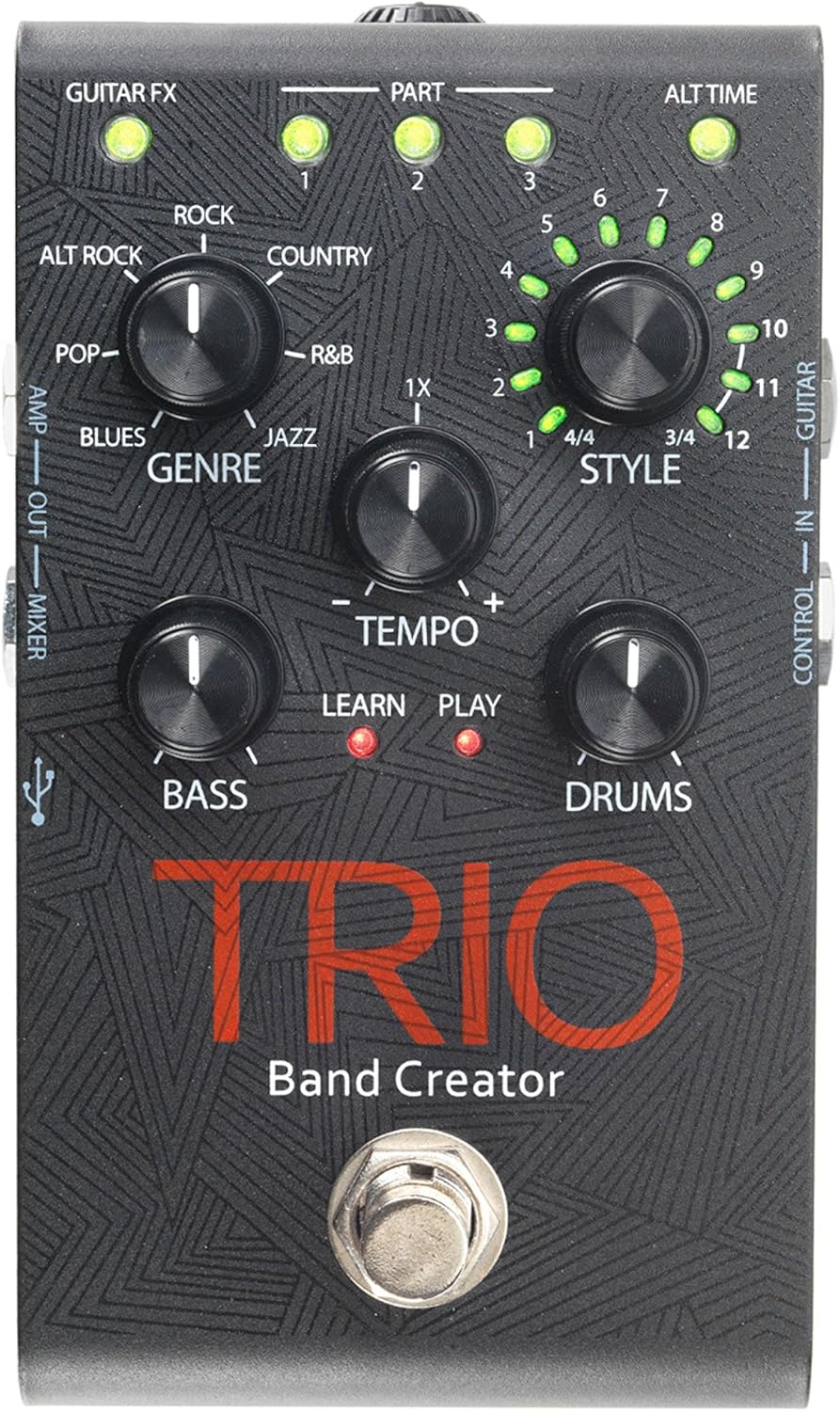
ຮູບທີ 1: ທາງເທິງ view of the DigiTech TRIO pedal, showing the main controls and footswitch.
ຄໍາແນະນໍາການດໍາເນີນງານ
Basic Operation: Teaching the TRIO a Song
- ກົດ ແຖບ footswitch once to enter 'Listen' mode. The ຮຽນຮູ້ LED ຈະສະຫວ່າງ.
- Play your desired chord progression and rhythm clearly. The TRIO will analyze your playing.
- ກົດ ແຖບ footswitch again to stop 'Listen' mode. The ຫຼິ້ນ LED will illuminate, and the TRIO will immediately begin playing generated bass and drum parts.
- You can now play along with your virtual band.
Genre and Style Selection
- ໃຊ້ ປະເພດ knob to select from Blues, Pop, Alternative Rock, Rock, Country, R&B, and Jazz. The genre affects the overall feel of the generated bass and drum parts.
- ໃຊ້ ຮູບແບບ knob to choose from twelve different song styles available for each genre. This allows for further customization of the rhythm and feel.
- ໄດ້ ALTTIME button allows you to switch between 3/4 and 4/4 time signatures.
Looping and Song Parts
- The TRIO can learn up to 3 different song parts. To record a new part, select an empty ສ່ວນ slot (1, 2, or 3) using the corresponding buttons.
- Follow the 'Basic Operation' steps to teach the TRIO the new song part.
- During playback, you can switch between learned song parts on-the-fly by pressing the corresponding ສ່ວນ ປຸ່ມ.
- ໄດ້ LOOPER footswitch allows you to record and playback your own guitar loops. Press once to start recording, press again to stop recording and start playback, and press and hold to clear the loop.
Adjusting Levels and Tempo
- ໄດ້ TEMPO knob adjusts the playback speed of the band and loops.
- ໄດ້ ເບສ knob controls the volume level of the generated bass line.
- ໄດ້ Drums knob controls the volume level of the generated drum track.
- ໄດ້ LOOP knob controls the volume level of your recorded guitar loop.

ຮູບທີ 2: ມຸມ view of the DigiTech TRIO pedal, highlighting the control knobs and input/output jacks.
ການຄວບຄຸມ ແລະການເຊື່ອມຕໍ່
The DigiTech TRIO pedal features a user-friendly layout with clearly labeled controls and versatile connection options:
ແຜງຄວບຄຸມດ້ານໜ້າ:
- GUITAR FX: Activates built-in guitar effects tailored to the selected genre.
- PART 1, 2, 3: Buttons to select and recall different learned song parts.
- ALT TIME: Toggles between 3/4 and 4/4 time signatures.
- TEMPO Knob: Adjusts the overall playback speed.
- ປຸ່ມປະເພດ: Selects the musical genre (Blues, Pop, Alt Rock, Rock, Country, R&B, Jazz).
- STYLE Knob: Selects one of twelve styles within the chosen genre.
- LOOP Knob: Controls the volume of your recorded guitar loop.
- ບິດເບສ: Controls the volume of the generated bass line.
- DRUMS Knob: Controls the volume of the generated drum track.
- ສະວິດຕີນ LOOPER: Records/plays/clears guitar loops.
- ສະວິດຕີນແຖບ: Enters 'Listen' mode to learn chords/rhythm, or starts/stops band playback.
Side and Rear Panel Connections:
- ກີຕ້າໃນ: 1/4-inch input for your electric guitar.
- AMP ອອກ: 1/4-inch output to your guitar ampມີຊີວິດຊີວາ.
- MIXER OUT: 1/4-inch output for connecting to a mixer or PA system.
- ຫົວ ໜ້າ HEADPHONE ຜົນຜະລິດສະເຕີລິໂອ 1/8 ນິ້ວສຳລັບຫູຟັງ.
- ຄວບຄຸມໃນ: 1/4-inch input for optional DigiTech FS3X Footswitch.
- ພະລັງງານ: 9V DC input for the included power supply.
- USB: Mini-USB port for firmware updates.

ຮູບ 3: ດ້ານຫລັງ view of the DigiTech TRIO pedal, showing the power input and headphone jack.
ຂໍ້ມູນຈໍາເພາະ
| ຄຸນສົມບັດ | ລາຍລະອຽດ |
|---|---|
| ນ້ໍາຫນັກລາຍການ | 10.6 ອໍ (0.3 ກິໂລ) |
| ຂະໜາດສິນຄ້າ | 4.63 x 3.19 x 2.13 ນິ້ວ (11.76 x 8.10 x 5.41 cm) |
| ໝາຍເລກຕົວແບບ | TRIO |
| ໝໍ້ໄຟ | 1 9V battery required (for internal use, not primary power) |
| ການໂຕ້ຕອບຮາດແວ | ສຽງ 1/4 ນິ້ວ |
| ຮູບແບບສັນຍານ | ອະນາລັອກ |
| ແຫຼ່ງພະລັງງານ | Corded Electric (9V DC adapter included) |
| ສະບັບtage | 9 ໂວນ |
| Ampອາຍຸ | 300 ລ້ານamps |
ບໍາລຸງຮັກສາ
- ຮັກສາຄັນເລັ່ງໃຫ້ສະອາດໂດຍການເຊັດມັນດ້ວຍຜ້າອ່ອນໆແລະແຫ້ງ. ຫຼີກລ່ຽງການໃຊ້ນໍ້າຢາເຮັດຄວາມສະອາດທີ່ມີສີຂັດ ຫຼື ຕົວລະລາຍ.
- ເກັບຮັກສາ pedal ໃນບ່ອນທີ່ເຢັນ, ແຫ້ງ, ຫ່າງຈາກແສງແດດໂດຍກົງແລະອຸນຫະພູມທີ່ສຸດ.
- ໃຫ້ແນ່ໃຈວ່າສາຍໄຟທັງໝົດໄດ້ເຊື່ອມຕໍ່ກັນຢ່າງແໜ້ນໜາເພື່ອປ້ອງກັນການສູນເສຍສັນຍານ ຫຼື ຄວາມເສຍຫາຍ.
- ຫຼີກລ້ຽງການຫຼຸດລົງ pedal ຫຼືມັນຈະມີຜົນກະທົບທີ່ເຂັ້ມແຂງ.
ການແກ້ໄຂບັນຫາ
- ບໍ່ມີສຽງ: ກວດເບິ່ງການເຊື່ອມຕໍ່ສາຍເຄເບີ້ນທັງໝົດ (ກີຕ້າ, amp, power). Ensure the pedal is powered on and the volume knobs are not set to zero.
- ຄຸນະພາບສຽງບໍ່ດີ: Verify that your instrument and amplifier are functioning correctly. Check for damaged cables.
- Band Not Generating Correctly: Ensure you are playing clear, distinct chords during the 'Listen' phase. Try different genres and styles to see if a different setting better interprets your playing.
- Footswitch Unresponsive: Disconnect and reconnect the power supply. If using an optional FS3X footswitch, ensure it is properly connected.
ການຮັບປະກັນແລະການສະຫນັບສະຫນູນ
ສໍາລັບຂໍ້ມູນການຮັບປະກັນ ແລະການຊ່ວຍເຫຼືອດ້ານວິຊາການ, ກະລຸນາອ້າງອີງເຖິງ DigiTech ຢ່າງເປັນທາງການ webເວັບໄຊ ຫຼືຕິດຕໍ່ບໍລິການລູກຄ້າຂອງເຂົາເຈົ້າ. ຮັກສາຫຼັກຖານການຊື້ຂອງທ່ານສໍາລັບການຮ້ອງຂໍການຮັບປະກັນ.
Ask a question about this manual
Ask about setup, troubleshooting, compatibility, parts, safety, or missing instructions. Manuals+ will review the question and use this page’s manual context to help answer it.