
COTEK SP-1000-224
ຄູ່ມືຜູ້ໃຊ້ Cotek SP-1000-224 Pure Sine Wave Inverter
Model: SP-1000-224 | Brand: COTEK
1. ບົດແນະນຳ
This manual provides detailed instructions for the installation, operation, and maintenance of the Cotek SP-1000-224 Pure Sine Wave Inverter. This inverter is designed to convert 24VDC power to 230VAC, providing a stable and reliable power source for various applications.
ຄຸນນະສົມບັດທີ່ສໍາຄັນ:
- ຜົນຜະລິດຄື້ນ sine ອັນບໍລິສຸດສໍາລັບເອເລັກໂຕຣນິກທີ່ລະອຽດອ່ອນ.
- ຄວາມສາມາດໃນການເປີດ / ປິດການຄວບຄຸມໄລຍະໄກ (ສີຂຽວ Terminal).
- Input & output ໂດດດ່ຽວຢ່າງເຕັມສ່ວນເພື່ອຄວາມປອດໄພທີ່ເພີ່ມຂຶ້ນ.
- Temperature & load controlled cooling fan for optimal performance.
- ການໂຕ້ຕອບຜູ້ເປັນມິດ.
- ຄວາມຖີ່ຂອງຜົນຜະລິດ (50/60 Hz) ສາມາດເລືອກໄດ້ຜ່ານປຸ່ມ DIP.
- ຜົນຜະລິດ voltage ສາມາດເລືອກໄດ້ຜ່ານປຸ່ມ DIP.
- Power saving mode adjustable via variable resistor.
- 3-color LED status indicators for easy monitoring.
- ການປ້ອງກັນການປ້ອນຂໍ້ມູນແບບຄົບວົງຈອນ: Reverse Polarity (Fuse), ພາຍໃຕ້ Voltage, Over Voltage.
- ການປ້ອງກັນຜົນຜະລິດທີ່ເຂັ້ມແຂງ: ວົງຈອນສັ້ນ, overload, ອຸນຫະພູມເກີນໄປ.
- ປະເພດ 1 ອະລູມິນຽມໃນລົ່ມ.
- E13 / UL / CE / FCC ອະນຸມັດ.
2. ຂໍ້ມູນຄວາມປອດໄພ
WARNING: Please read and understand all safety instructions before installing or operating this inverter. Failure to follow these instructions may result in electric shock, fire, serious injury, or death.
- ອັນຕະລາຍໄຟຟ້າ: This unit produces high voltage. Do not open the inverter casing. ອ້າງອີງການບໍລິການທັງໝົດໃຫ້ກັບບຸກຄະລາກອນທີ່ມີຄຸນວຸດທິ.
- ຄວາມປອດໄພຫມໍ້ໄຟ: Work in a well-ventilated area. Batteries can produce explosive gases. Do not smoke or allow sparks or flames near the battery.
- ການລະບາຍອາກາດທີ່ເຫມາະສົມ: Ensure adequate airflow around the inverter. Do not block ventilation openings.
- ເງື່ອນໄຂສິ່ງແວດລ້ອມ: Do not expose the inverter to rain, moisture, or excessive dust. Operate in a dry, cool environment.
- ການຕໍ່ດິນ: The inverter must be properly grounded. Follow all local and national electrical codes.
- ຄວາມອາດສາມາດໂຫຼດ: Do not exceed the inverter's rated power output. Overloading can cause damage to the inverter and connected devices.
- ຄຳເຕືອນຂອງ California Proposition 65: ຜະລິດຕະພັນນີ້ອາດມີວັດສະດຸທີ່ໄດ້ຮັບການເຕືອນໂດຍ California Proposition 65.
3. ຜະລິດຕະພັນເກີນview ແລະອົງປະກອບ
Familiarize yourself with the various parts of your Cotek SP-1000-224 Pure Sine Wave Inverter.

ຮູບທີ 3.1: ມຸມ view of the Cotek SP-1000-224 Pure Sine Wave Inverter, showing its blue aluminum casing and grey end caps with ventilation and connection ports.

ຮູບທີ 3.2: Front panel of the inverter, featuring the AC output socket (Schuko type), a power switch, LED indicators, and DIP switches for configuration.

ຮູບທີ 3.3: Rear panel of the inverter, showing the DC input terminals for battery connection, a remote control port (RJ45), and a green terminal block for remote ON/OFF control.

ຮູບທີ 3.4: ຂ້າງ view of the inverter, highlighting its robust blue aluminum heat sink casing designed for efficient heat dissipation.
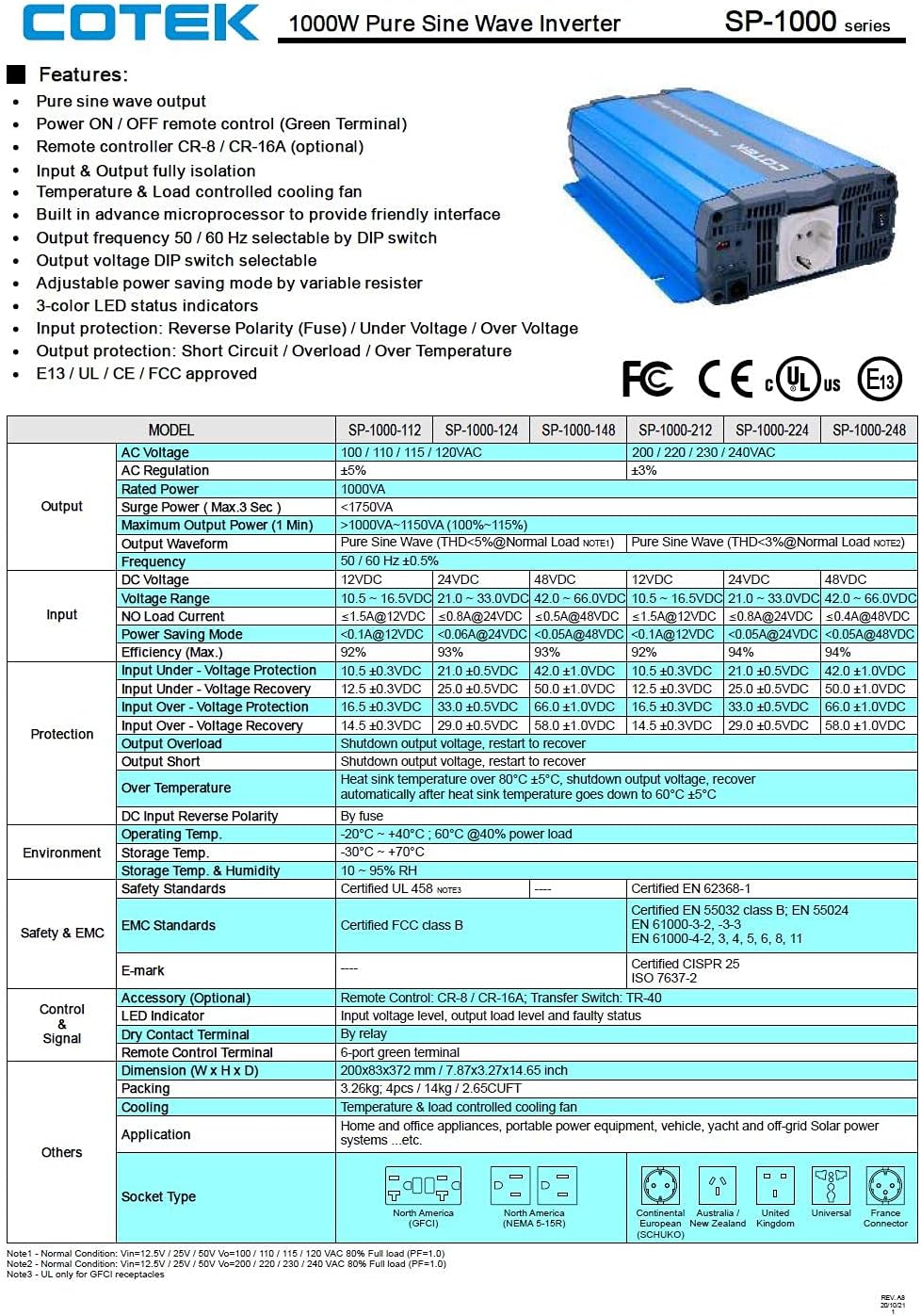
ຮູບທີ 3.5: A detailed table outlining the features and technical specifications of the Cotek SP-1000 series inverters, including input/output parameters, protections, and certifications.

ຮູບທີ 3.6: Mechanical drawings providing dimensions of the inverter, along with power voltage and power temperature curves illustrating performance characteristics.
4. ການຕິດຕັ້ງແລະການຕິດຕັ້ງ
4.1 ການເລືອກສະຖານທີ່:
- Install the inverter in a dry, cool, and well-ventilated area.
- Avoid direct sunlight, heat sources, and moisture.
- Ensure sufficient clearance around the inverter for proper airflow, especially around the cooling fan and ventilation openings.
- Mount the inverter securely on a stable, non-combustible surface.
4.2 DC Input Connection:
- ໃຫ້ແນ່ໃຈວ່າສະວິດໄຟຂອງ inverter ຢູ່ໃນຕໍາແຫນ່ງ OFF.
- Connect the positive (+) terminal of the 24VDC battery bank to the positive (+) DC input terminal on the inverter.
- Connect the negative (-) terminal of the 24VDC battery bank to the negative (-) DC input terminal on the inverter.
- ໃຊ້ສາຍເຄເບີນທີ່ມີຂະຫນາດທີ່ເຫມາະສົມເພື່ອຫຼຸດຜ່ອນ voltage drop and ensure safe operation. Refer to electrical standards for cable sizing.
- ໃຫ້ແນ່ໃຈວ່າການເຊື່ອມຕໍ່ທັງຫມົດແຫນ້ນແຫນ້ນແລະປອດໄພ.
4.3 AC Output Connection:
- Plug your AC appliances directly into the AC output socket on the inverter.
- Ensure the total power consumption of all connected appliances does not exceed the inverter's 1000W continuous output rating.
4.4 ການວາງສາຍດິນ:
Proper grounding is essential for safety. Connect the inverter's chassis ground terminal to a reliable earth ground using a suitable grounding wire. Consult local electrical codes for specific grounding requirements.
4.5 Remote Control (Optional):
The inverter supports remote ON/OFF control via the green terminal block or an optional RJ45 remote control unit. Refer to the accessory manual for detailed instructions on connecting and using the remote control.
4.6 DIP Switch Configuration:
The inverter features DIP switches on the front panel to select output frequency (50/60 Hz) and output voltage. Refer to the table below for common settings. Ensure the inverter is OFF before changing DIP switch settings.
| ການຕັ້ງຄ່າ | DIP Switch position |
|---|---|
| ຄວາມຖີ່ຂາອອກ 50Hz | Switch 1: OFF, Switch 2: OFF (Example, refer to actual product manual/Figure 3.5) |
| ຄວາມຖີ່ຂາອອກ 60Hz | Switch 1: ON, Switch 2: OFF (Example, refer to actual product manual/Figure 3.5) |
| ຜົນໄດ້ຮັບ Voltage 230VAC | Switch 3: ON, Switch 4: OFF (Example, refer to actual product manual/Figure 3.5) |
Note: The exact DIP switch configurations for specific voltage and frequency settings are detailed in the product's full technical specifications (refer to Figure 3.5). Always verify settings before operation.
5. ການດໍາເນີນງານ
5.1 Powering On the Inverter:
- Ensure all DC and AC connections are secure and correct.
- If using the remote control, ensure it is connected and in the ON position.
- Flip the main power switch on the inverter's front panel to the "ON" position.
- Observe the 3-color LED status indicators. A green light indicates normal operation.
5.2 LED Status Indicators:
- ສີຂຽວ: ການດໍາເນີນງານປົກກະຕິ.
- ສີເຫລືອງ / ອໍາພັນ: Warning (e.g., input voltage slightly low/high, minor overload). The inverter may continue to operate but requires attention.
- ສີແດງ: Fault condition (e.g., severe overload, short circuit, over-temperature, critical input voltage). The inverter will shut down to protect itself and connected devices.
5.3 Power Saving Mode:
The inverter features a power saving mode, adjustable via a variable resistor. This mode reduces power consumption when no load or a very light load is detected. Adjust the resistor to set the sensitivity for entering/exiting power saving mode.
5.4 Powering Off the Inverter:
- Turn off all connected AC appliances.
- Flip the main power switch on the inverter's front panel to the "OFF" position.
- If using a remote control, turn it off as well.
6. ບໍາລຸງຮັກສາ
ການບຳລຸງຮັກສາເປັນປະຈຳຮັບປະກັນອາຍຸການໃຊ້ງານທີ່ຍາວນານ ແລະ ການເຮັດວຽກທີ່ໜ້າເຊື່ອຖືຂອງອິນເວີເຕີຂອງທ່ານ.
- ທໍາຄວາມສະອາດ: ທຳຄວາມສະອາດດ້ານນອກຂອງອິນເວີເຕີເປັນໄລຍະດ້ວຍຜ້າແຫ້ງ ແລະ ອ່ອນ. ຢ່າໃຊ້ນ້ຳຢາທຳຄວາມສະອາດ ຫຼື ຕົວລະລາຍ. ຮັບປະກັນວ່າຊ່ອງລະບາຍອາກາດບໍ່ມີຝຸ່ນ ແລະ ສິ່ງເສດເຫຼືອ.
- ການເຊື່ອມຕໍ່: Periodically check all DC and AC connections to ensure they are tight and free from corrosion. Loose connections can cause overheating and poor performance.
- ການລະບາຍອາກາດ: Ensure the cooling fan and ventilation grilles are not obstructed. The fan operates based on temperature and load, so ensure it can draw and expel air freely.
- ສຸຂະພາບຫມໍ້ໄຟ: Monitor the health of your battery bank. A weak or failing battery can negatively impact inverter performance and lifespan.
WARNING: Do not attempt to service the inverter yourself. There are no user-serviceable parts inside. Refer all servicing to qualified personnel.
7. ການແກ້ໄຂບັນຫາ
This section provides solutions to common issues you might encounter with your inverter. If the problem persists after following these steps, contact customer support.
| ບັນຫາ | ສາເຫດທີ່ເປັນໄປໄດ້ | ການແກ້ໄຂ |
|---|---|---|
| Inverter does not turn on (No LED indication) |
|
|
| Red LED is on, inverter shuts down |
|
|
| Yellow/Amber LED is on |
|
|
| ບໍ່ມີຜົນຜະລິດ AC |
|
|
8. ຂໍ້ກໍານົດດ້ານວິຊາການ
The following table provides detailed technical specifications for the Cotek SP-1000-224 Pure Sine Wave Inverter. For a comprehensive overview, refer to Figure 3.5.
| ພາລາມິເຕີ | Value (SP-1000-224) |
|---|---|
| ຕົວແບບ | SP-1000-224 |
| Vol ອອກ ACtage | 230VAC (selectable) |
| DC Input Voltage | 24VDC |
| ພະລັງງານຢ່າງຕໍ່ເນື່ອງ | 1000W |
| Surge Power (3 sec) | 1750VA |
| Output Waveform | ຄື້ນ Sine Wave (THD <3%) |
| ຄວາມຖີ່ຂອງຜົນຜະລິດ | 50/60 Hz (ເລືອກໄດ້) |
| Efficiency (Max) | 92% |
| ການປ້ອນຂໍ້ມູນພາຍໃຕ້ Voltage ການປົກປ້ອງ | 21.0 ± 0.5VDC |
| ປ້ອນເຂົ້າໃສ່ Voltage ການປົກປ້ອງ | 33.0 ± 0.5VDC |
| ອຸນຫະພູມປະຕິບັດການ | -20°C ~ +40°C (60% power load) |
| ຂະໜາດ (L x W x H) | 17 x 10 x 6 ນິ້ວ (ປະມານ) |
| ນ້ຳໜັກ | 8.94 ປອນ |
| ການຢັ້ງຢືນ | E13 / UL / CE / FCC ອະນຸມັດ |
Note: Specifications are subject to change without notice. Always refer to the product label or manufacturer's official documentation for the most accurate and up-to-date information.
9. ຂໍ້ມູນການຮັບປະກັນ
COTEK products are manufactured to high quality standards. For specific warranty terms and conditions, including duration and coverage, please refer to the warranty card included with your product or visit the official COTEK webເວັບໄຊ. ຮັກສາຫຼັກຖານການຊື້ຂອງທ່ານສໍາລັບການຮ້ອງຂໍການຮັບປະກັນ.
Typical warranties cover defects in materials and workmanship under normal use. Damage caused by improper installation, misuse, abuse, or unauthorized modifications is generally not covered.
10. ການຊ່ວຍເຫຼືອລູກຄ້າ
If you have any questions, require technical assistance, or need to report an issue with your Cotek SP-1000-224 Pure Sine Wave Inverter, please contact COTEK customer support or your authorized dealer.
ເມື່ອຕິດຕໍ່ກັບຝ່າຍຊ່ວຍເຫຼືອ, ກະລຸນາມີຂໍ້ມູນຕໍ່ໄປນີ້ພ້ອມ:
- Product Model: SP-1000-224
- Serial Number (if applicable, usually found on the product label)
- ວັນທີຊື້
- ລາຍລະອຽດກ່ຽວກັບບັນຫາທີ່ທ່ານກຳລັງປະສົບຢູ່.
For the most up-to-date contact information, please visit the official COTEK webເວັບໄຊ: www.cotek.com.tw (ນີ້ແມ່ນຕົວຍຶດຕຳແໜ່ງ URL, please verify the actual manufacturer webເວັບໄຊ).
Ask a question about this manual
Ask about setup, troubleshooting, compatibility, parts, safety, or missing instructions. Manuals+ will review the question and use this page’s manual context to help answer it.