
ສິນຄ້າເກີນview
The PORTER-CABLE PC60THP 6-Amp Hand Planer is designed for smooth and efficient material removal in various woodworking applications. Its robust 6-Amp motor delivers up to 16,500 RPM for clean cuts in hard materials. Key features include dual-side dust extraction, a depth adjustment knob with 10 positive steps, and an 11.5-inch cast aluminum shoe for enhanced control and finish quality.
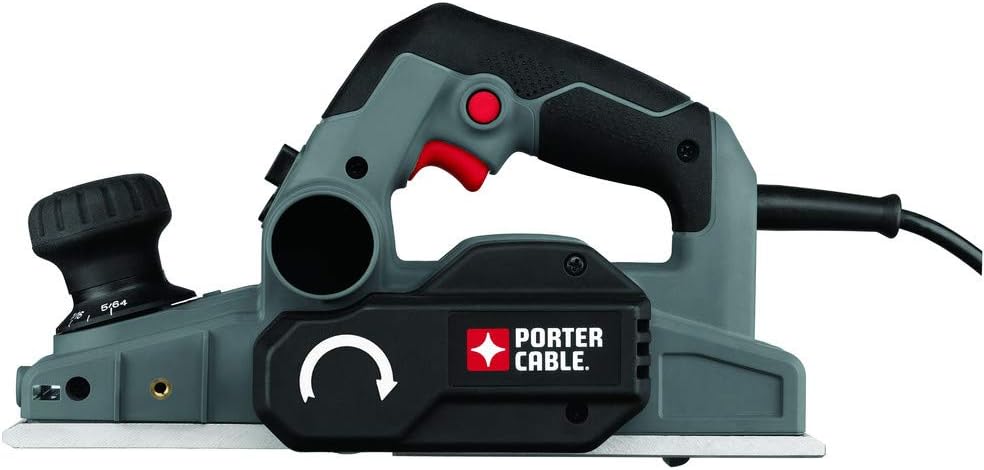
Image: The PORTER-CABLE PC60THP 6-Amp Hand Planer, showcasing its ergonomic design and dust collection port.
ຂໍ້ມູນຄວາມປອດໄພທີ່ສໍາຄັນ
ຄໍາເຕືອນ: ອ່ານຄໍາເຕືອນຄວາມປອດໄພທັງຫມົດແລະຄໍາແນະນໍາກ່ອນທີ່ຈະດໍາເນີນການເຄື່ອງມືພະລັງງານນີ້. ການບໍ່ປະຕິບັດຕາມຄຳເຕືອນ ແລະຄຳແນະນຳອາດສົ່ງຜົນໃຫ້ເກີດໄຟຟ້າຊັອດ, ໄຟໄໝ້, ແລະ/ຫຼື ບາດເຈັບສາຫັດ.
- ໃສ່ເຄື່ອງປ້ອງກັນຕາ ແລະ ປ້ອງກັນການໄດ້ຍິນສະເໝີ.
- Keep hands away from the cutting area and the blade.
- ໃຫ້ແນ່ໃຈວ່າ workpiece ໄດ້ຢ່າງປອດໄພ clamped before planing.
- ຖອດປລັກໄຟອອກຈາກແຫຼ່ງພະລັງງານກ່ອນທີ່ຈະເຮັດການປັບແຕ່ງ, ປ່ຽນອຸປະກອນເສີມ ຫຼື ເກັບຮັກສາເຄື່ອງມື.
- ຮັກສາພື້ນທີ່ເຮັດວຽກໃຫ້ສະອາດ ແລະ ມີແສງສະຫວ່າງດີ. ພື້ນທີ່ວຸ້ນວາຍ ຫຼືບ່ອນມືດພາໃຫ້ເກີດອຸປະຕິເຫດ.
- ຫ້າມໃຊ້ເຄື່ອງມືໄຟຟ້າໃນບັນຍາກາດທີ່ລະເບີດ, ເຊັ່ນໃນທີ່ປະທັບຂອງຂອງແຫຼວ, ອາຍແກັສ, ຫຼືຂີ້ຝຸ່ນ.
ການຕິດຕັ້ງແລະການປະກອບ
1. ຕິດຖົງຂີ້ຝຸ່ນ
The planer features a dual-side dust extractor. Attach the included dust bag to either of the dust ports. Ensure the bag is securely fastened to collect wood shavings and maintain a cleaner work area. The direction of dust expulsion can be adjusted via a switch on the tool.
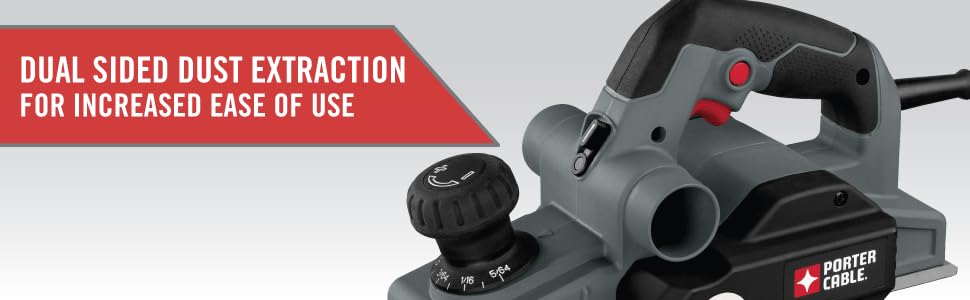
Image: The planer highlighting its dual-sided dust extraction system for user convenience.
2. ການປັບຄວາມເລິກຂອງການຕັດ
The planer is equipped with an overmold depth knob offering 10 positive steps for precise depth control. Rotate the knob to select the desired cutting depth. For initial passes, it is recommended to start with a shallower depth and gradually increase as needed.

Image: Close-up of the depth adjustment knob, showing the various settings for precise material removal.
3. Safety Foot Stand
The planer features an automatic foot stand that deploys when the tool is lifted from the workpiece. This prevents the blades from contacting the work surface or workbench when not in use, protecting both the blades and the surface.
ຄໍາແນະນໍາການດໍາເນີນງານ
1. General Planing Technique
Ensure the workpiece is stable. Place the front shoe of the planer flat on the workpiece, ensuring the blades are not touching. Start the planer, then slowly and steadily move it forward across the material. Apply even pressure throughout the pass. For best results, make multiple shallow passes rather than one deep pass.
2. Using Chamfering Grooves
The front shoe of the planer includes three chamfering grooves. These grooves allow for easy and consistent chamfering of edges. Select the appropriate groove size for your desired chamfer and guide the tool along the edge of the workpiece.
3. Trigger Lock Feature
For extended use, the planer includes a trigger lock button. Press the trigger to start the tool, then press the lock button to keep the tool running without continuously holding the trigger. To release, simply press the trigger again.
4. Operational Demonstration
Video: An official demonstration of the PORTER-CABLE PC60THP Hand Planer in use, showcasing ລັກສະນະ ແລະ ການດຳເນີນງານຂອງມັນ.
ບໍາລຸງຮັກສາ
1. ທໍາຄວາມສະອາດ
Regularly empty the dust bag and clean the dust ports to ensure efficient dust extraction. Use a soft brush or compressed air to remove any accumulated sawdust from the tool's vents and moving parts. Ensure the tool is unplugged before cleaning.
2. ການກວດກາ ແລະປ່ຽນແຜ່ນໃບ
Inspect the planer blades regularly for sharpness and damage. Dull or chipped blades can lead to poor finish quality and increased strain on the motor. The blades are replaceable; refer to the full product manual for detailed instructions on how to safely replace them. Always use genuine PORTER-CABLE replacement blades.
3. ການດູແລທົ່ວໄປ
Store the planer in a dry, clean environment. Avoid exposing it to moisture or extreme temperatures. Periodically check all screws and fasteners for tightness and tighten as necessary.
ການແກ້ໄຂບັນຫາ
If you encounter issues with your PORTER-CABLE PC60THP Hand Planer, consider the following common solutions:
- ເຄື່ອງມືບໍ່ໄດ້ເລີ່ມຕົ້ນ: Check if the power cord is securely plugged in. Ensure the trigger lock is disengaged. Verify power supply.
- ປະສິດທິພາບການຕັດບໍ່ດີ: Inspect blades for dullness or damage and replace if necessary. Ensure the cutting depth is set correctly.
- Excessive dust: Empty the dust bag. Clear any blockages in the dust ports. Ensure the dust bag is properly attached.
- Uneven planing: Ensure the workpiece is stable and flat. Check for debris on the planer's shoe. Adjust planing technique for even pressure.
For more complex issues, please refer to the detailed troubleshooting section in the complete user manual or contact PORTER-CABLE customer support.
ຂໍ້ມູນຈໍາເພາະ
| ຄຸນສົມບັດ | ຂໍ້ມູນຈໍາເພາະ |
|---|---|
| ຍີ່ຫໍ້ | PORTER-CABLE |
| ໝາຍເລກຕົວແບບ | PC60THP |
| Ampອາຍຸ | 6 Amps |
| ຄວາມໄວການຫມຸນສູງສຸດ | 16500 RPM |
| ຄວາມເລິກການຕັດ | 0.47 Inches (Max Rabbit Depth) |
| ຂະໜາດສິນຄ້າ | 14.63"L x 7.75"W x 8.25"H |
| ນ້ໍາຫນັກລາຍການ | 8.19 ປອນ |
| ແຫຼ່ງພະລັງງານ | ໄຟຟ້າສາຍ |
| ອົງປະກອບລວມ | 2 Carbide Cutting Blades, Wrench, Dust bag |
ຂໍ້ມູນການຮັບປະກັນ
This PORTER-CABLE product comes with a ການຮັບປະກັນ 3 ປີຈາກຜູ້ຜະລິດທີ່ມີຂໍ້ຈຳກັດ. This warranty covers defects in material or workmanship. For full details regarding warranty coverage, limitations, and how to make a claim, please refer to the official warranty document included with your product or visit the PORTER-CABLE webເວັບໄຊ.
ການຊ່ວຍເຫຼືອລູກຄ້າ
For technical assistance, replacement parts, or service information, please contact PORTER-CABLE customer support. You can typically find contact details on the official PORTER-CABLE webເວັບໄຊທ໌ຫຼືຢູ່ໃນຄູ່ມືຜະລິດຕະພັນເຕັມ.
ຊັບພະຍາກອນອອນໄລນ໌: ຢ້ຽມຢາມຢ່າງເປັນທາງການ PORTER-CABLE Store on Amazon ສໍາລັບຂໍ້ມູນເພີ່ມເຕີມຜະລິດຕະພັນແລະອຸປະກອນເສີມ.