
ຂໍ້ມູນຄວາມປອດໄພທີ່ສໍາຄັນ
Read all instructions carefully before installation and operation. Failure to follow these instructions may result in electric shock, fire, or serious injury. This device is intended for indoor use only.
- ຄຳເຕືອນ: Risk of electric shock. Disconnect power at the circuit breaker or fuse box before installing or servicing.
- ການຕິດຕັ້ງຄວນໄດ້ຮັບການປະຕິບັດໂດຍຊ່າງໄຟຟ້າທີ່ມີຄຸນວຸດທິຫຼືພະນັກງານທີ່ໄດ້ຮັບການຝຶກອົບຮົມ.
- ໃຫ້ແນ່ໃຈວ່າການເຊື່ອມຕໍ່ສາຍໄຟທັງຫມົດແມ່ນປອດໄພແລະປະຕິບັດຕາມລະຫັດໄຟຟ້າທ້ອງຖິ່ນ.
- ຢ່າໃຊ້ເກີນຄ່າສູງສຸດຂອງເຄື່ອງຈັບເວລາ.
- Keep children away from the timer and wiring during installation and operation.
ສິນຄ້າເກີນview
The Intermatic 610224 is a digital 7-day programmable timer designed to automate the ON/OFF switching of electrical loads such as lights, fans, and other appliances. It features a clear digital display and intuitive controls for setting daily or weekly schedules. This timer operates at 120V AC and can handle loads up to 15 Ampເອີ.
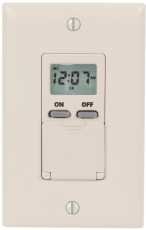
ຮູບພາບ: ດ້ານໜ້າ view of the Intermatic 610224 Digital 7-Day Timer. The image displays the timer's ivory-colored faceplate with a digital screen at the top and several control buttons below it. The buttons are arranged for setting time, programming, and manual override functions.
ການຕິດຕັ້ງ
Follow these steps to properly install your Intermatic 610224 Digital 7-Day Timer.
- ປິດໄຟ: ຊອກຫາຕົວຕັດວົງຈອນຫຼືຟິວທີ່ຄວບຄຸມພະລັງງານໄປຫາສະວິດທີ່ທ່ານກໍາລັງປ່ຽນແທນ. ປິດໄຟຫມົດ. ກວດສອບວ່າພະລັງງານປິດການນໍາໃຊ້ voltage ເຄື່ອງທົດສອບ.
- ລຶບສະວິດທີ່ມີຢູ່ແລ້ວອອກ: Carefully remove the wall plate and unscrew the existing switch from the wall box. Disconnect the wires from the old switch, noting which wire is connected to which terminal (Line, Load, Neutral, Ground).
- ການເຊື່ອມຕໍ່ສາຍໄຟ: The Intermatic 610224 timer requires Line (hot), Load, Neutral, and Ground connections. Connect the wires from the wall box to the corresponding terminals on the timer:
- ເຊື່ອມຕໍ່ ສາຍ (ຮ້ອນ) wire (usually black) from the power source to the terminal marked 'LINE'.
- ເຊື່ອມຕໍ່ ໂຫຼດ wire (usually black, going to the fixture) to the terminal marked 'LOAD'.
- ເຊື່ອມຕໍ່ ເປັນກາງ wire (usually white) to the terminal marked 'NEUTRAL'.
- ເຊື່ອມຕໍ່ ດິນ wire (usually bare copper or green) to the terminal marked 'GROUND'.
Note: A wiring diagram is typically included with the product packaging. Ensure all connections are tight and secure.
- ການຕິດຕັ້ງ: Gently push the wired timer into the wall box. Secure it with the provided screws. Attach the new wall plate.
- ຟື້ນຟູພະລັງງານ: Turn the power back on at the circuit breaker or fuse box. The timer display should illuminate.
ຄໍາແນະນໍາການດໍາເນີນງານ
This section details how to set the current time and program ON/OFF events for your timer.
ການກໍານົດເວລາປະຈຸບັນແລະມື້
- Press the 'CLOCK' button. The time display will flash.
- Use the 'HOUR' and 'MIN' buttons to adjust the current hour and minute.
- Press the 'DAY' button to select the current day of the week.
- Press 'CLOCK' again to save the settings and exit.
ໂປຣແກມເປີດ/ປິດເຫດການ
The timer allows for multiple ON/OFF programs per day. Refer to your specific model's manual for the exact number of programs (typically up to 14 ON and 14 OFF events).
- Press the 'PROG' button. The display will show '1 ON' and the time will flash.
- Use the 'HOUR' and 'MIN' buttons to set the desired ON time for program 1.
- Press the 'DAY' button repeatedly to select the day(s) of the week for this program (e.g., Mon-Sun, Mon-Fri, Sat-Sun, individual days).
- Press 'PROG' again. The display will show '1 OFF' and the time will flash.
- Use the 'HOUR' and 'MIN' buttons to set the desired OFF time for program 1.
- Press the 'DAY' button to select the day(s) for this OFF program, matching the ON program.
- Repeat steps 1-6 for additional ON/OFF programs (e.g., '2 ON', '2 OFF', etc.).
- After setting all desired programs, press the 'CLOCK' button to exit programming mode.
ຍົກເລີກຄູ່ມື
To temporarily override the current program without deleting it:
- Press the 'MANUAL' button. This will cycle the output between ON, OFF, and AUTO modes.
- In 'AUTO' mode, the timer follows the programmed schedule.
- In 'ON' or 'OFF' mode, the timer will remain in that state until the next programmed event or until 'MANUAL' is pressed again to return to 'AUTO'.
ການປັບເວລາປະຢັດແສງກາງເວັນ
Some models may have an automatic Daylight Saving Time adjustment feature. If not, manually adjust the time by one hour forward or backward as required using the 'HOUR' button in clock setting mode.
ບໍາລຸງຮັກສາ
The Intermatic 610224 Digital 7-Day Timer requires minimal maintenance.
- ທໍາຄວາມສະອາດ: To clean the timer, wipe the surface with a soft, damp ຜ້າ. ຫ້າມໃຊ້ເຄື່ອງຊັກຜ້າ ຫຼືສານລະລາຍທີ່ຂັດ, ເພາະວ່າພວກມັນອາດຈະທຳລາຍເຄື່ອງສຳ ເລັດຮູບ ຫຼື ອົງປະກອບພາຍໃນ.
- ແບັດ ສຳ ຮອງ: This timer typically includes an internal battery backup to retain programmed settings during power outages. The battery is usually non-replaceable by the user and designed to last the life of the product. If the display is blank or programs are lost after a power outage, the battery may be depleted, indicating the unit may need replacement.
ການແກ້ໄຂບັນຫາ
If you encounter issues with your timer, refer to the following common problems and solutions.
| ບັນຫາ | ສາເຫດທີ່ເປັນໄປໄດ້ | ການແກ້ໄຂ |
|---|---|---|
| ຈໍສະແດງໂມງຈັບເວລາວ່າງເປົ່າ. | ບໍ່ມີພະລັງງານກັບເຄື່ອງຈັບເວລາ. | Check circuit breaker or fuse. Ensure wiring connections are secure. |
| ໂມງຈັບເວລາບໍ່ເປີດ/ປິດໃນເວລາຕັ້ງໂປຣແກຣມ. | Incorrect programming; Timer is in Manual ON/OFF mode. | Review programming steps. Ensure timer is in 'AUTO' mode (press 'MANUAL' button until 'AUTO' is displayed). |
| ເວລາບໍ່ຖືກຕ້ອງຫຼັງຈາກພະລັງງານ outage. | Internal battery backup depleted. | Reset the current time and day. If this occurs frequently, the timer may need replacement. |
| Load (light/appliance) does not turn on. | Load is faulty; Wiring issue; Timer is OFF. | Test the load directly. Check wiring connections. Ensure timer is programmed to ON or manually set to ON. |
ຂໍ້ມູນຈໍາເພາະ
- ຕົວແບບ: 610224
- ສະບັບtage: 120V AC, 60Hz
- ການຈັດອັນດັບປັດຈຸບັນ: 15A Resistive, 10A Tungsten, 1/2 HP
- Program Cycles: 7 ມື້
- ໂຄງການ: Up to 28 ON/OFF events (14 ON, 14 OFF)
- ອຸນຫະພູມປະຕິບັດການ: 0°C ຫາ 50°C (32°F ຫາ 122°F)
- ເອກະສານຄັດຕິດ: Ivory, Wall Mount
ການຮັບປະກັນແລະການສະຫນັບສະຫນູນ
Intermatic products are manufactured to high-quality standards and are backed by a manufacturer's warranty. For specific warranty details, please refer to the warranty card included with your product or visit the official Intermatic webເວັບໄຊ.
For technical support, troubleshooting assistance, or to inquire about replacement parts, please contact Intermatic customer service. Contact information can typically be found on the product packaging or the manufacturer's webເວັບໄຊ.