
1. ບົດແນະນຳ
This manual provides essential information for the proper setup, operation, and maintenance of your Sony SLV-FT5 VHS Video Cassette Recorder (VCR). Please read these instructions thoroughly before using the unit to ensure optimal performance and safety.
2. ຂໍ້ມູນຄວາມປອດໄພ
ປະຕິບັດຕາມຄວາມລະມັດລະວັງດ້ານຄວາມປອດໄພຂັ້ນພື້ນຖານສະເໝີເມື່ອໃຊ້ຜະລິດຕະພັນນີ້ເພື່ອຫຼຸດຜ່ອນຄວາມສ່ຽງຕໍ່ການເກີດອັກຄີໄພ, ໄຟໄໝ້, ແລະການບາດເຈັບ.
- ຫ້າມບໍ່ໃຫ້ອຸປະກອນຖືກຝົນ ຫຼື ຄວາມຊຸ່ມຊື່ນ.
- ຢ່າເປີດຕູ້. ອ້າງເຖິງການບໍລິການກັບບຸກຄະລາກອນທີ່ມີຄຸນວຸດທິເທົ່ານັ້ນ.
- ຮັບປະກັນການລະບາຍອາກາດທີ່ເຫມາະສົມ; ຫ້າມປິດປະຕູລະບາຍອາກາດ.
- ໃຊ້ພຽງແຕ່ການສະຫນອງພະລັງງານທີ່ລະບຸໄວ້ສໍາລັບຫນ່ວຍງານນີ້.
- ຮັກສາອຸປະກອນໃຫ້ຫ່າງຈາກແຫຼ່ງຄວາມຮ້ອນແລະແສງແດດໂດຍກົງ.
3. ຕັ້ງຄ່າ
3.1 ການຫຸ້ມຫໍ່
Carefully remove the VCR and all accessories from the packaging. Verify that all components are present: the SLV-FT5 VCR unit, remote control, and necessary connection cables (e.g., RCA audio/video cables).
3.2 ການເຊື່ອມຕໍ່ກັບໂທລະພາບ
To connect the VCR to your television, use the provided RCA audio/video cables. Match the colored plugs to the corresponding colored jacks on both the VCR and your TV (Yellow for Video, White for Left Audio, Red for Right Audio).

ຮູບທີ 1: Rear panel of the Sony SLV-FT5 VCR. This image displays the various input and output ports, including RCA jacks for audio and video, and the power input. The product label with model number SLV-FT5 and power specifications (100V 18W 50/60Hz) is also visible.
3.3 ການເຊື່ອມຕໍ່ພະລັງງານ
Plug the VCR's power cord into a standard electrical outlet (AC 100V, 50/60Hz). Ensure the power outlet is easily accessible.
3.4 ຕັ້ງຄ່າຄວບຄຸມໄລຍະໄກ
Open the battery compartment on the back of the remote control and insert two AA batteries, observing the correct polarity (+/-). Close the compartment securely.

ຮູບທີ 2: The Sony RMT-V219 remote control, designed for the SLV-FT5 VCR. This image also shows the included RCA audio/video cables, which are typically used for connecting the VCR to a television.
4. ການດໍາເນີນງານ VCR
4.1 ການເປີດ/ປິດ
ກົດ ພະລັງງານ button on the VCR's front panel or the remote control to turn the unit on or off.
4.2 Loading and Unloading a VHS Tape
- ກຳລັງໂຫຼດ: Insert a VHS cassette into the tape slot on the front of the VCR with the tape window facing forward. The VCR will automatically pull the tape in.
- ກຳ ລັງໂຫລດ: ກົດ EJECT button on the VCR or remote control. The tape will be ejected.
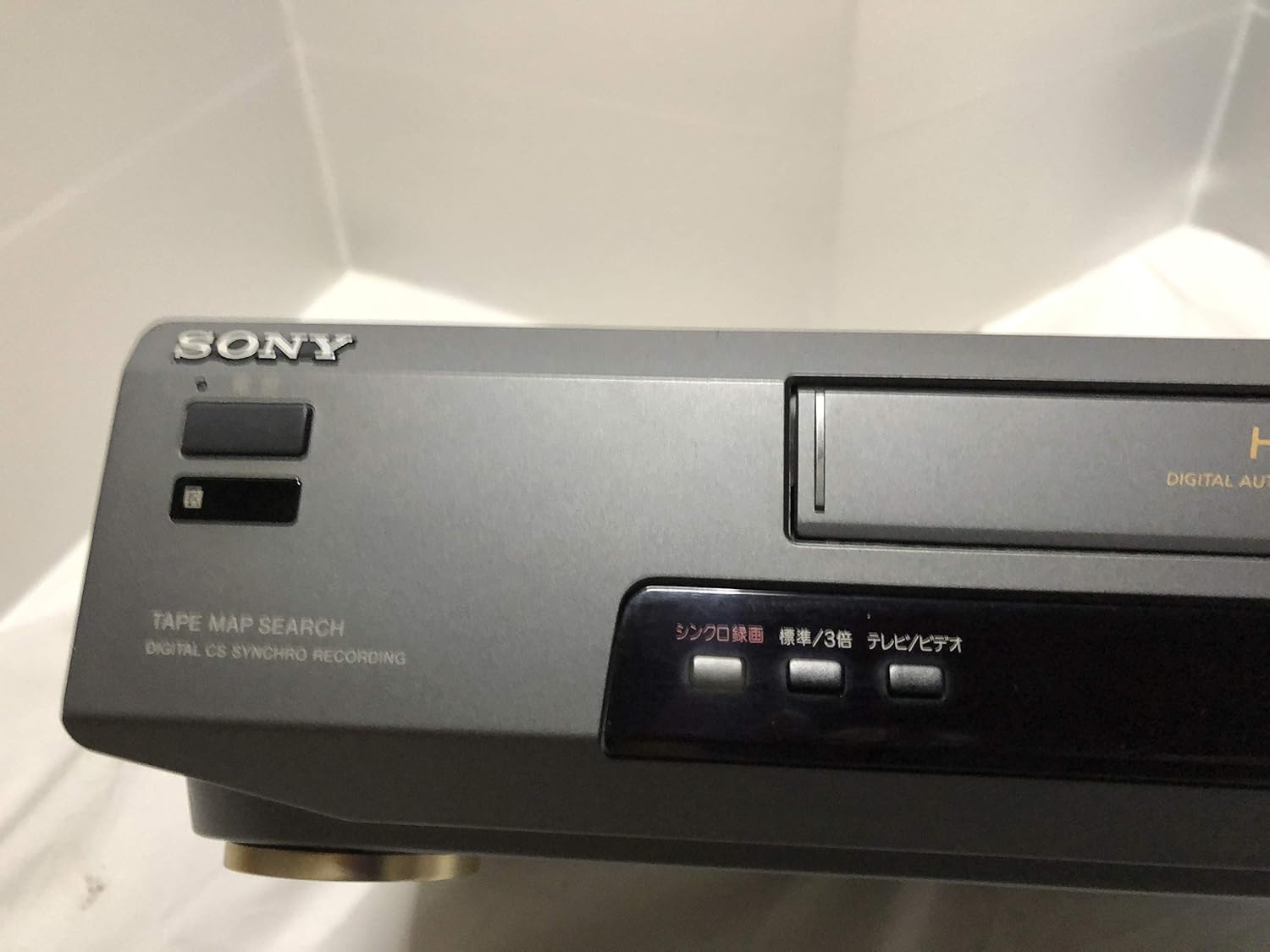
ຮູບທີ 3: Front left section of the Sony SLV-FT5 VCR. This view highlights the tape loading slot and the 'TAPE MAP SEARCH' feature, which assists in navigating recorded content on a tape.
4.3 ການຫຼິ້ນຄືນ
After loading a tape, press the ຫຼິ້ນ button (►) on the VCR or remote control to begin playback. Use the ຢຸດຊົ່ວຄາວ (∥), ຢຸດ (■), ກັບຄືນ (◀◀), and ເດີນໜ້າໄວ (►►) buttons to control playback.

ຮູບທີ 4: Front right section of the Sony SLV-FT5 VCR. This image displays the main playback controls (Play, Stop, Rewind, Fast Forward, Pause) and additional buttons for 'Quick Timer' and 'Tracking' adjustments.
4.4 ການບັນທຶກ
To record, ensure a blank or recordable tape is inserted. Select the desired input source (e.g., TV channel). Press the REC (●) button on the VCR or remote control. Press ຢຸດ (■) ເພື່ອຢຸດການບັນທຶກສຽງ.
4.5 Tracking Adjustment
If the picture quality during playback is poor (e.g., horizontal lines or noise), use the ການຕິດຕາມ buttons on the front panel or remote control to fine-tune the tape's alignment with the VCR's heads.
5. ບໍາລຸງຮັກສາ
5.1 ການທໍາຄວາມສະອາດຫນ່ວຍງານ
Wipe the exterior of the VCR with a soft, dry cloth. For stubborn stains, use a cloth lightly dampened with a mild detergent solution, then wipe dry. Do not use abrasive cleaners or solvents.
5.2 ການເຮັດຄວາມສະອາດຫົວ
Over time, VCR heads can accumulate dirt, leading to poor picture and sound quality. Use a commercially available dry-type VHS head cleaning cassette according to its instructions. Avoid wet-type cleaners as they can damage the heads.
5.3 ການເກັບຮັກສາ
When not in use for extended periods, disconnect the VCR from the power outlet. Store the unit in a cool, dry place, away from dust and direct sunlight.
6. ການແກ້ໄຂບັນຫາ
If you encounter issues with your VCR, refer to the following common problems and solutions before seeking professional service.
| ບັນຫາ | ສາເຫດທີ່ເປັນໄປໄດ້ | ການແກ້ໄຂ |
|---|---|---|
| ບໍ່ມີພະລັງງານ | ສາຍໄຟຖືກຕັດ; ບັນຫາປລັກສຽບໄຟ | ກວດເບິ່ງການເຊື່ອມຕໍ່ສາຍໄຟ; ລອງຮ້ານອື່ນ. |
| ບໍ່ມີຮູບພາບ/ສຽງ | Incorrect TV input; loose A/V cables | Select correct TV input (e.g., Video 1, AV); ensure A/V cables are securely connected. |
| Poor picture quality (snowy, lines) | Dirty VCR heads; tracking issue; old/damaged tape | Clean VCR heads; adjust tracking; try a different tape. |
| Tape won't eject | Power issue; mechanical malfunction | Ensure power is on; try pressing EJECT multiple times. If issue persists, seek service. |
| ການຄວບຄຸມໄລຍະໄກບໍ່ເຮັດວຽກ | Dead batteries; obstructed sensor | Replace batteries; ensure no obstacles between remote and VCR sensor. |
7. ຂໍ້ມູນຈໍາເພາະ
| ຄຸນສົມບັດ | ຂໍ້ມູນຈໍາເພາະ |
|---|---|
| ຍີ່ຫໍ້ | Sony |
| ໝາຍເລກຕົວແບບ | SLV-FT5 |
| ປະເພດສື່ | VHS |
| ຄວາມລະອຽດ | 720 x 480 ພິກເຊລ |
| ນ້ຳໜັກສິນຄ້າ | 4160 ກຣາມ |
| ຮູບແບບການອອກສຽງ | ສະເຕຣິໂອ |
| ຮູບແບບສຽງທີ່ຮອງຮັບ | Monaural, Stereo |
| ການເຂົ້າລະຫັດວິດີໂອ | ອະນາລັອກ |
| ອຸປະກອນທີ່ເຂົ້າກັນໄດ້ | ໂທລະພາບ |
| ຄວາມເຂົ້າກັນໄດ້ຂອງວິດີໂອອິນພຸດ | NTSC |
| ຄວາມຕ້ອງການພະລັງງານ | 100V, 18W, 50/60Hz |
8. ການຮັບປະກັນແລະການສະຫນັບສະຫນູນ
For warranty information and customer support, please refer to the documentation included with your purchase or visit the official Sony webເວັບໄຊ. ຮັກສາຫຼັກຖານການຊື້ຂອງທ່ານສໍາລັບການຮ້ອງຂໍການຮັບປະກັນ.