
1. ບົດແນະນຳ
This manual provides instructions for the proper setup, operation, and maintenance of your Amazon Basics Large Portable Bluetooth Speaker (Model BTV3_2). Please read this manual thoroughly before using the product to ensure optimal performance and safety.
2. ຂໍ້ມູນຄວາມປອດໄພ
- ຢ່າປ່ອຍໃຫ້ລໍາໂພງຖືກນ້ໍາຫຼືຄວາມຊຸ່ມຊື່ນຫຼາຍເກີນໄປ.
- ຫຼີກເວັ້ນການວາງລໍາໂພງຢູ່ໃກ້ກັບແຫຼ່ງຄວາມຮ້ອນ ຫຼືຢູ່ໃນແສງແດດໂດຍກົງ.
- ຢ່າພະຍາຍາມຖອດປະກອບ ຫຼືດັດແປງລຳໂພງ. ນີ້ຈະເປັນການຍົກເລີກການຮັບປະກັນ.
- Use only the provided AC power adapter for charging.
- ຮັກສາລໍາໂພງຢູ່ຫ່າງຈາກເດັກນ້ອຍ.
3. ເນື້ອໃນຊຸດ
ກວດສອບວ່າລາຍການທັງຫມົດແມ່ນມີຢູ່ໃນຊຸດ:
- Amazon Basics Large Portable Bluetooth Speaker
- ເຄື່ອງປັບໄຟຟ້າ AC

ລາຍລະອຽດ: This image shows the Amazon Basics Large Portable Bluetooth Speaker securely placed within its brown cardboard packaging, indicating how the product is received.
4. ຜະລິດຕະພັນເກີນview
4.1. ດ້ານໜ້າ View

ລາຍລະອຽດ: This image displays the front of the Amazon Basics Large Portable Bluetooth Speaker, featuring a black mesh grille that covers the speaker drivers.
4.2. ແຜງຄວບຄຸມສູງສຸດ

ລາຍລະອຽດ: This image shows the top panel of the speaker with four circular buttons and a small LED indicator. From left to right, the buttons are: Volume Down (-), Play/Pause, Volume Up (+), and Bluetooth Pairing/Call Answer. Below the buttons, a small Bluetooth logo and an LED indicator are visible.
- - (Volume Down): ຫຼຸດລະດັບສຽງ.
- ຫຼິ້ນ/ຢຸດ: ຫຼິ້ນ ຫຼືຢຸດການຫຼິ້ນສຽງຊົ່ວຄາວ.
- + (Volume Up): ເພີ່ມລະດັບສຽງ.
- Bluetooth/Call: Initiates Bluetooth pairing mode or answers/ends phone calls.
- ຕົວຊີ້ວັດ LED: Displays power and Bluetooth status.
4.3. ພອດແຜງດ້ານຂ້າງ

ລາຍລະອຽດ: This image shows the right side panel of the speaker, featuring a power switch, a DC input port for charging, and an AUX input port for wired audio connections.
- ປຸ່ມເປີດ/ປິດ: ເປີດ ຫຼືປິດ ລຳໂພງ.
- DC ຢູ່ໃນຜອດ: Connects to the AC power adapter for charging.
- ພອດ AUX: Connects to audio devices using a 3.5mm stereo cable (not included).
5. ຕັ້ງຄ່າ
5.1. ການສາກໄຟ ລຳ ໂພງ
- Connect the provided AC power adapter to the DC IN port on the side of the speaker.
- ສຽບອະແດບເຕີໄຟ AC ເຂົ້າໄປໃນເຕົ້າສຽບໃສ່ຝາ.
- The LED indicator will illuminate to show charging status. A full charge provides up to 8 hours of playback.
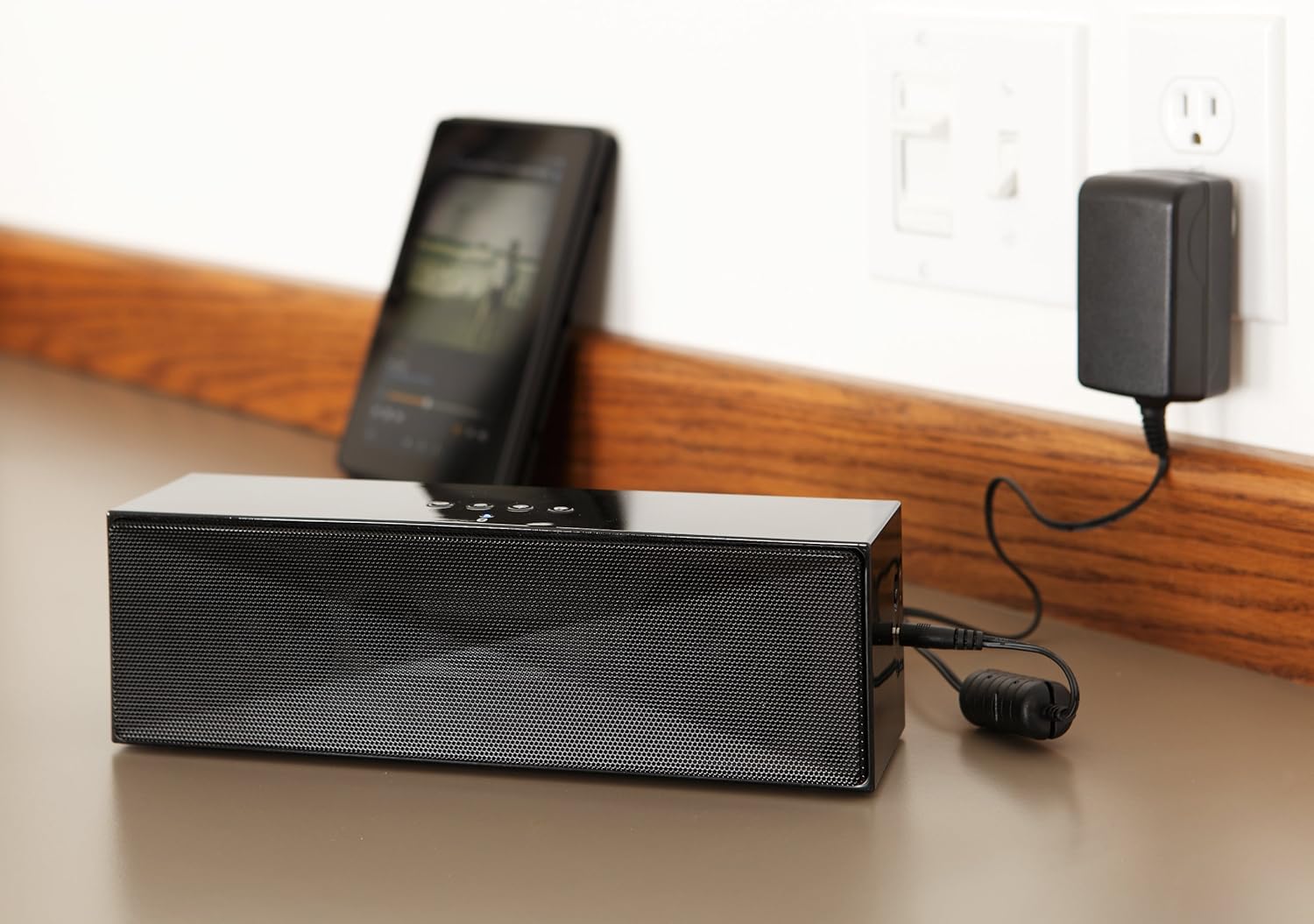
ລາຍລະອຽດ: This image shows the speaker placed on a surface, with its AC power adapter plugged into a wall outlet, illustrating the charging process.
5.2. ເປີດ / ປິດພະລັງງານ
Slide the ON/OFF switch located on the side panel to the "ON" position to power on the speaker. Slide it to the "OFF" position to power off.
6. ຄໍາແນະນໍາການດໍາເນີນງານ
6.1. ການຈັບຄູ່ Bluetooth
- ໃຫ້ແນ່ໃຈວ່າລຳໂພງເປີດຢູ່. ໄຟ LED ຈະກະພິບ, ຊີ້ບອກວ່າມັນຢູ່ໃນໂໝດຈັບຄູ່.
- ໃນອຸປະກອນທີ່ເປີດໃຊ້ Bluetooth ຂອງທ່ານ (ໂທລະສັບສະຫຼາດ, ແທັບເລັດ, ແລັບທັອບ), ເປີດໃຊ້ Bluetooth ແລະຄົ້ນຫາອຸປະກອນທີ່ມີຢູ່.
- Select "Amazon Basics BTV3_2" from the list of devices.
- Once paired, the LED indicator on the speaker will glow solid blue.
- The speaker can connect to devices up to 30 feet (10 meters) away.

ລາຍລະອຽດ: This image shows the speaker positioned next to a tablet displaying a music playback interface, demonstrating a typical Bluetooth connection scenario.
6.2. Connecting via AUX Cable
- Connect one end of a 3.5mm stereo audio cable (not included) to the AUX port on the speaker.
- ເຊື່ອມຕໍ່ສົ້ນອື່ນຂອງສາຍກັບຊ່ອງສຽບອອກສຽງຂອງອຸປະກອນຂອງທ່ານ.
- ລຳໂພງຈະປ່ຽນໄປໃຊ້ໂໝດປ້ອນຂໍ້ມູນ AUX ໂດຍອັດຕະໂນມັດ.
6.3. ໂທຟຣີ
ລຳໂພງມີໄມໂຄຣໂຟນໃນຕົວສຳລັບການໂທແບບບໍ່ຕ້ອງໃຊ້ມືເມື່ອເຊື່ອມຕໍ່ຜ່ານ Bluetooth.
- ຕອບການໂທ: Press the Bluetooth/Call button once.
- ສິ້ນສຸດການໂທ: Press the Bluetooth/Call button once during a call.
- ການປະຕິເສດການໂທ: Press and hold the Bluetooth/Call button.
7. ບໍາລຸງຮັກສາ
- ເຊັດລຳໂພງດ້ວຍຜ້າອ່ອນໆແຫ້ງ. ຢ່າໃຊ້ນໍ້າຢາລ້າງລຳໂພງ ຫຼື ນໍ້າຢາສີດ.
- ເກັບຮັກສາລຳໂພງໄວ້ໃນບ່ອນເຢັນ ແລະແຫ້ງເມື່ອບໍ່ໄດ້ໃຊ້ເປັນເວລາດົນ.
- ຫຼີກລ່ຽງການຕົກລຳໂພງ ຫຼື ກະທົບກັບລຳໂພງຢ່າງແຮງ.
8. ການແກ້ໄຂບັນຫາ
| ບັນຫາ | ສາເຫດທີ່ເປັນໄປໄດ້ | ການແກ້ໄຂ |
|---|---|---|
| ລຳໂພງບໍ່ເປີດ. | ແບັດເຕີຣີໝົດ. | Connect the speaker to the AC power adapter and charge it. |
| ບໍ່ສາມາດຈັບຄູ່ຜ່ານ Bluetooth ໄດ້. | Speaker is not in pairing mode; device Bluetooth is off; device is out of range. | Ensure speaker LED is flashing; enable Bluetooth on your device; move device closer to the speaker (within 30 feet/10 meters). |
| ບໍ່ມີສຽງ ຫຼືສຽງຕໍ່າ. | Volume on speaker or connected device is too low; incorrect input source. | Increase volume on both the speaker and your connected device. Ensure correct connection (Bluetooth or AUX). |
| Speaker turns off automatically when using AUX. | Automatic power-off feature activated due to prolonged silence. | This model may have an automatic power-off feature after a period of inactivity or silence, even when connected via AUX. To resume playback, power the speaker off and then on again using the side switch. |
| ການບິດເບືອນສຽງ. | Volume too high; weak battery; interference. | Reduce volume; charge the speaker; move away from other electronic devices. |
9. ຂໍ້ມູນຈໍາເພາະ
| ຄຸນສົມບັດ | ລາຍລະອຽດ |
|---|---|
| ໝາຍເລກຕົວແບບ | BTV3_2 |
| ຂະໜາດ (L x W x H) | 10.2 x 2.9 x 3.1 ນິ້ວ (25.9 x 7.4 x 7.9 cm) |
| ນ້ຳໜັກ | 1.61 ປອນ (0.73 ກິໂລ) |
| ລຳໂພງ Output | 2 x 5W (ທັງໝົດ 10W) |
| ການເຊື່ອມຕໍ່ | Bluetooth, AUX 3.5mm |
| ຊ່ວງ Bluetooth | ສູງເຖິງ 30 ຟຸດ (10 ແມັດ) |
| ຊີວິດຫມໍ້ໄຟ | ສູງສຸດ 8 ຊົ່ວໂມງ |
| ຄວາມອາດສາມາດຫມໍ້ໄຟ | 8000 mAh |
| ໄມໂຄຣໂຟນໃນຕົວ | ແມ່ນແລ້ວ |
| ແຫຼ່ງພະລັງງານ | Battery Powered, AC Adapter |
| ວັດສະດຸ | ພາດສະຕິກ |

ລາຍລະອຽດ: This image provides a visual representation of the speaker's dimensions, showing its length (10.2"), width (2.9"), and height (3.1").
10. ການຮັບປະກັນແລະການສະຫນັບສະຫນູນ
For warranty information and customer support, please refer to the documentation included with your purchase or visit the official Amazon Basics webເວັບໄຊ. ຮັກສາຫຼັກຖານການຊື້ຂອງທ່ານສໍາລັບການຮ້ອງຂໍການຮັບປະກັນ.
ສະຫນັບສະຫນູນອອນໄລນ໌: ຮ້ານ Amazon Basics