
1. ຜະລິດຕະພັນເກີນview
The Soundstream VR-930B is a single DIN car DVD player featuring a 9.3-inch motorized LCD touchscreen display and Bluetooth connectivity. This unit supports playback of various media types including CD, CD-R/RW, DVD, DVD-R/RW, MP3, WMA, and AAC. It includes a front USB input and a front SD card slot for expanded media options. The device also offers AM/FM radio tuning and MP3 ID3 Tag Display for track information.
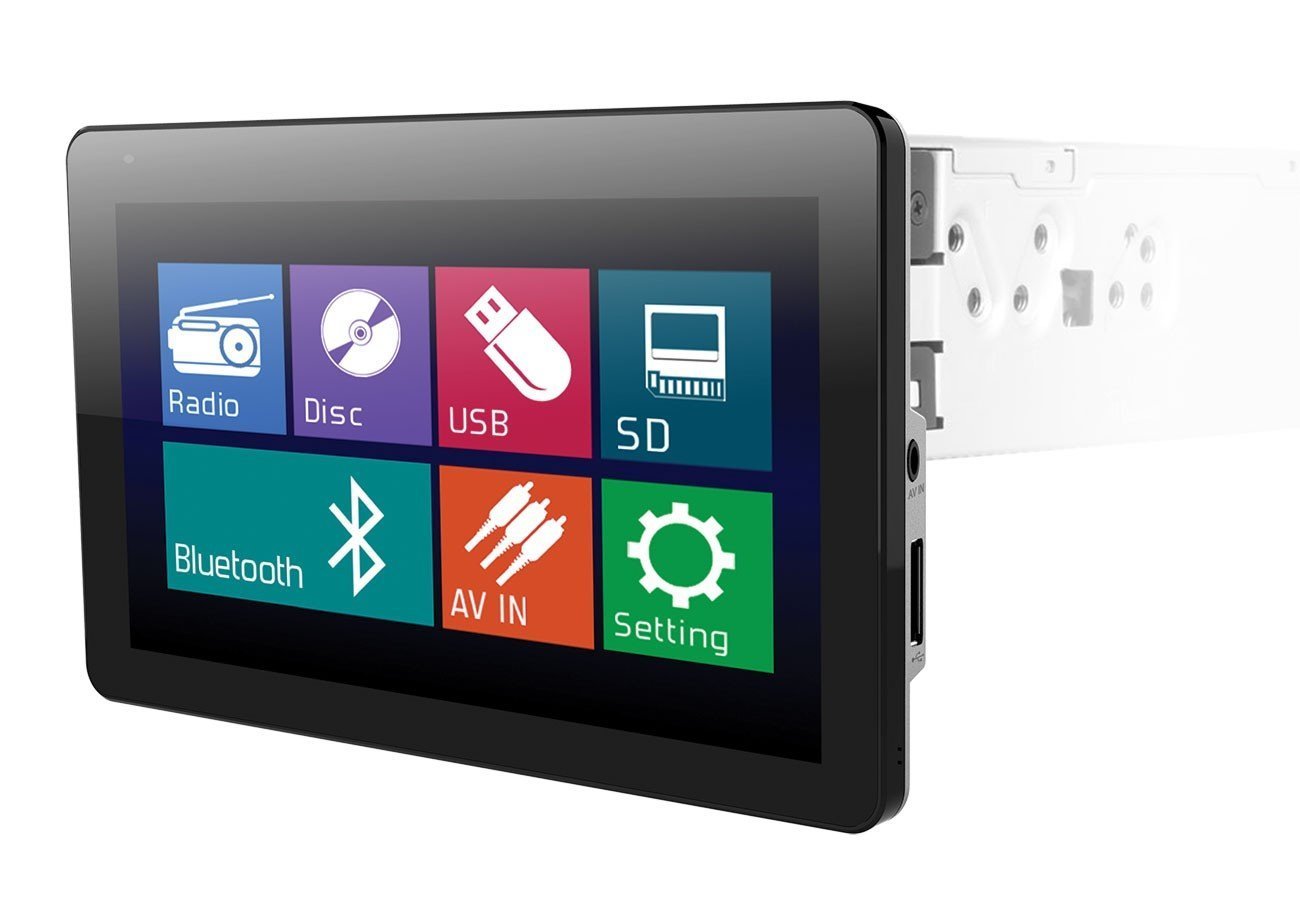
Image: The Soundstream VR-930B car DVD player, showcasing its large 9.3-inch motorized LCD touchscreen display in a vehicle dashboard.
ຄຸນນະສົມບັດທີ່ສໍາຄັນ:
- Single DIN chassis with a 9.3-inch motorized LCD touchscreen display.
- Bluetooth for audio streaming and hands-free calling.
- Media playback from CD, DVD, USB, and SD cards.
- AM/FM tuner with MP3 ID3 Tag ຈໍສະແດງຜົນ.
- Maximum power output of 52 watts x 4 channels.
- Removable faceplate for security.
- Includes a wireless remote control.
2. ຂໍ້ມູນຄວາມປອດໄພ
Read all instructions carefully before installation and operation. Failure to follow these instructions may result in damage to the unit, vehicle, or personal injury. Always ensure the vehicle is parked and the parking brake is engaged when operating features that require visual attention, such as DVD playback or extensive menu navigation. Do not operate the unit in a manner that distracts you from driving safely. Consult a professional for installation if you are unsure about any wiring or mounting procedures.
3. ເນື້ອໃນຊຸດ
Verify that all items are present in the package before beginning installation. The typical package includes:
- Soundstream VR-930B Head Unit
- ສາຍເຊືອກ
- ການຄວບຄຸມໄລຍະໄກໄຮ້ສາຍ
- ຮາດແວຕິດຕັ້ງ
- ຄູ່ມືຜູ້ໃຊ້ (ເອກະສານນີ້)
4. ຕັ້ງຄ່າ
4.1 ການຕິດຕັ້ງ
The VR-930B is designed for single DIN dashboard openings. Professional installation is highly recommended to ensure proper wiring and functionality. Incorrect installation can lead to damage to the unit or vehicle electrical system. Ensure the vehicle's battery is disconnected before starting any installation work.
4.2 ແຜນວາດສາຍ
Refer to the detailed wiring diagram provided in the separate installation guide or on the unit's chassis for specific connections. Key connections include power (constant 12V, accessory 12V, ground), speaker outputs, antenna, parking brake sensor, and reverse gear input.
4.3 ການເປີດເຄື່ອງເບື້ອງຕົ້ນ
After installation, reconnect the vehicle battery. Press the power button on the unit or remote control. The unit should power on and display the Soundstream logo. Follow any on-screen prompts for initial setup, such as language selection or clock setting.
5. ຄໍາແນະນໍາການດໍາເນີນງານ
5.1 ການຄວບຄຸມພື້ນຖານ
- ປຸ່ມເປີດປິດ: ກົດເພື່ອເປີດ/ປິດເຄື່ອງ.
- ປຸ່ມ/ປຸ່ມປັບລະດັບສຽງ: ປັບລະດັບສຽງອອກ.
- ປຸ່ມໂໝດ: Cycle through available audio sources (Radio, DVD, USB, SD, Bluetooth, AUX).
- ປຸ່ມເມນູ: Access the main system settings and options.
5.2 ການຫຼິ້ນ DVD/CD
Insert a DVD or CD into the disc slot. The unit will automatically detect the disc and begin playback. Use the on-screen controls or remote control for functions such as Play, Pause, Stop, Skip Track/Chapter, and Fast Forward/Rewind. Ensure the parking brake is engaged for video playback.
5.3 ການເຊື່ອມຕໍ່ Bluetooth
ເພື່ອຈັບຄູ່ອຸປະກອນ Bluetooth:
- ເປີດໃຊ້ Bluetooth ໃນອຸປະກອນມືຖືຂອງທ່ານ.
- On the VR-930B, select the Bluetooth source.
- ຊອກຫາ available devices on your mobile phone. The unit's name will typically appear as "Soundstream VR-930B" or similar.
- Select the unit and enter the default PIN (usually "0000") if prompted.
Once paired, you can stream audio from your device or make/receive hands-free calls through the unit.
5.4 ການຫຼິ້ນສື່ USB/SD
Insert a USB drive into the front USB port or an SD card into the front SD card slot. The unit will automatically switch to the respective source and display the media files. Navigate through folders and select files using the touchscreen or remote control. Supported formats include MP3, WMA, and AAC.
5.5 ການໃຊ້ງານວິທະຍຸ (AM/FM)
Select the Radio source. Use the 'Seek' or 'Tune' functions to find radio stations. You can save your favorite stations as presets for quick access. Press the 'Band' button to switch between AM and FM bands.
5.6 ການເຮັດວຽກຂອງຫນ້າຈໍສໍາຜັດ
The 9.3-inch LCD is a resistive touchscreen. Use light pressure with your fingertip or a stylus to interact with on-screen icons and menus. The motorized screen allows for angle adjustment to optimize viewing.
6. ບໍາລຸງຮັກສາ
6.1 ການທໍາຄວາມສະອາດຫນ່ວຍງານ
Wipe the unit's surface and touchscreen with a soft, dry cloth. For stubborn dirt, use a slightly damp cloth with a mild, non-abrasive cleaner. Avoid using harsh chemicals or solvents, as they can damage the finish or screen. Ensure the unit is powered off before cleaning.
6.2 ການດູແລແຜ່ນ
Handle discs by their edges to avoid fingerprints and scratches. Store discs in their cases when not in use. Clean dirty discs with a soft, lint-free cloth, wiping from the center outwards. Do not use abrasive cleaners or solvents on discs.
7. ການແກ້ໄຂບັນຫາ
If you encounter issues with your VR-930B, refer to the table below for common problems and solutions.
| ບັນຫາ | ສາເຫດທີ່ເປັນໄປໄດ້ | ການແກ້ໄຂ |
|---|---|---|
| ຫນ່ວຍບໍລິການບໍ່ເປີດ. | ສາຍໄຟບໍ່ຖືກຕ້ອງ; ຟິວເປົ່າ; ແບັດເຕີຣີລົດຕໍ່າ. | Check power and ground connections. Inspect vehicle fuses. Ensure battery is charged. |
| ບໍ່ມີສຽງ. | ລະດັບສຽງຕໍ່າເກີນໄປ; ປິດສຽງແລ້ວ; ສາຍລຳໂພງຖືກຕັດການເຊື່ອມຕໍ່. | Increase volume. Deactivate mute. Check speaker wiring connections. |
| Disc error. | Dirty or scratched disc; Unsupported disc format. | Clean the disc. Try a different disc. Ensure disc format is supported. |
| Bluetooth ບໍ່ເຊື່ອມຕໍ່. | ບໍ່ໄດ້ເປີດໃຊ້ Bluetooth ໃນອຸປະກອນ; ເຄື່ອງບໍ່ໄດ້ຢູ່ໃນໂໝດຈັບຄູ່; ການລົບກວນ. | Ensure Bluetooth is on and visible. Put unit in pairing mode. Move closer to the unit. |
| Video not playing. | Parking brake not engaged; Incorrect video format. | Ensure parking brake is fully engaged. Check video file ຄວາມເຂົ້າກັນໄດ້ຂອງຮູບແບບ. |
8. ຂໍ້ມູນຈໍາເພາະ
Below are the technical specifications for the Soundstream VR-930B:
| ຄຸນສົມບັດ | ຂໍ້ມູນຈໍາເພາະ |
|---|---|
| ໝາຍເລກຕົວແບບ | VR-930B |
| ຂະຫນາດຈໍສະແດງຜົນ | 9.3 ນິ້ວ |
| ປະເພດການສະແດງ | Motorized LCD Touchscreen |
| ຄວາມລະອຽດການສະແດງ | 800 x 480 |
| ຜົນຜະລິດພະລັງງານສູງສຸດ | 52 ວັດ x 4 ຊ່ອງ |
| ປະເພດສື່ທີ່ຮອງຮັບ | CD+RW, CD-R, MP3, DVD, DVD-R/RW, WMA, AAC |
| ເຕັກໂນໂລຊີການເຊື່ອມຕໍ່ | Bluetooth, USB |
| ແຫຼ່ງພະລັງງານ | 12V |
| ນ້ຳໜັກສິນຄ້າ | 2.8 ປອນ |
| GTIN / UPC | 709483047792 |
9. ຂໍ້ມູນການຮັບປະກັນ
ຜະລິດຕະພັນ Soundstream ໄດ້ຖືກອອກແບບ ແລະ ຜະລິດຕາມມາດຕະຖານຄຸນນະພາບສູງສຸດ. ຜະລິດຕະພັນນີ້ໄດ້ຮັບການຄຸ້ມຄອງໂດຍການຮັບປະກັນທີ່ຈຳກັດຕໍ່ກັບຂໍ້ບົກຜ່ອງດ້ານວັດສະດຸ ແລະ ຝີມືແຮງງານ. ໄລຍະເວລາ ແລະ ເງື່ອນໄຂຂອງການຮັບປະກັນອາດແຕກຕ່າງກັນໄປຕາມພາກພື້ນ ແລະ ຮ້ານຄ້າປີກ. ກະລຸນາເກັບຫຼັກຖານການຊື້ຂອງທ່ານໄວ້ເພື່ອການຮຽກຮ້ອງການຮັບປະກັນ. ສຳລັບລາຍລະອຽດການຮັບປະກັນສະເພາະ, ໃຫ້ອ້າງອີງເຖິງບັດຮັບປະກັນທີ່ມາພ້ອມກັບຜະລິດຕະພັນຂອງທ່ານ ຫຼື ຕິດຕໍ່ຝ່າຍສະໜັບສະໜູນລູກຄ້າຂອງ Soundstream.
10. ການຊ່ວຍເຫຼືອລູກຄ້າ
For technical assistance, troubleshooting beyond this manual, or warranty inquiries, please contact Soundstream customer support. Visit the official Soundstream website for contact information, FAQs, and additional resources. When contacting support, please have your product model number (VR-930B) and proof of purchase readily available.