
1. ບົດແນະນຳ
This manual provides instructions for the safe and effective operation of the Mastech MS2108A Auto Range DC AC Current Digital Clamp Meter Multimeter. This instrument is designed for measuring AC/DC voltage and current, resistance, capacitance, frequency, duty cycle, diode, and continuity. It features an auto-ranging function, LCD backlight, clamp lighting, and data hold capabilities, making it suitable for various electrical testing applications.
2. ຂໍ້ມູນຄວາມປອດໄພ
ຄຳເຕືອນ: To avoid electrical shock or personal injury, read all safety information before using this product. Use the product only as specified in this manual, or the protection provided by the product may be impaired.
- ໃຫ້ແນ່ໃຈວ່າມິເຕີຢູ່ໃນໜ້າທີ່ ແລະ ລະດັບທີ່ຖືກຕ້ອງກ່ອນການວັດແທກສະເໝີ.
- ຫ້າມໃຊ້ຫຼາຍກ່ວາ voltage, ຕາມທີ່ໝາຍໄວ້ເທິງເຄື່ອງວັດແທກ, ລະຫວ່າງ terminals ຫຼືລະຫວ່າງ terminal ແລະດິນແຜ່ນດິນໂລກ.
- ໃຊ້ຄວາມລະມັດລະວັງໃນເວລາທີ່ເຮັດວຽກກັບ voltages ຂ້າງເທິງ 30V AC RMS, ສູງສຸດ 42V, ຫຼື 60V DC. vol ເຫຼົ່ານີ້tages ເຮັດໃຫ້ເກີດອັນຕະລາຍຊ໊ອກ.
- Before measuring current, ensure the circuit is de-energized and the clamp jaws are properly closed around the conductor.
- Do not operate the meter with the battery cover open.
- ໃຫ້ປ່ຽນແບັດເຕີຣີທັນທີເມື່ອໄຟສະແດງວ່າແບັດເຕີຣີຕໍ່າປະກົດຂຶ້ນ.
- ຖອດສາຍທົດສອບອອກຈາກວົງຈອນສະເໝີກ່ອນທີ່ຈະປ່ຽນໜ້າທີ່.
- ປະຕິບັດຕາມລະຫັດຄວາມປອດໄພຂອງທ້ອງຖິ່ນ ແລະ ລະດັບຊາດທັງໝົດ.
3. ຜະລິດຕະພັນເກີນview ແລະຄຸນສົມບັດ
The Mastech MS2108A is a versatile digital clamp meter designed for electrical professionals and enthusiasts. Its key features include:
- AC/DC voltage ແລະການວັດແທກປະຈຸບັນ
- Resistance, capacitance, frequency, and duty cycle measurement
- Diode and continuity test functions
- Clamp for non-contact AC/DC current measurement
- LCD with backlight and bar graph display
- ປະສົມປະສານ clamp lighting bulb
- ການວັດແທກມູນຄ່າທີ່ກ່ຽວຂ້ອງ
- Auto-ranging function
- Data hold, maximum (MAX), and minimum (MIN) value measuring
- Automatic power off and low battery indication
- Full overload protection and dual insulation
- Durable over-molding rubber case for shake-proof and skid-proof handling
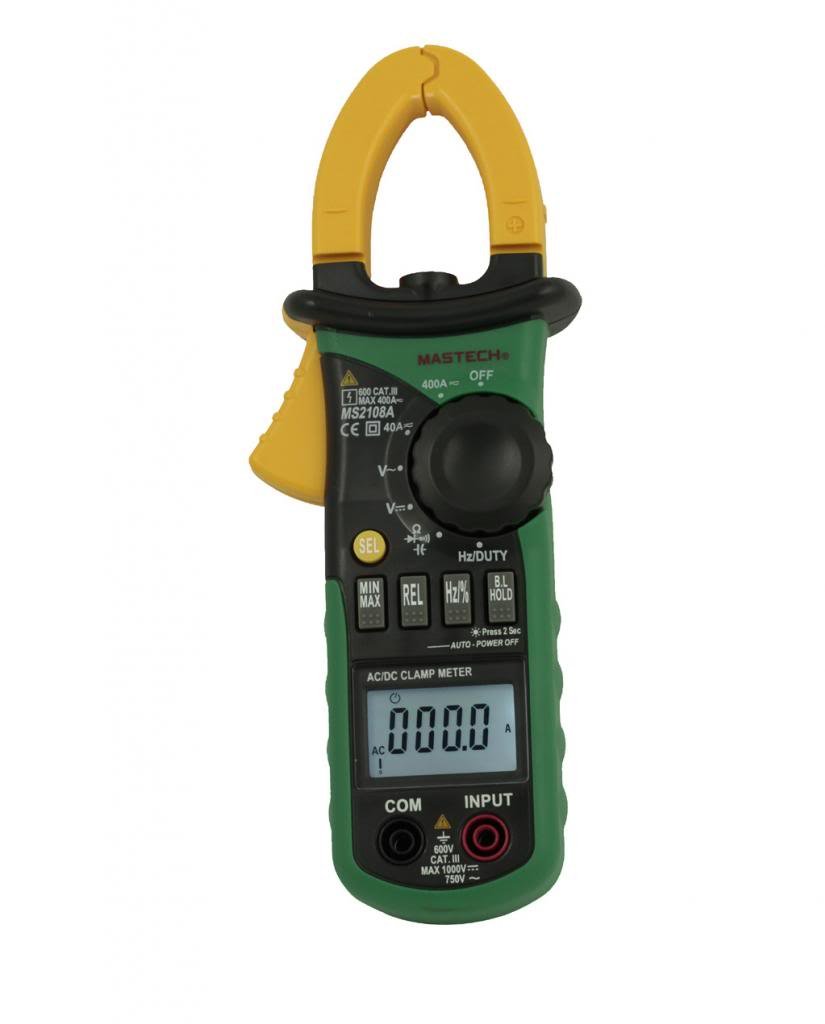
ຮູບ 3.1: ດ້ານຫນ້າ view of the Mastech MS2108A Digital Clamp Meter, showing the display, function dial, and clamp ຄາງກະໄຕ.
4. ເນື້ອໃນຊຸດ
ກວດສອບວ່າທຸກລາຍການຢູ່ໃນສະພາບທີ່ດີໃນການເປີດຊຸດ:
- ເຄື່ອງອ່ານດິຈິຕອລ Mastech MS2108Aamp ແມັດ
- ສາຍທົດສອບ (ສີແດງໜຶ່ງອັນ, ສີດຳໜຶ່ງອັນ)
- ກະເປົາຖື
- ຄູ່ມືຜູ້ໃຊ້ (ເອກະສານນີ້)

Figure 4.1: The Mastech MS2108A Clamp Meter, test leads, and carrying case.
5. ຕັ້ງຄ່າ
5.1 ການຕິດຕັ້ງຫມໍ້ໄຟ
- ໃຫ້ແນ່ໃຈວ່າມິເຕີຖືກປິດ.
- ຊອກຫາຝາປິດຊ່ອງໃສ່ຫມໍ້ໄຟຢູ່ດ້ານຫຼັງຂອງເຄື່ອງວັດແທກ.
- ໃຊ້ໄຂຄວງເພື່ອຄາຍສະກູທີ່ຍຶດຝາປິດແບັດເຕີຣີອອກ.
- ເອົາຝາປິດຫມໍ້ໄຟອອກ.
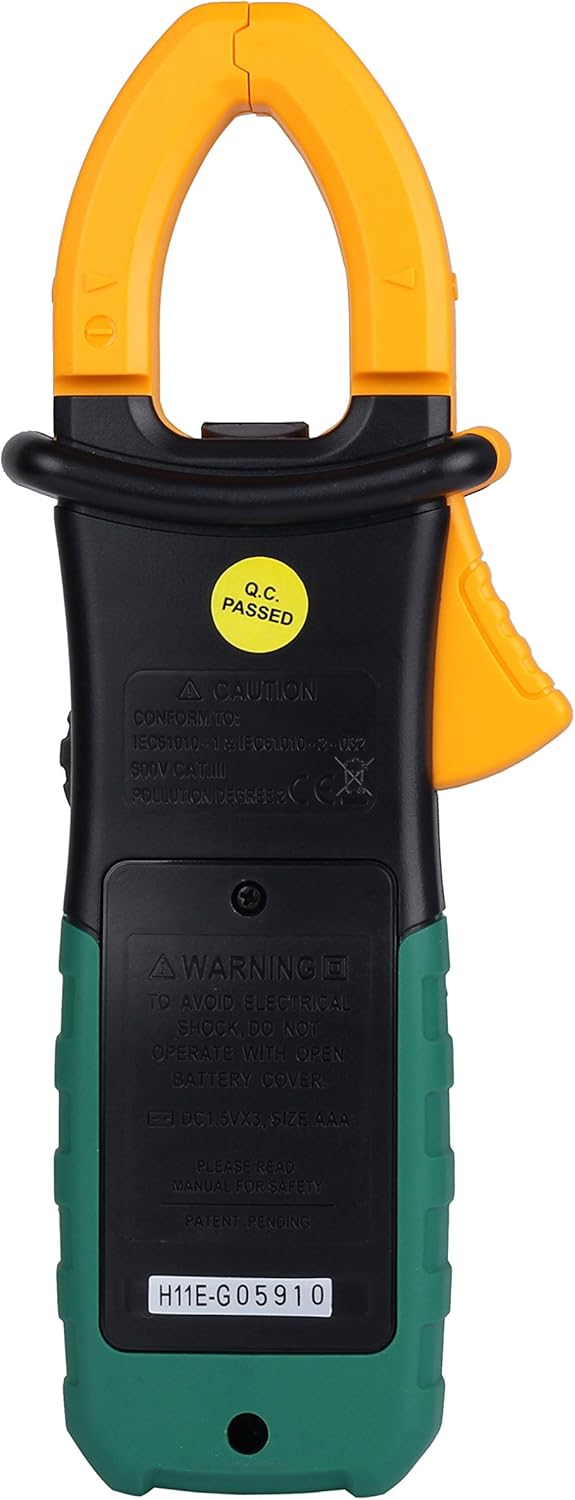
- Insert three AAA 1.5V batteries, observing the correct polarity (+ and -).
- ໃສ່ຝາປິດແບັດເຕີຣີຄືນ ແລະ ຂັນສະກູໃຫ້ແໜ້ນ.
ຮູບ 5.1: ດ້ານຫລັງ view ຂອງ cl ໄດ້amp meter, indicating the battery compartment location.
5.2 ການເຊື່ອມຕໍ່ຜູ້ນໍາການທົດສອບ
ສໍາລັບ voltage, resistance, capacitance, frequency, duty cycle, diode, and continuity measurements:
- ໃສ່ສາຍທົດສອບສີແດງເຂົ້າໄປໃນຂົ້ວຕໍ່ "INPUT".
- Insert the black test lead into the "COM" (common) terminal.
6. ຄໍາແນະນໍາການດໍາເນີນງານ
6.1 ເປີດ/ປິດ
Rotate the function dial from the "OFF" position to any desired measurement function to turn the meter ON. To turn OFF, rotate the dial back to the "OFF" position.
6.2 ການເລືອກຟັງຊັນ
The large rotary dial allows selection of various measurement functions. Some positions on the dial may have multiple functions (e.g., AC voltage ແລະ DC voltage). ກົດ "SEL" button to cycle through these functions.

ຮູບ 6.1: ຂ້າງ view ຂອງ cl ໄດ້amp meter, highlighting the function dial and control buttons.
6.3 ການວັດແທກກະແສໄຟຟ້າ AC/DC (Clamp)
- ໝຸນປຸ່ມປັບໜ້າທີ່ໄປຫາ "A~" (ກະແສໄຟຟ້າ AC) ຫຼື "A=" ຕຳແໜ່ງ (ກະແສໄຟຟ້າ DC).
- ກົດ clamp ກະຕຸ້ນເພື່ອເປີດຄາງກະໄຕ.
- Enclose a single conductor (not a power cord with multiple wires) within the clamp ຄາງກະໄຕ. ຮັບປະກັນວ່າຄາງກະໄຕປິດສະໜິດແລ້ວ.
- ອ່ານຄ່າປະຈຸບັນໃນ LCD.
- For DC current, observe the polarity indicated on the display.

ຮູບທີ 6.2: clamp jaws of the meter, showing the integrated work light for illuminating the measurement area.
6.4 AC/DC Voltage ການວັດແທກ
- Connect the red test lead to the "INPUT" terminal and the black test lead to the "COM" terminal.
- ໝຸນປຸ່ມປັບໜ້າທີ່ໄປຫາ "V~" (AC Voltage) ຫຼື "V=" (DC Voltagຈ) ຕຳແໜ່ງ. ໃຊ້ "SEL" ປຸ່ມຖ້າຈຳເປັນ.
- ເຊື່ອມຕໍ່ການທົດສອບນໍາໃນຂະຫນານກັບວົງຈອນຫຼືອົງປະກອບພາຍໃຕ້ການທົດສອບ.
- ອ່ານ voltage ມູນຄ່າຢູ່ໃນ LCD ໄດ້.
6.5 Resistance, Capacitance, Frequency, Duty Cycle, Diode, and Continuity
For these measurements, connect the test leads as described in Section 5.2. Rotate the function dial to the appropriate position and use the "SEL" button to select the specific function if multiple are available on one dial position.
- ຄວາມຕ້ານທານ (Ω): ໃຫ້ແນ່ໃຈວ່າວົງຈອນຖືກຕັດພະລັງງານກ່ອນທີ່ຈະວັດແທກຄວາມຕ້ານທານ.
- ຄວາມຈຸ (F): Discharge capacitors before measurement.
- ຄວາມຖີ່ (Hz) / Duty Cycle (%): Connect across the signal source.
- ການທົດສອບ Diode (→ |): Connect the red lead to the anode and black lead to the cathode.
- ການທົດສອບຄວາມຕໍ່ເນື່ອງ ()))): A built-in buzzer will sound if the resistance is below approximately 50Ω.
6.6 ໜ້າທີ່ພິເສດ
- "HOLD" Button: Press to freeze the current reading on the display. Press again to release.
- "MAX/MIN" Button: Press to enter MAX/MIN recording mode. The meter will display the maximum or minimum value measured since entering the mode. Press again to cycle between MAX, MIN, and current reading. Hold to exit.
- "REL" (Relative) Button: Press to store the current reading as a reference value. Subsequent measurements will be displayed as the difference from this reference. Press again to exit.
- Backlight/Clamp ແສງ: The backlight and clamp light can be activated for improved visibility in low-light conditions. Refer to the specific button on the meter (often combined with another function or a dedicated light button).
7. ບໍາລຸງຮັກສາ
7.1 ການທໍາຄວາມສະອາດ
ເຊັດກໍລະນີທີ່ມີໂຄສະນາamp cloth and mild detergent. Do not use abrasives or solvents. Keep the terminals free of dirt and moisture.
7.2 ການທົດແທນຫມໍ້ໄຟ
When the low battery indicator appears on the display, replace the batteries as described in Section 5.1. Always use three new AAA 1.5V batteries.
7.3 ການເກັບຮັກສາ
If the meter is not used for an extended period, remove the batteries to prevent leakage and damage. Store the meter in its carrying case in a cool, dry place.
8. ການແກ້ໄຂບັນຫາ
| ບັນຫາ | ສາເຫດທີ່ເປັນໄປໄດ້ | ການແກ້ໄຂ |
|---|---|---|
| ເຄື່ອງວັດແທກບໍ່ເປີດ. | ແບັດເຕີຣີຕາຍ ຫຼື ຕິດຕັ້ງບໍ່ຖືກຕ້ອງ. | ກວດເບິ່ງຂົ້ວຂອງຫມໍ້ໄຟ; ປ່ຽນແບັດເຕີລີ. |
| ສະແດງ "OL" (ໂອເວີໂຫຼດ). | Input exceeds selected range or meter's maximum capacity. | Select a higher range (if manual ranging) or ensure input is within meter's specifications. |
| ການອ່ານບໍ່ຖືກຕ້ອງ. | Poor test lead connection, incorrect function selected, or external interference. | Ensure leads are firmly connected; verify function selection; move away from strong electromagnetic fields. |
| ບໍ່ມີສຽງດັງຕໍ່ເນື່ອງ. | Circuit resistance is too high. | Check the circuit for breaks or high resistance points. |
9. ຂໍ້ມູນຈໍາເພາະ
The following are general specifications for the Mastech MS2108A. Detailed ranges and accuracies can be found in the full technical datasheet.
- ຍີ່ຫໍ້: mastech
- ໝາຍເລກຕົວແບບ: MS2108A
- ປະເພດການວັດແທກ: Multimeter, Clamp ແມັດ
- ແຫຼ່ງພະລັງງານ: Battery Powered (3 x AAA 1.5V)
- ອົງປະກອບລວມ: Case, Test Leads
- ການຈັດອັນດັບຄວາມປອດໄພ: IEC 61010-1, CAT III 600V
- ຈໍສະແດງຜົນ: LCD with Backlight and Bar Graph
- ປິດເຄື່ອງອັດຕະໂນມັດ: ແມ່ນແລ້ວ
- ການຖືຂໍ້ມູນ: ແມ່ນແລ້ວ
- ການວັດແທກສູງສຸດ/ຕໍ່າສຸດ: ແມ່ນແລ້ວ
- ການວັດແທກພີ່ນ້ອງ: ແມ່ນແລ້ວ
10. ການຮັບປະກັນແລະການສະຫນັບສະຫນູນ
Mastech products are manufactured to high quality standards. For warranty information and technical support, please refer to the warranty card included with your purchase or contact your local Mastech distributor. Keep your purchase receipt as proof of purchase.