
1. ບົດແນະນຳ
This manual provides comprehensive instructions for the Adesso AKB-132UY Luminous Large Print Multimedia Desktop USB Keyboard. This keyboard is designed with large, high-contrast keys to enhance readability, particularly for users with visual impairments. It also integrates multimedia controls for convenience.

Figure 1: Adesso AKB-132UY Luminous Large Print Multimedia Desktop USB Keyboard. This image displays the full keyboard with its black frame and bright yellow keys, featuring large black characters.
2. ເນື້ອໃນຊຸດ
ກວດສອບວ່າລາຍການທັງຫມົດແມ່ນມີຢູ່ໃນຊຸດ:
- Adesso EasyTouch 132 - Florescent Yellow Multimedia Desktop Keyboard
- ຄູ່ມືເລີ່ມຕົ້ນດ່ວນ
3. ຄໍາແນະນໍາການຕິດຕັ້ງ
3.1 ການເຊື່ອມຕໍ່ຄີບອດ
- ຊອກຫາຊ່ອງສຽບ USB ທີ່ມີຢູ່ໃນຄອມພິວເຕີຂອງທ່ານ.
- Plug the USB connector of the Adesso AKB-132UY keyboard into the USB port.
- The operating system will automatically detect and install the necessary drivers. No additional software installation is typically required.
The keyboard is powered via the USB connection.
4. ການໃຊ້ງານຄີບອດ
4.1 ລັກສະນະທີ່ສໍາຄັນ
- Fluorescent 4X Large Print Keys: The keyboard features black characters printed in a large 4X size on bright fluorescent yellow keys. This design provides high contrast for improved visibility and readability, particularly beneficial for users with visual impairments.

ຮູບທີ 2: ໄລຍະໃກ້ view of the keyboard's QWERTY section, highlighting the large black characters on fluorescent yellow keys.
- ການຄວບຄຸມມັນຕິມີເດຍ: Dedicated hotkeys allow for one-touch control of media functions. These include:
- Media Player
- ປະລິມານລົງ
- ປະລິມານຂຶ້ນ
- ປິດສຽງ
- ຫຼິ້ນ/ຢຸດຊົ່ວຄາວ
- ເພງກ່ອນໜ້າ
- ຕິດຕາມຕໍ່ໄປ
- ຢຸດ

ຮູບທີ 3: ໄລຍະໃກ້ view of the numeric keypad and dedicated multimedia control keys located on the upper right side of the keyboard.
- Windows One-Touch Controls: Access common Windows applications directly with dedicated hotkeys:
- ຄອມພິວເຕີຂອງຂ້ອຍ
- ຄົ້ນຫາ
- ເຄື່ອງຄິດເລກ
- ຈົດໝາຍ
- Home (Browser)
- Favorites (Browser)
- Quiet Membrane Key Switches: The keyboard utilizes membrane key switches designed to provide a responsive and quiet typing experience. These switches are rated for a lifespan of up to five million keystrokes.
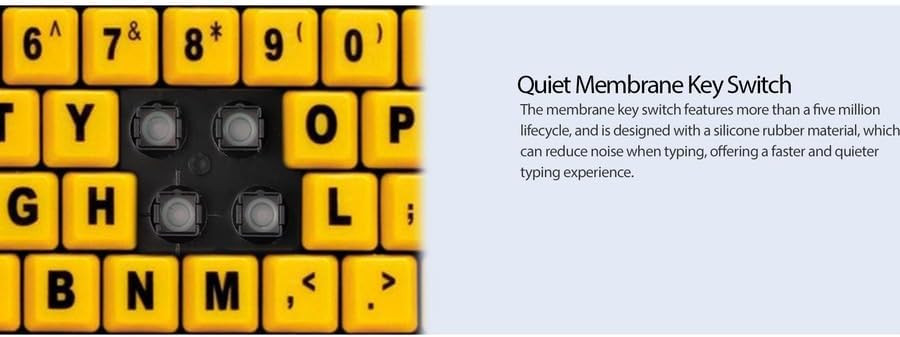
ຮູບທີ 4: ລາຍລະອຽດ view showing the internal membrane key switch mechanism beneath a keycap.
- 104-Key US Layout: The keyboard features a standard 104-key US layout, providing a familiar typing experience.
5. ບໍາລຸງຮັກສາ
5.1 ການທໍາຄວາມສະອາດແປ້ນພິມ
ເພື່ອຮັກສາຮູບລັກສະນະ ແລະການເຮັດວຽກຂອງແປ້ນພິມ:
- ຕັດການເຊື່ອມຕໍ່ແປ້ນພິມຈາກຄອມພິວເຕີຂອງທ່ານກ່ອນທີ່ຈະທໍາຄວາມສະອາດ.
- ໃຊ້ອ່ອນ, ເລັກນ້ອຍ damp cloth to wipe the surface of the keys and the keyboard body.
- For stubborn dirt or debris between keys, use compressed air or a soft brush.
- ຫຼີກລ່ຽງການໃຊ້ສານເຄມີທີ່ຮຸນແຮງ, ເຄື່ອງຊັກຜ້າ, ຫຼືຄວາມຊຸ່ມຊື່ນຫຼາຍເກີນໄປ, ເພາະວ່າສິ່ງເຫຼົ່ານີ້ສາມາດທໍາລາຍການສໍາເລັດຮູບຂອງແປ້ນພິມ ຫຼືອົງປະກອບພາຍໃນ.
6. ການແກ້ໄຂບັນຫາ
If you encounter issues with your Adesso AKB-132UY keyboard, refer to the following troubleshooting steps:
6.1 ແປ້ນພິມບໍ່ຕອບສະໜອງ
- ກວດເບິ່ງການເຊື່ອມຕໍ່ USB: Ensure the keyboard's USB cable is securely plugged into a functioning USB port on your computer. Try unplugging and re-plugging the cable.
- ລອງໃຊ້ພອດ USB ອື່ນ: Connect the keyboard to another USB port on your computer to rule out a faulty port.
- ປິດເປີດຄອມພິວເຕີຄືນໃໝ່: ບາງຄັ້ງການຣີສະຕາດລະບົບງ່າຍໆສາມາດແກ້ໄຂບັນຫາການເຊື່ອມຕໍ່ໄດ້.
- ທົດສອບໃນຄອມພິວເຕີອື່ນ: If possible, test the keyboard on a different computer to determine if the issue is with the keyboard or your computer's setup.
6.2 Keys Sticking or Not Registering
- Clean Under Keys: Dust, crumbs, or debris can get lodged under keys. Use compressed air to clear any obstructions.
- ຫຼີກເວັ້ນການຮົ່ວໄຫຼ: Liquid spills can cause keys to stick or malfunction. If a spill occurs, disconnect the keyboard immediately and allow it to dry completely before reconnecting.
7. ຂໍ້ມູນຈໍາເພາະ
| ຄຸນສົມບັດ | ລາຍລະອຽດ |
|---|---|
| ຍີ່ຫໍ້ | Adesso |
| ໝາຍເລກຕົວແບບ | AKB-132UY |
| ຊື່ຕົວແບບ | EasyTouch 132 |
| ເຕັກໂນໂລຊີການເຊື່ອມຕໍ່ | USB |
| ຄຳອະທິບາຍແປ້ນພິມ | ເຍື່ອ |
| ຄຸນນະສົມບັດພິເສດ | Large Print Keys |
| ສີ | ສີເຫຼືອງດຳ |
| ວັດສະດຸ | ພາດສະຕິກ |
| ຈໍານວນກະແຈ | 104 |
| ຮູບແບບແປ້ນພິມ | QWERTY (ຮູບແບບສະຫະລັດ) |
| ແຫຼ່ງພະລັງງານ | ພະລັງງານ USB |
| ນ້ໍາຫນັກລາຍການ | 1.5 ປອນ |
| ອຸປະກອນທີ່ເຂົ້າກັນໄດ້ | PC |
8. ຂໍ້ມູນການຮັບປະກັນ
The Adesso AKB-132UY keyboard comes with a ຮັບປະກັນ 1 ປີຈໍາກັດ from the date of purchase. This warranty covers defects in materials and workmanship under normal use. For specific terms and conditions, please refer to the warranty card included in your package or visit the official Adesso webເວັບໄຊ.
9. ສະຫນັບສະຫນູນ
For technical support, product registration, or additional information, please visit the official Adesso webສະຖານທີ່ຢູ່ www.adesso.com. You may also find FAQs and driver downloads on their support pages.