
1. ບົດແນະນຳ
This manual provides essential instructions for the safe and efficient operation of your ICOM BC-152 charger. Please read this manual thoroughly before using the charger to ensure proper setup, operation, and maintenance. Keep this manual for future reference.
2. ຂໍ້ມູນຄວາມປອດໄພ
Always observe the following safety precautions to prevent injury, damage to the charger, or damage to the device being charged.
- Use only with compatible ICOM battery packs. Using incompatible batteries may cause fire, explosion, or injury.
- ຢ່າປ່ອຍໃຫ້ສາຍສາກຖືກຝົນ, ຄວາມຊຸ່ມຊື່ນ, ຫຼືອຸນຫະພູມທີ່ຮຸນແຮງ.
- ຢ່າຖອດປະກອບ ຫຼື ດັດແປງເຄື່ອງສາກໄຟ. ໃຫ້ຕິດຕໍ່ບໍລິການທັງໝົດກັບພະນັກງານທີ່ມີຄຸນວຸດທິ.
- ໃຫ້ແນ່ໃຈວ່າປລັກສຽບໄຟ voltage ກົງກັບຂໍ້ສະເພາະຂອງເຄື່ອງສາກ.
- ຮັກສາສາຍສາກໃຫ້ຫ່າງຈາກແຫຼ່ງຄວາມຮ້ອນ ແລະແສງແດດໂດຍກົງ.
- ຖອດສາຍສາກອອກຈາກປລັກສຽບໄຟເມື່ອບໍ່ໄດ້ໃຊ້ ຫຼືກ່ອນທຳຄວາມສະອາດ.
3. ຕັ້ງຄ່າ
3.1 ການຫຸ້ມຫໍ່
Carefully remove the ICOM BC-152 charger from its packaging. Verify that all components are present:
- ICOM BC-152 Charger Unit
- AC Adapter (if included)
- ຄູ່ມືແນະ ນຳ (ເອກະສານນີ້)
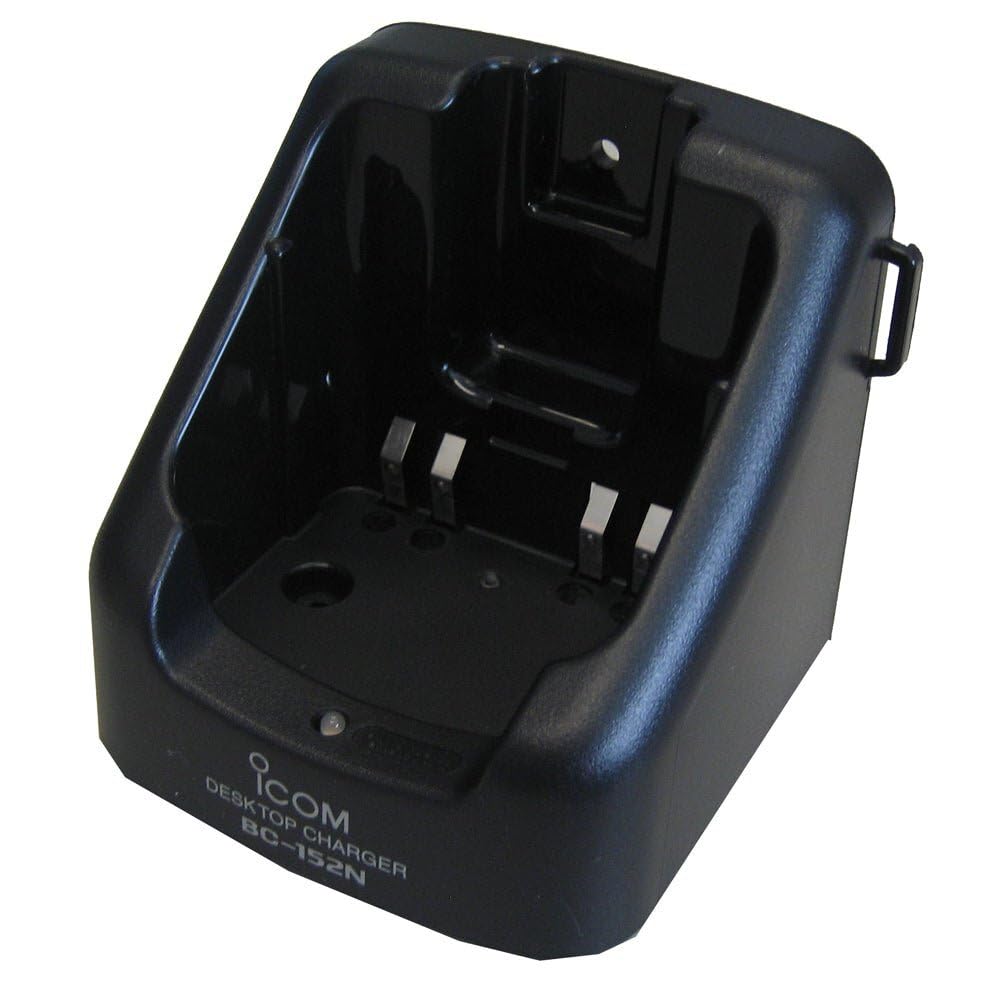
Figure 1: The ICOM BC-152 charger unit. This image shows the compact black charger with a single slot for a battery pack.
3.2 ການເຊື່ອມຕໍ່ພະລັງງານ
- Connect the AC adapter cable to the DC input jack on the rear of the BC-152 charger unit.
- ສຽບອະແດບເຕີ AC ເຂົ້າໄປໃນເຕົ້າສຽບໄຟມາດຕະຖານ.
- ດຽວນີ້ເຄື່ອງສາກພ້ອມນຳໃຊ້ແລ້ວ.
4. ຄໍາແນະນໍາການດໍາເນີນງານ
4.1 Charging a Battery Pack
Follow these steps to charge a compatible ICOM battery pack:
- ໃຫ້ແນ່ໃຈວ່າເຄື່ອງສາກໄດ້ເຊື່ອມຕໍ່ກັບແຫຼ່ງພະລັງງານຕາມທີ່ອະທິບາຍໄວ້ໃນພາກ 3.2.
- Carefully insert the battery pack into the charging slot of the BC-152 charger. Ensure it is seated firmly.
- Observe the charging indicator light.
4.2 ແສງຕົວຊີ້ວັດ
The BC-152 charger features an LED indicator to show the charging status:
- ສີແດງ (ແຂງ): ແບັດເຕີຣີກຳລັງສາກຢູ່.
- ສີຂຽວ (ແຂງ): Charging is complete. The battery pack is fully charged.
- ກະພິບສີແດງ: Charging error or battery fault. Remove the battery and re-insert. If the error persists, consult the troubleshooting section.
- ບໍ່ມີແສງ: Charger is not connected to power, or no battery is inserted.
Charging time may vary depending on the battery's capacity and its current charge level. Typically, a fully depleted battery will take approximately 2-4 hours to charge.
5. ບໍາລຸງຮັກສາ
5.1 ການທໍາຄວາມສະອາດ
ເພື່ອຮັກສາປະສິດທິພາບແລະຮູບລັກສະນະທີ່ດີທີ່ສຸດ:
- ຖອດສາຍສາກອອກຈາກປລັກສຽບໄຟກ່ອນທຳຄວາມສະອາດທຸກຄັ້ງ.
- ໃຊ້ຜ້າປຽກອ່ອນໆເຊັດດ້ານນອກຂອງສາຍສາກ.
- ຢ່າໃຊ້ເຄື່ອງເຮັດຄວາມສະອາດຂັດ, ສານລະລາຍ, ຫຼືສານເຄມີທີ່ຮຸນແຮງ.
- Ensure no moisture enters the charging slot or power input.
5.2 ການເກັບຮັກສາ
When not in use for extended periods, store the charger in a cool, dry place, away from direct sunlight and extreme temperatures. Disconnect it from the power supply.
6. ການແກ້ໄຂບັນຫາ
If you encounter issues with your BC-152 charger, refer to the table below for common problems and solutions.
| ບັນຫາ | ສາເຫດທີ່ເປັນໄປໄດ້ | ການແກ້ໄຂ |
|---|---|---|
| Charger indicator light is off. | No power supply or battery not inserted. | Check AC adapter connection. Ensure battery is correctly inserted. |
| Indicator light flashes red. | ແບັດເຕີຣີມີຂໍ້ບົກຜ່ອງ ຫຼື ຄວາມຜິດພາດໃນການສາກໄຟ. | Remove and re-insert the battery. Try a different compatible battery if available. |
| ແບັດເຕີຣີບໍ່ໄດ້ສາກ. | Faulty battery, charger, or power supply. | Verify power connection. Test with a known good battery. If problem persists, contact support. |
7. ຂໍ້ມູນຈໍາເພາະ
| ຍີ່ຫໍ້ | iCom |
| ຕົວແບບ | BC-152 |
| ການປ້ອນຂໍ້ມູນ Voltage | 12-16V DC (via AC adapter) |
| ຜົນໄດ້ຮັບ Voltage | 8.4V DC |
| ກຳລັງສາກໄຟ | ປະມານ. 450mA |
| ຂະໜາດ (W×H×D) | Approx. 80 × 50 × 90 mm (3.1 × 2.0 × 3.5 inches) |
| ນ້ຳໜັກ | 0.18 ປອນ (ປະມານ 82g) |
| ສີ | ດຳ |
ໝາຍເຫດ: ຂໍ້ມູນຈຳເພາະອາດມີການປ່ຽນແປງໂດຍບໍ່ຕ້ອງແຈ້ງໃຫ້ຊາບເພື່ອປັບປຸງ.
8. ຂໍ້ມູນການຮັບປະກັນ
ICOM products are manufactured with high-quality components and are subject to rigorous quality control. This product is covered by a limited warranty against defects in materials and workmanship. The specific terms and duration of the warranty may vary by region. Please refer to the warranty card included with your purchase or visit the official ICOM webເວັບໄຊທ for ສໍາລັບຂໍ້ມູນການຮັບປະກັນລະອຽດ.
This warranty does not cover damage caused by misuse, accident, unauthorized modification, or improper installation.
9. ການຊ່ວຍເຫຼືອລູກຄ້າ
If you have any questions, require technical assistance, or need to report a problem that cannot be resolved using the troubleshooting guide, please contact ICOM customer support.
ບໍລິສັດ ICOM ອາເມລິກາ
Visit ICOM America's Contact Page
Please have your product model (BC-152) and serial number ready when contacting support.