
Edifier R1600TIII
Edifier R1600TIII Active Bookshelf Speakers User Manual
Model: R1600TIII
ແນະນຳ
ຂອບໃຈສໍາລັບການຊື້asing the Edifier R1600TIII Active Bookshelf Speakers. This manual provides detailed instructions for setting up, operating, and maintaining your speakers to ensure optimal performance and longevity. Please read this manual thoroughly before use and retain it for future reference.
ຄໍາແນະນໍາຄວາມປອດໄພທີ່ສໍາຄັນ
- ອ່ານຄໍາແນະນໍາເຫຼົ່ານີ້ຢ່າງລະມັດລະວັງ.
- ຮັກສາຄໍາແນະນໍາເຫຼົ່ານີ້ສໍາລັບການອ້າງອີງໃນອະນາຄົດ.
- ຟັງຄຳເຕືອນທັງໝົດ.
- ປະຕິບັດຕາມຄໍາແນະນໍາທັງຫມົດ.
- ຢ່າໃຊ້ອຸປະກອນນີ້ຢູ່ໃກ້ກັບນ້ໍາ.
- ເຮັດຄວາມສະອາດດ້ວຍຜ້າແຫ້ງເທົ່ານັ້ນ.
- ຫ້າມປິດຊ່ອງລະບາຍອາກາດໃດໆ. ຕິດຕັ້ງຕາມຄໍາແນະນໍາຂອງຜູ້ຜະລິດ.
- ຫ້າມຕິດຕັ້ງໃກ້ກັບແຫຼ່ງຄວາມຮ້ອນເຊັ່ນລັງສີ, ເຄື່ອງບັນທຶກຄວາມຮ້ອນ, ເຕົາຫຼືອຸປະກອນອື່ນໆ (ລວມທັງ. amplifiers) ທີ່ຜະລິດຄວາມຮ້ອນ.
- ປົກປ້ອງສາຍໄຟຈາກການຖືກສຽບ ຫຼື ສຽບ, ໂດຍສະເພາະຢູ່ປລັກສຽບ, ກ່ອງຮັບສະດວກ, ແລະຈຸດທີ່ພວກມັນອອກຈາກອຸປະກອນ.
- ໃຊ້ໄຟລ໌ແນບ/ອຸປະກອນເສີມທີ່ຜູ້ຜະລິດລະບຸໄວ້ເທົ່ານັ້ນ.
- ຖອດອຸປະກອນນີ້ອອກໃນລະຫວ່າງການມີພາຍຸຟ້າຜ່າ ຫຼືເມື່ອບໍ່ໄດ້ໃຊ້ເປັນເວລາດົນນານ.
- ອ້າງອີງການບໍລິການທັງໝົດໃຫ້ກັບພະນັກງານບໍລິການທີ່ມີຄຸນວຸດທິ. ການບໍລິການແມ່ນຕ້ອງການເມື່ອອຸປະກອນໄດ້ຮັບຄວາມເສຍຫາຍໃນທາງໃດກໍ່ຕາມເຊັ່ນ: ສາຍໄຟຫຼືປລັກສຽບຖືກເສຍຫາຍ, ແຫຼວຮົ່ວໄຫຼຫຼືສິ່ງຂອງຕົກເຂົ້າໄປໃນອຸປະກອນ, ອຸປະກອນຖືກຝົນຫຼືຄວາມຊຸ່ມຊື່ນ, ບໍ່ເຮັດວຽກຕາມປົກກະຕິ. , ຫຼືໄດ້ຖືກຫຼຸດລົງ.
ເນື້ອໃນຊຸດ
ກະລຸນາກວດເບິ່ງເນື້ອໃນຂອງຊຸດຂອງທ່ານ. ຖ້າລາຍການໃດຂາດຫາຍໄປ ຫຼືເສຍຫາຍ, ໃຫ້ຕິດຕໍ່ຮ້ານຂາຍຍ່ອຍຂອງເຈົ້າ.
- Edifier R1600TIII Active Bookshelf Speakers (1 pair)
- ການຄວບຄຸມໄລຍະໄກໄຮ້ສາຍ
- ສາຍເຊື່ອມຕໍ່ລຳໂພງ
- ສາຍສຽງ RCA ຫາ RCA
- ສາຍໄຟ
- ຄູ່ມືຜູ້ໃຊ້ (ເອກະສານນີ້)
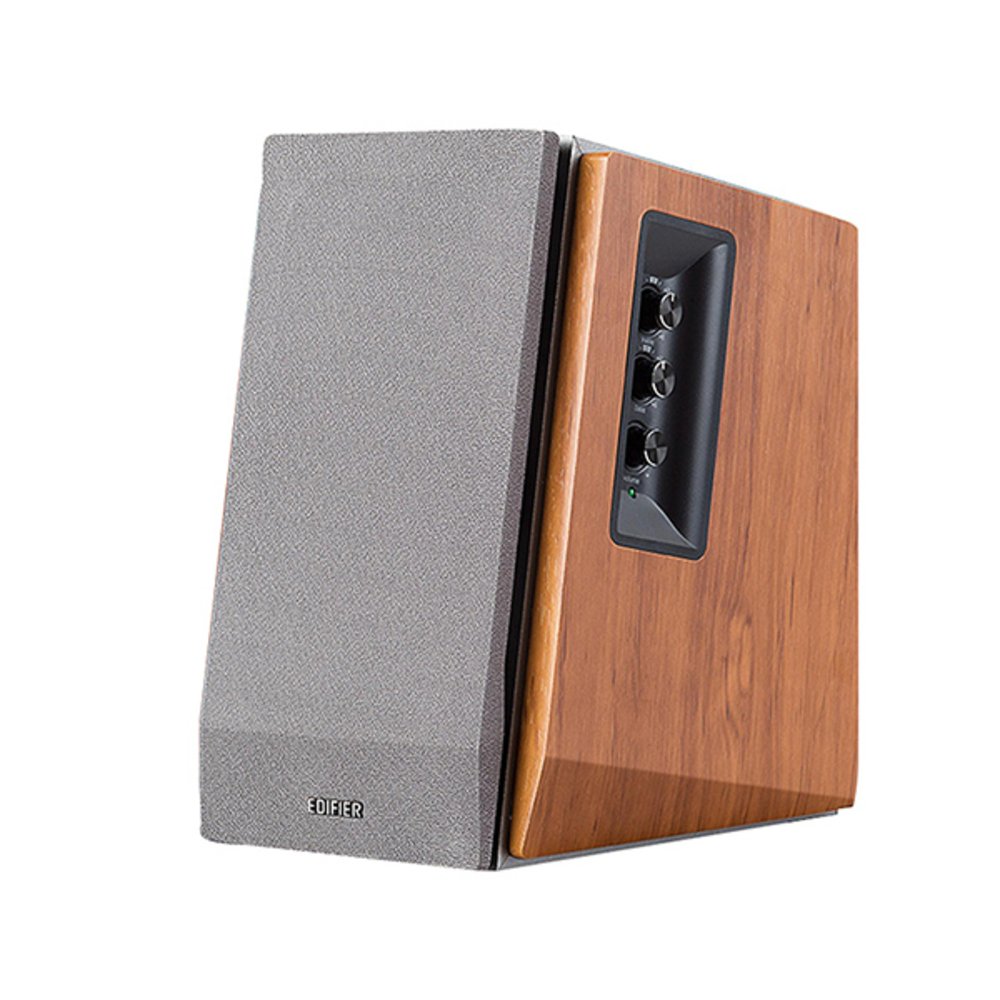
Image: Edifier R1600TIII Active Bookshelf Speakers. This image shows the two speakers, typically one active (with controls) and one passive, connected by a cable. The speakers feature a classic wooden finish and front-facing drivers.
ສິນຄ້າເກີນview
The Edifier R1600TIII is a 2.0 active bookshelf speaker system designed to deliver high-quality audio. It features a total output of 60 Watts and offers versatile connectivity options including RCA and Bluetooth.
ການຄວບຄຸມ ແລະການເຊື່ອມຕໍ່
- ການຄວບຄຸມແຜງດ້ານຂ້າງ: The active speaker features rotary controls for Volume, Bass, and Treble adjustments.
- ການຄວບຄຸມໄລຍະໄກໄຮ້ສາຍ: Adjust volume and mute functions conveniently from a distance.
- ວັດສະດຸປ້ອນ RCA: Two sets of RCA inputs for connecting to various audio sources like PCs, TVs, or MP3 players.
- ການເຊື່ອມຕໍ່ Bluetooth: Seamlessly connect your Bluetooth-enabled devices for wireless audio streaming.
ຕັ້ງຄ່າ
1. ການຈັດວາງລຳໂພງ
Place the speakers on a stable, flat surface such as a bookshelf or desk. For optimal stereo imaging, position the speakers equidistant from your listening position and angle them slightly inwards towards you.
2. ການເຊື່ອມຕໍ່ລໍາໂພງ
- ກໍານົດລໍາໂພງທີ່ໃຊ້ວຽກ (ມີການຄວບຄຸມແລະການປ້ອນຂໍ້ມູນພະລັງງານ) ແລະລໍາໂພງ passive.
- Connect the speaker connection cable from the active speaker's output to the passive speaker's input. Ensure a secure connection.
3. ການເຊື່ອມຕໍ່ແຫຼ່ງສຽງ
You can connect audio sources via RCA cables or Bluetooth.
ການເຊື່ອມຕໍ່ RCA:
- Using the provided RCA to RCA cable, connect one end to the RCA input ports on the active speaker (Input 1 or Input 2).
- Connect the other end of the cable to the audio output ports of your source device (e.g., PC, TV, MP3 player).
ການເຊື່ອມຕໍ່ບູທູດ:
- ກວດໃຫ້ແນ່ໃຈວ່າໄດ້ເປີດລຳໂພງແລ້ວ.
- Select the Bluetooth input mode on the speakers (usually by pressing the volume knob or a dedicated input button until the indicator light shows blue).
- On your Bluetooth-enabled device, search for "Edifier R1600TIII" in the Bluetooth settings.
- Select the speaker to pair. Once paired, the indicator light will remain solid blue.
4. ການເຊື່ອມຕໍ່ພະລັງງານ
- Connect the power cable to the active speaker's power input.
- ສຽບສາຍໄຟໃສ່ປລັກສຽບໃສ່ຝາ.
- Turn on the power switch, usually located on the rear panel of the active speaker.
ຄໍາແນະນໍາການດໍາເນີນງານ
ການຄວບຄຸມພື້ນຖານ
- ການຄວບຄຸມລະດັບສຽງ: Rotate the master volume knob on the side panel or use the volume buttons on the remote control to adjust the overall sound level.
- ການຄວບຄຸມສຽງເບດ: Rotate the bass knob on the side panel to increase or decrease the low-frequency output.
- ການຄວບຄຸມ Treble: Rotate the treble knob on the side panel to increase or decrease the high-frequency output.
- ການຄັດເລືອກການປ້ອນຂໍ້ມູນ: Press the master volume knob on the side panel or the input button on the remote to cycle through available inputs (RCA 1, RCA 2, or Bluetooth).
- ປິດສຽງ: Press the mute button on the remote control to silence the audio. Press again to unmute.
ການໃຊ້ຣີໂໝດຄວບຄຸມໄຮ້ສາຍ
The wireless remote control allows convenient adjustment of volume and mute functions. Ensure the remote has working batteries and is pointed towards the active speaker for best performance.
ບໍາລຸງຮັກສາ
- ທໍາຄວາມສະອາດ: Wipe the speaker cabinets with a soft, dry cloth. Do not use liquid cleaners or abrasive chemicals.
- ຂີ້ຝຸ່ນ: ເຊັດຝຸ່ນໃສ່ຕະແກງລຳໂພງ ແລະ ໜ້າຜິວເປັນປະຈຳເພື່ອປ້ອງກັນການສະສົມຂອງຂີ້ຝຸ່ນ.
- ສະພາບແວດລ້ອມ: ຫຼີກເວັ້ນການເປີດເຜີຍລໍາໂພງກັບອຸນຫະພູມທີ່ຮຸນແຮງ, ຄວາມຊຸ່ມຊື່ນ, ຫຼືແສງແດດໂດຍກົງ.
- ການເກັບຮັກສາ: ຖ້າເກັບຮັກສາລໍາໂພງໄວ້ເປັນເວລາດົນ, ໃຫ້ຖອດພວກມັນອອກຈາກພະລັງງານແລະເກັບໄວ້ໃນບ່ອນທີ່ເຢັນ, ແຫ້ງ.
ການແກ້ໄຂບັນຫາ
| ບັນຫາ | ສາເຫດທີ່ເປັນໄປໄດ້ | ການແກ້ໄຂ |
|---|---|---|
| ບໍ່ມີສຽງ |
|
|
| ຄຸນະພາບສຽງບໍ່ດີ / ການບິດເບືອນ |
|
|
| ບັນຫາການເຊື່ອມຕໍ່ Bluetooth |
|
|
ຂໍ້ມູນຈໍາເພາະ
- ຕົວແບບ: R1600TIII
- ຜົນຜະລິດພະລັງງານທັງໝົດ: 60 ວັດ (RMS)
- ປະເພດລຳໂພງ: Active Bookshelf
- ຂະໜາດລຳໂພງ: 4 ນິ້ວ (ວູບເຟີ)
- ໂModeດອອກສຽງ: ສະເຕຣິໂອ
- ເຕັກໂນໂລຍີການເຊື່ອມຕໍ່: RCA, Bluetooth
- ເຕັກໂນໂລຊີການສື່ສານໄຮ້ສາຍ: Bluetooth
- ວິທີການຄວບຄຸມ: Remote Control, Side Panel Knobs
- ອຸປະກອນທີ່ເຂົ້າກັນໄດ້: Karaoke device, Home cinema, Game console, MP3 player, Desktop computer, Projector, Television
- ວັດສະດຸ: ໄມ້
- ສີ: ສີຂາວ
- ຂະໜາດສິນຄ້າ (L x W x H): 290 x 39.3 x 30.8 ຊມ (11.4 x 15.5 x 12.1 ນິ້ວ)
- ນ້ຳໜັກສິນຄ້າ: 7.38 ກິໂລ (16.27 ປອນ)
- ແຫຼ່ງພະລັງງານ: ໄຟຟ້າສາຍ
- ຄຸນນະສົມບັດພິເສດ: ການເຊື່ອມຕໍ່ Bluetooth
- ກັນນ້ຳ: ແມ່ນແລ້ວ (Note: While listed as waterproof, it is generally recommended to protect electronic devices from water exposure.)
ການຮັບປະກັນແລະການສະຫນັບສະຫນູນ
The Edifier R1600TIII speakers come with a ການຮັບປະກັນຈໍາກັດ. Please refer to the warranty card included in your package or visit the official Edifier webເວັບໄຊສໍາລັບຂໍ້ກໍານົດແລະເງື່ອນໄຂລະອຽດ.
For technical support, service, or further inquiries, please contact Edifier customer service through their official webເວັບໄຊ ຫຼືຂໍ້ມູນຕິດຕໍ່ທີ່ສະໜອງໃຫ້ຢູ່ໃນເອກະສານຜະລິດຕະພັນຂອງທ່ານ.
Ask a question about this manual
Ask about setup, troubleshooting, compatibility, parts, safety, or missing instructions. Manuals+ will review the question and use this page’s manual context to help answer it.