
ແນະນຳ
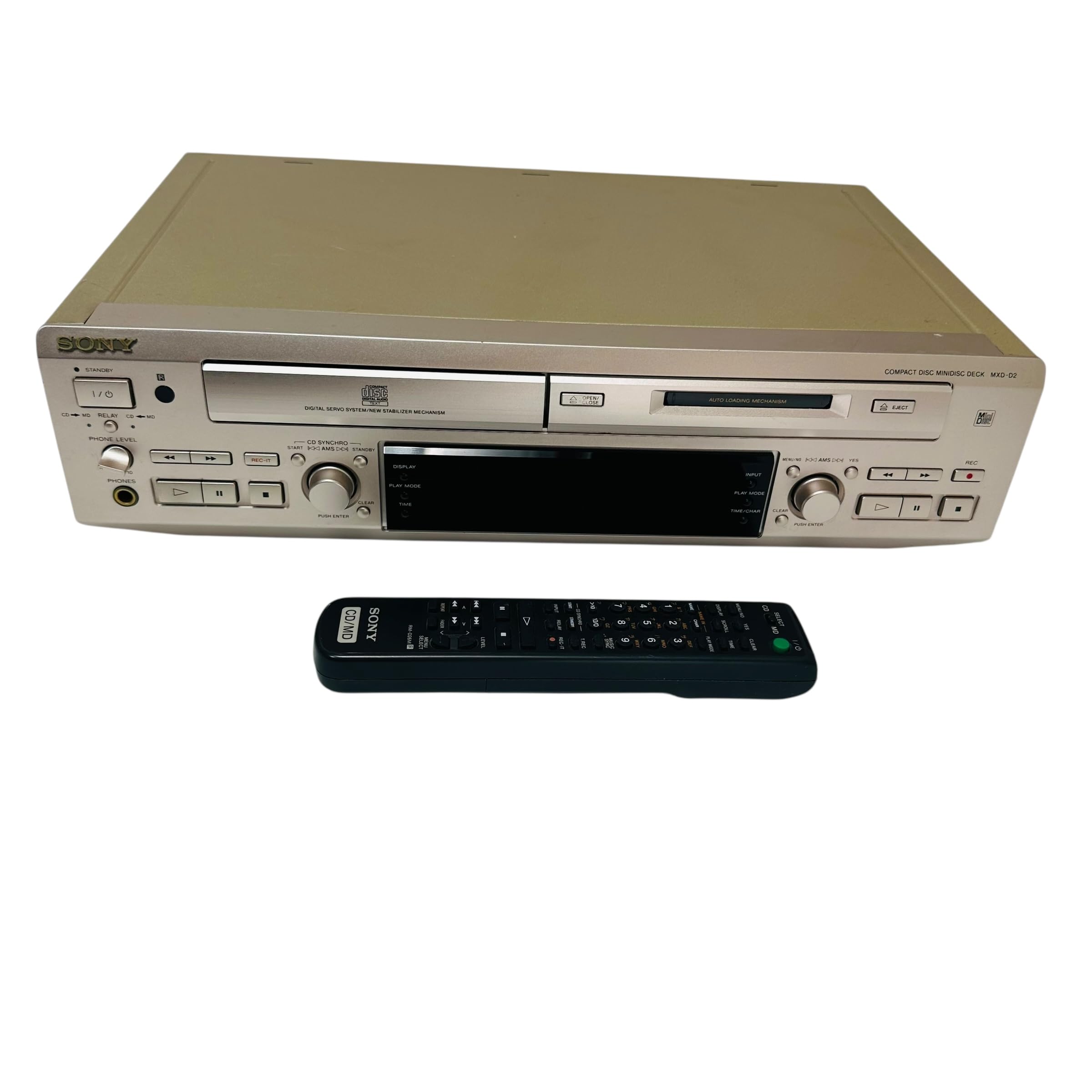
This manual provides essential information for the safe and efficient use of your Sony MXD-D2 MD Recorder/CD Player integrated deck. Please read these instructions thoroughly before operating the unit and retain them for future reference.
ຂໍ້ມູນຄວາມປອດໄພ
ປະຕິບັດຕາມຂໍ້ຄວນລະວັງດ້ານຄວາມປອດໄພຕໍ່ໄປນີ້ເພື່ອປ້ອງກັນໄຟຟ້າຊັອດ, ໄຟໄໝ້, ຫຼືຄວາມເສຍຫາຍຕໍ່ໜ່ວຍ:
- ແຫຼ່ງພະລັງງານ: Connect the unit only to an AC 100V, 50/60Hz power supply.
- ການລະບາຍອາກາດ: Ensure adequate ventilation by not blocking the ventilation openings. Do not place the unit on soft surfaces that may block these openings.
- ຄວາມຊຸ່ມ: ຫ້າມບໍ່ໃຫ້ອຸປະກອນຖືກຝົນ ຫຼື ຄວາມຊຸ່ມຊື່ນ. ຫຼີກເວັ້ນການວາງວັດຖຸທີ່ເຕັມໄປດ້ວຍຂອງແຫຼວ, ເຊັ່ນ vases, ໃສ່ເຄື່ອງ.
- ວັດຖຸຕ່າງປະເທດ: Do not insert any metallic objects or liquids into the unit.
- ການບໍລິການ: ຢ່າພະຍາຍາມໃຫ້ບໍລິການຫນ່ວຍງານດ້ວຍຕົວເອງ. ອ້າງອີງການບໍລິການທັງໝົດໃຫ້ກັບບຸກຄະລາກອນທີ່ມີຄຸນວຸດທິ.
ຕັ້ງຄ່າ
ການຫຸ້ມຫໍ່ແລະການຈັດວາງ
Carefully remove the unit from its packaging. Place the unit on a stable, level surface, ensuring sufficient space around it for proper ventilation.
ການເຊື່ອມຕໍ່ແຜງດ້ານຫລັງ
The rear panel of the MXD-D2 provides various input and output terminals for connecting to other audio components. Refer to the image below for a visual guide to the connections.
ຮູບພາບ: Rear panel of the Sony MXD-D2 unit. This view displays the analog RCA input/output, digital coaxial input, optical input/output, and Control 1 port, along with the power cord connection and product information label.
- ການເຊື່ອມຕໍ່ສຽງອະນາລັອກ: ໃຊ້ສາຍ RCA ເພື່ອເຊື່ອມຕໍ່ ການເຂົ້າໄປໃນການວິເຄາະ (入力) to the audio output of an external device (e.g., a tape deck or tuner). Connect the ການອອກອະນາລັອກ (出力) to the audio input of your amplifier or receiver. Ensure left (左) and right (右) channels are matched.
- ການເຊື່ອມຕໍ່ສຽງດິຈິຕອນ:
- Coaxial Digital Input (コアキシャル 入力): Connect a coaxial digital cable from the digital output of an external device.
- Optical Digital Input (オプチカル 入力): Connect an optical digital cable from the digital output of an external device.
- Optical Digital Output (オプチカル 出力): Connect an optical digital cable to the digital input of an external recording device or ampມີຊີວິດຊີວາ.
- Control 1 (コントロール 1): This port is for connecting to other compatible Sony components for synchronized operation. Refer to the manuals of connected components for specific instructions.
- ການເຊື່ອມຕໍ່ພະລັງງານ: After all audio connections are made, plug the power cord into an AC 100V wall outlet.
ຄໍາແນະນໍາການດໍາເນີນງານ
ເປີດ/ປິດ
ກົດ ພະລັງງານ ກົດປຸ່ມຢູ່ແຖບດ້ານຫນ້າເພື່ອເປີດຫຼືປິດເຄື່ອງ.
ການຫຼິ້ນ CD
- ກົດ ຊີດີ ເປີດ/ປິດ ປຸ່ມເພື່ອເປີດຖາດ CD.
- Place a CD with the label side up in the tray.
- ກົດ ຊີດີ ເປີດ/ປິດ ປຸ່ມອີກເທື່ອຫນຶ່ງເພື່ອປິດຖາດ.
- ກົດ CD PLAY ປຸ່ມເພື່ອເລີ່ມຕົ້ນການຫຼິ້ນ
- ໃຊ້ ຢຸດຊົ່ວຄາວ, ຢຸດ, ຂ້າມ (►►| / |◄◄), and ຄົ້ນຫາ ປຸ່ມສໍາລັບການຄວບຄຸມການຫຼິ້ນ.
MD Playback
- Insert a MiniDisc into the MD slot with the arrow pointing inwards.
- ກົດ MD PLAY ປຸ່ມເພື່ອເລີ່ມຕົ້ນການຫຼິ້ນ
- ໃຊ້ ຢຸດຊົ່ວຄາວ, ຢຸດ, ຂ້າມ (►►| / |◄◄), and ຄົ້ນຫາ ປຸ່ມສໍາລັບການຄວບຄຸມການຫຼິ້ນ.
MD ການບັນທຶກ
The MXD-D2 allows recording from CD, analog, or digital sources to a MiniDisc.
- Insert a blank or erasable MiniDisc into the MD slot.
- Select the desired input source (CD, ANALOG, DIGITAL COAXIAL, or DIGITAL OPTICAL) using the ຕົວເລືອກຂາເຂົ້າ ປຸ່ມ.
- For CD-to-MD recording, load the CD and select CD as the input source.
- ກົດ MD REC ເພື່ອເຂົ້າສູ່ໂໝດສະແຕນບາຍການບັນທຶກ.
- Start playback on the source device (if external) or press CD PLAY (for CD-to-MD recording).
- ກົດ MD REC ອີກເທື່ອຫນຶ່ງເພື່ອເລີ່ມຕົ້ນການບັນທຶກ.
- ກົດ MD STOP ເພື່ອຢຸດການບັນທຶກ.
- ຕິດຕາມເຄື່ອງຫມາຍ: The unit can automatically mark tracks during digital recording. For manual marking, press the ມາກ button during recording.
ບໍາລຸງຮັກສາ
ທໍາຄວາມສະອາດຫນ່ວຍງານ
ເຊັດດ້ານນອກຂອງເຄື່ອງດ້ວຍຜ້າອ່ອນ, ແຫ້ງ. ສໍາລັບຮອຍເປື້ອນທີ່ແຂງ, ໃຫ້ໃຊ້ຜ້າບາງໆ dampened with a mild detergent solution, then wipe dry. Do not use abrasive pads, scouring powder, or solvents such as alcohol or benzene.
ການດູແລແຜ່ນ
- Handle discs by their edges to avoid fingerprints on the recording surface.
- Keep discs in their cases when not in use to protect them from dust and scratches.
- ຢ່າໃຫ້ແຜ່ນດິດຖືກແສງແດດໂດຍກົງ ຫຼືແຫຼ່ງຄວາມຮ້ອນ.
ການແກ້ໄຂບັນຫາ
If you experience problems with your unit, consult the following table before seeking professional service.
| ບັນຫາ | ສາເຫດທີ່ເປັນໄປໄດ້ | ການແກ້ໄຂ |
|---|---|---|
| ບໍ່ມີພະລັງງານ | ສາຍໄຟບໍ່ໄດ້ເຊື່ອມຕໍ່ຢ່າງປອດໄພ. | Check that the power cord is firmly plugged into the unit and the wall outlet. |
| ບໍ່ມີສຽງ | Incorrect input selected; audio cables not connected properly; ampປະລິມານ lifier ຕໍ່າເກີນໄປ. | Select the correct input source. Check all audio cable connections. Increase the volume on your ampມີຊີວິດຊີວາ. |
| CD/MD does not play or record | Disc inserted incorrectly; disc is dirty or scratched; disc is unrecordable (for MD). | Ensure the disc is inserted correctly. Clean the disc with a soft cloth. Use a recordable MD. |
| Recording level is too low/high | Source device output level is incorrect. | Adjust the output level on the source device or the recording level on the MXD-D2 if available. |
ຂໍ້ມູນຈໍາເພາະ
| ຄຸນສົມບັດ | ລາຍລະອຽດ |
|---|---|
| ໝາຍເລກຕົວແບບ | MXD-D2 |
| ຍີ່ຫໍ້ | Sony |
| ຄວາມຕ້ອງການພະລັງງານ | AC 100V, 16W, 50/60Hz |
| ຮູບແບບສື່ | Compact Disc (CD), MiniDisc (MD) |
| ຂໍ້ມູນຂາເຂົ້າ | RCA (Left/Right) |
| ຜົນອອກມາຈາກອະນາລັອກ | RCA (Left/Right) |
| ການປ້ອນຂໍ້ມູນດິຈິຕອນ | Coaxial (1), Optical (1) |
| ຜົນຜະລິດດິຈິຕອນ | Optical (1) |
| ຄວບຄຸມພອດ | ຄວບຄຸມ 1 |
| ອຸປະກອນທີ່ເຂົ້າກັນໄດ້ | Speakers, Headphones |
| ເລກລໍາດັບ | 213013 (ອະດີດampເລ) |
| ປະເທດຕົ້ນກໍາເນີດ | ຜະລິດໃນປະເທດຍີ່ປຸ່ນ |
ການຮັບປະກັນແລະການສະຫນັບສະຫນູນ
For warranty information and technical support, please refer to the warranty card included with your product or visit the official Sony webເວັບໄຊສໍາລັບພາກພື້ນຂອງທ່ານ. ຮັກສາໃບຮັບເງິນການຊື້ຂອງທ່ານໄວ້ເປັນຫຼັກຖານການຊື້.