
ແນະນຳ
The Bogen TAMB2PS Telephone Access Module is designed to serve as an interface between a telephone system and a paging system. This module facilitates dual-purpose voice paging, allowing for seamless communication. It is compatible with various analog telephone port types and supports both station port and trunk port operations. A 24V power supply is included and is essential for all operational modes.
ຂໍ້ມູນຄວາມປອດໄພທີ່ສໍາຄັນ
ຄຳເຕືອນ: ຜະລິດຕະພັນນີ້ປະກອບດ້ວຍສານເຄມີທີ່ລັດຄາລິຟໍເນຍຮູ້ວ່າເປັນສາເຫດຂອງມະເຮັງ ແລະ ຄວາມຜິດປົກກະຕິໃນເວລາເກີດ ຫຼື ອັນຕະລາຍຕໍ່ລະບົບສືບພັນອື່ນໆ. ກະລຸນາຈັດການດ້ວຍຄວາມລະມັດລະວັງ ແລະ ອ້າງອີງເຖິງລະບຽບການຂອງທ້ອງຖິ່ນສຳລັບການກຳຈັດ.
ສິນຄ້າເກີນview ແລະຄຸນນະສົມບັດທີ່ສໍາຄັນ
The TAMB2PS module integrates telephone and paging functionalities. Its key features include:
- 600-ohm output: Ensures compatibility with various audio systems.
- Adjustable tone volume: Allows customization of alert tones.
- Background music input with volume control: Enables integration of background music, which can be muted during paging.
- Dual-purpose voice paging: Supports both telephone and paging system integration.
- Analog telephone port compatibility: Works with a full range of analog telephone port types.
- Station port or trunk port operation: ຕົວເລືອກການນຳໃຊ້ທີ່ມີຄວາມຍືດຫຍຸ່ນ.
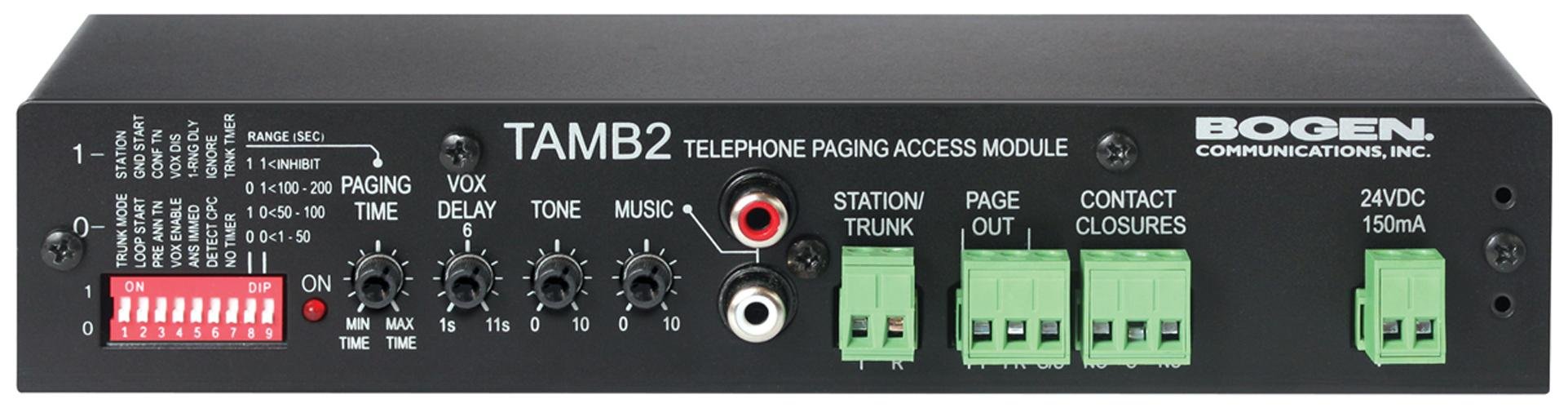
Figure 1: Bogen TAMB2PS Telephone Access Module with included power supply. This image shows the front and side view of the compact black unit, highlighting its various ports and indicators.
ການຕິດຕັ້ງແລະການຕິດຕັ້ງ
Follow these steps to properly set up your Bogen TAMB2PS module:
- ຖອດໂມດູນອອກ: Carefully remove the TAMB2PS module and its 24V power supply from the packaging.
- Connect to Telephone System: Connect the module to your analog telephone system. The TAMB2PS supports both station port and trunk port configurations. Refer to your telephone system's documentation for the appropriate connection method.
- Connect to Paging System: Connect the 600-ohm output of the TAMB2PS to the input of your paging amplifier. Ensure proper impedance matching for optimal audio quality.
- Background Music Input (Optional): If using background music, connect your audio source (e.g., CD player, radio) to the line-level input RCA jacks on the module. Adjust the background music volume control as needed.
- ເຊື່ອມຕໍ່ການສະຫນອງພະລັງງານ: Plug the included 24V power supply into the designated power input on the TAMB2PS module, then connect the power supply to a standard electrical outlet. The module requires continuous power for operation.
- ການທົດສອບເບື້ອງຕົ້ນ: After all connections are made, perform a test page through the telephone system to verify proper functionality and audio output.
ການດໍາເນີນງານ
Once installed, the Bogen TAMB2PS operates as follows:
- ການສົ່ງຂໍ້ຄວາມສຽງ: To initiate a page, access the telephone line connected to the TAMB2PS module. Speak into the telephone handset to broadcast your message through the connected paging system.
- Background Music Muting: When a page is initiated, the TAMB2PS automatically mutes the background music playing through its input, allowing the page to be heard clearly. Music resumes once the page is complete.
- ການປັບລະດັບສຽງ: Use the adjustable tone volume control on the module to set the desired level for any alert tones generated by the system.
ບໍາລຸງຮັກສາ
The Bogen TAMB2PS module requires minimal maintenance to ensure long-term performance:
- ທໍາຄວາມສະອາດ: Periodically wipe the exterior of the unit with a soft, dry cloth. Do not use liquid cleaners or solvents.
- ສະພາບແວດລ້ອມ: Ensure the module is installed in a dry, well-ventilated area, away from direct sunlight, extreme temperatures, and excessive dust.
- ການເຊື່ອມຕໍ່ສາຍ: ກວດເບິ່ງການເຊື່ອມຕໍ່ສາຍເຄເບີນທັງໝົດຢ່າງເປັນປົກກະຕິເພື່ອຮັບປະກັນວ່າພວກມັນປອດໄພ ແລະ ບໍ່ມີຄວາມເສຍຫາຍ.
ການແກ້ໄຂບັນຫາ
If you encounter issues with your TAMB2PS module, refer to the following common problems and solutions:
- ບໍ່ມີສຽງອອກ:
- Verify the 24V power supply is correctly connected and receiving power.
- Check all audio connections between the TAMB2PS and the paging ampມີຊີວິດຊີວາ.
- Ensure the telephone line connected to the module is active and functioning.
- Confirm the paging amplifier is powered on and its volume is adjusted appropriately.
- Low Paging Volume:
- Adjust the output level control on the TAMB2PS module.
- Increase the input sensitivity or volume on your paging ampມີຊີວິດຊີວາ.
- Ensure the telephone system's output level to the TAMB2PS is sufficient.
- ສຽງຮືມ ຫຼື ສຽງດັງສະຖິດ:
- Check for ground loops. Try connecting the TAMB2PS and paging amplifier to the same power outlet or using a ground loop isolator.
- Ensure all cables are properly shielded and not running parallel to power lines.
- ກວດສອບສາຍໄຟວ່າເສຍຫາຍ ຫຼື ການເຊື່ອມຕໍ່ວ່າງຫຼືບໍ່.
- Background Music Not Muting:
- Verify the background music source is connected to the correct input on the TAMB2PS.
- Ensure the telephone system is properly signaling the TAMB2PS when a page is initiated.
If problems persist, contact Bogen customer support or a qualified technician.
ຂໍ້ມູນຈໍາເພາະ
| ຄຸນສົມບັດ | ຂໍ້ມູນຈໍາເພາະ |
|---|---|
| ຍີ່ຫໍ້ | ໂບເຈນ |
| ຊື່ຕົວແບບ | TAMB2PS |
| ໝາຍເລກຕົວແບບ | TAMB2PS |
| ຂະໜາດສິນຄ້າ (LxWxH) | 8.5 x 3 x 1.75 ນິ້ວ |
| ນ້ໍາຫນັກລາຍການ | 2 ປອນ |
| ປະເພດຕົວເຊື່ອມຕໍ່ | RCA (for background music input) |
| ສູງສຸດ Voltage | 24 Volts DC (from included power supply) |
| ຜົນຜະລິດ Impedance | 600-ohm |
| ການນຳໃຊ້ພາຍໃນ/ນອກ | ພາຍໃນ |
| UPC | 643749567672, 765368482058 |
| ASIN | B00D61HS2I |
ໝາຍ ເຫດ: ຂໍ້ມູນສະເພາະແມ່ນມີການປ່ຽນແປງໂດຍບໍ່ຕ້ອງແຈ້ງ.
ຂໍ້ມູນການຮັບປະກັນ
Specific warranty details for the Bogen TAMB2PS Telephone Access Module are typically provided with the product packaging or can be found on the official Bogen Communications website. Please retain your proof of purchase for warranty claims. For the most current and detailed warranty information, please visit the manufacturer's official support page or contact your authorized dealer.
ການຊ່ວຍເຫຼືອລູກຄ້າ
For technical assistance, product inquiries, or further support regarding your Bogen TAMB2PS module, please contact Bogen Communications directly:
- ຜູ້ຜະລິດ Webເວັບໄຊ: Visit the official Bogen Communications webສະຖານທີ່ສໍາລັບເອກະສານຜະລິດຕະພັນ, FAQs, ແລະຂໍ້ມູນຕິດຕໍ່.
- ບໍລິການລູກຄ້າ: Refer to the contact details provided in your product packaging or on the manufacturer's webສະຖານທີ່ສະຫນັບສະຫນູນໂທລະສັບຫຼືອີເມລ໌.
When contacting support, please have your product model number (TAMB2PS) and purchase information readily available.