
ແນະນຳ
This manual provides detailed instructions for the installation, operation, and maintenance of your ICM Controls SC1600L Simple Comfort Non-Programmable Heat Only Thermostat. This thermostat is designed for use with single-stage heating systems and features a backlit display for easy readability. Please read this manual thoroughly before installation and operation to ensure proper use and to prevent damage to the unit or your heating system.
ຂໍ້ມູນຄວາມປອດໄພ
- ປິດໄຟໃຫ້ກັບລະບົບຄວາມຮ້ອນຢູ່ຟິວຫຼັກ ຫຼື ແຜງຕັດວົງຈອນກ່ອນຕິດຕັ້ງ ຫຼື ໃຫ້ບໍລິການເຄື່ອງຄວບຄຸມອຸນຫະພູມ.
- This thermostat is designed for 24 VAC heating systems only. Do not use it with line voltage systems (120/240 VAC).
- ການຕິດຕັ້ງຄວນໄດ້ຮັບການປະຕິບັດໂດຍນັກວິຊາການທີ່ມີຄຸນວຸດທິຖ້າທ່ານບໍ່ແນ່ໃຈກ່ຽວກັບຂັ້ນຕອນໃດໆ.
- ຫ້າມເຮັດໃຫ້ໝໍ້ໄຟສາຍຂອງໝໍ້ໄຟສັ້ນລົງ.
- ຖິ້ມແບດເຕີລີ່ຕາມກົດລະບຽບທ້ອງຖິ່ນ.
ເນື້ອໃນຊຸດ
- ICM Controls SC1600L Thermostat Control Unit
- ຮາດແວຕິດຕັ້ງ (ສະກູ ແລະສະມໍຝາ)
- ຄູ່ມືຜູ້ໃຊ້
ການຕິດຕັ້ງແລະການຕິດຕັ້ງ
1. ການເລືອກສະຖານທີ່
Install the thermostat approximately 5 feet (1.5 meters) above the floor in an area with good air circulation. Avoid locations near heat sources (lamps, sunlight, fireplaces), cold drafts (windows, doors), or areas with poor air circulation.
2. ການຕັດການເຊື່ອມຕໍ່ພະລັງງານ
Before beginning installation, ensure the power to your heating system is completely turned off at the circuit breaker or fuse box.
3. ການຖອດເຄື່ອງຄວບຄຸມອຸນຫະພູມເກົ່າອອກ
- ເອົາຝາປິດເຄື່ອງຄວບຄຸມອຸນຫະພູມເກົ່າຂອງເຈົ້າອອກຢ່າງລະມັດລະວັງ.
- Note the wire connections. This thermostat is designed for 2-wire heat-only systems. Typically, these wires are connected to terminals labeled 'R' and 'W'. Take a picture or label the wires for reference.
- ຖອດສາຍໄຟອອກ ແລະຖອດແຜ່ນຍຶດຂອງເຄື່ອງຄວບຄຸມອຸນຫະພູມເກົ່າອອກຈາກຝາ.
4. ການຕິດຕັ້ງເຄື່ອງຄວບຄຸມອຸນຫະພູມໃໝ່
- Separate the front cover from the backplate of the SC1600L thermostat.
- Position the backplate against the wall, feeding the wires through the opening. Mark the mounting holes.
- Drill pilot holes if necessary and secure the backplate to the wall using the provided screws.
5. ສາຍໄຟ
Connect the two heating system wires to the terminals on the SC1600L backplate. This thermostat typically uses two wires: one for power (often labeled 'R' or 'Rh') and one for the heating call (often labeled 'W'). Ensure connections are secure.
6. ການຕິດຕັ້ງຫມໍ້ໄຟ
This thermostat is battery-powered. Insert the required batteries (typically 2 AA batteries, not included) into the battery compartment on the back of the front cover, observing the correct polarity (+/-). The display should illuminate.
7. Attaching the Front Cover
Carefully align the front cover with the mounted backplate and snap it into place.
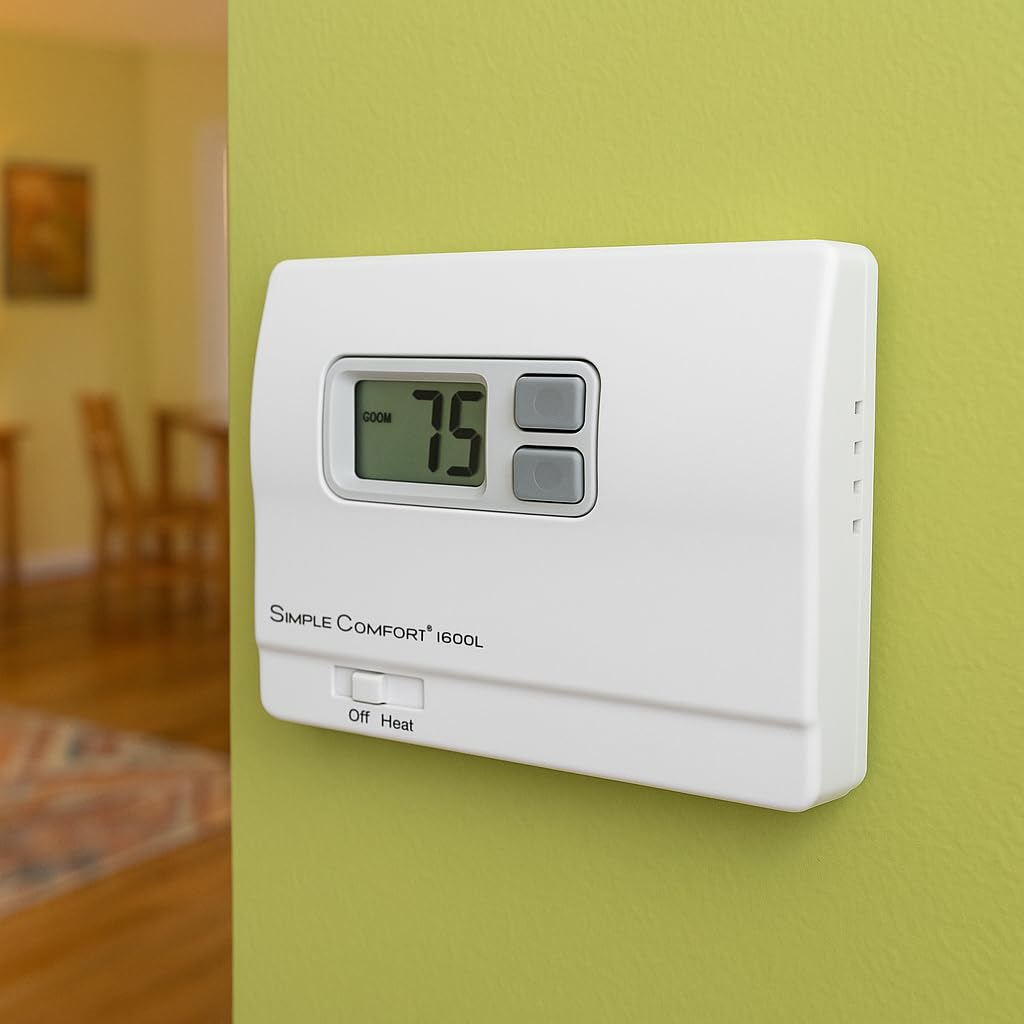
Image: The ICM Controls SC1600L thermostat installed on a wall, showing its digital display and control buttons.
8. Power Restoration
ຟື້ນຟູພະລັງງານໃຫ້ກັບລະບົບຄວາມຮ້ອນຂອງທ່ານຢູ່ທີ່ຟິວຫຼັກ ຫຼືແຜງຕັດວົງຈອນ.
ຄໍາແນະນໍາການດໍາເນີນງານ
1. ສະແດງຫຼາຍກວ່າview
The large digital display shows the current room temperature. When adjusting the setpoint, the desired temperature will be displayed temporarily.
2. ການຕັ້ງຄ່າອຸນຫະພູມ
- ໃຊ້ UP (▲) ແລະ ລົງ (▼) arrow buttons located next to the display to adjust the desired temperature (setpoint).
- Each press of the button will change the setpoint by one degree Fahrenheit.
- The thermostat will automatically maintain the set temperature.
3. System Mode Switch (Off/Heat)
Locate the slide switch at the bottom of the thermostat. This switch controls the system mode:
- ປິດ: The heating system is turned off. The thermostat will not call for heat.
- ຄວາມຮ້ອນ: The thermostat will operate the heating system to maintain the set temperature.
4. ການເຮັດວຽກຂອງໄຟພື້ນຫຼັງ
The display backlight will activate when any button is pressed, providing improved visibility in low-light conditions. The backlight will automatically turn off after a short period of inactivity.

ຮູບພາບ: A ລາຍລະອຽດ view of the SC1600L thermostat's controls and display.
ບໍາລຸງຮັກສາ
1. ການທົດແທນຫມໍ້ໄຟ
The thermostat is battery-powered. When the battery icon appears on the display, it indicates that the batteries are low and need to be replaced. To replace batteries:
- Gently pull the front cover of the thermostat away from the wall plate.
- Remove the old batteries and insert new ones, ensuring correct polarity.
- Snap the front cover back onto the wall plate.
ໝາຍເຫດ: Replacing batteries typically does not affect the set temperature, but it is good practice to verify the setting after replacement.
2. ທໍາຄວາມສະອາດ
ເຮັດຄວາມສະອາດດ້ານນອກຂອງເຄື່ອງຄວບຄຸມອຸນຫະພູມດ້ວຍຄວາມອ່ອນໂຍນ, ງamp ຜ້າ. ຢ່າໃຊ້ເຄື່ອງເຮັດຄວາມສະອາດຂັດຫຼືສານລະລາຍ. ຫຼີກເວັ້ນການສີດນໍ້າໂດຍກົງໃສ່ເຄື່ອງຄວບຄຸມອຸນຫະພູມ.
ການແກ້ໄຂບັນຫາ
| ບັນຫາ | ສາເຫດທີ່ເປັນໄປໄດ້ | ການແກ້ໄຂ |
|---|---|---|
| ບໍ່ມີຈໍສະແດງຜົນ ຫຼື ມືດ | ແບດເຕີຣີທີ່ຕາຍແລ້ວຫຼືຕໍ່າ | ປ່ຽນແບັດເຕີລີ່ໃໝ່. |
| ລະບົບຄວາມຮ້ອນບໍ່ເປີດ | System switch in OFF position; Incorrect wiring; Blown fuse/tripped breaker; Heating system malfunction | Ensure switch is in HEAT position. Check wiring connections. Check heating system's power supply. Consult a qualified HVAC technician. |
| Thermostat not holding set temperature | Thermostat location near drafts or heat sources; Thermostat malfunction | Relocate thermostat if possible. Ensure no direct drafts or heat sources affect the thermostat. If problem persists, contact support. |
ຂໍ້ມູນຈໍາເພາະ
- ຕົວແບບ: SC1600L
- ຍີ່ຫໍ້: ການຄວບຄຸມ ICM
- ປະເພດການຄວບຄຸມ: ບໍ່ແມ່ນ Programmable
- ປະເພດການຄວບຄຸມອຸນຫະພູມ: ການໃຫ້ຄວາມຮ້ອນ
- ແຫຼ່ງພະລັງງານ: ພະລັງງານຫມໍ້ໄຟ
- ສະບັບtage: 24 ໂວນ
- ປະເພດການສະແດງ: LCD ກັບ Backlight
- ວິທີການຄວບຄຸມ: ການຄວບຄຸມປຸ່ມ
- ປະເພດວັດສະດຸ: ພາດສະຕິກ
- ປະເພດການຕິດຕັ້ງ: ກະດານ Mount
ຂໍ້ມູນການຮັບປະກັນ
ICM Controls products are manufactured to high standards and are backed by a limited warranty. For specific warranty details, including duration and coverage, please refer to the warranty card included with your product or visit the official ICM Controls webເວັບໄຊ. ຮັກສາຫຼັກຖານການຊື້ຂອງທ່ານສໍາລັບການຮ້ອງຂໍການຮັບປະກັນ.
ສະຫນັບສະຫນູນ
If you have any questions or require technical assistance with your ICM Controls SC1600L thermostat, please contact ICM Controls customer support. Contact information can typically be found on the product packaging or the official ICM Controls webເວັບໄຊ.