
1. ບົດແນະນຳ
This manual provides instructions for the OEM RMT-B119A remote control, designed as a replacement or secondary remote for various Sony Blu-ray player models. This remote offers full functionality for controlling your Blu-ray player's features.
Compatible Sony Blu-ray Player Models:
- BDP-BX59
- BDP-S390
- BDP-S590
- BDP-BX110
- BDP-S1100
- BDP-S3100
- BDP-BX310
2. ຕັ້ງຄ່າ
2.1 ການຕິດຕັ້ງຫມໍ້ໄຟ
The remote control requires two (2) AAA batteries (not included). Follow these steps to install the batteries:
- ຊອກຫາຝາປິດຊ່ອງໃສ່ຫມໍ້ໄຟຢູ່ດ້ານຫຼັງຂອງຣີໂໝດຄວບຄຸມ.
- ກົດລົງໃສ່ແຖບ ແລະເລື່ອນຝາປິດລົງລຸ່ມເພື່ອເປີດຊ່ອງໃສ່.
- ໃສ່ໝໍ້ໄຟ AAA ສອງໜ່ວຍ, ຮັບປະກັນຈຸດບວກ (+) ແລະ ລົບ (-) ສອດຄ່ອງຖືກຕ້ອງກັບເຄື່ອງໝາຍພາຍໃນຊ່ອງ.
- ເລື່ອນຝາປິດຊ່ອງໃສ່ໝໍ້ໄຟຄືນໃສ່ບ່ອນເກົ່າຈົນກວ່າມັນຈະກົດຢ່າງປອດໄພ.
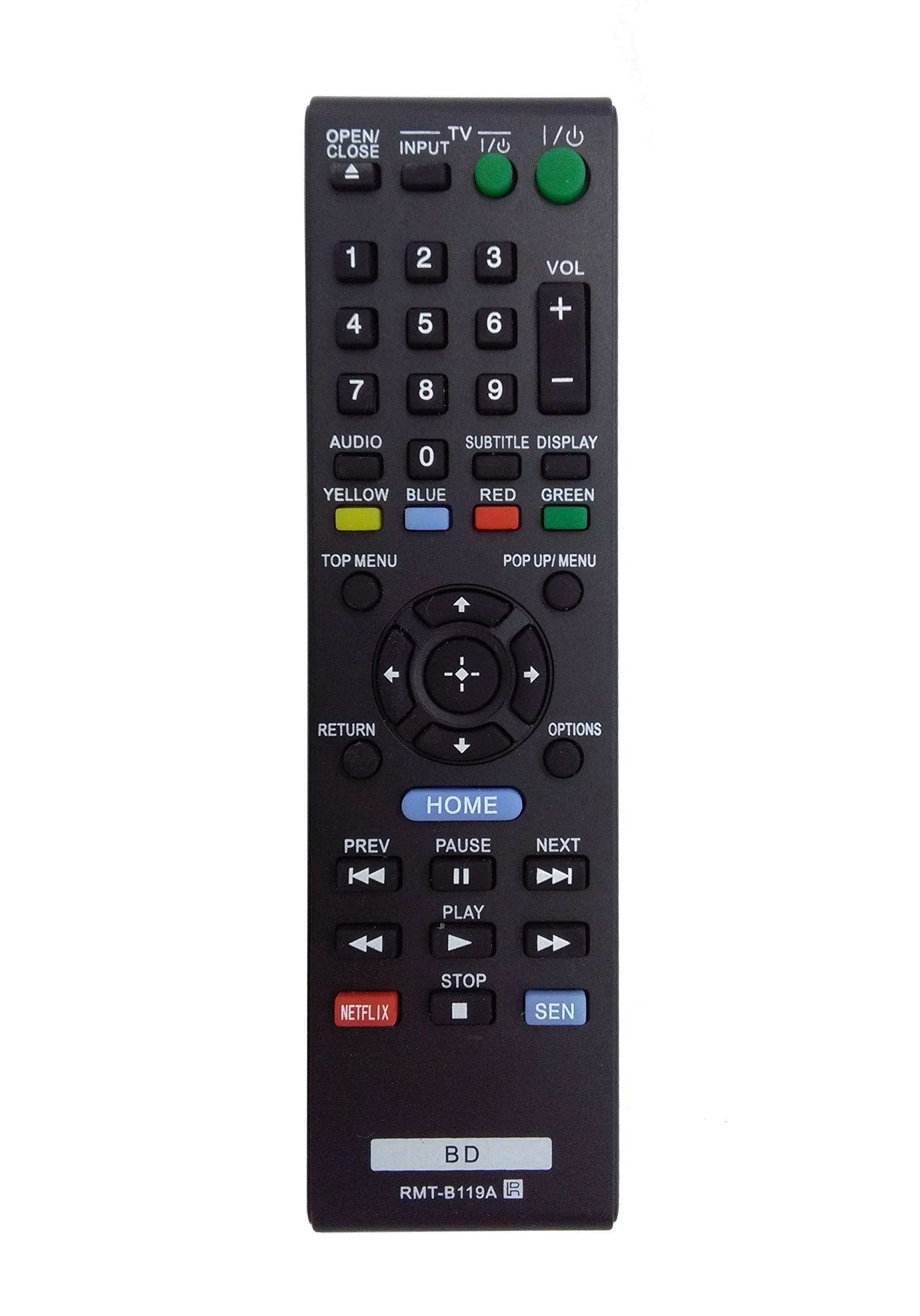
Image: The OEM RMT-B119A remote control, showing the full button layout on the front and a partial view of the open battery compartment on the back, revealing the battery terminals.
3. ຄໍາແນະນໍາການດໍາເນີນງານ
3.1 Remote Control Layout and Button Functions
Familiarize yourself with the buttons on your RMT-B119A remote control. Below is a description of each button's primary function.
Image: The OEM RMT-B119A remote control, displaying all buttons and their labels.
- ພະລັງງານ (ເຂົ້າ/ອອກ): Turns the Blu-ray player on or off.
- OPEN/CLOSE (▲): ເປີດຫຼືປິດຖາດແຜ່ນ.
- ການປ້ອນຂໍ້ມູນ: Switches the input source on the connected TV (if programmed).
- ໂທລະພາບ: Switches the remote to TV control mode (if programmed).
- ໝາຍເລກ Pad (0-9): Used for direct track selection, chapter selection, or entering numerical data.
- VOL (+/-): Adjusts the volume level (typically for the connected TV, if programmed).
- ສຽງ: Changes the audio track or language during playback.
- SUBTITLE DISPLAY: Toggles subtitle display on or off, or cycles through available subtitle languages.
- YELLOW, BLUE, RED, GREEN: Color-coded function buttons, typically used for specific features within menus or interactive content. Their function varies depending on the disc or menu.
- ເມນູເທິງ: Accesses the main menu of the Blu-ray disc.
- POP UP/MENU: Displays the pop-up menu during disc playback.
- Directional Pad (↑↓←→): ນຳທາງຜ່ານເມນູ ແລະຕົວເລືອກຕ່າງໆ.
- Center Button (Enter/Select): Confirms a selection or enters a menu item.
- ກັບຄືນ: ກັບຄືນໄປໜ້າຈໍ ຫຼືເມນູກ່ອນໜ້າ.
- ຕົວເລືອກ: Displays context-sensitive options or settings.
- ບ້ານ: Accesses the Blu-ray player's home menu.
- PREV (◀◀): ຂ້າມໄປຫາຈຸດເລີ່ມຕົ້ນຂອງເພງ/ບົດປະຈຸບັນ ຫຼື ເພງ/ບົດກ່ອນໜ້ານີ້.
- PAUSE (▌▌): ຢຸດການຫຼິ້ນຊົ່ວຄາວ.
- NEXT (▶▶): ຂ້າມໄປຫາເພງ ຫຼື ບົດຕໍ່ໄປ.
- ຫຼິ້ນ (▶): ເລີ່ມ ຫຼື ສືບຕໍ່ການຫຼິ້ນຄືນ.
- ຢຸດ (■): ຢຸດການຫຼິ້ນ.
- NETFLIX: Direct access button for the Netflix streaming service.
- ເຊັນ: Direct access button for the Sony Entertainment Network (now PlayStation Video/Music).
- BD: Likely a dedicated button for Blu-ray Disc functions or to switch to Blu-ray mode.
4. ບໍາລຸງຮັກສາ
ເພື່ອຮັບປະກັນອາຍຸຍືນ ແລະການເຮັດວຽກທີ່ເຫມາະສົມຂອງການຄວບຄຸມໄລຍະໄກຂອງທ່ານ, ປະຕິບັດຕາມຄໍາແນະນໍາການບໍາລຸງຮັກເຫຼົ່ານີ້:
- ທໍາຄວາມສະອາດ: ເຊັດການຄວບຄຸມໄລຍະໄກດ້ວຍຜ້າອ່ອນ, ແຫ້ງ. ສໍາລັບຝຸ່ນ stubborn, ເລັກນ້ອຍ dampເຊັດຜ້າດ້ວຍນ້ຳ ຫຼື ນ້ຳຢາທຳຄວາມສະອາດອ່ອນໆທີ່ບໍ່ຮຸນແຮງ. ຫຼີກລ່ຽງການໃຊ້ສານເຄມີ ຫຼື ຕົວລະລາຍທີ່ຮຸນແຮງ.
- ການປ່ຽນແບັດເຕີຣີ: Replace batteries when the remote's response becomes sluggish or it stops functioning. Always replace both batteries at the same time with new ones of the same type.
- ການເກັບຮັກສາ: ເກັບຮັກສາຣີໂໝດໄວ້ໃນບ່ອນທີ່ເຢັນ, ແຫ້ງ ແລະ ຫ່າງຈາກແສງແດດໂດຍກົງ, ອຸນຫະພູມສູງສຸດ ແລະ ຄວາມຊຸ່ມຊື່ນສູງ. ຖ້າບໍ່ໄດ້ໃຊ້ຣີໂໝດເປັນເວລາດົນ, ໃຫ້ຖອດແບັດເຕີຣີອອກເພື່ອປ້ອງກັນການຮົ່ວໄຫຼ.
- ຫຼີກລ້ຽງການຫຼຸດລົງ: ປົກປ້ອງຫ່າງໄກສອກຫຼີກຈາກຜົນກະທົບທາງດ້ານຮ່າງກາຍ, ຍ້ອນວ່າການຫຼຸດລົງສາມາດທໍາລາຍອົງປະກອບພາຍໃນ.
5. ການແກ້ໄຂບັນຫາ
ຖ້າທ່ານປະສົບບັນຫາກັບຣີໂໝດຄວບຄຸມຂອງທ່ານ, ໃຫ້ອ້າງອີງຕາຕະລາງຕໍ່ໄປນີ້ສຳລັບບັນຫາ ແລະ ວິທີແກ້ໄຂທົ່ວໄປ:
| ບັນຫາ | ສາເຫດທີ່ເປັນໄປໄດ້ | ການແກ້ໄຂ |
|---|---|---|
| ໄລຍະໄກບໍ່ເຮັດວຽກ. | ຫມໍ້ໄຟທີ່ຕາຍແລ້ວ ຫຼືໃສ່ບໍ່ຖືກຕ້ອງ. | ປ່ຽນແບັດໃໝ່, ຮັບປະກັນການຂົ້ວທີ່ຖືກຕ້ອງ (+/-). |
| ໄລຍະໄກເຮັດວຽກເປັນໄລຍະໆ. | ພະລັງງານແບັດເຕີຣີຕໍ່າ ຫຼື ມີສິ່ງກີດຂວາງ. | Replace batteries. Ensure no objects are blocking the remote's signal path to the Blu-ray player. |
| ຣີໂໝດບໍ່ສາມາດຄວບຄຸມໂທລະພາບໄດ້. | Remote not programmed for TV or TV mode not selected. | This remote is primarily for Blu-ray players. TV control functionality may require specific programming not covered by this manual, or may not be supported by this OEM model. |
| ປຸ່ມບໍ່ຕອບສະໜອງ ຫຼືໜຽວ. | ຝຸ່ນຫຼືສິ່ງເສດເຫຼືອພາຍໃຕ້ປຸ່ມ. | Clean the remote control surface. Avoid spilling liquids on the remote. |
6. ຂໍ້ມູນຈໍາເພາະ
- ຍີ່ຫໍ້: OEM
- ໝາຍເລກຕົວແບບ: RMT-B119A
- ເຕັກໂນໂລຍີການເຊື່ອມຕໍ່: ອິນຟາເລດ (IR)
- ອຸປະກອນທີ່ເຂົ້າກັນໄດ້: Sony Blu-ray Players (specific models listed in Introduction)
- ແຫຼ່ງພະລັງງານ: 2 x ຫມໍ້ໄຟ AAA (ບໍ່ລວມ)
- ໄລຍະສູງສຸດ: ປະມານ 10 ແມັດ (33 ຟຸດ)
- ຄຸນນະສົມບັດພິເສດ: ການອອກແບບ Ergonomic
7. ການຮັບປະກັນແລະການສະຫນັບສະຫນູນ
This OEM RMT-B119A remote control comes with a ຮັບປະກັນ 30 ວັນ ຈາກວັນທີ່ຊື້, ກວມເອົາຂໍ້ບົກພ່ອງການຜະລິດ. ກະລຸນາຮັກສາຫຼັກຖານການຊື້ຂອງທ່ານສໍາລັບການຮຽກຮ້ອງການຮັບປະກັນ.
For technical support or warranty inquiries, please contact the retailer or manufacturer directly. Refer to your purchase documentation for specific contact information.